Repository Public
1---2title: Skill authoring best practices3url: https://platform.claude.com/docs/en/agents-and-tools/agent-skills/best-practices4description: Learn how to write effective Skills that Claude can discover and use successfully.5---67Good Skills are concise, well-structured, and tested with real usage. This guide provides practical authoring decisions to help you write Skills that Claude can discover and use effectively.89For conceptual background on how Skills work, see the [Skills overview](https://platform.claude.com/docs/en/agents-and-tools/agent-skills/overview).1011## Core principles1213### Concise is key1415The [context window](https://platform.claude.com/docs/en/build-with-claude/context-windows) is a public good. Your Skill shares the context window with everything else Claude needs to know, including:1617* The system prompt18* Conversation history19* Other Skills' metadata20* Your actual request2122Not every token in your Skill has an immediate cost. At startup, only the metadata (name and description) from all Skills is pre-loaded. Claude reads SKILL.md only when the Skill becomes relevant, and reads additional files only as needed. However, being concise in SKILL.md still matters: once Claude loads it, every token competes with conversation history and other context.2324**Default assumption:** Claude is already very smart2526Only add context Claude doesn't already have. Challenge each piece of information:2728* "Does Claude really need this explanation?"29* "Can I assume Claude knows this?"30* "Does this paragraph justify its token cost?"3132**Good example: Concise** (approximately 50 tokens):3334````markdown35## Extract PDF text3637Use pdfplumber for text extraction:3839```python40import pdfplumber4142with pdfplumber.open("file.pdf") as pdf:43 text = pdf.pages[0].extract_text()44```45````4647**Bad example: Too verbose** (approximately 150 tokens):4849```markdown50## Extract PDF text5152PDF (Portable Document Format) files are a common file format that contains53text, images, and other content. To extract text from a PDF, you'll need to54use a library. There are many libraries available for PDF processing, but55pdfplumber is recommended because it's easy to use and handles most cases well.56First, you'll need to install it using pip. Then you can use the code below...57```5859The concise version assumes Claude already has information about PDFs and how libraries work.6061### Set appropriate degrees of freedom6263Match the level of specificity to the task's fragility and variability.6465**High freedom** (text-based instructions):6667Use when:6869* Multiple approaches are valid70* Decisions depend on context71* Heuristics guide the approach7273Example:7475```markdown76## Code review process77781. Analyze the code structure and organization792. Check for potential bugs or edge cases803. Suggest improvements for readability and maintainability814. Verify adherence to project conventions82```8384**Medium freedom** (pseudocode or scripts with parameters):8586Use when:8788* A preferred pattern exists89* Some variation is acceptable90* Configuration affects behavior9192Example:9394````markdown95## Generate report9697Use this template and customize as needed:9899```python100def generate_report(data, format="markdown", include_charts=True):101 # Process data102 # Generate output in specified format103 # Optionally include visualizations104```105````106107**Low freedom** (specific scripts, few or no parameters):108109Use when:110111* Operations are fragile and error-prone112* Consistency is critical113* A specific sequence must be followed114115Example:116117````markdown118## Database migration119120Run exactly this script:121122```bash123python scripts/migrate.py --verify --backup124```125126Do not modify the command or add additional flags.127````128129**Analogy:** Think of Claude as a robot exploring a path:130131* **Narrow bridge with cliffs on both sides:** There's only one safe way forward. Provide specific guardrails and exact instructions (low freedom). Example: database migrations that must run in exact sequence.132* **Open field with no hazards:** Many paths lead to success. Give general direction and trust Claude to find the best route (high freedom). Example: code reviews where context determines the best approach.133134### Test with all models you plan to use135136Skills act as additions to models, so effectiveness depends on the underlying model. Test your Skill with all the models you plan to use it with.137138**Testing considerations by model:**139140* **Claude Haiku** (fast, economical): Does the Skill provide enough guidance?141* **Claude Sonnet** (balanced): Is the Skill clear and efficient?142* **Claude Opus** (powerful reasoning): Does the Skill avoid over-explaining?143144What works perfectly for Opus might need more detail for Haiku. If you plan to use your Skill across multiple models, aim for instructions that work well with all of them.145146## Skill structure147148<Note>149 **YAML Frontmatter:** The SKILL.md frontmatter requires two fields:150151 `name`:152153 * Maximum 64 characters154 * Must contain only lowercase letters, numbers, and hyphens155 * Cannot contain XML tags156 * Cannot contain reserved words: "anthropic", "claude"157158 `description`:159160 * Must be non-empty161 * Maximum 1,024 characters162 * Cannot contain XML tags163 * Should describe what the Skill does and when to use it164165 For complete Skill structure details, see the [Skills overview](https://platform.claude.com/docs/en/agents-and-tools/agent-skills/overview#skill-structure).166</Note>167168### Naming conventions169170Use consistent naming patterns to make Skills easier to reference and discuss. Consider using **gerund form** (verb + -ing) for Skill names, as this clearly describes the activity or capability the Skill provides.171172Remember that the `name` field must use lowercase letters, numbers, and hyphens only.173174**Good naming examples (gerund form):**175176* `processing-pdfs`177* `analyzing-spreadsheets`178* `managing-databases`179* `testing-code`180* `writing-documentation`181182**Acceptable alternatives:**183184* Noun phrases: `pdf-processing`, `spreadsheet-analysis`185* Action-oriented: `process-pdfs`, `analyze-spreadsheets`186187**Avoid:**188189* Vague names: `helper`, `utils`, `tools`190* Overly generic: `documents`, `data`, `files`191* Reserved words: `anthropic-helper`, `claude-tools`192* Inconsistent patterns within your skill collection193194Consistent naming makes it easier to:195196* Reference Skills in documentation and conversations197* Understand what a Skill does at a glance198* Organize and search through multiple Skills199* Maintain a professional, cohesive skill library200201### Writing effective descriptions202203The `description` field enables Skill discovery and should include both what the Skill does and when to use it.204205<Warning>206 **Always write in third person**. The description is injected into the system prompt, and inconsistent point-of-view can cause discovery problems.207208 * **Good:** "Processes Excel files and generates reports"209 * **Avoid:** "I can help you process Excel files"210 * **Avoid:** "You can use this to process Excel files"211</Warning>212213**Be specific and include key terms**. Include both what the Skill does and specific triggers/contexts for when to use it.214215Each Skill has exactly one description field. The description is critical for skill selection: Claude uses it to choose the right Skill from potentially 100+ available Skills. Your description must provide enough detail for Claude to know when to select this Skill, while the rest of SKILL.md provides the implementation details.216217Effective examples:218219**PDF Processing skill:**220221```yaml222description: Extract text and tables from PDF files, fill forms, merge documents. Use when working with PDF files or when the user mentions PDFs, forms, or document extraction.223```224225**Excel Analysis skill:**226227```yaml228description: Analyze Excel spreadsheets, create pivot tables, generate charts. Use when analyzing Excel files, spreadsheets, tabular data, or .xlsx files.229```230231**Git Commit Helper skill:**232233```yaml234description: Generate descriptive commit messages by analyzing git diffs. Use when the user asks for help writing commit messages or reviewing staged changes.235```236237Avoid vague descriptions like these:238239```yaml240description: Helps with documents241```242243```yaml244description: Processes data245```246247```yaml248description: Does stuff with files249```250251### Progressive disclosure patterns252253SKILL.md serves as an overview that points Claude to detailed materials as needed, like a table of contents in an onboarding guide. For an explanation of how progressive disclosure works, see [How Skills work](https://platform.claude.com/docs/en/agents-and-tools/agent-skills/overview#how-skills-work) in the overview.254255**Practical guidance:**256257* Keep SKILL.md body under 500 lines for optimal performance258* Split content into separate files when approaching this limit259* Use the following patterns to organize instructions, code, and resources effectively260261#### Visual overview: From simple to complex262263A basic Skill starts with just a SKILL.md file containing metadata and instructions:264265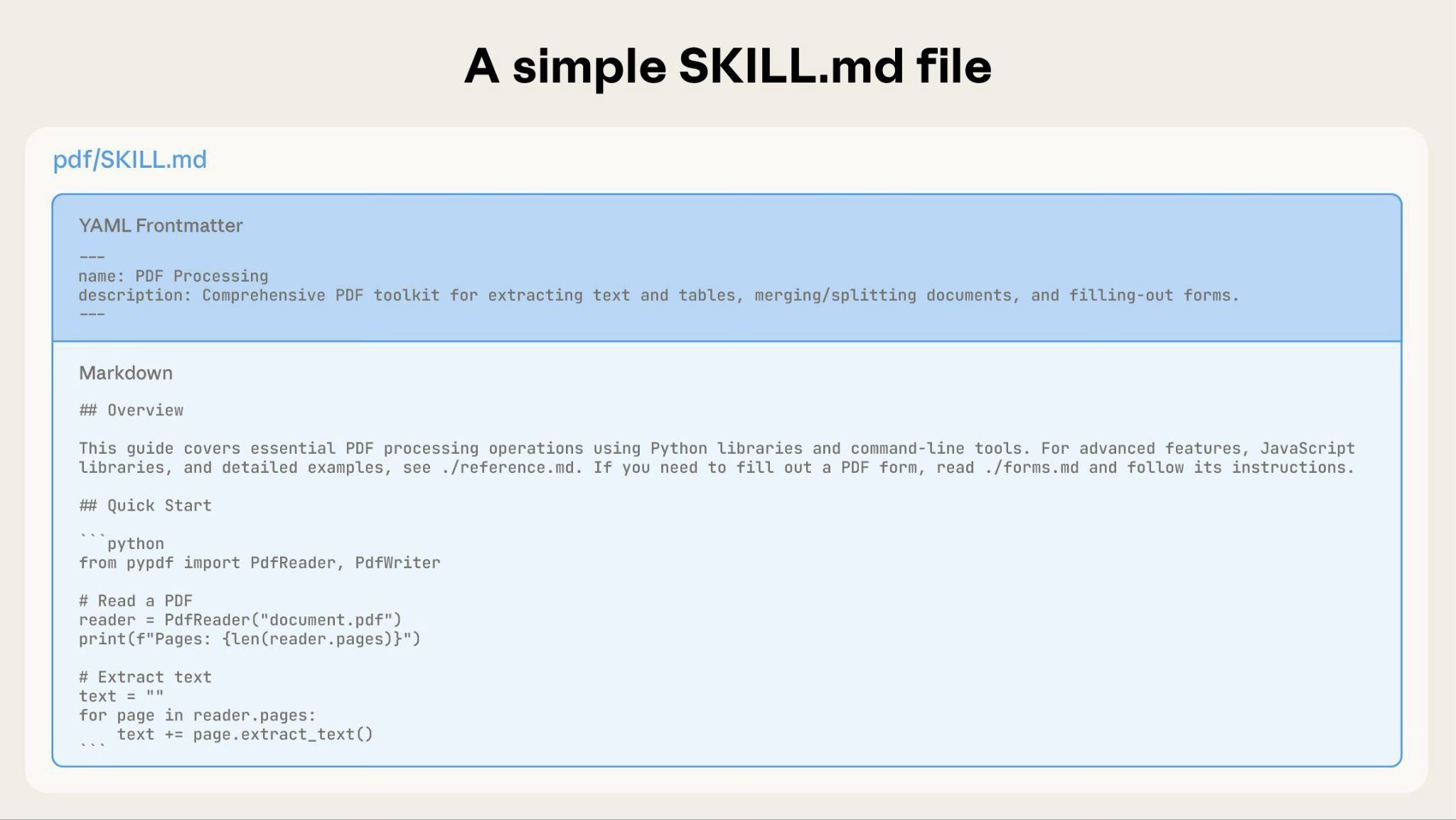266267As your Skill grows, you can bundle additional content that Claude loads only when needed:268269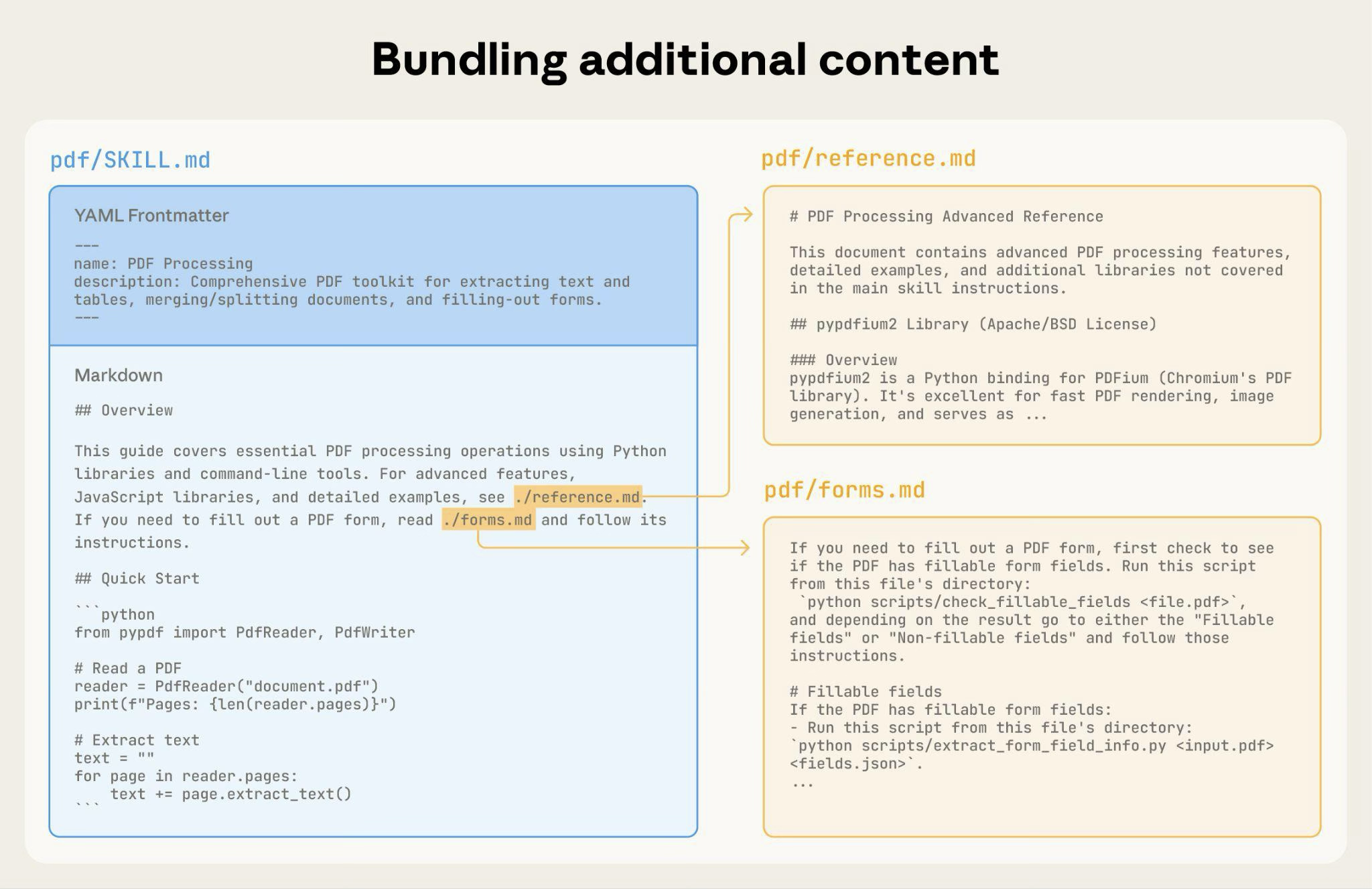270271The complete Skill directory structure might look like this:272273* `pdf/`274275 * `SKILL.md`: Main instructions (loaded when triggered)276277 * `FORMS.md`: Form-filling guide (loaded as needed)278279 * `reference.md`: API reference (loaded as needed)280281 * `examples.md`: Usage examples (loaded as needed)282283 * `scripts/`284285 * `analyze_form.py`: Utility script (executed, not loaded)286 * `fill_form.py`: Form filling script287 * `validate.py`: Validation script288289#### Pattern 1: High-level guide with references290291````markdown292---293name: pdf-processing294description: Extracts text and tables from PDF files, fills forms, and merges documents. Use when working with PDF files or when the user mentions PDFs, forms, or document extraction.295---296297# PDF Processing298299## Quick start300301Extract text with pdfplumber:302```python303import pdfplumber304with pdfplumber.open("file.pdf") as pdf:305 text = pdf.pages[0].extract_text()306```307308## Advanced features309310**Form filling**: See [FORMS.md](FORMS.md) for complete guide311**API reference**: See [REFERENCE.md](REFERENCE.md) for all methods312**Examples**: See [EXAMPLES.md](EXAMPLES.md) for common patterns313````314315Claude loads FORMS.md, REFERENCE.md, or EXAMPLES.md only when needed.316317#### Pattern 2: Domain-specific organization318319For Skills with multiple domains, organize content by domain to avoid loading irrelevant context. When a user asks about sales metrics, Claude only needs to read sales-related schemas, not finance or marketing data. This keeps token usage low and context focused.320321* `bigquery-skill/`322323 * `SKILL.md` (overview and navigation)324325 * `reference/`326327 * `finance.md` (revenue, billing metrics)328 * `sales.md` (opportunities, pipeline)329 * `product.md` (API usage, features)330 * `marketing.md` (campaigns, attribution)331332````markdown SKILL.md333# BigQuery Data Analysis334335## Available datasets336337**Finance**: Revenue, ARR, billing → See [reference/finance.md](reference/finance.md)338**Sales**: Opportunities, pipeline, accounts → See [reference/sales.md](reference/sales.md)339**Product**: API usage, features, adoption → See [reference/product.md](reference/product.md)340**Marketing**: Campaigns, attribution, email → See [reference/marketing.md](reference/marketing.md)341342## Quick search343344Find specific metrics using grep:345346```bash347grep -i "revenue" reference/finance.md348grep -i "pipeline" reference/sales.md349grep -i "api usage" reference/product.md350```351````352353#### Pattern 3: Conditional details354355Show basic content, link to advanced content:356357```markdown358# DOCX Processing359360## Creating documents361362Use docx-js for new documents. See [DOCX-JS.md](DOCX-JS.md).363364## Editing documents365366For simple edits, modify the XML directly.367368**For tracked changes**: See [REDLINING.md](REDLINING.md)369**For OOXML details**: See [OOXML.md](OOXML.md)370```371372Claude reads REDLINING.md or OOXML.md only when the user needs those features.373374### Avoid deeply nested references375376Claude may partially read files when they're referenced from other referenced files. When encountering nested references, Claude might use commands like `head -100` to preview content rather than reading entire files, resulting in incomplete information.377378**Keep references one level deep from SKILL.md**. All reference files should link directly from SKILL.md to ensure Claude reads complete files when needed.379380**Bad example: Too deep**:381382```markdown383# SKILL.md384See [advanced.md](advanced.md)...385386# advanced.md387See [details.md](details.md)...388389# details.md390Here's the actual information...391```392393**Good example: One level deep**:394395```markdown396# SKILL.md397398**Basic usage**: [instructions in SKILL.md]399**Advanced features**: See [advanced.md](advanced.md)400**API reference**: See [reference.md](reference.md)401**Examples**: See [examples.md](examples.md)402```403404### Structure longer reference files with table of contents405406For reference files longer than 100 lines, include a table of contents at the top. This ensures Claude can see the full scope of available information even when previewing with partial reads.407408**Example:**409410```markdown411# API Reference412413## Contents414- Authentication and setup415- Core methods (create, read, update, delete)416- Advanced features (batch operations, webhooks)417- Error handling patterns418- Code examples419420## Authentication and setup421...422423## Core methods424...425```426427Claude can then read the complete file or jump to specific sections as needed.428429For details on how this filesystem-based architecture enables progressive disclosure, see the [Runtime environment](https://platform.claude.com/docs/en/agents-and-tools/agent-skills/best-practices#runtime-environment) section later in this guide.430431## Workflows and feedback loops432433### Use workflows for complex tasks434435Break complex operations into clear, sequential steps. For particularly complex workflows, provide a checklist that Claude can copy into its response and check off as it progresses.436437**Example 1: Research synthesis workflow** (for Skills without code):438439````markdown440## Research synthesis workflow441442Copy this checklist and track your progress:443444```445Research Progress:446- [ ] Step 1: Read all source documents447- [ ] Step 2: Identify key themes448- [ ] Step 3: Cross-reference claims449- [ ] Step 4: Create structured summary450- [ ] Step 5: Verify citations451```452453**Step 1: Read all source documents**454455Review each document in the `sources/` directory. Note the main arguments and supporting evidence.456457**Step 2: Identify key themes**458459Look for patterns across sources. What themes appear repeatedly? Where do sources agree or disagree?460461**Step 3: Cross-reference claims**462463For each major claim, verify it appears in the source material. Note which source supports each point.464465**Step 4: Create structured summary**466467Organize findings by theme. Include:468- Main claim469- Supporting evidence from sources470- Conflicting viewpoints (if any)471472**Step 5: Verify citations**473474Check that every claim references the correct source document. If citations are incomplete, return to Step 3.475````476477This example shows how workflows apply to analysis tasks that don't require code. The checklist pattern works for any complex, multistep process.478479**Example 2: PDF form filling workflow** (for Skills with code):480481````markdown482## PDF form filling workflow483484Copy this checklist and check off items as you complete them:485486```487Task Progress:488- [ ] Step 1: Analyze the form (run analyze_form.py)489- [ ] Step 2: Create field mapping (edit fields.json)490- [ ] Step 3: Validate mapping (run validate_fields.py)491- [ ] Step 4: Fill the form (run fill_form.py)492- [ ] Step 5: Verify output (run verify_output.py)493```494495**Step 1: Analyze the form**496497Run: `python scripts/analyze_form.py input.pdf`498499This extracts form fields and their locations, saving to `fields.json`.500501**Step 2: Create field mapping**502503Edit `fields.json` to add values for each field.504505**Step 3: Validate mapping**506507Run: `python scripts/validate_fields.py fields.json`508509Fix any validation errors before continuing.510511**Step 4: Fill the form**512513Run: `python scripts/fill_form.py input.pdf fields.json output.pdf`514515**Step 5: Verify output**516517Run: `python scripts/verify_output.py output.pdf`518519If verification fails, return to Step 2.520````521522Clear steps prevent Claude from skipping critical validation. The checklist helps both Claude and you track progress through multistep workflows.523524### Implement feedback loops525526**Common pattern:** Run validator → fix errors → repeat527528This pattern greatly improves output quality.529530**Example 1: Style guide compliance** (for Skills without code):531532```markdown533## Content review process5345351. Draft your content following the guidelines in STYLE_GUIDE.md5362. Review against the checklist:537 - Check terminology consistency538 - Verify examples follow the standard format539 - Confirm all required sections are present5403. If issues found:541 - Note each issue with specific section reference542 - Revise the content543 - Review the checklist again5444. Only proceed when all requirements are met5455. Finalize and save the document546```547548This shows the validation loop pattern using reference documents instead of scripts. The "validator" is STYLE\_GUIDE.md, and Claude performs the check by reading and comparing.549550**Example 2: Document editing process** (for Skills with code):551552```markdown553## Document editing process5545551. Make your edits to `word/document.xml`5562. **Validate immediately**: `python ooxml/scripts/validate.py unpacked_dir/`5573. If validation fails:558 - Review the error message carefully559 - Fix the issues in the XML560 - Run validation again5614. **Only proceed when validation passes**5625. Rebuild: `python ooxml/scripts/pack.py unpacked_dir/ output.docx`5636. Test the output document564```565566The validation loop catches errors early.567568## Content guidelines569570### Avoid time-sensitive information571572Don't include information that will become outdated:573574**Bad example: Time-sensitive** (will become wrong):575576```markdown577If you're doing this before August 2025, use the old API.578After August 2025, use the new API.579```580581**Good example** (use "old patterns" section):582583```markdown584## Current method585586Use the v2 API endpoint: `api.example.com/v2/messages`587588## Old patterns589590<details>591<summary>Legacy v1 API (deprecated 2025-08)</summary>592593The v1 API used: `api.example.com/v1/messages`594595This endpoint is no longer supported.596</details>597```598599The old patterns section provides historical context without cluttering the main content.600601### Use consistent terminology602603Choose one term and use it throughout the Skill:604605**Good - Consistent:**606607* Always "API endpoint"608* Always "field"609* Always "extract"610611**Bad - Inconsistent:**612613* Mix "API endpoint", "URL", "API route", "path"614* Mix "field", "box", "element", "control"615* Mix "extract", "pull", "get", "retrieve"616617Consistency helps Claude parse and follow instructions.618619## Common patterns620621### Template pattern622623Provide templates for output format. Match the level of strictness to your needs.624625**For strict requirements** (such as API responses or data formats):626627````markdown628## Report structure629630ALWAYS use this exact template structure:631632```markdown633# [Analysis Title]634635## Executive summary636[One-paragraph overview of key findings]637638## Key findings639- Finding 1 with supporting data640- Finding 2 with supporting data641- Finding 3 with supporting data642643## Recommendations6441. Specific actionable recommendation6452. Specific actionable recommendation646```647````648649**For flexible guidance** (when adaptation is useful):650651````markdown652## Report structure653654Here is a sensible default format, but use your best judgment based on the analysis:655656```markdown657# [Analysis Title]658659## Executive summary660[Overview]661662## Key findings663[Adapt sections based on what you discover]664665## Recommendations666[Tailor to the specific context]667```668669Adjust sections as needed for the specific analysis type.670````671672### Examples pattern673674For Skills where output quality depends on seeing examples, provide input/output pairs just like in regular prompting:675676````markdown677## Commit message format678679Generate commit messages following these examples:680681**Example 1:**682Input: Added user authentication with JWT tokens683Output:684```685feat(auth): implement JWT-based authentication686687Add login endpoint and token validation middleware688```689690**Example 2:**691Input: Fixed bug where dates displayed incorrectly in reports692Output:693```694fix(reports): correct date formatting in timezone conversion695696Use UTC timestamps consistently across report generation697```698699**Example 3:**700Input: Updated dependencies and refactored error handling701Output:702```703chore: update dependencies and refactor error handling704705- Upgrade lodash to 4.17.21706- Standardize error response format across endpoints707```708709Follow this style: type(scope): brief description, then detailed explanation.710````711712Examples convey the desired style and level of detail to Claude more clearly than descriptions alone.713714### Conditional workflow pattern715716Guide Claude through decision points:717718```markdown719## Document modification workflow7207211. Determine the modification type:722723 **Creating new content?** → Follow "Creation workflow" below724 **Editing existing content?** → Follow "Editing workflow" below7257262. Creation workflow:727 - Use docx-js library728 - Build document from scratch729 - Export to .docx format7307313. Editing workflow:732 - Unpack existing document733 - Modify XML directly734 - Validate after each change735 - Repack when complete736```737738<Tip>739 If workflows become large or complicated with many steps, consider pushing them into separate files and tell Claude to read the appropriate file based on the task at hand.740</Tip>741742## Evaluation and iteration743744### Build evaluations first745746**Create evaluations BEFORE writing extensive documentation.** This ensures your Skill solves real problems rather than documenting imagined ones.747748**Evaluation-driven development:**7497501. **Identify gaps:** Run Claude on representative tasks without a Skill. Document specific failures or missing context7512. **Create evaluations:** Build three scenarios that test these gaps7523. **Establish baseline:** Measure Claude's performance without the Skill7534. **Write minimal instructions:** Create just enough content to address the gaps and pass evaluations7545. **Iterate:** Execute evaluations, compare against baseline, and refine755756This approach ensures you're solving actual problems rather than anticipating requirements that may never materialize.757758**Evaluation structure:**759760```json761{762 "skills": ["pdf-processing"],763 "query": "Extract all text from this PDF file and save it to output.txt",764 "files": ["test-files/document.pdf"],765 "expected_behavior": [766 "Successfully reads the PDF file using an appropriate PDF processing library or command-line tool",767 "Extracts text content from all pages in the document without missing any pages",768 "Saves the extracted text to a file named output.txt in a clear, readable format"769 ]770}771```772773<Note>774 This example demonstrates a data-driven evaluation with a simple testing rubric. There is not currently a built-in way to run these evaluations. Users can create their own evaluation system. Evaluations are your source of truth for measuring Skill effectiveness.775</Note>776777### Develop Skills iteratively with Claude778779The most effective Skill development process involves Claude itself. Work with one instance of Claude ("Claude A") to create a Skill that is used by other instances ("Claude B"). Claude A helps you design and refine instructions, while Claude B tests them in real tasks. This works because Claude models understand both how to write effective agent instructions and what information agents need.780781**Creating a new Skill:**7827831. **Complete a task without a Skill:** Work through a problem with Claude A using normal prompting. As you work, you'll naturally provide context, explain preferences, and share procedural knowledge. Notice what information you repeatedly provide.7847852. **Identify the reusable pattern:** After completing the task, identify what context you provided that would be useful for similar future tasks.786787 **Example:** If you worked through a BigQuery analysis, you might have provided table names, field definitions, filtering rules (such as "always exclude test accounts"), and common query patterns.7887893. **Ask Claude A to create a Skill:** "Create a Skill that captures this BigQuery analysis pattern we just used. Include the table schemas, naming conventions, and the rule about filtering test accounts."790791 <Tip>792 Claude models understand the Skill format and structure natively. You don't need special system prompts or a "writing skills" skill to get Claude to help create Skills. Simply ask Claude to create a Skill and it generates properly structured SKILL.md content with appropriate frontmatter and body content.793 </Tip>7947954. **Review for conciseness:** Check that Claude A hasn't added unnecessary explanations. Ask: "Remove the explanation about what win rate means - Claude already knows that."7967975. **Improve information architecture:** Ask Claude A to organize the content more effectively. For example: "Organize this so the table schema is in a separate reference file. We might add more tables later."7987996. **Test on similar tasks:** Use the Skill with Claude B (a fresh instance with the Skill loaded) on related use cases. Observe whether Claude B finds the right information, applies rules correctly, and handles the task successfully.8008017. **Iterate based on observation:** If Claude B struggles or misses something, return to Claude A with specifics: "When Claude used this Skill, it forgot to filter by date for Q4. Should we add a section about date filtering patterns?"802803**Iterating on existing Skills:**804805The same hierarchical pattern continues when improving Skills. You alternate between:806807* **Working with Claude A** (the expert who helps refine the Skill)808* **Testing with Claude B** (the agent using the Skill to perform real work)809* **Observing Claude B's behavior** and bringing insights back to Claude A8108111. **Use the Skill in real workflows:** Give Claude B (with the Skill loaded) actual tasks, not test scenarios8128132. **Observe Claude B's behavior:** Note where it struggles, succeeds, or makes unexpected choices814815 **Example observation:** "When I asked Claude B for a regional sales report, it wrote the query but forgot to filter out test accounts, even though the Skill mentions this rule."8168173. **Return to Claude A for improvements:** Share the current SKILL.md and describe what you observed. Ask: "I noticed Claude B forgot to filter test accounts when I asked for a regional report. The Skill mentions filtering, but maybe it's not prominent enough?"8188194. **Review Claude A's suggestions:** Claude A might suggest reorganizing to make rules more prominent, using stronger language such as "MUST filter" instead of "always filter," or restructuring the workflow section.8208215. **Apply and test changes:** Update the Skill with Claude A's refinements, then test again with Claude B on similar requests8228236. **Repeat based on usage:** Continue this observe-refine-test cycle as you encounter new scenarios. Each iteration improves the Skill based on real agent behavior, not assumptions.824825**Gathering team feedback:**8268271. Share Skills with teammates and observe their usage8282. Ask: Does the Skill activate when expected? Are instructions clear? What's missing?8293. Incorporate feedback to address gaps in your own usage patterns830831**Why this approach works:** Claude A understands agent needs, you provide domain expertise, Claude B reveals gaps through real usage, and iterative refinement improves Skills based on observed behavior rather than assumptions.832833### Observe how Claude navigates Skills834835As you iterate on Skills, pay attention to how Claude actually uses them in practice. Watch for:836837* **Unexpected exploration paths:** Does Claude read files in an order you didn't anticipate? This might indicate your structure isn't as intuitive as you thought838* **Missed connections:** Does Claude fail to follow references to important files? Your links might need to be more explicit or prominent839* **Overreliance on certain sections:** If Claude repeatedly reads the same file, consider whether that content should be in the main SKILL.md instead840* **Ignored content:** If Claude never accesses a bundled file, it might be unnecessary or poorly signaled in the main instructions841842Iterate based on these observations rather than assumptions. The 'name' and 'description' in your Skill's metadata are particularly critical. Claude uses these when determining whether to trigger the Skill in response to the current task. Make sure they clearly describe what the Skill does and when it should be used.843844## Anti-patterns to avoid845846### Avoid Windows-style paths847848Always use forward slashes in file paths, even on Windows:849850* ✓ **Good:** `scripts/helper.py`, `reference/guide.md`851* ✗ **Avoid:** `scripts\helper.py`, `reference\guide.md`852853Unix-style paths work across all platforms, while Windows-style paths cause errors on Unix systems.854855### Avoid offering too many options856857Don't present multiple approaches unless necessary:858859````markdown860**Bad example: Too many choices** (confusing):861"You can use pypdf, or pdfplumber, or PyMuPDF, or pdf2image, or..."862863**Good example: Provide a default** (with escape hatch):864"Use pdfplumber for text extraction:865```python866import pdfplumber867```868869For scanned PDFs requiring OCR, use pdf2image with pytesseract instead."870````871872## Advanced: Skills with executable code873874The following sections focus on Skills that include executable scripts. If your Skill uses only markdown instructions, skip to [Checklist for effective Skills](https://platform.claude.com/docs/en/agents-and-tools/agent-skills/best-practices#checklist-for-effective-skills).875876### Solve, don't defer877878When writing scripts for Skills, handle error conditions rather than deferring to Claude.879880**Good example: Handle errors explicitly:**881882```python883def process_file(path):884 """Process a file, creating it if it doesn't exist."""885 try:886 with open(path) as f:887 return f.read()888 except FileNotFoundError:889 # Create file with default content instead of failing890 print(f"File {path} not found, creating default")891 with open(path, "w") as f:892 f.write("")893 return ""894 except PermissionError:895 # Provide alternative instead of failing896 print(f"Cannot access {path}, using default")897 return ""898```899900**Bad example: Defer to Claude:**901902```python903def process_file(path):904 # Just fail and let Claude figure it out905 return open(path).read()906```907908Configuration parameters should also be justified and documented to avoid "voodoo constants" (Ousterhout's law). If you don't know the right value, how will Claude determine it?909910**Good example: Self-documenting:**911912```python913# HTTP requests typically complete within 30 seconds914# Longer timeout accounts for slow connections915REQUEST_TIMEOUT = 30916917# Three retries balances reliability vs speed918# Most intermittent failures resolve by the second retry919MAX_RETRIES = 3920```921922**Bad example: Magic numbers:**923924```python925TIMEOUT = 47 # Why 47?926RETRIES = 5 # Why 5?927```928929### Provide utility scripts930931Even if Claude could write a script, pre-made scripts offer advantages:932933**Benefits of utility scripts:**934935* More reliable than generated code936* Save tokens (no need to include code in context)937* Save time (no code generation required)938* Ensure consistency across uses939940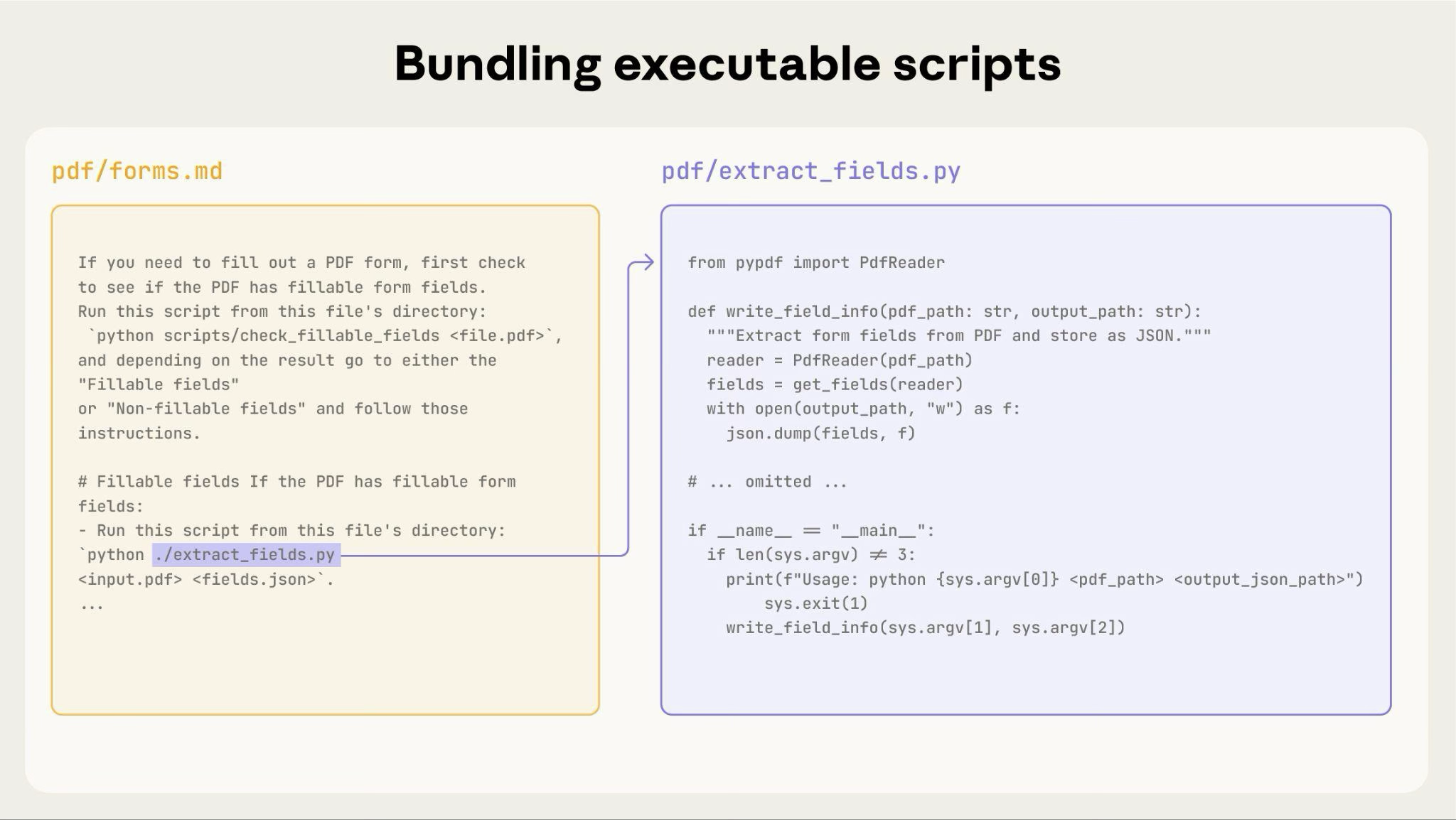941942The preceding diagram shows how executable scripts work alongside instruction files. The instruction file (forms.md) references the script, and Claude can execute it without loading its contents into context.943944**Important distinction:** Make clear in your instructions whether Claude should:945946* **Execute the script** (most common): "Run `analyze_form.py` to extract fields"947* **Read it as reference** (for complex logic): "See `analyze_form.py` for the field extraction algorithm"948949For most utility scripts, execution is preferred because it's more reliable and efficient. See the following [Runtime environment](https://platform.claude.com/docs/en/agents-and-tools/agent-skills/best-practices#runtime-environment) section for details on how script execution works.950951**Example:**952953````markdown954## Utility scripts955956**analyze_form.py**: Extract all form fields from PDF957958```bash959python scripts/analyze_form.py input.pdf > fields.json960```961962Output format:963```json964{965 "field_name": {"type": "text", "x": 100, "y": 200},966 "signature": {"type": "sig", "x": 150, "y": 500}967}968```969970**validate_boxes.py**: Check for overlapping bounding boxes971972```bash973python scripts/validate_boxes.py fields.json974# Returns: "OK" or lists conflicts975```976977**fill_form.py**: Apply field values to PDF978979```bash980python scripts/fill_form.py input.pdf fields.json output.pdf981```982````983984### Use visual analysis985986When inputs can be rendered as images, have Claude analyze them:987988````markdown989## Form layout analysis9909911. Convert PDF to images:992 ```bash993 python scripts/pdf_to_images.py form.pdf994 ```9959962. Analyze each page image to identify form fields9973. Claude can see field locations and types visually998````9991000<Note>1001 In this example, you'd need to write the `pdf_to_images.py` script.1002</Note>10031004Claude's vision capabilities help analyze layouts and structures.10051006### Create verifiable intermediate outputs10071008When Claude performs complex, open-ended tasks, it can make mistakes. The "plan-validate-execute" pattern catches errors early by having Claude first create a plan in a structured format, then validate that plan with a script before executing it.10091010**Example:** Imagine asking Claude to update 50 form fields in a PDF based on a spreadsheet. Without validation, Claude might reference non-existent fields, create conflicting values, miss required fields, or apply updates incorrectly.10111012**Solution:** Use the workflow pattern shown earlier (PDF form filling), but add an intermediate `changes.json` file that gets validated before applying changes. The workflow becomes: analyze → **create plan file** → **validate plan** → execute → verify.10131014**Why this pattern works:**10151016* **Catches errors early:** Validation finds problems before changes are applied1017* **Machine-verifiable:** Scripts provide objective verification1018* **Reversible planning:** Claude can iterate on the plan without touching originals1019* **Clear debugging:** Error messages point to specific problems10201021**When to use:** Batch operations, destructive changes, complex validation rules, high-stakes operations.10221023**Implementation tip:** Make validation scripts verbose with specific error messages such as "Field 'signature\_date' not found. Available fields: customer\_name, order\_total, signature\_date\_signed" to help Claude fix issues.10241025### Package dependencies10261027Skills run in the code execution environment with platform-specific limitations:10281029* **claude.ai:** Can install packages from npm and PyPI and pull from GitHub repositories1030* **Claude API:** Has no network access and no runtime package installation10311032List required packages in your SKILL.md and verify they're available in the [Code execution tool](https://platform.claude.com/docs/en/agents-and-tools/tool-use/code-execution-tool) documentation.10331034### Runtime environment10351036Skills run in a code execution environment with filesystem access, bash commands, and code execution capabilities. For the conceptual explanation of this architecture, see [The Skills architecture](https://platform.claude.com/docs/en/agents-and-tools/agent-skills/overview#the-skills-architecture) in the overview.10371038**How this affects your authoring:**10391040**How Claude accesses Skills:**104110421. **Metadata pre-loaded:** At startup, the name and description from all Skills' YAML frontmatter are loaded into the system prompt10432. **Files read on-demand:** Claude uses bash Read tools to access SKILL.md and other files from the filesystem when needed10443. **Scripts executed efficiently:** Utility scripts can be executed through bash without loading their full contents into context. Only the script's output consumes tokens10454. **No context penalty for large files:** Reference files, data, or documentation don't consume context tokens until actually read10461047* **File paths matter:** Claude navigates your skill directory like a filesystem. Use forward slashes (`reference/guide.md`), not backslashes10481049* **Name files descriptively:** Use names that indicate content: `form_validation_rules.md`, not `doc2.md`10501051* **Organize for discovery:** Structure directories by domain or feature10521053 * Good: `reference/finance.md`, `reference/sales.md`1054 * Bad: `docs/file1.md`, `docs/file2.md`10551056* **Bundle comprehensive resources:** Include complete API docs, extensive examples, large datasets; no context penalty until accessed10571058* **Prefer scripts for deterministic operations:** Write `validate_form.py` rather than asking Claude to generate validation code10591060* **Make execution intent clear:**10611062 * "Run `analyze_form.py` to extract fields" (execute)1063 * "See `analyze_form.py` for the extraction algorithm" (read as reference)10641065* **Test file access patterns:** Verify Claude can navigate your directory structure by testing with real requests10661067**Example:**10681069* `bigquery-skill/`10701071 * `SKILL.md` (overview, points to reference files)10721073 * `reference/`10741075 * `finance.md` (revenue metrics)1076 * `sales.md` (pipeline data)1077 * `product.md` (usage analytics)10781079When the user asks about revenue, Claude reads SKILL.md, sees the reference to `reference/finance.md`, and calls bash to read just that file. The sales.md and product.md files remain on the filesystem, consuming zero context tokens until needed. This filesystem-based model is what enables progressive disclosure. Claude can navigate and selectively load exactly what each task requires.10801081For complete details on the technical architecture, see [How Skills work](https://platform.claude.com/docs/en/agents-and-tools/agent-skills/overview#how-skills-work) in the Skills overview.10821083### MCP tool references10841085If your Skill uses MCP (Model Context Protocol) tools, always use fully qualified tool names to avoid "tool not found" errors.10861087**Format:** `ServerName:tool_name`10881089**Example:**10901091```markdown1092Use the BigQuery:bigquery_schema tool to retrieve table schemas.1093Use the GitHub:create_issue tool to create issues.1094```10951096Where:10971098* `BigQuery` and `GitHub` are MCP server names1099* `bigquery_schema` and `create_issue` are the tool names within those servers11001101Without the server prefix, Claude may fail to locate the tool, especially when multiple MCP servers are available.11021103### Avoid assuming tools are installed11041105Don't assume packages are available:11061107````markdown1108**Bad example: Assumes installation**:1109"Use the pdf library to process the file."11101111**Good example: Explicit about dependencies**:1112"Install required package: `pip install pypdf`11131114Then use it:1115```python1116from pypdf import PdfReader1117reader = PdfReader("file.pdf")1118```"1119````11201121## Technical notes11221123### YAML frontmatter requirements11241125The SKILL.md frontmatter requires `name` and `description` fields with specific validation rules:11261127* `name`: Maximum 64 characters, lowercase letters/numbers/hyphens only, no XML tags, no reserved words1128* `description`: Maximum 1,024 characters, non-empty, no XML tags11291130See the [Skills overview](https://platform.claude.com/docs/en/agents-and-tools/agent-skills/overview#skill-structure) for complete structure details.11311132### Token budgets11331134Keep SKILL.md body under 500 lines for optimal performance. If your content exceeds this, split it into separate files using the progressive disclosure patterns described earlier. For architectural details, see the [Skills overview](https://platform.claude.com/docs/en/agents-and-tools/agent-skills/overview#how-skills-work).11351136## Checklist for effective Skills11371138Before sharing a Skill, verify:11391140### Core quality11411142* [ ] Description is specific and includes key terms1143* [ ] Description includes both what the Skill does and when to use it1144* [ ] SKILL.md body is under 500 lines1145* [ ] Additional details are in separate files (if needed)1146* [ ] No time-sensitive information (or in "old patterns" section)1147* [ ] Consistent terminology throughout1148* [ ] Examples are concrete, not abstract1149* [ ] File references are one level deep1150* [ ] Progressive disclosure used appropriately1151* [ ] Workflows have clear steps11521153### Code and scripts11541155* [ ] Scripts solve problems rather than defer to Claude1156* [ ] Error handling is explicit and helpful1157* [ ] No "voodoo constants" (all values justified)1158* [ ] Required packages listed in instructions and verified as available1159* [ ] Scripts have clear documentation1160* [ ] No Windows-style paths (all forward slashes)1161* [ ] Validation/verification steps for critical operations1162* [ ] Feedback loops included for quality-critical tasks11631164### Testing11651166* [ ] At least three evaluations created1167* [ ] Tested with Haiku, Sonnet, and Opus1168* [ ] Tested with real usage scenarios1169* [ ] Team feedback incorporated (if applicable)11701171## Next steps11721173<CardGroup cols={2}>1174 <Card title="Get started with Agent Skills" icon="rocket" href="https://platform.claude.com/docs/en/agents-and-tools/agent-skills/quickstart">1175 Create your first Skill1176 </Card>11771178 <Card title="Use Skills in Claude Code" icon="terminal" href="https://code.claude.com/docs/en/skills">1179 Create and manage Skills in Claude Code1180 </Card>11811182 <Card title="Use Skills with the API" icon="code" href="https://platform.claude.com/docs/en/build-with-claude/skills-guide">1183 Upload and use Skills programmatically1184 </Card>1185</CardGroup>1186