Repository Public
1---2title: Define tools3url: https://platform.claude.com/docs/en/agents-and-tools/tool-use/define-tools4description: Specify tool schemas, write effective descriptions, and control when Claude calls your tools.5---67## Prerequisites89* Familiarity with the [tool use overview](https://platform.claude.com/docs/en/agents-and-tools/tool-use/overview)10* A Claude API key and a working SDK or cURL setup1112<Tip>13 If using Claude with tool use and thinking, see [Thinking](https://platform.claude.com/docs/en/build-with-claude/thinking) for more information.14</Tip>1516## Specifying client tools1718Client tools are specified in the `tools` top-level parameter of the API request. Anthropic-schema client tools, such as the bash and text editor tools, are declared by a date-versioned `type`; see each tool's page, linked from the [Tool reference](https://platform.claude.com/docs/en/agents-and-tools/tool-use/tool-reference), for the fields it accepts. The computer use and browser use tools are [client toolsets](https://platform.claude.com/docs/en/agents-and-tools/tool-use/tool-reference#client-toolsets): a single entry with no `name` that declares a fixed set of member tools. A user-defined tool definition includes:1920| Parameter | Description |21| ---------------- | -------------------------------------------------------------------------------------------------------------------------------------------------------------------------------------------------------------------------------------- |22| `name` | The name of the tool. Must match the regex `^[a-zA-Z0-9_-]{1,128}$`. |23| `description` | A detailed plaintext description of what the tool does, when it should be used, and how it behaves. |24| `input_schema` | A [JSON Schema](https://json-schema.org/) object defining the expected parameters for the tool. |25| `input_examples` | (Optional) An array of example input objects to help Claude understand how to use the tool. See [Providing tool use examples](https://platform.claude.com/docs/en/agents-and-tools/tool-use/define-tools#providing-tool-use-examples). |2627For the full set of optional properties available on any single tool definition, including `cache_control`, `strict`, `defer_loading`, and `allowed_callers`, see the [Tool reference](https://platform.claude.com/docs/en/agents-and-tools/tool-use/tool-reference#tool-definition-properties). A client toolset entry accepts `cache_control` and `allowed_callers` on the entry and sets `defer_loading` per member; see [Client toolsets](https://platform.claude.com/docs/en/agents-and-tools/tool-use/tool-reference#client-toolsets).2829<Accordion title="Example simple tool definition">30 ```json JSON31 {32 "name": "get_weather",33 "description": "Get the current weather in a given location",34 "input_schema": {35 "type": "object",36 "properties": {37 "location": {38 "type": "string",39 "description": "The city and state, e.g. San Francisco, CA"40 },41 "unit": {42 "type": "string",43 "enum": ["celsius", "fahrenheit"],44 "description": "The unit of temperature, either 'celsius' or 'fahrenheit'"45 }46 },47 "required": ["location"]48 }49 }50 ```5152 This tool, named `get_weather`, expects an input object with a required `location` string and an optional `unit` string that must be either "celsius" or "fahrenheit".53</Accordion>5455### Tool use system prompt5657When you call the Claude API with the `tools` parameter, the API constructs a special system prompt from the tool definitions, tool configuration, and any user-specified system prompt. The constructed prompt is designed to instruct the model to use the specified tool(s) and provide the necessary context for the tool to operate properly:5859```text wrap60In this environment you have access to a set of tools you can use to answer the user's question.61{{ FORMATTING INSTRUCTIONS }}62String and scalar parameters should be specified as is, while lists and objects should use JSON format. Note that spaces for string values are not stripped. The output is not expected to be valid XML and is parsed with regular expressions.63Here are the functions available in JSONSchema format:64{{ TOOL DEFINITIONS IN JSON SCHEMA }}65{{ USER SYSTEM PROMPT }}66{{ TOOL CONFIGURATION }}67```6869### Best practices for tool definitions7071To get the best performance out of Claude when using tools, follow these guidelines:7273* **Provide extremely detailed descriptions.** This is by far the most important factor in tool performance. Your descriptions should explain every detail about the tool, including:7475 * What the tool does76 * When it should be used (and when it shouldn't)77 * What each parameter means and how it affects the tool's behavior78 * Any important caveats or limitations, such as what information the tool does not return if the tool name is unclear. The more context you can give Claude about your tools, the better it will be at deciding when and how to use them. Aim for at least 3–4 sentences for each tool description, more if the tool is complex.7980* **Prioritize descriptions, but consider using `input_examples` for complex tools.** Clear descriptions are most important, but for tools with complex inputs, nested objects, or format-sensitive parameters, you can use the `input_examples` field to provide schema-validated examples. See [Providing tool use examples](https://platform.claude.com/docs/en/agents-and-tools/tool-use/define-tools#providing-tool-use-examples) for details.8182* **Consolidate related operations into fewer tools.** Rather than creating a separate tool for every action (`create_pr`, `review_pr`, `merge_pr`), group them into a single tool with an `action` parameter. Fewer, more capable tools reduce selection ambiguity and make your tool surface easier for Claude to navigate.8384* **Use meaningful namespacing in tool names.** When your tools span multiple services or resources, prefix names with the service (for example, `github_list_prs`, `slack_send_message`). This makes tool selection unambiguous as your library grows, and is especially important when using [tool search](https://platform.claude.com/docs/en/agents-and-tools/tool-use/tool-search-tool).8586* **Design tool responses to return only high-signal information.** Return semantic, stable identifiers (for example, slugs or UUIDs) rather than opaque internal references, and include only the fields Claude needs to reason about its next step. Bloated responses waste context and make it harder for Claude to extract what matters.8788<AccordionGroup>89 <Accordion title="Example of a good tool description">90 ```json JSON91 {92 "name": "get_stock_price",93 "description": "Retrieves the current stock price for a given ticker symbol. The ticker symbol must be a valid symbol for a publicly traded company on a major US stock exchange like NYSE or NASDAQ. The tool will return the latest trade price in USD. It should be used when the user asks about the current or most recent price of a specific stock. It will not provide any other information about the stock or company.",94 "input_schema": {95 "type": "object",96 "properties": {97 "ticker": {98 "type": "string",99 "description": "The stock ticker symbol, e.g. AAPL for Apple Inc."100 }101 },102 "required": ["ticker"]103 }104 }105 ```106 </Accordion>107108 <Accordion title="Example poor tool description">109 ```json JSON110 {111 "name": "get_stock_price",112 "description": "Gets the stock price for a ticker.",113 "input_schema": {114 "type": "object",115 "properties": {116 "ticker": {117 "type": "string"118 }119 },120 "required": ["ticker"]121 }122 }123 ```124 </Accordion>125</AccordionGroup>126127The good description clearly explains what the tool does, when to use it, what data it returns, and what the `ticker` parameter means. The poor description is too brief and leaves Claude with many open questions about the tool's behavior and usage.128129<Tip>130 For deeper guidance on tool design (consolidation, naming, and response shaping), see [Writing tools for agents](https://www.anthropic.com/engineering/writing-tools-for-agents).131</Tip>132133## Providing tool use examples134135You can provide concrete examples of valid tool inputs to help Claude understand how to use your tools more effectively. This is particularly useful for complex tools with nested objects, optional parameters, or format-sensitive inputs.136137### Basic usage138139Add an optional `input_examples` field to your tool definition with an array of example input objects. Each example must be valid according to the tool's `input_schema`:140141<CodeGroup>142 ```bash cURL143 curl -sS https://api.anthropic.com/v1/messages \144 -H "content-type: application/json" \145 -H "x-api-key: $ANTHROPIC_API_KEY" \146 -H "anthropic-version: 2023-06-01" \147 -d @- <<'EOF'148 {149 "model": "claude-opus-5",150 "max_tokens": 1024,151 "tools": [152 {153 "name": "get_weather",154 "description": "Get the current weather in a given location",155 "input_schema": {156 "type": "object",157 "properties": {158 "location": {159 "type": "string",160 "description": "The city and state, e.g. San Francisco, CA"161 },162 "unit": {163 "type": "string",164 "enum": ["celsius", "fahrenheit"],165 "description": "The unit of temperature"166 }167 },168 "required": ["location"]169 },170 "input_examples": [171 {"location": "San Francisco, CA", "unit": "fahrenheit"},172 {"location": "Tokyo, Japan", "unit": "celsius"},173 {"location": "New York, NY"}174 ]175 }176 ],177 "messages": [178 {"role": "user", "content": "What's the weather like in San Francisco?"}179 ]180 }181 EOF182 ```183184 ```bash CLI185 ant messages create <<'YAML'186 model: claude-opus-5187 max_tokens: 1024188 tools:189 - name: get_weather190 description: Get the current weather in a given location191 input_schema:192 type: object193 properties:194 location:195 type: string196 description: The city and state, e.g. San Francisco, CA197 unit:198 type: string199 enum: [celsius, fahrenheit]200 description: The unit of temperature201 required: [location]202 input_examples:203 - location: San Francisco, CA204 unit: fahrenheit205 - location: Tokyo, Japan206 unit: celsius207 - location: New York, NY # 'unit' is optional208 messages:209 - role: user210 content: What's the weather like in San Francisco?211 YAML212 ```213214 ```python Python215 client = anthropic.Anthropic()216217 response = client.messages.create(218 model="claude-opus-5",219 max_tokens=1024,220 tools=[221 {222 "name": "get_weather",223 "description": "Get the current weather in a given location",224 "input_schema": {225 "type": "object",226 "properties": {227 "location": {228 "type": "string",229 "description": "The city and state, e.g. San Francisco, CA",230 },231 "unit": {232 "type": "string",233 "enum": ["celsius", "fahrenheit"],234 "description": "The unit of temperature",235 },236 },237 "required": ["location"],238 },239 "input_examples": [240 {"location": "San Francisco, CA", "unit": "fahrenheit"},241 {"location": "Tokyo, Japan", "unit": "celsius"},242 {243 "location": "New York, NY" # 'unit' is optional244 },245 ],246 }247 ],248 messages=[{"role": "user", "content": "What's the weather like in San Francisco?"}],249 )250251 print(response)252 ```253254 ```typescript TypeScript255 const client = new Anthropic();256257 const response = await client.messages.create({258 model: "claude-opus-5",259 max_tokens: 1024,260 tools: [261 {262 name: "get_weather",263 description: "Get the current weather in a given location",264 input_schema: {265 type: "object",266 properties: {267 location: {268 type: "string",269 description: "The city and state, e.g. San Francisco, CA"270 },271 unit: {272 type: "string",273 enum: ["celsius", "fahrenheit"],274 description: "The unit of temperature"275 }276 },277 required: ["location"]278 },279 input_examples: [280 {281 location: "San Francisco, CA",282 unit: "fahrenheit"283 },284 {285 location: "Tokyo, Japan",286 unit: "celsius"287 },288 {289 location: "New York, NY"290 // Demonstrates that 'unit' is optional291 }292 ]293 }294 ],295 messages: [{ role: "user", content: "What's the weather like in San Francisco?" }]296 });297298 console.log(response);299 ```300301 ```csharp C#302 AnthropicClient client = new();303304 var parameters = new MessageCreateParams305 {306 Model = Model.ClaudeOpus5,307 MaxTokens = 1024,308 Tools = [309 new ToolUnion(new Tool()310 {311 Name = "get_weather",312 Description = "Get the current weather in a given location",313 InputSchema = new InputSchema()314 {315 Properties = new Dictionary<string, JsonElement>316 {317 ["location"] = JsonSerializer.SerializeToElement(new { type = "string", description = "The city and state, e.g. San Francisco, CA" }),318 ["unit"] = JsonSerializer.SerializeToElement(new { type = "string", @enum = new[] { "celsius", "fahrenheit" }, description = "The unit of temperature" }),319 },320 Required = ["location"],321 },322 InputExamples =323 [324 new Dictionary<string, JsonElement>()325 {326 { "location", JsonSerializer.SerializeToElement("San Francisco, CA") },327 { "unit", JsonSerializer.SerializeToElement("fahrenheit") },328 },329 new Dictionary<string, JsonElement>()330 {331 { "location", JsonSerializer.SerializeToElement("Tokyo, Japan") },332 { "unit", JsonSerializer.SerializeToElement("celsius") },333 },334 new Dictionary<string, JsonElement>()335 {336 { "location", JsonSerializer.SerializeToElement("New York, NY") },337 },338 ],339 }),340 ],341 Messages = [342 new() { Role = Role.User, Content = "What's the weather like in San Francisco?" }343 ]344 };345346 var message = await client.Messages.Create(parameters);347 Console.WriteLine(message);348 ```349350 ```go Go351 client := anthropic.NewClient()352353 response, err := client.Messages.New(context.TODO(), anthropic.MessageNewParams{354 Model: anthropic.ModelClaudeOpus5,355 MaxTokens: 1024,356 Tools: []anthropic.ToolUnionParam{357 {OfTool: &anthropic.ToolParam{358 Name: "get_weather",359 Description: anthropic.String("Get the current weather in a given location"),360 InputSchema: anthropic.ToolInputSchemaParam{361 Properties: map[string]any{362 "location": map[string]any{363 "type": "string",364 "description": "The city and state, e.g. San Francisco, CA",365 },366 "unit": map[string]any{367 "type": "string",368 "enum": []string{"celsius", "fahrenheit"},369 "description": "The unit of temperature",370 },371 },372 Required: []string{"location"},373 },374 InputExamples: []map[string]any{375 {376 "location": "San Francisco, CA",377 "unit": "fahrenheit",378 },379 {380 "location": "Tokyo, Japan",381 "unit": "celsius",382 },383 {384 "location": "New York, NY",385 // Demonstrates that 'unit' is optional386 },387 },388 }},389 },390 Messages: []anthropic.MessageParam{391 anthropic.NewUserMessage(anthropic.NewTextBlock("What's the weather like in San Francisco?")),392 },393 })394 if err != nil {395 log.Fatal(err)396 }397 fmt.Println(response.RawJSON())398 ```399400 ```java Java401 import com.anthropic.models.messages.Tool;402 import com.anthropic.models.messages.Tool.InputSchema;403 // ...404 void main() {405 AnthropicClient client = AnthropicOkHttpClient.fromEnv();406407 MessageCreateParams params = MessageCreateParams.builder()408 .model(Model.CLAUDE_OPUS_5)409 .maxTokens(1024L)410 .addTool(Tool.builder()411 .name("get_weather")412 .description("Get the current weather in a given location")413 .inputSchema(InputSchema.builder()414 .properties(JsonValue.from(Map.of(415 "location", Map.of(416 "type", "string",417 "description", "The city and state, e.g. San Francisco, CA"418 ),419 "unit", Map.of(420 "type", "string",421 "enum", List.of("celsius", "fahrenheit"),422 "description", "The unit of temperature"423 )424 )))425 .required(List.of("location"))426 .build())427 .putAdditionalProperty("input_examples", JsonValue.from(List.of(428 Map.of(429 "location", "San Francisco, CA",430 "unit", "fahrenheit"431 ),432 Map.of(433 "location", "Tokyo, Japan",434 "unit", "celsius"435 ),436 Map.of(437 "location", "New York, NY"438 )439 )))440 .build())441 .addUserMessage("What's the weather like in San Francisco?")442 .build();443444 Message response = client.messages().create(params);445 IO.println(response);446 }447 ```448449 ```php PHP450 $client = new Client();451452 $message = $client->messages->create(453 maxTokens: 1024,454 messages: [455 ['role' => 'user', 'content' => "What's the weather like in San Francisco?"]456 ],457 model: 'claude-opus-5',458 tools: [459 [460 'name' => 'get_weather',461 'description' => 'Get the current weather in a given location',462 'input_schema' => [463 'type' => 'object',464 'properties' => [465 'location' => [466 'type' => 'string',467 'description' => 'The city and state, e.g. San Francisco, CA'468 ],469 'unit' => [470 'type' => 'string',471 'enum' => ['celsius', 'fahrenheit'],472 'description' => 'The unit of temperature'473 ]474 ],475 'required' => ['location']476 ],477 'input_examples' => [478 [479 'location' => 'San Francisco, CA',480 'unit' => 'fahrenheit'481 ],482 [483 'location' => 'Tokyo, Japan',484 'unit' => 'celsius'485 ],486 [487 'location' => 'New York, NY'488 ]489 ]490 ]491 ],492 );493 ```494495 ```ruby Ruby496 client = Anthropic::Client.new497498 message = client.messages.create(499 model: "claude-opus-5",500 max_tokens: 1024,501 tools: [502 {503 name: "get_weather",504 description: "Get the current weather in a given location",505 input_schema: {506 type: "object",507 properties: {508 location: {509 type: "string",510 description: "The city and state, e.g. San Francisco, CA"511 },512 unit: {513 type: "string",514 enum: ["celsius", "fahrenheit"],515 description: "The unit of temperature"516 }517 },518 required: ["location"]519 },520 input_examples: [521 {522 location: "San Francisco, CA",523 unit: "fahrenheit"524 },525 {526 location: "Tokyo, Japan",527 unit: "celsius"528 },529 {530 location: "New York, NY"531 }532 ]533 }534 ],535 messages: [536 { role: "user", content: "What's the weather like in San Francisco?" }537 ]538 )539 puts message540 ```541</CodeGroup>542543Examples are included in the prompt alongside your tool schema, showing Claude concrete patterns for well-formed tool calls. This helps Claude understand when to include optional parameters, what formats to use, and how to structure complex inputs.544545### Requirements and limitations546547* **Schema validation** - Each example must be valid according to the tool's `input_schema`. Invalid examples return a 400 error548* **Not supported for server-side tools or client toolsets** - Input examples work on user-defined and Anthropic-schema client tools other than the [computer use](https://platform.claude.com/docs/en/agents-and-tools/tool-use/computer-use-tool) and [browser use](https://platform.claude.com/docs/en/agents-and-tools/tool-use/browser-use-tool) toolsets, but not on server tools such as web search or code execution549* **Token cost** - Examples add to prompt tokens: \~20–50 tokens for simple examples, \~100–200 tokens for complex nested objects550551## Controlling Claude's output552553### Forcing tool use554555In some cases, you may want Claude to use a specific tool to answer the user's question, even if Claude would otherwise answer directly without calling a tool. You can do this by specifying the tool in the `tool_choice` field of the request.556557Not every model and setting supports forced tool use. Where it isn't supported, `tool_choice: {"type": "any"}` and `tool_choice: {"type": "tool", "name": "..."}` fail, while `tool_choice: {"type": "auto"}` (the default) and `tool_choice: {"type": "none"}` still work:558559| Model or setting | Restriction | What to use instead |560| ----------------------------------------------------------------------------------------------------------------------------------- | ------------------------------------------------------------------------------------------------------------------- | ---------------------------------------------------------------------------------------------------------------------------------------------------------------------------------------------------------------------------------------------------------------------------------------------------------------------------------------------------------------------------------- |561| Manual [extended thinking](https://platform.claude.com/docs/en/build-with-claude/extended-thinking) (`thinking: {type: "enabled"}`) | `any` and `tool` are not supported and result in an error | `auto` or `none`. [Adaptive thinking](https://platform.claude.com/docs/en/build-with-claude/thinking), including on models where thinking is on by default such as Claude Opus 5, supports forced tool use |562| Claude Fable 5.1 and [Claude Mythos 5.1](https://anthropic.com/glasswing) | `any` and `tool` return a [400 error](https://platform.claude.com/docs/en/api/errors#forced-tool-use-not-supported) | `auto` with [strict tool use](https://platform.claude.com/docs/en/agents-and-tools/tool-use/strict-tool-use) to guarantee schema-valid tool inputs, or [structured outputs](https://platform.claude.com/docs/en/build-with-claude/structured-outputs) when you need a response in a fixed JSON shape. Prompting still influences which tool `auto` picks. `none` is also supported |563564On models that support it, the highlighted lines are the only difference from a standard tool use request:565566<CodeGroup>567 ```bash cURL568 curl -sS https://api.anthropic.com/v1/messages \569 -H "content-type: application/json" \570 -H "x-api-key: $ANTHROPIC_API_KEY" \571 -H "anthropic-version: 2023-06-01" \572 -d @- <<'EOF'573 {574 "model": "claude-opus-5",575 "max_tokens": 1024,576 "tools": [577 {578 "name": "get_weather",579 "description": "Get the current weather in a given location",580 "input_schema": {581 "type": "object",582 "properties": {583 "location": {584 "type": "string",585 "description": "The city and state, e.g. San Francisco, CA"586 }587 },588 "required": ["location"]589 }590 }591 ],592 "tool_choice": {"type": "tool", "name": "get_weather"},593 "messages": [594 {"role": "user", "content": "What's the weather like in San Francisco?"}595 ]596 }597 EOF598 ```599600 ```bash CLI601 ant messages create <<'YAML'602 model: claude-opus-5603 max_tokens: 1024604 tools:605 - name: get_weather606 description: Get the current weather in a given location607 input_schema:608 type: object609 properties:610 location:611 type: string612 description: The city and state, e.g. San Francisco, CA613 required: [location]614 tool_choice:615 type: tool616 name: get_weather617 messages:618 - role: user619 content: What's the weather like in San Francisco?620 YAML621 ```622623 ```python Python624 client = anthropic.Anthropic()625626 tools = [627 {628 "name": "get_weather",629 "description": "Get the current weather in a given location",630 "input_schema": {631 "type": "object",632 "properties": {633 "location": {634 "type": "string",635 "description": "The city and state, e.g. San Francisco, CA",636 }637 },638 "required": ["location"],639 },640 }641 ]642643 response = client.messages.create(644 model="claude-opus-5",645 max_tokens=1024,646 tools=tools,647 tool_choice={"type": "tool", "name": "get_weather"},648 messages=[{"role": "user", "content": "What's the weather like in San Francisco?"}],649 )650651 print(response)652 ```653654 ```typescript TypeScript655 const client = new Anthropic();656657 const response = await client.messages.create({658 model: "claude-opus-5",659 max_tokens: 1024,660 tools: [661 {662 name: "get_weather",663 description: "Get the current weather in a given location",664 input_schema: {665 type: "object",666 properties: {667 location: {668 type: "string",669 description: "The city and state, e.g. San Francisco, CA"670 }671 },672 required: ["location"]673 }674 }675 ],676 tool_choice: { type: "tool", name: "get_weather" },677 messages: [{ role: "user", content: "What's the weather like in San Francisco?" }]678 });679680 console.log(response);681 ```682683 ```csharp C#684 AnthropicClient client = new();685686 var parameters = new MessageCreateParams687 {688 Model = Model.ClaudeOpus5,689 MaxTokens = 1024,690 Tools = [691 new ToolUnion(new Tool()692 {693 Name = "get_weather",694 Description = "Get the current weather in a given location",695 InputSchema = new InputSchema()696 {697 Properties = new Dictionary<string, JsonElement>698 {699 ["location"] = JsonSerializer.SerializeToElement(new { type = "string", description = "The city and state, e.g. San Francisco, CA" }),700 },701 Required = ["location"],702 },703 }),704 ],705 ToolChoice = new ToolChoiceTool { Name = "get_weather" },706 Messages = [707 new() { Role = Role.User, Content = "What's the weather like in San Francisco?" }708 ]709 };710711 var message = await client.Messages.Create(parameters);712 Console.WriteLine(message);713 ```714715 ```go Go716 client := anthropic.NewClient()717718 response, err := client.Messages.New(context.TODO(), anthropic.MessageNewParams{719 Model: anthropic.ModelClaudeOpus5,720 MaxTokens: 1024,721 Tools: []anthropic.ToolUnionParam{722 {OfTool: &anthropic.ToolParam{723 Name: "get_weather",724 Description: anthropic.String("Get the current weather in a given location"),725 InputSchema: anthropic.ToolInputSchemaParam{726 Properties: map[string]any{727 "location": map[string]any{728 "type": "string",729 "description": "The city and state, e.g. San Francisco, CA",730 },731 },732 Required: []string{"location"},733 },734 }},735 },736 ToolChoice: anthropic.ToolChoiceUnionParam{OfTool: &anthropic.ToolChoiceToolParam{Name: "get_weather"}},737 Messages: []anthropic.MessageParam{738 anthropic.NewUserMessage(anthropic.NewTextBlock("What's the weather like in San Francisco?")),739 },740 })741 if err != nil {742 log.Fatal(err)743 }744 fmt.Println(response.RawJSON())745 ```746747 ```java Java748 import com.anthropic.models.messages.Tool;749 import com.anthropic.models.messages.Tool.InputSchema;750 import com.anthropic.models.messages.ToolChoice;751 import com.anthropic.models.messages.ToolChoiceTool;752 // ...753 void main() {754 AnthropicClient client = AnthropicOkHttpClient.fromEnv();755756 MessageCreateParams params = MessageCreateParams.builder()757 .model(Model.CLAUDE_OPUS_5)758 .maxTokens(1024L)759 .addTool(Tool.builder()760 .name("get_weather")761 .description("Get the current weather in a given location")762 .inputSchema(InputSchema.builder()763 .properties(JsonValue.from(Map.of(764 "location", Map.of(765 "type", "string",766 "description", "The city and state, e.g. San Francisco, CA"767 )768 )))769 .required(List.of("location"))770 .build())771 .build())772 .toolChoice(ToolChoice.ofTool(ToolChoiceTool.builder()773 .name("get_weather")774 .build()))775 .addUserMessage("What's the weather like in San Francisco?")776 .build();777778 Message response = client.messages().create(params);779 IO.println(response);780 }781 ```782783 ```php PHP784 $client = new Client();785786 $message = $client->messages->create(787 maxTokens: 1024,788 messages: [789 ['role' => 'user', 'content' => "What's the weather like in San Francisco?"]790 ],791 model: 'claude-opus-5',792 toolChoice: ['type' => 'tool', 'name' => 'get_weather'],793 tools: [794 [795 'name' => 'get_weather',796 'description' => 'Get the current weather in a given location',797 'input_schema' => [798 'type' => 'object',799 'properties' => [800 'location' => [801 'type' => 'string',802 'description' => 'The city and state, e.g. San Francisco, CA'803 ]804 ],805 'required' => ['location']806 ]807 ]808 ],809 );810 ```811812 ```ruby Ruby813 client = Anthropic::Client.new814815 message = client.messages.create(816 model: "claude-opus-5",817 max_tokens: 1024,818 tools: [819 {820 name: "get_weather",821 description: "Get the current weather in a given location",822 input_schema: {823 type: "object",824 properties: {825 location: {826 type: "string",827 description: "The city and state, e.g. San Francisco, CA"828 }829 },830 required: ["location"]831 }832 }833 ],834 tool_choice: { type: "tool", name: "get_weather" },835 messages: [836 { role: "user", content: "What's the weather like in San Francisco?" }837 ]838 )839 puts message840 ```841</CodeGroup>842843When working with the `tool_choice` parameter, there are four possible options:844845* `auto` allows Claude to decide whether to call any provided tools or not. This is the default value when `tools` are provided.846* `any` tells Claude that it must use one of the provided tools, but doesn't force a particular tool.847* `tool` forces Claude to always use a particular tool.848* `none` prevents Claude from using any tools. This is the default value when no `tools` are provided.849850<Note>851 When using [prompt caching](https://platform.claude.com/docs/en/build-with-claude/prompt-caching#what-invalidates-the-cache), changes to the `tool_choice` parameter will invalidate cached message blocks. Tool definitions and system prompts remain cached, but message content must be reprocessed.852</Note>853854This diagram illustrates how each option works:855856<Frame>857 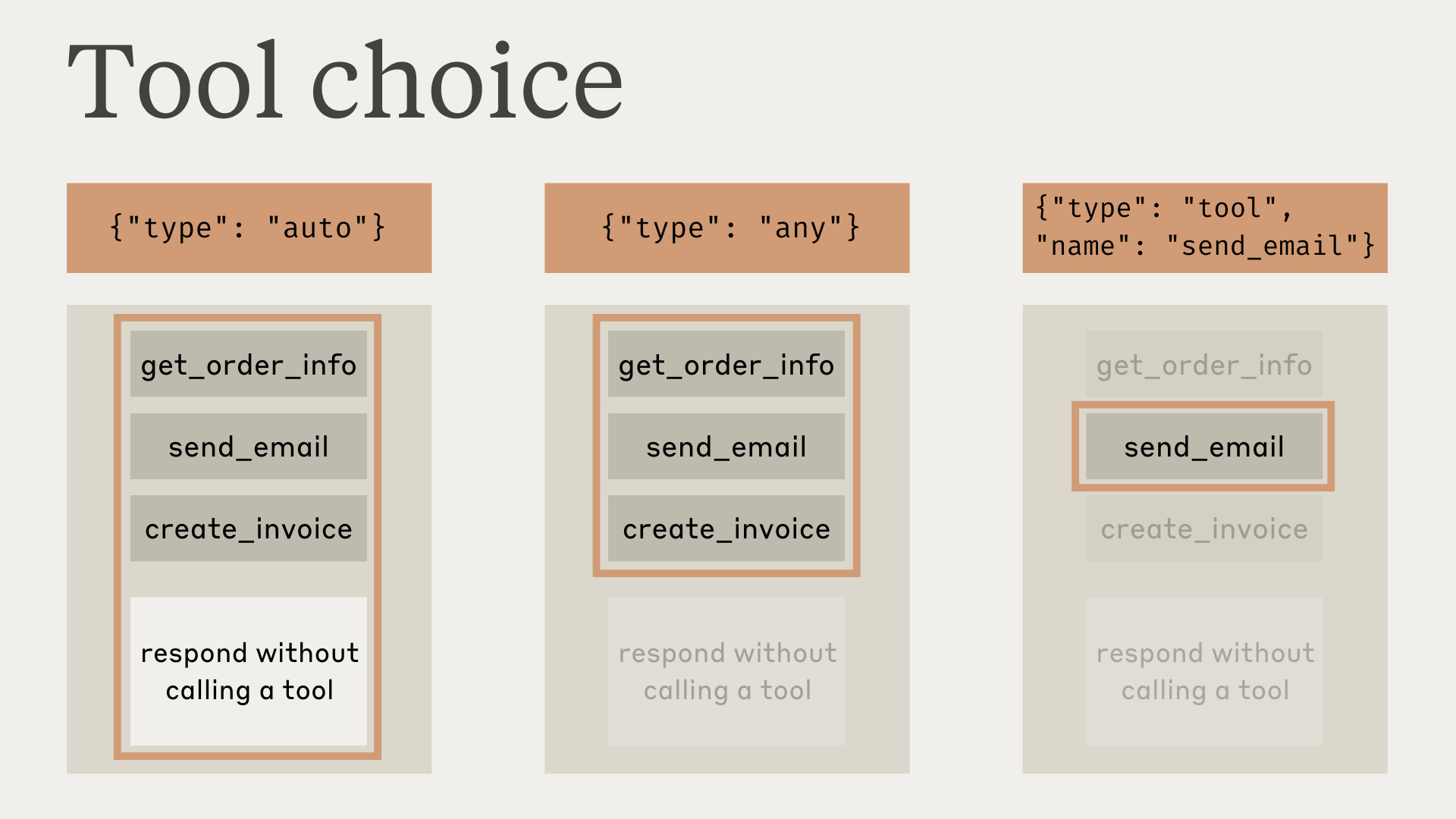858</Frame>859860Note that when you have `tool_choice` as `any` or `tool`, the API prefills the assistant message to force a tool to be used. This means that the models will not emit a natural language response or explanation before `tool_use` content blocks, even if explicitly asked to do so.861862Testing has shown that this should not reduce performance. If you would like the model to provide natural language context or explanations while still requesting that the model use a specific tool, you can use `{"type": "auto"}` for `tool_choice` (the default) and add explicit instructions in a `user` message. For example: `What's the weather like in London? Use the get_weather tool in your response.`863864<Tip>865 **Guaranteed tool calls with strict tools**866867 On models that support forced tool use, combine `tool_choice: {"type": "any"}` with [strict tool use](https://platform.claude.com/docs/en/agents-and-tools/tool-use/strict-tool-use) to guarantee both that one of your tools is called and that the tool inputs strictly follow your schema. Set `strict: true` on your tool definitions to enable schema validation.868</Tip>869870### Model responses with tools871872When using tools, Claude often comments on what it's doing or responds naturally to the user before calling tools.873874For example, given the prompt "What's the weather like in San Francisco right now, and what time is it there?", Claude might respond with:875876```json JSON877{878 "role": "assistant",879 "content": [880 {881 "type": "text",882 "text": "I'll help you check the current weather and time in San Francisco."883 },884 {885 "type": "tool_use",886 "id": "toolu_01A09q90qw90lq917835lq9",887 "name": "get_weather",888 "input": { "location": "San Francisco, CA" }889 }890 ]891}892```893894This natural response style helps users understand what Claude is doing and creates a more conversational interaction. You can guide the style and content of these responses through your system prompts and by providing `<examples>` in your prompts.895896It's important to note that Claude may use various phrasings and approaches when explaining its actions. Your code should treat these responses like any other assistant-generated text, and not rely on specific formatting conventions.897898## Next steps899900<CardGroup>901 <Card href="https://platform.claude.com/docs/en/agents-and-tools/tool-use/handle-tool-calls" title="Handle tool calls">902 Parse tool\_use blocks and format tool\_result responses.903 </Card>904905 <Card href="https://platform.claude.com/docs/en/agents-and-tools/tool-use/tool-runner" title="Tool Runner (SDK)">906 Let the SDK handle the agentic loop automatically.907 </Card>908909 <Card href="https://platform.claude.com/docs/en/agents-and-tools/tool-use/tool-reference" title="Tool reference">910 Directory of Anthropic-provided tools and optional properties.911 </Card>912</CardGroup>913