Repository Public
1<br />23The Computer Use tool lets you build browser, mobile, and desktop control agents4that interact with and automate tasks. Using screenshots, the model can "see" a5computer screen, and "act" by generating specific UI actions like mouse clicks6and keyboard inputs. Similar to function calling, you will need to implement the7client-side execution environment to receive and execute the Computer Use8actions.910For the list of supported models, see [Model versions](https://ai.google.dev/gemini-api/docs/computer-use#model-versions). The Gemini 3.x models support several advanced capabilities:1112- **Multi-environment support:** build agents for [browser, mobile, and desktop](https://ai.google.dev/gemini-api/docs/computer-use#supported-environments) environments.13- **Streamlined actions with intents:** actions include an `intent` field that explains the model's reasoning behind each step.14- **Configurable safety policies:** fine-tune [safety behavior](https://ai.google.dev/gemini-api/docs/computer-use#safety-policies) with built-in policy categories and overrides.15- **Prompt injection detection:** opt-in [screenshot scanning](https://ai.google.dev/gemini-api/docs/computer-use#prompt-injection) to detect hidden adversarial instructions.1617With Computer Use, you can build agents that:1819- Automate repetitive data entry or form filling on websites.20- Perform automated testing of web applications and user flows21- Conduct research across various websites (e.g., gathering product information, prices, and reviews from ecommerce sites to inform a purchase)2223Here's a minimal example of initializing the client and sending a prompt to the model with the `computer_use` tool enabled for a browser environment:2425### Python2627 from google import genai2829 client = genai.Client()3031 interaction = client.interactions.create(32 model="gemini-3.8-flash",33 input="Search for 'Gemini API' on Google.",34 tools=[{"type": "computer_use", "environment": "browser"}]35 )3637 print(interaction)3839### JavaScript4041 import { GoogleGenAI } from '@google/genai';4243 const ai = new GoogleGenAI();4445 const interaction = await ai.interactions.create({46 model: 'gemini-3.8-flash',47 input: "Search for 'Gemini API' on Google.",48 tools: [{ type: "computer_use", environment: "browser" }]49 });5051 console.log(interaction);5253### Java5455 import com.google.genai.Client;56 import com.google.genai.gaos.models.interactions.ComputerUse;57 import com.google.genai.gaos.models.interactions.CreateModelInteraction;58 import com.google.genai.gaos.models.interactions.EnvironmentEnum;59 import com.google.genai.gaos.models.interactions.Interaction;60 import com.google.genai.gaos.models.interactions.InteractionsInput;61 import com.google.genai.gaos.models.operations.CreateInteractionRequestBody;62 import java.util.Arrays;6364 Client client = new Client();6566 CreateModelInteraction params =67 CreateModelInteraction.builder()68 .model("gemini-3.8-flash")69 .input(InteractionsInput.of("Search for 'Gemini API' on Google."))70 .tools(71 Arrays.asList(72 ComputerUse.builder().environment(EnvironmentEnum.BROWSER).build()))73 .build();7475 Interaction interaction =76 client.interactions.create(CreateInteractionRequestBody.of(params)).interaction().get();7778 System.out.println(interaction);7980<br />8182> [!NOTE]83> **Note:** As a Preview capability, Computer Use may contain errors and security vulnerabilities. We recommend supervising closely for important tasks, and that you avoid using the Computer Use capability for tasks involving critical decisions, sensitive data, or actions where serious errors cannot be corrected. We encourage you to review the [Safety best practices](https://ai.google.dev/gemini-api/docs/computer-use#safety-best-practices), the [Prohibited Use84> Policy](https://policies.google.com/terms/generative-ai/use-policy) and [Gemini85> API Additional Terms of Service](https://ai.google.dev/terms).8687## How Computer Use works8889To build an agent with the Computer Use model, you need to set up a90continuous loop between your application and the API. Here is what your code91will do at each step:92931. [**Send a request to the model**](https://ai.google.dev/gemini-api/docs/computer-use#send-request)94 - Your application sends an API request containing the Computer Use tool, your configuration settings (like the target environment), the user's prompt, and a screenshot of the current screen.952. [**Receive the model response**](https://ai.google.dev/gemini-api/docs/computer-use#model-response)96 - The model analyzes the screen and the prompt, returning a response which includes a suggested `function_call` representing a UI action (such as a click, scroll, or keystroke).97 - For **Gemini 3.x models** , the response also includes a reasoning `intent` explaining why the model chose that action.98 - The response may also include a `safety_decision` from an internal safety system that classifies the action as regular/allowed, `require_confirmation` (requiring user approval), or blocked.993. [**Execute the received action**](https://ai.google.dev/gemini-api/docs/computer-use#execute-actions)100 - If the action is allowed (or the user confirms it), your client-side code parses the `function_call`, scales the normalized coordinates to match your viewport, and executes the action in your target environment using automation tools (such as Playwright). If the action is blocked, your client should halt the execution or handle the interruption.1014. [**Capture the new environment state**](https://ai.google.dev/gemini-api/docs/computer-use#capture-state)102 - After the action finishes executing, your application captures a new screenshot and sends it back to the model in a `function_result` to request the next step.103104This process then repeats from step 2, continually soliciting the next action105from the model until the task is completed or terminated.106107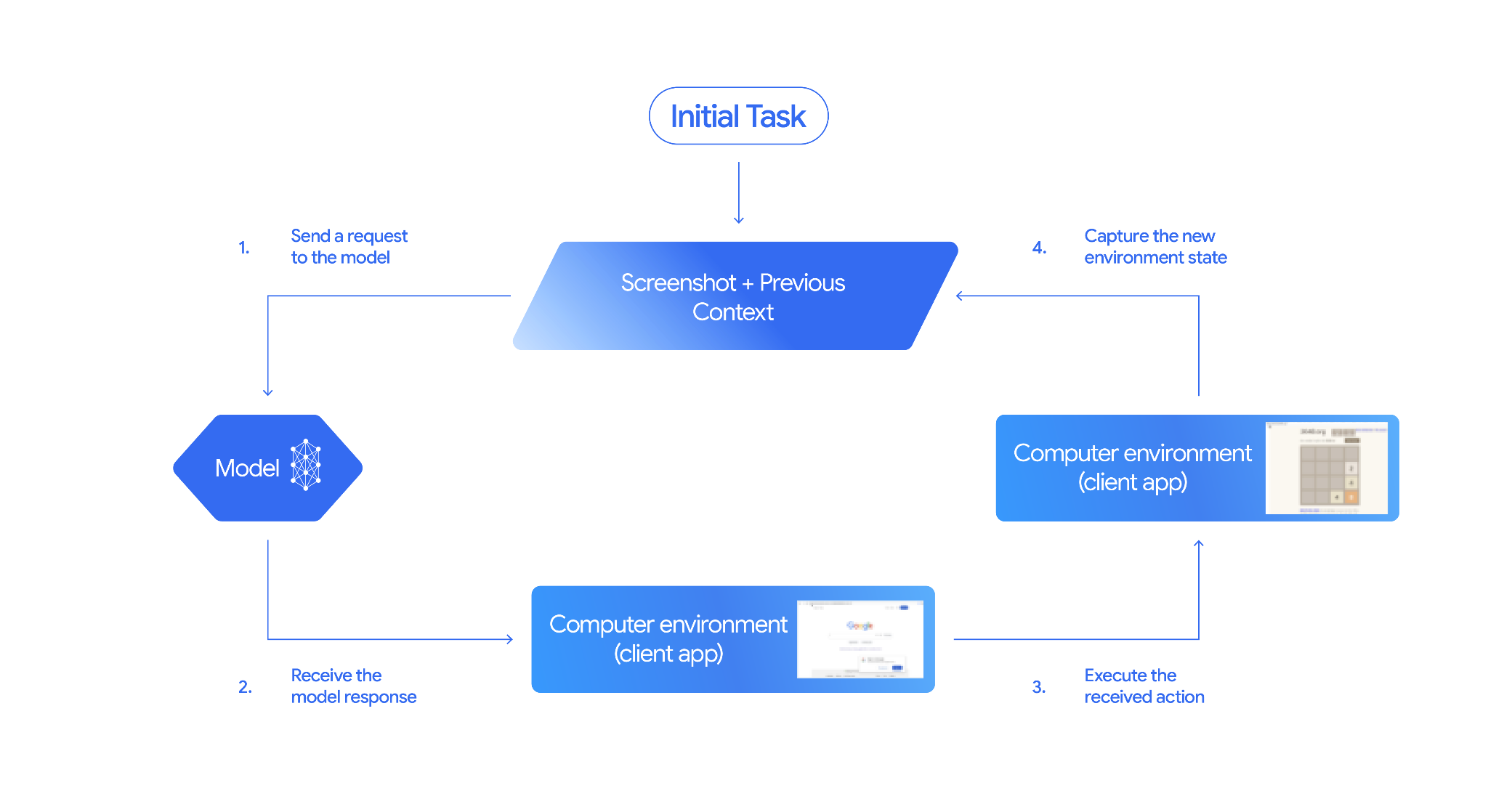108109## How to implement Computer Use110111Before building with the Computer Use tool you will need to set up:112113- **Secure execution environment:** Run your agent in a sandboxed VM or container to isolate it from your host system and limit its potential impact. The [reference implementation](https://github.com/google/computer-use-preview/) includes a ready-to-use Docker-based sandbox you can use as a starting point.114- **Client-side action handler:** Implement client-side logic to execute coordinates, type text, and take screenshots.115116The examples below use a web browser as the execution environment and117[Playwright](https://playwright.dev/) as the client-side handler.118119### 0. Set up Playwright120121First, install the required packages:122123 pip install google-genai playwright124 playwright install chromium125126Then, initialize a Playwright browser instance to use for execution:127128 from playwright.sync_api import sync_playwright129130 # 1. Configure screen dimensions for the target environment131 SCREEN_WIDTH = 1440132 SCREEN_HEIGHT = 900133134 # 2. Start the Playwright browser135 # In production, utilize a sandboxed environment.136 playwright = sync_playwright().start()137 # Set headless=False to see the actions performed on your screen138 browser = playwright.chromium.launch(headless=False)139140 # 3. Create a context and page with the specified dimensions141 context = browser.new_context(142 viewport={"width": SCREEN_WIDTH, "height": SCREEN_HEIGHT}143 )144 page = context.new_page()145146 # 4. Navigate to an initial page to start the task147 page.goto("https://www.google.com")148149 # The 'page', 'SCREEN_WIDTH', and 'SCREEN_HEIGHT' variables150 # will be used in the steps below.151152### 1. Send a request to the model153154Initialize the client library and configure the Computer Use tool. Note that there is no need to specify the display size when issuing a request; the model predicts pixel coordinates scaled to the height and width of the screen.155156### Gemini 3.x157158### Python159160Use the `google-genai` Python SDK (version `2.7.0` or higher) to configure a request targeting the browser environment:161162 from google import genai163164 client = genai.Client()165166 interaction = client.interactions.create(167 model='gemini-3.8-flash',168 input="Find a flight from SF to Hawaii on Jun 30th, coming back on Jul 6th",169 tools=[170 {171 "type": "computer_use",172 "environment": "browser",173 "enable_prompt_injection_detection": True174 }175 ]176 )177178 print(interaction)179180### JavaScript181182Use the `@google/genai` Node.js SDK to configure a request targeting the browser environment:183184 import { GoogleGenAI } from '@google/genai';185186 const ai = new GoogleGenAI();187188 const interaction = await ai.interactions.create({189 model: 'gemini-3.8-flash',190 input: "Find a flight from SF to Hawaii on Jun 30th, coming back on Jul 6th",191 tools: [192 {193 type: "computer_use",194 environment: "browser",195 enable_prompt_injection_detection: true196 }197 ]198 });199200 console.log(interaction);201202### Java203204 import com.google.genai.Client;205 import com.google.genai.gaos.models.interactions.ComputerUse;206 import com.google.genai.gaos.models.interactions.CreateModelInteraction;207 import com.google.genai.gaos.models.interactions.EnvironmentEnum;208 import com.google.genai.gaos.models.interactions.Interaction;209 import com.google.genai.gaos.models.interactions.InteractionsInput;210 import com.google.genai.gaos.models.operations.CreateInteractionRequestBody;211 import java.util.Arrays;212213 Client client = new Client();214215 CreateModelInteraction params =216 CreateModelInteraction.builder()217 .model("gemini-3.8-flash")218 .input(219 InteractionsInput.of(220 "Find a flight from SF to Hawaii on Jun 30th, coming back on Jul 6th"))221 .tools(222 Arrays.asList(223 ComputerUse.builder()224 .environment(EnvironmentEnum.BROWSER)225 .enablePromptInjectionDetection(true)226 .build()))227 .build();228229 Interaction interaction =230 client.interactions.create(CreateInteractionRequestBody.of(params)).interaction().get();231232 System.out.println(interaction);233234### REST235236Use curl to send a request:237238 curl -X POST \239 "https://generativelanguage.googleapis.com/v1beta/interactions" \240 -H "x-goog-api-key: $GEMINI_API_KEY" \241 -H "Content-Type: application/json" \242 -d '{243 "model": "gemini-3.8-flash",244 "input": "Find me a flight from SF to Hawaii on Jun 30th, coming back on Jul 6th. Start by navigating directly to flights.google.com",245 "tools": [246 {247 "type": "computer_use",248 "environment": "browser",249 "enable_prompt_injection_detection": true250 }251 ]252 }'253254### Gemini 2.5 (Legacy)255256### Python257258 from google import genai259260 client = genai.Client()261262 # Specify predefined functions to exclude (optional)263 excluded_functions = ["drag_and_drop"]264265 interaction = client.interactions.create(266 model='gemini-2.5-computer-use-preview-10-2025',267 input="Search for highly rated smart fridges on Google Shopping.",268 tools=[269 {270 "type": "computer_use",271 "environment": "browser",272 "excluded_predefined_functions": excluded_functions273 }274 ]275 )276277 print(interaction)278279### JavaScript280281 import { GoogleGenAI } from '@google/genai';282283 const ai = new GoogleGenAI();284285 // Specify predefined functions to exclude (optional)286 const excludedFunctions = ["drag_and_drop"];287288 const interaction = await ai.interactions.create({289 model: 'gemini-2.5-computer-use-preview-10-2025',290 input: "Search for highly rated smart fridges on Google Shopping.",291 tools: [292 {293 type: "computer_use",294 environment: "browser",295 excluded_predefined_functions: excludedFunctions296 }297 ]298 });299300 console.log(interaction);301302### Java303304 import com.google.genai.Client;305 import com.google.genai.gaos.models.interactions.ComputerUse;306 import com.google.genai.gaos.models.interactions.CreateModelInteraction;307 import com.google.genai.gaos.models.interactions.EnvironmentEnum;308 import com.google.genai.gaos.models.interactions.Interaction;309 import com.google.genai.gaos.models.interactions.InteractionsInput;310 import com.google.genai.gaos.models.operations.CreateInteractionRequestBody;311 import java.util.Arrays;312 import java.util.List;313314 Client client = new Client();315316 // Specify predefined functions to exclude (optional)317 List<String> excludedFunctions = Arrays.asList("drag_and_drop");318319 CreateModelInteraction params =320 CreateModelInteraction.builder()321 .model("gemini-2.5-computer-use-preview-10-2025")322 .input(InteractionsInput.of("Search for highly rated smart fridges on Google Shopping."))323 .tools(324 Arrays.asList(325 ComputerUse.builder()326 .environment(EnvironmentEnum.BROWSER)327 .excludedPredefinedFunctions(excludedFunctions)328 .build()))329 .build();330331 Interaction interaction =332 client.interactions.create(CreateInteractionRequestBody.of(params)).interaction().get();333334 System.out.println(interaction);335336### 2. Receive the model response337338The response model suggests a function call. For **Gemini 3.x models**, the339response contains a tailored reasoning intent alongside coordinates. The340following shows examples of both responses:341342### Gemini 3.x343344 {345 "steps": [346 {347 "type": "function_call",348 "name": "click",349 "arguments": {350 "x": 450,351 "y": 120,352 "intent": "Click the search box to type the destination."353 }354 }355 ]356 }357358### Gemini 2.5 (Legacy)359360 {361 "steps": [362 {363 "type": "model_output",364 "content": [365 {366 "type": "text",367 "text": "I will type the search query into the search bar."368 }369 ]370 },371 {372 "type": "function_call",373 "name": "type_text_at",374 "arguments": {375 "x": 371,376 "y": 470,377 "text": "highly rated smart fridges",378 "press_enter": true379 }380 }381 ]382 }383384### 3. Execute the received actions385386Your application must parse the response coordinates, execute the action, and scale them from the normalized 1000x1000 coordinates.387388The code below handles both legacy tool commands (`click_at`, `type_text_at`) and modern streamlined commands (`click`, `type`).389390### Python391392 from typing import Any, List, Tuple393 import time394395 def denormalize_x(x: int, screen_width: int) -> int:396 """Convert normalized x coordinate (0-1000) to actual pixel coordinate."""397 return int(x / 1000 * screen_width)398399 def denormalize_y(y: int, screen_height: int) -> int:400 """Convert normalized y coordinate (0-1000) to actual pixel coordinate."""401 return int(y / 1000 * screen_height)402403 def execute_function_calls(interaction, page, screen_width, screen_height):404 results = []405 function_calls = [406 step for step in interaction.steps if step.type == "function_call"407 ]408409 for function_call in function_calls:410 action_result = {}411 fname = function_call.name412 args = function_call.arguments413 print(f" -> Executing: {fname} (Intent: {args.get('intent', 'N/A')})")414415 try:416 if fname in ("open_web_browser", "open_app"):417 pass # Handled / already open418 elif fname in ("click", "click_at", "double_click", "triple_click", "middle_click", "right_click", "move", "long_press"):419 actual_x = denormalize_x(args["x"], screen_width)420 actual_y = denormalize_y(args["y"], screen_height)421422 if fname in ("click", "click_at"):423 page.mouse.click(actual_x, actual_y)424 elif fname == "double_click":425 page.mouse.dblclick(actual_x, actual_y)426 elif fname == "right_click":427 page.mouse.click(actual_x, actual_y, button="right")428 elif fname == "middle_click":429 page.mouse.click(actual_x, actual_y, button="middle")430 elif fname == "move":431 page.mouse.move(actual_x, actual_y)432 elif fname in ("type", "type_text_at"):433 actual_x = denormalize_x(args["x"], screen_width) if "x" in args else None434 actual_y = denormalize_y(args["y"], screen_height) if "y" in args else None435 text = args["text"]436 press_enter = args.get("press_enter", False)437438 if actual_x is not None and actual_y is not None:439 page.mouse.click(actual_x, actual_y)440 # Clear field first441 page.keyboard.press("Meta+A")442 page.keyboard.press("Backspace")443 page.keyboard.type(text)444 if press_enter:445 page.keyboard.press("Enter")446 elif fname == "navigate":447 page.goto(args["url"])448 elif fname == "go_back":449 page.go_back()450 elif fname == "go_forward":451 page.go_forward()452 elif fname == "wait":453 time.sleep(args.get("seconds", 1))454 else:455 print(f"Warning: Custom or unhandled function {fname}")456457 page.wait_for_load_state(timeout=5000)458 time.sleep(1)459460 except Exception as e:461 print(f"Error executing {fname}: {e}")462 action_result = {"error": str(e)}463464 results.append((fname, function_call.id, action_result))465466 return results467468### JavaScript469470 function denormalizeX(x, screenWidth) {471 // Convert normalized x coordinate (0-1000) to actual pixel coordinate.472 return Math.floor((x / 1000) * screenWidth);473 }474475 function denormalizeY(y, screenHeight) {476 // Convert normalized y coordinate (0-1000) to actual pixel coordinate.477 return Math.floor((y / 1000) * screenHeight);478 }479480 async function executeFunctionCalls(interaction, page, screenWidth, screenHeight) {481 const results = [];482 const functionCalls = interaction.steps.filter(step => step.type === "function_call");483484 for (const functionCall of functionCalls) {485 const actionResult = {};486 const fname = functionCall.name;487 const args = functionCall.arguments;488 console.log(` -> Executing: ${fname} (Intent: ${args.intent || 'N/A'})`);489490 try {491 if (fname === "open_web_browser" || fname === "open_app") {492 // Handled / already open493 } else if (["click", "click_at", "double_click", "triple_click", "middle_click", "right_click", "move", "long_press"].includes(fname)) {494 const actualX = denormalizeX(args.x, screenWidth);495 const actualY = denormalizeY(args.y, screenHeight);496497 if (fname === "click" || fname === "click_at") {498 await page.mouse.click(actualX, actualY);499 } else if (fname === "double_click") {500 await page.mouse.dblclick(actualX, actualY);501 } else if (fname === "right_click") {502 await page.mouse.click(actualX, actualY, { button: "right" });503 } else if (fname === "middle_click") {504 await page.mouse.click(actualX, actualY, { button: "middle" });505 } else if (fname === "move") {506 await page.mouse.move(actualX, actualY);507 }508 } else if (fname === "type" || fname === "type_text_at") {509 const actualX = args.x !== undefined ? denormalizeX(args.x, screenWidth) : null;510 const actualY = args.y !== undefined ? denormalizeY(args.y, screenHeight) : null;511 const text = args.text;512 const pressEnter = args.press_enter || false;513514 if (actualX !== null && actualY !== null) {515 await page.mouse.click(actualX, actualY);516 }517 // Clear field first518 await page.keyboard.press("Meta+A");519 await page.keyboard.press("Backspace");520 await page.keyboard.type(text);521 if (pressEnter) {522 await page.keyboard.press("Enter");523 }524 } else if (fname === "navigate") {525 await page.goto(args.url);526 } else if (fname === "go_back") {527 await page.goBack();528 } else if (fname === "go_forward") {529 await page.goForward();530 } else if (fname === "wait") {531 await new Promise(resolve => setTimeout(resolve, (args.seconds || 1) * 1000));532 } else {533 console.log(`Warning: Custom or unhandled function ${fname}`);534 }535536 await page.waitForLoadState('load', { timeout: 5000 }).catch(() => {});537 await new Promise(resolve => setTimeout(resolve, 1000));538 } catch (e) {539 console.log(`Error executing ${fname}: ${e}`);540 actionResult.error = e.message;541 }542543 results.push([fname, functionCall.id, actionResult]);544 }545546 return results;547 }548549### Java550551 import com.google.genai.gaos.models.interactions.FunctionCallStep;552 import com.google.genai.gaos.models.interactions.Interaction;553 import com.google.genai.gaos.models.interactions.Step;554 import java.util.ArrayList;555 import java.util.Collections;556 import java.util.HashMap;557 import java.util.List;558 import java.util.Map;559560 class ActionExecutor {561 int denormalizeX(int x, int screenWidth) {562 return (int) (x / 1000.0 * screenWidth);563 }564565 int denormalizeY(int y, int screenHeight) {566 return (int) (y / 1000.0 * screenHeight);567 }568569 List<Map<String, Object>> executeFunctionCalls(570 Interaction interaction, int screenWidth, int screenHeight) {571 List<Map<String, Object>> results = new ArrayList<>();572573 for (Step step : interaction.steps().orElse(Collections.emptyList())) {574 if (step instanceof FunctionCallStep) {575 FunctionCallStep functionCall = (FunctionCallStep) step;576 String fname = functionCall.name().orElse("");577 Map<String, Object> args = functionCall.arguments().orElse(Collections.emptyMap());578 Map<String, Object> actionResult = new HashMap<>();579580 System.out.println(581 " -> Executing: " + fname + " (Intent: " + args.getOrDefault("intent", "N/A") + ")");582583 try {584 if (fname.equals("click") || fname.equals("click_at")) {585 int actualX = denormalizeX(((Number) args.get("x")).intValue(), screenWidth);586 int actualY = denormalizeY(((Number) args.get("y")).intValue(), screenHeight);587 // Perform mouse click at (actualX, actualY) using your browser automation library588 } else if (fname.equals("type") || fname.equals("type_text_at")) {589 String text = (String) args.get("text");590 // Type text into active element using your browser automation library591 } else if (fname.equals("navigate")) {592 String url = (String) args.get("url");593 // Navigate browser to url594 }595 } catch (Exception e) {596 actionResult.put("error", e.getMessage());597 }598599 Map<String, Object> entry = new HashMap<>();600 entry.put("name", fname);601 entry.put("callId", functionCall.id().orElse(""));602 entry.put("result", actionResult);603 results.add(entry);604 }605 }606 return results;607 }608 }609610### 4. Capture the new environment state611612After executing the actions, send the result of the function execution back to613the model so it can use this information to generate the next action. If614multiple actions (parallel calls) were executed, you must send a615`function_result` for each one in the subsequent user turn.616617### Python618619 import json620 import base64621622 def get_function_responses(page, results):623 screenshot_bytes = page.screenshot(type="png")624 current_url = page.url625 function_responses = []626 for name, call_id, result in results:627 function_responses.append({628 "type": "function_result",629 "name": name,630 "call_id": call_id,631 "result": [632 {633 "type": "text",634 "text": json.dumps({"url": current_url, **result})635 },636 {637 "type": "image",638 "data": base64.b64encode(screenshot_bytes).decode("utf-8"),639 "mime_type": "image/png"640 }641 ]642 })643 return function_responses644645### JavaScript646647 async function getFunctionResponses(page, results) {648 const screenshotBuffer = await page.screenshot({ type: 'png' });649 const screenshotBase64 = screenshotBuffer.toString('base64');650 const currentUrl = page.url();651 const functionResponses = [];652653 for (const [name, callId, result] of results) {654 functionResponses.push({655 type: "function_result",656 name: name,657 call_id: callId,658 result: [659 {660 type: "text",661 text: JSON.stringify({ url: currentUrl, ...result })662 },663 {664 type: "image",665 data: screenshotBase64,666 mime_type: "image/png"667 }668 ]669 });670 }671 return functionResponses;672 }673674### Java675676 import com.google.genai.gaos.models.interactions.FunctionResultStep;677 import com.google.genai.gaos.models.interactions.FunctionResultStepResultUnion;678 import com.google.genai.gaos.models.interactions.ImageContent;679 import com.google.genai.gaos.models.interactions.ImageContentMimeType;680 import com.google.genai.gaos.models.interactions.Step;681 import com.google.genai.gaos.models.interactions.TextContent;682 import java.util.ArrayList;683 import java.util.Arrays;684 import java.util.Base64;685 import java.util.List;686 import java.util.Map;687688 class StateCapturer {689 List<Step> getFunctionResponses(690 byte[] screenshotBytes, String currentUrl, List<Map<String, Object>> results) {691 List<Step> functionResponses = new ArrayList<>();692 String base64Screenshot = Base64.getEncoder().encodeToString(screenshotBytes);693694 for (Map<String, Object> entry : results) {695 String name = (String) entry.get("name");696 String callId = (String) entry.get("callId");697 String jsonResult = String.format("{\"url\": \"%s\"}", currentUrl);698699 FunctionResultStep responseStep =700 FunctionResultStep.builder()701 .name(name)702 .callId(callId)703 .result(704 FunctionResultStepResultUnion.of(705 Arrays.asList(706 TextContent.builder().text(jsonResult).build(),707 ImageContent.builder()708 .data(base64Screenshot)709 .mimeType(ImageContentMimeType.IMAGE_PNG)710 .build())))711 .build();712 functionResponses.add(responseStep);713 }714 return functionResponses;715 }716 }717718Once you have defined how to capture and format the environment state, you can719combine all these steps into a continuous execution loop.720721## Build an agent loop722723To enable multi-step interactions, combine the four steps from the [How to724implement Computer Use](https://ai.google.dev/gemini-api/docs/computer-use#implement-computer-use) section into a single loop.725This loop continues requesting actions and feeding the results back to the model726until the task is complete.727728Remember to manage the conversation history correctly by appending both the729model responses and your function responses to the history at each step.730731### Python732733 import time734 from typing import Any, List, Tuple735 from playwright.sync_api import sync_playwright736737 from google import genai738739 client = genai.Client()740741 # Constants for screen dimensions742 SCREEN_WIDTH = 1440743 SCREEN_HEIGHT = 900744745 # Setup Playwright746 print("Initializing browser...")747 playwright = sync_playwright().start()748 browser = playwright.chromium.launch(headless=False)749 context = browser.new_context(viewport={"width": SCREEN_WIDTH, "height": SCREEN_HEIGHT})750 page = context.new_page()751752 # Define helper functions. Copy/paste from steps 3 and 4753 # def denormalize_x(...)754 # def denormalize_y(...)755 # def execute_function_calls(...)756 # def get_function_responses(...)757758 try:759 # Go to initial page760 page.goto("https://ai.google.dev/gemini-api/docs")761762 # Take initial screenshot763 initial_screenshot = page.screenshot(type="png")764 USER_PROMPT = "Go to ai.google.dev/gemini-api/docs and search for pricing."765 print(f"Goal: {USER_PROMPT}")766767 # First interaction768 interaction = client.interactions.create(769 model='gemini-3.8-flash',770 input=[771 {"type": "text", "text": USER_PROMPT},772 {"type": "image", "data": base64.b64encode(initial_screenshot).decode("utf-8"), "mime_type": "image/png"}773 ],774 tools=[{775 "type": "computer_use",776 "environment": "browser",777 "enable_prompt_injection_detection": True778 }]779 )780781 # Agent Loop782 turn_limit = 5783 for i in range(turn_limit):784 print(f"\n--- Turn {i+1} ---")785786 has_function_calls = any(787 step.type == "function_call"788 for step in interaction.steps789 )790 if not has_function_calls:791 text_response = " ".join([792 content_block.text for step in interaction.steps if step.type == "model_output"793 for content_block in step.content if content_block.type == "text"794 ])795 print("Agent finished:", text_response)796 break797798 print("Executing actions...")799 results = execute_function_calls(interaction, page, SCREEN_WIDTH, SCREEN_HEIGHT)800801 print("Capturing state...")802 function_responses = get_function_responses(page, results)803804 # Continue conversation with function responses805 interaction = client.interactions.create(806 model='gemini-3.8-flash',807 previous_interaction_id=interaction.id,808 input=function_responses,809 tools=[{810 "type": "computer_use",811 "environment": "browser",812 "enable_prompt_injection_detection": True813 }]814 )815816 finally:817 # Cleanup818 print("\nClosing browser...")819 browser.close()820 playwright.stop()821822### JavaScript823824 import { chromium } from 'playwright';825 import { GoogleGenAI } from '@google/genai';826827 const ai = new GoogleGenAI();828829 // Constants for screen dimensions830 const SCREEN_WIDTH = 1440;831 const SCREEN_HEIGHT = 900;832833 console.log("Initializing browser...");834 const browser = await chromium.launch({ headless: false });835 const context = await browser.newContext({836 viewport: { width: SCREEN_WIDTH, height: SCREEN_HEIGHT }837 });838 const page = await context.newPage();839840 // Define helper functions. Copy/paste from steps 3 and 4:841 // function denormalizeX(...)842 // function denormalizeY(...)843 // async function executeFunctionCalls(...)844 // async function getFunctionResponses(...)845846 try {847 // Go to initial page848 await page.goto("https://ai.google.dev/gemini-api/docs");849850 // Take initial screenshot851 const initialScreenshotBuffer = await page.screenshot({ type: 'png' });852 const initialScreenshotBase64 = initialScreenshotBuffer.toString('base64');853 const USER_PROMPT = "Go to ai.google.dev/gemini-api/docs and search for pricing.";854 console.log(`Goal: ${USER_PROMPT}`);855856 // First interaction857 let interaction = await ai.interactions.create({858 model: 'gemini-3.8-flash',859 input: [860 { type: 'text', text: USER_PROMPT },861 { type: 'image', data: initialScreenshotBase64, mime_type: 'image/png' }862 ],863 tools: [{864 type: 'computer_use',865 environment: 'browser',866 enable_prompt_injection_detection: true867 }]868 });869870 // Agent Loop871 const turnLimit = 5;872 for (let i = 0; i < turnLimit; i++) {873 console.log(`\n--- Turn ${i + 1} ---`);874875 const hasFunctionCalls = interaction.steps.some(step => step.type === "function_call");876 if (!hasFunctionCalls) {877 const textResponses = [];878 for (const step of interaction.steps) {879 if (step.type === "model_output") {880 for (const contentBlock of step.content || []) {881 if (contentBlock.type === "text") {882 textResponses.push(contentBlock.text);883 }884 }885 }886 }887 console.log("Agent finished:", textResponses.join(" "));888 break;889 }890891 console.log("Executing actions...");892 const results = await executeFunctionCalls(interaction, page, SCREEN_WIDTH, SCREEN_HEIGHT);893894 console.log("Capturing state...");895 const functionResponses = await getFunctionResponses(page, results);896897 // Continue conversation with function responses898 interaction = await ai.interactions.create({899 model: 'gemini-3.8-flash',900 previous_interaction_id: interaction.id,901 input: functionResponses,902 tools: [{903 type: 'computer_use',904 environment: 'browser',905 enable_prompt_injection_detection: true906 }]907 });908 }909 } finally {910 // Cleanup911 console.log("\nClosing browser...");912 await browser.close();913 }914915### Java916917 import com.google.genai.Client;918 import com.google.genai.gaos.models.interactions.ComputerUse;919 import com.google.genai.gaos.models.interactions.Content;920 import com.google.genai.gaos.models.interactions.CreateModelInteraction;921 import com.google.genai.gaos.models.interactions.EnvironmentEnum;922 import com.google.genai.gaos.models.interactions.FunctionCallStep;923 import com.google.genai.gaos.models.interactions.ImageContent;924 import com.google.genai.gaos.models.interactions.ImageContentMimeType;925 import com.google.genai.gaos.models.interactions.Interaction;926 import com.google.genai.gaos.models.interactions.InteractionsInput;927 import com.google.genai.gaos.models.interactions.ModelOutputStep;928 import com.google.genai.gaos.models.interactions.Step;929 import com.google.genai.gaos.models.interactions.TextContent;930 import com.google.genai.gaos.models.operations.CreateInteractionRequestBody;931 import java.util.ArrayList;932 import java.util.Arrays;933 import java.util.Base64;934 import java.util.Collections;935 import java.util.List;936937 Client client = new Client();938939 // Constants for screen dimensions940 int screenWidth = 1440;941 int screenHeight = 900;942943 // Capture initial screenshot from browser driver (e.g. Playwright)944 byte[] initialScreenshot = new byte[0];945 String base64Screenshot = Base64.getEncoder().encodeToString(initialScreenshot);946 String userPrompt = "Go to ai.google.dev/gemini-api/docs and search for pricing.";947 System.out.println("Goal: " + userPrompt);948949 ComputerUse computerUseTool =950 ComputerUse.builder()951 .environment(EnvironmentEnum.BROWSER)952 .enablePromptInjectionDetection(true)953 .build();954955 CreateModelInteraction initialParams =956 CreateModelInteraction.builder()957 .model("gemini-3.8-flash")958 .input(959 InteractionsInput.ofContent(960 Arrays.asList(961 TextContent.builder().text(userPrompt).build(),962 ImageContent.builder()963 .data(base64Screenshot)964 .mimeType(ImageContentMimeType.IMAGE_PNG)965 .build())))966 .tools(Arrays.asList(computerUseTool))967 .build();968969 Interaction interaction =970 client.interactions.create(CreateInteractionRequestBody.of(initialParams)).interaction().get();971972 int turnLimit = 5;973 for (int i = 0; i < turnLimit; i++) {974 System.out.println("\n--- Turn " + (i + 1) + " ---");975976 boolean hasFunctionCalls =977 interaction.steps().orElse(Collections.emptyList()).stream()978 .anyMatch(step -> step instanceof FunctionCallStep);979980 if (!hasFunctionCalls) {981 StringBuilder textResponse = new StringBuilder();982 for (Step step : interaction.steps().orElse(Collections.emptyList())) {983 if (step instanceof ModelOutputStep) {984 for (Content contentBlock :985 ((ModelOutputStep) step).content().orElse(Collections.emptyList())) {986 if (contentBlock instanceof TextContent) {987 textResponse.append(((TextContent) contentBlock).text().orElse("")).append(" ");988 }989 }990 }991 }992 System.out.println("Agent finished: " + textResponse.toString().trim());993 break;994 }995996 System.out.println("Executing actions and capturing state...");997 // Execute function calls against browser driver and capture List<Step> functionResponses998 List<Step> functionResponses = new ArrayList<>();9991000 CreateModelInteraction nextParams =1001 CreateModelInteraction.builder()1002 .model("gemini-3.8-flash")1003 .previousInteractionId(interaction.id().get())1004 .input(InteractionsInput.ofStep(functionResponses))1005 .tools(Arrays.asList(computerUseTool))1006 .build();10071008 interaction =1009 client.interactions.create(CreateInteractionRequestBody.of(nextParams)).interaction().get();1010 }10111012## Supported environments (Gemini 3.x)10131014Gemini 3.x models support three environments specified in the `computer_use`1015configurations:10161017### Browser environment (`ENVIRONMENT_BROWSER`)10181019Available actions under browser tool:10201021| Command name | Description | Arguments (in function call) |1022|---|---|---|1023| **click** | Left clicks at the coordinate. | `y`: int (0-999) `x`: int (0-999) `intent`: str |1024| **double_click** | Double clicks at the coordinate. | `y`: int (0-999) `x`: int (0-999) `intent`: str |1025| **triple_click** | Triple clicks at the coordinate. | `y`: int (0-999) `x`: int (0-999) `intent`: str |1026| **middle_click** | Middle clicks at the coordinate. | `y`: int (0-999) `x`: int (0-999) `intent`: str |1027| **right_click** | Right clicks at the coordinate. | `y`: int (0-999) `x`: int (0-999) `intent`: str |1028| **mouse_down** | Presses and holds the mouse button at the coordinate. | `y`: int (0-999) `x`: int (0-999) `intent`: str |1029| **mouse_up** | Releases the mouse button at the coordinate. | `y`: int (0-999) `x`: int (0-999) `intent`: str |1030| **move** | Moves the cursor to the specified position. | `y`: int (0-999) `x`: int (0-999) `intent`: str |1031| **type** | Types text. | `text`: str `press_enter`: bool (Optional, default `false`) `intent`: str |1032| **drag_and_drop** | Drags an item from the start coordinate to the end coordinate. | `start_y`: int (0-999) `start_x`: int (0-999) `end_y`: int (0-999) `end_x`: int (0-999) `intent`: str |1033| **wait** | Pauses execution for a specified number of seconds. | `seconds`: int (Optional, default `1`) `intent`: str |1034| **press_key** | Presses the specified key and releases it. | `key`: str `intent`: str |1035| **key_down** | Presses and holds the specified key. | `key`: str `intent`: str |1036| **key_up** | Releases the specified key. | `key`: str `intent`: str |1037| **hotkey** | Presses the specified key combination. | `keys`: `List[str]` `intent`: `str` |1038| **take_screenshot** | Returns a screenshot of the current screen. | `intent`: str |1039| **scroll** | Scrolls up, down, left, or right at a coordinate by a pixel distance. | `y`: int (0-999) `x`: int (0-999) `direction`: str (`"up"`, `"down"`, `"left"`, `"right"`) `magnitude_in_pixels`: int (0-999, Optional, default `300`) `intent`: str |1040| **go_back** | Navigates back to the previous webpage in the browser history. | `intent`: str |1041| **navigate** | Navigates directly to a specified URL. | `url`: str `intent`: str |1042| **go_forward** | Navigates forward to the next webpage in the browser history. | `intent`: str |10431044### Mobile environment (`ENVIRONMENT_MOBILE`)10451046Android-optimized environment actions:10471048| Command name | Description | Arguments (in function call) |1049|---|---|---|1050| **open_app** | Opens an application by its name. | `app_name`: str `intent`: str |1051| **click** | Left clicks at the coordinate. | `y`: int (0-999) `x`: int (0-999) `intent`: str |1052| **list_apps** | Lists available applications on the device, returning their names and package names. | `intent`: str |1053| **wait** | Pauses execution for a specified number of seconds. | `seconds`: int (Optional, default `1`) `intent`: str |1054| **go_back** | Navigates back to the previous screen or webpage. | `intent`: str |1055| **type** | Types text. | `text`: str `press_enter`: bool (Optional, default `false`) `intent`: str |1056| **drag_and_drop** | Drags an item from the start coordinate to the end coordinate. | `start_y`: int (0-999) `start_x`: int (0-999) `end_y`: int (0-999) `end_x`: int (0-999) `intent`: str |1057| **long_press** | Performs a long press at a coordinate on the screen. | `y`: int (0-999) `x`: int (0-999) `seconds`: int (Optional, default `2`) `intent`: str |1058| **press_key** | Presses the specified key and releases it. | `key`: str `intent`: str |1059| **take_screenshot** | Returns a screenshot of the current screen. | `intent`: str |10601061### Desktop environment (`ENVIRONMENT_DESKTOP`)10621063Desktop environments OS-level cursor commands:10641065| Command name | Description | Arguments (in function call) |1066|---|---|---|1067| **click** | Left clicks at the coordinate. | `y`: int (0-999) `x`: int (0-999) `intent`: str |1068| **double_click** | Double clicks at the coordinate. | `y`: int (0-999) `x`: int (0-999) `intent`: str |1069| **triple_click** | Triple clicks at the coordinate. | `y`: int (0-999) `x`: int (0-999) `intent`: str |1070| **middle_click** | Middle clicks at the coordinate. | `y`: int (0-999) `x`: int (0-999) `intent`: str |1071| **right_click** | Right clicks at the coordinate. | `y`: int (0-999) `x`: int (0-999) `intent`: str |1072| **mouse_down** | Presses and holds the mouse button at the coordinate. | `y`: int (0-999) `x`: int (0-999) `intent`: str |1073| **mouse_up** | Releases the mouse button at the coordinate. | `y`: int (0-999) `x`: int (0-999) `intent`: str |1074| **move** | Moves the cursor to the specified position. | `y`: int (0-999) `x`: int (0-999) `intent`: str |1075| **type** | Types text. | `text`: str `press_enter`: bool (Optional, default `false`) `intent`: str |1076| **drag_and_drop** | Drags an item from the start coordinate to the end coordinate. | `start_y`: int (0-999) `start_x`: int (0-999) `end_y`: int (0-999) `end_x`: int (0-999) `intent`: str |1077| **wait** | Pauses execution for a specified number of seconds. | `seconds`: int (Optional, default `1`) `intent`: str |1078| **press_key** | Presses the specified key and releases it. | `key`: str `intent`: str |1079| **key_down** | Presses and holds the specified key. | `key`: str `intent`: str |1080| **key_up** | Releases the specified key. | `key`: str `intent`: str |1081| **hotkey** | Presses the specified key combination. | `keys`: `List[str]` `intent`: `str` |1082| **take_screenshot** | Returns a screenshot of the current screen. | `intent`: str |1083| **scroll** | Scrolls up, down, left, or right at a coordinate by a pixel distance. | `y`: int (0-999) `x`: int (0-999) `direction`: str (`"up"`, `"down"`, `"left"`, `"right"`) `magnitude_in_pixels`: int (0-999, Optional, default `300`) `intent`: str |10841085## Legacy Supported UI actions (Gemini 2.5)10861087For legacy models (`gemini-2.5-computer-use-preview-10-2025`), the following actions are supported:10881089| Command name | Description | Arguments (in function call) | Example function call |1090|---|---|---|---|1091| **open_web_browser** | Opens the web browser. | None | `{"name": "open_web_browser", "arguments": {}}` |1092| **wait_5_seconds** | Pauses execution for 5 seconds. | None | `{"name": "wait_5_seconds", "arguments": {}}` |1093| **go_back** | Navigates to the previous page in history. | None | `{"name": "go_back", "arguments": {}}` |1094| **go_forward** | Navigates to the next page in history. | None | `{"name": "go_forward", "arguments": {}}` |1095| **search** | Navigates to default search engine. | None | `{"name": "search", "arguments": {}}` |1096| **navigate** | Navigates the browser directly to the specified URL. | `url`: str | `{"name": "navigate", "arguments": {"url": "https://www.wikipedia.org"}}` |1097| **click_at** | Clicks at a specific coordinate. | `y`: int (0-999), `x`: int (0-999) | `{"name": "click_at", "arguments": {"y": 300, "x": 500}}` |1098| **hover_at** | Hovers mouse at a specific coordinate. | `y`: int (0-999), `x`: int (0-999) | `{"name": "hover_at", "arguments": {"y": 150, "x": 250}}` |1099| **type_text_at** | Types text at a coordinate. | `y`: int (0-999), `x`: int (0-999), `text`: str, `press_enter`: bool (Optional, default True), `clear_before_typing`: bool (Optional, default True) | `{"name": "type_text_at", "arguments": {"y": 250, "x": 400, "text": "search", "press_enter": false}}` |1100| **key_combination** | Press keys or combinations. | `keys`: str | `{"name": "key_combination", "arguments": {"keys": "Control+A"}}` |1101| **scroll_document** | Scrolls the entire webpage. | `direction`: str | `{"name": "scroll_document", "arguments": {"direction": "down"}}` |1102| **scroll_at** | Scrolls at coordinate (x,y). | `y`: int, `x`: int, `direction`: str, `magnitude`: int (Optional, default 800) | `{"name": "scroll_at", "arguments": {"y": 500, "x": 500, "direction": "down"}}` |1103| **drag_and_drop** | Drags between two coordinates. | `y`: int, `x`: int, `destination_y`: int, `destination_x`: int | `{"name": "drag_and_drop", "arguments": {"y": 100, "destination_y": 500, "destination_x": 500, "x": 100}}` |11041105## Custom user-defined functions11061107You can extend the functionality of the model by including custom user-defined functions. For example, in human-in-the-loop (HITL) scenarios you can exclude default predefined actions and register custom actions.11081109#### Gemini 3.x Custom Tooling11101111### Python11121113Exclude standard predefined browser actions (such as `click`) and register a custom `yield_to_user` tool:11141115 from google import genai11161117 client = genai.Client()11181119 yield_to_user_tool = {1120 "type": "function",1121 "name": "yield_to_user",1122 "description": "Yields control back to the user for assistance or verification when an automated action is unsafe or ambiguous.",1123 "parameters": {1124 "type": "object",1125 "properties": {1126 "reason": {1127 "type": "string",1128 "description": "The reason why the agent is yielding control to the human."1129 }1130 },1131 "required": ["reason"]1132 }1133 }11341135 interaction = client.interactions.create(1136 model="gemini-3.8-flash",1137 input="Click the submit button. If you need a second factor authentication code, ask me.",1138 tools=[1139 {1140 "type": "computer_use",1141 "environment": "mobile",1142 "excluded_predefined_functions": ["click"]1143 },1144 yield_to_user_tool1145 ]1146 )11471148### JavaScript11491150Exclude standard predefined browser actions (such as `click`) and register a custom `yield_to_user` tool:11511152 import { GoogleGenAI } from '@google/genai';11531154 const ai = new GoogleGenAI();11551156 const yieldToUserTool = {1157 type: "function",1158 name: "yield_to_user",1159 description: "Yields control back to the user for assistance or verification when an automated action is unsafe or ambiguous.",1160 parameters: {1161 type: "object",1162 properties: {1163 reason: {1164 type: "string",1165 description: "The reason why the agent is yielding control to the human."1166 }1167 },1168 required: ["reason"]1169 }1170 };11711172 const interaction = await ai.interactions.create({1173 model: "gemini-3.8-flash",1174 input: "Click the submit button. If you need a second factor authentication code, ask me.",1175 tools: [1176 {1177 type: "computer_use",1178 environment: "mobile",1179 excluded_predefined_functions: ["click"]1180 },1181 yieldToUserTool1182 ]1183 });11841185### Java11861187 import com.google.genai.Client;1188 import com.google.genai.gaos.models.interactions.ComputerUse;1189 import com.google.genai.gaos.models.interactions.CreateModelInteraction;1190 import com.google.genai.gaos.models.interactions.EnvironmentEnum;1191 import com.google.genai.gaos.models.interactions.Function;1192 import com.google.genai.gaos.models.interactions.Interaction;1193 import com.google.genai.gaos.models.interactions.InteractionsInput;1194 import com.google.genai.gaos.models.operations.CreateInteractionRequestBody;1195 import java.util.Arrays;1196 import java.util.Collections;1197 import java.util.HashMap;1198 import java.util.Map;11991200 Client client = new Client();12011202 Map<String, Object> reasonProp = new HashMap<>();1203 reasonProp.put("type", "string");1204 reasonProp.put("description", "The reason why the agent is yielding control to the human.");12051206 Map<String, Object> properties = new HashMap<>();1207 properties.put("reason", reasonProp);12081209 Map<String, Object> parameters = new HashMap<>();1210 parameters.put("type", "object");1211 parameters.put("properties", properties);1212 parameters.put("required", Collections.singletonList("reason"));12131214 Function yieldToUserTool =1215 Function.builder()1216 .name("yield_to_user")1217 .description(1218 "Yields control back to the user for assistance or verification when an automated action is unsafe or ambiguous.")1219 .parameters(parameters)1220 .build();12211222 CreateModelInteraction params =1223 CreateModelInteraction.builder()1224 .model("gemini-3.8-flash")1225 .input(1226 InteractionsInput.of(1227 "Click the submit button. If you need a second factor authentication code, ask me."))1228 .tools(1229 Arrays.asList(1230 ComputerUse.builder()1231 .environment(EnvironmentEnum.MOBILE)1232 .excludedPredefinedFunctions(Arrays.asList("click"))1233 .build(),1234 yieldToUserTool))1235 .build();12361237 Interaction interaction =1238 client.interactions.create(CreateInteractionRequestBody.of(params)).interaction().get();12391240#### Gemini 2.5 (Legacy) Custom Tooling12411242### Python12431244 from google import genai12451246 client = genai.Client()12471248 # Define custom tools here1249 custom_functions = [...] # Describe parameters as function declarations12501251 excluded_functions = [1252 "open_web_browser",1253 "wait_5_seconds",1254 "go_back",1255 "go_forward",1256 "search",1257 "navigate",1258 "hover_at",1259 "scroll_document",1260 "key_combination",1261 "drag_and_drop",1262 ]12631264 interaction = client.interactions.create(1265 model='gemini-2.5-computer-use-preview-10-2025',1266 input="Open Chrome, then long-press at 200,400.",1267 tools=[1268 {1269 "type": "computer_use",1270 "environment": "browser",1271 "excluded_predefined_functions": excluded_functions1272 },1273 *custom_functions1274 ]1275 )12761277 print(interaction)12781279### JavaScript12801281 import { GoogleGenAI } from '@google/genai';12821283 const ai = new GoogleGenAI();12841285 // Define custom tools here1286 const customFunctions = [...]; // Describe parameters as function declarations12871288 const excludedFunctions = [1289 "open_web_browser",1290 "wait_5_seconds",1291 "go_back",1292 "go_forward",1293 "search",1294 "navigate",1295 "hover_at",1296 "scroll_document",1297 "key_combination",1298 "drag_and_drop",1299 ];13001301 const interaction = await ai.interactions.create({1302 model: 'gemini-2.5-computer-use-preview-10-2025',1303 input: "Open Chrome, then long-press at 200,400.",1304 tools: [1305 {1306 type: "computer_use",1307 environment: "browser",1308 excluded_predefined_functions: excludedFunctions1309 },1310 ...customFunctions1311 ]1312 });13131314 console.log(interaction);13151316### Java13171318 import com.google.genai.Client;1319 import com.google.genai.gaos.models.interactions.ComputerUse;1320 import com.google.genai.gaos.models.interactions.CreateModelInteraction;1321 import com.google.genai.gaos.models.interactions.EnvironmentEnum;1322 import com.google.genai.gaos.models.interactions.Function;1323 import com.google.genai.gaos.models.interactions.Interaction;1324 import com.google.genai.gaos.models.interactions.InteractionsInput;1325 import com.google.genai.gaos.models.operations.CreateInteractionRequestBody;1326 import java.util.Arrays;1327 import java.util.List;13281329 Client client = new Client();13301331 // Define custom tools here1332 Function customFunction =1333 Function.builder()1334 .name("long_press_at")1335 .description("Long-press at specified coordinates.")1336 .build();13371338 List<String> excludedFunctions =1339 Arrays.asList(1340 "open_web_browser",1341 "wait_5_seconds",1342 "go_back",1343 "go_forward",1344 "search",1345 "navigate",1346 "hover_at",1347 "scroll_document",1348 "key_combination",1349 "drag_and_drop");13501351 CreateModelInteraction params =1352 CreateModelInteraction.builder()1353 .model("gemini-2.5-computer-use-preview-10-2025")1354 .input(InteractionsInput.of("Open Chrome, then long-press at 200,400."))1355 .tools(1356 Arrays.asList(1357 ComputerUse.builder()1358 .environment(EnvironmentEnum.BROWSER)1359 .excludedPredefinedFunctions(excludedFunctions)1360 .build(),1361 customFunction))1362 .build();13631364 Interaction interaction =1365 client.interactions.create(CreateInteractionRequestBody.of(params)).interaction().get();13661367 System.out.println(interaction);13681369## Managing thinking levels (Gemini 3.x)13701371For computer use agents, you can configure different thinking levels to balance action quality and execution speed. Lower thinking levels generally achieve a good balance for standard automation tasks.13721373## Safety and security13741375### Configuring safety policies (Gemini 3.x)13761377Gemini 3.x models include built-in safety service categories that automatically determine if user confirmation is required.13781379| Safety policy category | Description |1380|---|---|1381| `FINANCIAL_TRANSACTIONS` | Blocks or triggers confirmation for actions involving payments, retail checkout, or regulated goods. |1382| `SENSITIVE_DATA_MODIFICATION` | Protects health, financial, or government records from unauthorized modification. |1383| `COMMUNICATION_TOOL` | Restricts the agent from autonomously sending emails, chat messages, or drafts. |1384| `ACCOUNT_CREATION` | Restricts the agent from autonomously registering new accounts on websites. |1385| `DATA_MODIFICATION` | Regulates overall file system modifications, data sharing, and storage deletion. |1386| `USER_CONSENT_MANAGEMENT` | Requires user takeover for cookie consent banners and privacy prompts. |1387| `LEGAL_TERMS_AND_AGREEMENTS` | Prevents the model from autonomously accepting Terms of Service or legally binding contracts. |13881389#### Safety overrides13901391You can override select policies by passing overrides:13921393> [!NOTE]1394> **Note:** Safety overrides indicate your preference, but the model may still return a `safety_decision` with `require_confirmation` in some cases. Your application should always implement safety decision handling regardless of configured overrides.13951396### Python13971398 from google import genai13991400 client = genai.Client()14011402 interaction = client.interactions.create(1403 model="gemini-3.8-flash",1404 input="Clean up the local folder by archiving old logs.",1405 tools=[1406 {1407 "type": "computer_use",1408 "environment": "desktop",1409 "disabled_safety_policies": [1410 "data_modification"1411 ]1412 }1413 ]1414 )14151416### JavaScript14171418 import { GoogleGenAI } from '@google/genai';14191420 const ai = new GoogleGenAI();14211422 const interaction = await ai.interactions.create({1423 model: "gemini-3.8-flash",1424 input: "Clean up the local folder by archiving old logs.",1425 tools: [1426 {1427 type: "computer_use",1428 environment: "desktop",1429 disabled_safety_policies: [1430 "data_modification"1431 ]1432 }1433 ]1434 });14351436### Java14371438 import com.google.genai.Client;1439 import com.google.genai.gaos.models.interactions.ComputerUse;1440 import com.google.genai.gaos.models.interactions.CreateModelInteraction;1441 import com.google.genai.gaos.models.interactions.DisabledSafetyPolicy;1442 import com.google.genai.gaos.models.interactions.EnvironmentEnum;1443 import com.google.genai.gaos.models.interactions.Interaction;1444 import com.google.genai.gaos.models.interactions.InteractionsInput;1445 import com.google.genai.gaos.models.operations.CreateInteractionRequestBody;1446 import java.util.Arrays;14471448 Client client = new Client();14491450 CreateModelInteraction params =1451 CreateModelInteraction.builder()1452 .model("gemini-3.8-flash")1453 .input(InteractionsInput.of("Clean up the local folder by archiving old logs."))1454 .tools(1455 Arrays.asList(1456 ComputerUse.builder()1457 .environment(EnvironmentEnum.DESKTOP)1458 .disabledSafetyPolicies(1459 Arrays.asList(DisabledSafetyPolicy.DATA_MODIFICATION))1460 .build()))1461 .build();14621463 Interaction interaction =1464 client.interactions.create(CreateInteractionRequestBody.of(params)).interaction().get();14651466### Prompt injection detection (Gemini 3.x)14671468Computer Use for Gemini 3.5 Flash or later supports an advanced safety1469mechanism to detect prompt injection attacks. When enabled, this feature1470checks whether an included screenshot contains hidden adversarial1471instructions (for example, "Ignore previous commands") and blocks1472execution when detected.14731474Prompt injection detection is an opt-in feature. The default is `false`.14751476The following examples demonstrate how to enable prompt injection detection1477in your Computer Use tool configuration:14781479### Python14801481 from google import genai14821483 client = genai.Client()14841485 interaction = client.interactions.create(1486 model="gemini-3.5-flash",1487 input="Search for flight deals and summarize top results.",1488 tools=[1489 {1490 "type": "computer_use",1491 "environment": "desktop",1492 "enable_prompt_injection_detection": True,1493 }1494 ],1495 )14961497### JavaScript14981499 import { GoogleGenAI } from '@google/genai';15001501 const ai = new GoogleGenAI();15021503 const interaction = await ai.interactions.create({1504 model: "gemini-3.5-flash",1505 input: "Search for flight deals and summarize top results.",1506 tools: [1507 {1508 type: "computer_use",1509 environment: "desktop",1510 enablePromptInjectionDetection: true,1511 }1512 ]1513 });15141515### Java15161517 import com.google.genai.Client;1518 import com.google.genai.gaos.models.interactions.ComputerUse;1519 import com.google.genai.gaos.models.interactions.CreateModelInteraction;1520 import com.google.genai.gaos.models.interactions.EnvironmentEnum;1521 import com.google.genai.gaos.models.interactions.Interaction;1522 import com.google.genai.gaos.models.interactions.InteractionsInput;1523 import com.google.genai.gaos.models.operations.CreateInteractionRequestBody;1524 import java.util.Arrays;15251526 Client client = new Client();15271528 CreateModelInteraction params =1529 CreateModelInteraction.builder()1530 .model("gemini-3.5-flash")1531 .input(InteractionsInput.of("Search for flight deals and summarize top results."))1532 .tools(1533 Arrays.asList(1534 ComputerUse.builder()1535 .environment(EnvironmentEnum.DESKTOP)1536 .enablePromptInjectionDetection(true)1537 .build()))1538 .build();15391540 Interaction interaction =1541 client.interactions.create(CreateInteractionRequestBody.of(params)).interaction().get();15421543### cURL15441545 curl "https://generativelanguage.googleapis.com/v1beta/interactions?key=${GEMINI_API_KEY}" \1546 -H 'Content-Type: application/json' \1547 -d '{1548 "model": "gemini-3.5-flash",1549 "input": "Search for flight deals and summarize top results.",1550 "tools": [1551 {1552 "type": "computer_use",1553 "environment": "desktop",1554 "enable_prompt_injection_detection": true1555 }1556 ]1557 }'15581559### Acknowledge safety decision15601561The response may include a `safety_decision` parameter in the function call arguments:15621563 {1564 "steps": [1565 {1566 "type": "function_call",1567 "name": "click_at",1568 "arguments": {1569 "x": 60,1570 "y": 100,1571 "safety_decision": {1572 "explanation": "Must check check-box",1573 "decision": "require_confirmation"1574 }1575 }1576 }1577 ]1578 }15791580If the `safety_decision` is `require_confirmation`, prompt the end user. If the user confirms, set `safety_acknowledgement` in `function_result`.15811582### Python15831584 def get_safety_confirmation(safety_decision):1585 # Prompt user for confirmation1586 print(f"Safety confirmation required: {safety_decision.get('explanation', '')}")1587 return "CONTINUE" # Or TERMINATE15881589 # Inside execute_function_calls, check for safety_decision:1590 if 'safety_decision' in function_call.arguments:1591 decision = get_safety_confirmation(function_call.arguments['safety_decision'])1592 if decision == "TERMINATE":1593 break1594 # Include safety_acknowledgement inside the action result1595 action_result["safety_acknowledgement"] = True15961597### Safety best practices15981599Computer Use presents unique security and operational risks, as a model acting1600on a user's behalf might encounter untrusted content on screens or make errors1601in executing actions. Implement the following best practices to protect user1602data and systems:160316041. **Human-in-the-Loop (HITL):**1605 - **Enforce user confirmation:** When the safety response indicates `require_confirmation` (or legacy safety decision requires it), prompt the user for approval.1606 - **Provide custom safety instructions:** Implement a custom system instruction to define and enforce your own safety boundaries. For example:16071608 ### Python16091610 from google import genai16111612 client = genai.Client()16131614 system_instruction = """1615 ## **RULE 1: Seek User Confirmation (USER_CONFIRMATION)**16161617 This is your first and most important check. If the next required action falls1618 into any of the following categories, you MUST stop immediately, and seek the1619 user's explicit permission.16201621 **Procedure for Seeking Confirmation:**1622 * **For Consequential Actions:** Perform all preparatory steps (e.g., navigating,1623 filling out forms, typing a message). You will ask for confirmation **AFTER**1624 all necessary information is entered on the screen, but **BEFORE** you perform1625 the final, irreversible action (e.g., before clicking "Send", "Submit",1626 "Confirm Purchase", "Share").1627 * **For Prohibited Actions:** If the action is strictly forbidden (e.g., accepting1628 legal terms, solving a CAPTCHA), you must first inform the user about the1629 required action and ask for their confirmation to proceed.16301631 **USER_CONFIRMATION Categories:**16321633 * **Consent and Agreements:** You are FORBIDDEN from accepting, selecting, or1634 agreeing to any of the following on the user's behalf. You must ask the1635 user to confirm before performing these actions.1636 * Terms of Service1637 * Privacy Policies1638 * Cookie consent banners1639 * End User License Agreements (EULAs)1640 * Any other legally significant contracts or agreements.1641 * **Robot Detection:** You MUST NEVER attempt to solve or bypass the1642 following. You must ask the user to confirm before performing these actions.1643 * CAPTCHAs (of any kind)1644 * Any other anti-robot or human-verification mechanisms, even if you are1645 capable.1646 * **Financial Transactions:**1647 * Completing any purchase.1648 * Managing or moving money (e.g., transfers, payments).1649 * Purchasing regulated goods or participating in gambling.1650 * **Sending Communications:**1651 * Sending emails.1652 * Sending messages on any platform (e.g., social media, chat apps).1653 * Posting content on social media or forums.1654 * **Accessing or Modifying Sensitive Information:**1655 * Health, financial, or government records (e.g., medical history, tax1656 forms, passport status).1657 * Revealing or modifying sensitive personal identifiers (e.g., SSN, bank1658 account number, credit card number).1659 * **User Data Management:**1660 * Accessing, downloading, or saving files from the web.1661 * Sharing or sending files/data to any third party.1662 * Transferring user data between systems.1663 * **Browser Data Usage:**1664 * Accessing or managing Chrome browsing history, bookmarks, autofill data,1665 or saved passwords.1666 * **Security and Identity:**1667 * Logging into any user account.1668 * Any action that involves misrepresentation or impersonation (e.g.,1669 creating a fan account, posting as someone else).1670 * **Insurmountable Obstacles:** If you are technically unable to interact with1671 a user interface element or are stuck in a loop you cannot resolve, ask the1672 user to take over.1673 ---16741675 ## **RULE 2: Default Behavior (ACTUATE)**16761677 If an action does **NOT** fall under the conditions for `USER_CONFIRMATION`,1678 your default behavior is to **Actuate**.16791680 **Actuation Means:** You MUST proactively perform all necessary steps to move1681 the user's request forward. Continue to actuate until you either complete the1682 non-consequential task or encounter a condition defined in Rule 1.16831684 * **Example 1:** If asked to send money, you will navigate to the payment1685 portal, enter the recipient's details, and enter the amount. You will then1686 **STOP** as per Rule 1 and ask for confirmation before clicking the final1687 "Send" button.1688 * **Example 2:** If asked to post a message, you will navigate to the site,1689 open the post composition window, and write the full message. You will then1690 **STOP** as per Rule 1 and ask for confirmation before clicking the final1691 "Post" button.16921693 After the user has confirmed, remember to get the user's latest screen1694 before continuing to perform actions.16951696 # Final Response Guidelines:1697 Write final response to the user in the following cases:1698 - User confirmation1699 - When the task is complete or you have enough information to respond to the user1700 """17011702 interaction = client.interactions.create(1703 model="gemini-3.8-flash",1704 system_instruction=system_instruction,1705 input="Prepare a draft but do not send.",1706 tools=[{1707 "type": "computer_use",1708 "environment": "browser"1709 }]1710 )17111712 ### JavaScript17131714 import { GoogleGenAI } from '@google/genai';17151716 const ai = new GoogleGenAI();17171718 const systemInstruction = `1719 ## **RULE 1: Seek User Confirmation (USER_CONFIRMATION)**17201721 This is your first and most important check. If the next required action falls1722 into any of the following categories, you MUST stop immediately, and seek the1723 user's explicit permission.17241725 **Procedure for Seeking Confirmation:**1726 * **For Consequential Actions:** Perform all preparatory steps (e.g., navigating,1727 filling out forms, typing a message). You will ask for confirmation **AFTER**1728 all necessary information is entered on the screen, but **BEFORE** you perform1729 the final, irreversible action (e.g., before clicking "Send", "Submit",1730 "Confirm Purchase", "Share").1731 * **For Prohibited Actions:** If the action is strictly forbidden (e.g., accepting1732 legal terms, solving a CAPTCHA), you must first inform the user about the1733 required action and ask for their confirmation to proceed.17341735 **USER_CONFIRMATION Categories:**17361737 * **Consent and Agreements:** You are FORBIDDEN from accepting, selecting, or1738 agreeing to any of the following on the user's behalf. You must ask the1739 user to confirm before performing these actions.1740 * Terms of Service1741 * Privacy Policies1742 * Cookie consent banners1743 * End User License Agreements (EULAs)1744 * Any other legally significant contracts or agreements.1745 * **Robot Detection:** You MUST NEVER attempt to solve or bypass the1746 following. You must ask the user to confirm before performing these actions.1747 * CAPTCHAs (of any kind)1748 * Any other anti-robot or human-verification mechanisms, even if you are1749 capable.1750 * **Financial Transactions:**1751 * Completing any purchase.1752 * Managing or moving money (e.g., transfers, payments).1753 * Purchasing regulated goods or participating in gambling.1754 * **Sending Communications:**1755 * Sending emails.1756 * Sending messages on any platform (e.g., social media, chat apps).1757 * Posting content on social media or forums.1758 * **Accessing or Modifying Sensitive Information:**1759 * Health, financial, or government records (e.g., medical history, tax1760 forms, passport status).1761 * Revealing or modifying sensitive personal identifiers (e.g., SSN, bank1762 account number, credit card number).1763 * **User Data Management:**1764 * Accessing, downloading, or saving files from the web.1765 * Sharing or sending files/data to any third party.1766 * Transferring user data between systems.1767 * **Browser Data Usage:**1768 * Accessing or managing Chrome browsing history, bookmarks, autofill data,1769 or saved passwords.1770 * **Security and Identity:**1771 * Logging into any user account.1772 * Any action that involves misrepresentation or impersonation (e.g.,1773 creating a fan account, posting as someone else).1774 * **Insurmountable Obstacles:** If you are technically unable to interact with1775 a user interface element or are stuck in a loop you cannot resolve, ask the1776 user to take over.1777 ---17781779 ## **RULE 2: Default Behavior (ACTUATE)**17801781 If an action does **NOT** fall under the conditions for \`USER_CONFIRMATION\`,1782 your default behavior is to **Actuate**.17831784 **Actuation Means:** You MUST proactively perform all necessary steps to move1785 the user's request forward. Continue to actuate until you either complete the1786 non-consequential task or encounter a condition defined in Rule 1.17871788 * **Example 1:** If asked to send money, you will navigate to the payment1789 portal, enter the recipient's details, and enter the amount. You will then1790 **STOP** as per Rule 1 and ask for confirmation before clicking the final1791 "Send" button.1792 * **Example 2:** If asked to post a message, you will navigate to the site,1793 open the post composition window, and write the full message. You will then1794 **STOP** as per Rule 1 and ask for confirmation before clicking the final1795 "Post" button.17961797 After the user has confirmed, remember to get the user's latest screen1798 before continuing to perform actions.17991800 # Final Response Guidelines:1801 Write final response to the user in the following cases:1802 - User confirmation1803 - When the task is complete or you have enough information to respond to the user1804 `;18051806 const interaction = await ai.interactions.create({1807 model: "gemini-3.8-flash",1808 system_instruction: systemInstruction,1809 input: "Prepare a draft but do not send.",1810 tools: [{1811 type: "computer_use",1812 environment: "browser"1813 }]1814 });18151816### Java18171818``java1819import com.google.genai.Client;1820import com.google.genai.gaos.models.interactions.ComputerUse;1821import com.google.genai.gaos.models.interactions.CreateModelInteraction;1822import com.google.genai.gaos.models.interactions.EnvironmentEnum;1823import com.google.genai.gaos.models.interactions.Interaction;1824import com.google.genai.gaos.models.interactions.InteractionsInput;1825import com.google.genai.gaos.models.operations.CreateInteractionRequestBody;1826import java.util.Arrays;18271828Client client = new Client();18291830String systemInstruction =1831"## **RULE 1: Seek User Confirmation (USER_CONFIRMATION)**\n\n"1832+ "This is your first and most important check. If the next required action falls "1833+ "into any of the following categories, you MUST stop immediately, and seek the "1834+ "user's explicit permission.\n\n"1835+ "## **RULE 2: Default Behavior (ACTUATE)**\n\n"1836+ "If an action does **NOT** fall under the conditions for `USER_CONFIRMATION`, "1837+ "your default behavior is to **Actuate**.";18381839CreateModelInteraction params =1840CreateModelInteraction.builder()1841.model("gemini-3.8-flash")1842.systemInstruction(systemInstruction)1843.input(InteractionsInput.of("Prepare a draft but do not send."))1844.tools(1845Arrays.asList(1846ComputerUse.builder().environment(EnvironmentEnum.BROWSER).build()))1847.build();18481849Interaction interaction =1850client.interactions.create(CreateInteractionRequestBody.of(params)).interaction().get();``185118521. **Secure execution environment:** Run your agent in a secure, sandboxed environment to limit its potential impact. This can be a sandboxed virtual machine (VM), a container (e.g., Docker), or a dedicated browser profile with limited permissions. See the [GitHub reference implementation](https://github.com/google/computer-use-preview/) for sandbox setup guidance using Docker.18532. **Input sanitization:** Sanitize all user-generated text in prompts to mitigate the risk of unintended instructions or prompt injection. This is a helpful layer of security, but not a replacement for a secure execution environment.18543. **Content guardrails:** Use guardrails and content safety APIs to evaluate user inputs, tool inputs and outputs, and the agent's responses for appropriateness, prompt injection, and jailbreak detection.18554. **Allowlists and blocklists:** Implement filtering mechanisms to control where the model can navigate and what it can do. A blocklist of prohibited websites is a good starting point, while a more restrictive allowlist is even more secure.18565. **Observability and logging:** Maintain detailed logs for debugging, auditing, and incident response. Your client should log prompts, screenshots, model-suggested actions (`function_call`), safety responses, and all actions ultimately executed by the client.18576. **Environment management:** Ensure the GUI environment is consistent. Unexpected pop-ups, notifications, or changes in layout can confuse the model. Start from a known, clean state for each new task if possible.18581859## Model versions18601861You can use Computer Use with the following models:18621863- [**Gemini 3.8 Flash**](https://ai.google.dev/gemini-api/docs/models/gemini-3.8-flash) (`gemini-3.8-flash`): The recommended model for computer use, featuring high-accuracy UI interaction and reliable tool calling.1864- [**Gemini 3.7 Flash**](https://ai.google.dev/gemini-api/docs/models/gemini-3.7-flash) (`gemini-3.7-flash`): Previous stable model for computer use, featuring streamlined actions with intents, support for browser, mobile, and desktop environments, configurable safety policies, and prompt injection detection.1865- [**Gemini 3.5 Flash-Lite**](https://ai.google.dev/gemini-api/docs/models/gemini-3.5-flash-lite) (`gemini-3.5-flash-lite`): A low-latency, cost-effective model supporting computer use.1866- [**Gemini 3.5 Flash**](https://ai.google.dev/gemini-api/docs/models/gemini-3.5-flash) (`gemini-3.5-flash`): Previous stable model supporting computer use.1867- [**Gemini 3 Flash Preview**](https://ai.google.dev/gemini-api/docs/models/gemini-3-flash-preview) (`gemini-3-flash-preview`): Preview model supporting computer use.1868- [**Gemini 2.5 (Legacy Preview)**](https://ai.google.dev/gemini-api/docs/models/gemini-2.5-computer-use-preview-10-2025) (`gemini-2.5-computer-use-preview-10-2025`): Legacy preview model optimized for browser-based computer use.18691870## What's next18711872- Experiment with Computer Use in the [Browserbase demo environment](http://gemini.browserbase.com).1873- Check out the [Reference implementation](https://github.com/google/computer-use-preview) for example code.1874- Learn about other Gemini API tools:1875 - [Function calling](https://ai.google.dev/gemini-api/docs/function-calling)1876 - [Grounding with Google Search](https://ai.google.dev/gemini-api/docs/google-search)