Repository Public
1Function calling lets you connect models to external tools and APIs.2Instead of generating text responses, the model determines when to call specific3functions and provides the necessary parameters to execute real-world actions.4This allows the model to act as a bridge between natural language and real-world5actions and data. Function calling has 3 primary use cases:67- [**Take Actions:**](https://ai.google.dev/gemini-api/docs/generate-content/function-calling#meeting) Interact with external systems using APIs, such as scheduling appointments, creating invoices, sending emails, or controlling smart home devices.8- [**Augment Knowledge:**](https://ai.google.dev/gemini-api/docs/generate-content/function-calling#weather) Access information from external sources like databases, APIs, and knowledge bases.9- [**Extend Capabilities:**](https://ai.google.dev/gemini-api/docs/generate-content/function-calling#chart) Use external tools to perform computations and extend the limitations of the model, such as using a calculator or creating charts.1011You can browse examples of these use cases below:1213### Schedule Meeting1415This example shows how to define a function that schedules a meeting with attendees at a specific time, allowing the model to parse user requests and return structured arguments to trigger actions in external systems.1617### Python1819 from google import genai20 from google.genai import types2122 # Define the function declaration for the model23 schedule_meeting_function = {24 "name": "schedule_meeting",25 "description": "Schedules a meeting with specified attendees at a given time and date.",26 "parameters": {27 "type": "object",28 "properties": {29 "attendees": {30 "type": "array",31 "items": {"type": "string"},32 "description": "List of people attending the meeting.",33 },34 "date": {35 "type": "string",36 "description": "Date of the meeting (e.g., '2024-07-29')",37 },38 "time": {39 "type": "string",40 "description": "Time of the meeting (e.g., '15:00')",41 },42 "topic": {43 "type": "string",44 "description": "The subject or topic of the meeting.",45 },46 },47 "required": ["attendees", "date", "time", "topic"],48 },49 }5051 # Configure the client and tools52 client = genai.Client()53 tools = types.Tool(function_declarations=[schedule_meeting_function])54 config = types.GenerateContentConfig(tools=[tools])5556 # Send request with function declarations57 response = client.models.generate_content(58 model="gemini-3.8-flash",59 contents="Schedule a meeting with Bob and Alice for 03/14/2025 at 10:00 AM about the Q3 planning.",60 config=config,61 )6263 # Check for a function call64 if response.candidates[0].content.parts[0].function_call:65 function_call = response.candidates[0].content.parts[0].function_call66 print(f"Function to call: {function_call.name}")67 print(f"ID: {function_call.id}")68 print(f"Arguments: {function_call.args}")69 # In a real app, you would call your function here:70 # result = schedule_meeting(**function_call.args)71 else:72 print("No function call found in the response.")73 print(response.text)7475### JavaScript7677 import { GoogleGenAI, Type } from '@google/genai';7879 // Configure the client80 const ai = new GoogleGenAI({});8182 // Define the function declaration for the model83 const scheduleMeetingFunctionDeclaration = {84 name: 'schedule_meeting',85 description: 'Schedules a meeting with specified attendees at a given time and date.',86 parameters: {87 type: Type.OBJECT,88 properties: {89 attendees: {90 type: Type.ARRAY,91 items: { type: Type.STRING },92 description: 'List of people attending the meeting.',93 },94 date: {95 type: Type.STRING,96 description: 'Date of the meeting (e.g., "2024-07-29")',97 },98 time: {99 type: Type.STRING,100 description: 'Time of the meeting (e.g., "15:00")',101 },102 topic: {103 type: Type.STRING,104 description: 'The subject or topic of the meeting.',105 },106 },107 required: ['attendees', 'date', 'time', 'topic'],108 },109 };110111 // Send request with function declarations112 const response = await ai.models.generateContent({113 model: 'gemini-3.8-flash',114 contents: 'Schedule a meeting with Bob and Alice for 03/27/2025 at 10:00 AM about the Q3 planning.',115 config: {116 tools: [{117 functionDeclarations: [scheduleMeetingFunctionDeclaration]118 }],119 },120 });121122 // Check for function calls in the response123 if (response.functionCalls && response.functionCalls.length > 0) {124 const functionCall = response.functionCalls[0]; // Assuming one function call125 console.log(`Function to call: ${functionCall.name}`);126 console.log(`ID: ${functionCall.id}`);127 console.log(`Arguments: ${JSON.stringify(functionCall.args)}`);128 // In a real app, you would call your actual function here:129 // const result = await scheduleMeeting(functionCall.args);130 } else {131 console.log("No function call found in the response.");132 console.log(response.text);133 }134135### Go136137 package main138139 import (140 "context"141 "fmt"142 "log"143144 "google.golang.org/genai"145 )146147 func main() {148 ctx := context.Background()149 client, err := genai.NewClient(ctx, nil)150 if err != nil {151 log.Fatal(err)152 }153154 // Define the function declaration for the model155 scheduleMeetingFunc := &genai.FunctionDeclaration{156 Name: "schedule_meeting",157 Description: "Schedules a meeting with specified attendees at a given time and date.",158 Parameters: &genai.Schema{159 Type: genai.TypeObject,160 Properties: map[string]*genai.Schema{161 "attendees": {162 Type: genai.TypeArray,163 Items: &genai.Schema{Type: genai.TypeString},164 Description: "List of people attending the meeting.",165 },166 "date": {167 Type: genai.TypeString,168 Description: "Date of the meeting (e.g., '2024-07-29')",169 },170 "time": {171 Type: genai.TypeString,172 Description: "Time of the meeting (e.g., '15:00')",173 },174 "topic": {175 Type: genai.TypeString,176 Description: "The subject or topic of the meeting.",177 },178 },179 Required: []string{"attendees", "date", "time", "topic"},180 },181 }182183 config := &genai.GenerateContentConfig{184 Tools: []*genai.Tool{185 {FunctionDeclarations: []*genai.FunctionDeclaration{scheduleMeetingFunc}},186 },187 }188189 // Send request with function declarations190 response, err := client.Models.GenerateContent(191 ctx,192 "gemini-3.8-flash",193 genai.Text("Schedule a meeting with Bob and Alice for 03/14/2025 at 10:00 AM about the Q3 planning."),194 config,195 )196 if err != nil {197 log.Fatal(err)198 }199200 // Check for a function call201 if len(response.FunctionCalls()) > 0 {202 functionCall := response.FunctionCalls()[0]203 fmt.Printf("Function to call: %s\n", functionCall.Name)204 fmt.Printf("ID: %s\n", functionCall.ID)205 fmt.Printf("Arguments: %v\n", functionCall.Args)206 // In a real app, you would call your function here:207 // result := scheduleMeeting(functionCall.Args)208 } else {209 fmt.Println("No function call found in the response.")210 fmt.Println(response.Text())211 }212 }213214### REST215216 curl "https://generativelanguage.googleapis.com/v1beta/models/gemini-3.8-flash:generateContent" \217 -H "x-goog-api-key: $GEMINI_API_KEY" \218 -H 'Content-Type: application/json' \219 -X POST \220 -d '{221 "contents": [222 {223 "role": "user",224 "parts": [225 {226 "text": "Schedule a meeting with Bob and Alice for 03/27/2025 at 10:00 AM about the Q3 planning."227 }228 ]229 }230 ],231 "tools": [232 {233 "functionDeclarations": [234 {235 "name": "schedule_meeting",236 "description": "Schedules a meeting with specified attendees at a given time and date.",237 "parameters": {238 "type": "object",239 "properties": {240 "attendees": {241 "type": "array",242 "items": {"type": "string"},243 "description": "List of people attending the meeting."244 },245 "date": {246 "type": "string",247 "description": "Date of the meeting (e.g., '2024-07-29')"248 },249 "time": {250 "type": "string",251 "description": "Time of the meeting (e.g., '15:00')"252 },253 "topic": {254 "type": "string",255 "description": "The subject or topic of the meeting."256 }257 },258 "required": ["attendees", "date", "time", "topic"]259 }260 }261 ]262 }263 ]264 }'265266### Get Weather267268This example shows how to define a function that retrieves temperature data for a location, enabling the model to call external APIs to answer queries requiring real-time or external information.269270### Python271272 from google import genai273 from google.genai import types274275 # Define the function declaration for the model276 weather_function = {277 "name": "get_current_temperature",278 "description": "Gets the current temperature for a given location.",279 "parameters": {280 "type": "object",281 "properties": {282 "location": {283 "type": "string",284 "description": "The city name, e.g. San Francisco",285 },286 },287 "required": ["location"],288 },289 }290291 # Configure the client and tools292 client = genai.Client()293 tools = types.Tool(function_declarations=[weather_function])294 config = types.GenerateContentConfig(tools=[tools])295296 # Send request with function declarations297 response = client.models.generate_content(298 model="gemini-3.8-flash",299 contents="What's the temperature in London?",300 config=config,301 )302303 # Check for a function call304 if response.candidates[0].content.parts[0].function_call:305 function_call = response.candidates[0].content.parts[0].function_call306 print(f"Function to call: {function_call.name}")307 print(f"ID: {function_call.id}")308 print(f"Arguments: {function_call.args}")309 # In a real app, you would call your function here:310 # result = get_current_temperature(**function_call.args)311 else:312 print("No function call found in the response.")313 print(response.text)314315### JavaScript316317 import { GoogleGenAI, Type } from '@google/genai';318319 // Configure the client320 const ai = new GoogleGenAI({});321322 // Define the function declaration for the model323 const weatherFunctionDeclaration = {324 name: 'get_current_temperature',325 description: 'Gets the current temperature for a given location.',326 parameters: {327 type: Type.OBJECT,328 properties: {329 location: {330 type: Type.STRING,331 description: 'The city name, e.g. San Francisco',332 },333 },334 required: ['location'],335 },336 };337338 // Send request with function declarations339 const response = await ai.models.generateContent({340 model: 'gemini-3.8-flash',341 contents: "What's the temperature in London?",342 config: {343 tools: [{344 functionDeclarations: [weatherFunctionDeclaration]345 }],346 },347 });348349 // Check for function calls in the response350 if (response.functionCalls && response.functionCalls.length > 0) {351 const functionCall = response.functionCalls[0]; // Assuming one function call352 console.log(`Function to call: ${functionCall.name}`);353 console.log(`ID: ${functionCall.id}`);354 console.log(`Arguments: ${JSON.stringify(functionCall.args)}`);355 // In a real app, you would call your actual function here:356 // const result = await getCurrentTemperature(functionCall.args);357 } else {358 console.log("No function call found in the response.");359 console.log(response.text);360 }361362### Go363364 package main365366 import (367 "context"368 "fmt"369 "log"370371 "google.golang.org/genai"372 )373374 func main() {375 ctx := context.Background()376 client, err := genai.NewClient(ctx, nil)377 if err != nil {378 log.Fatal(err)379 }380381 // Define the function declaration for the model382 weatherFunc := &genai.FunctionDeclaration{383 Name: "get_current_temperature",384 Description: "Gets the current temperature for a given location.",385 Parameters: &genai.Schema{386 Type: genai.TypeObject,387 Properties: map[string]*genai.Schema{388 "location": {389 Type: genai.TypeString,390 Description: "The city name, e.g. San Francisco",391 },392 },393 Required: []string{"location"},394 },395 }396397 config := &genai.GenerateContentConfig{398 Tools: []*genai.Tool{399 {FunctionDeclarations: []*genai.FunctionDeclaration{weatherFunc}},400 },401 }402403 // Send request with function declarations404 response, err := client.Models.GenerateContent(405 ctx,406 "gemini-3.8-flash",407 genai.Text("What's the temperature in London?"),408 config,409 )410 if err != nil {411 log.Fatal(err)412 }413414 // Check for a function call415 if len(response.FunctionCalls()) > 0 {416 functionCall := response.FunctionCalls()[0]417 fmt.Printf("Function to call: %s\n", functionCall.Name)418 fmt.Printf("ID: %s\n", functionCall.ID)419 fmt.Printf("Arguments: %v\n", functionCall.Args)420 // In a real app, you would call your function here:421 // result := getCurrentTemperature(functionCall.Args)422 } else {423 fmt.Println("No function call found in the response.")424 fmt.Println(response.Text())425 }426 }427428### REST429430 curl "https://generativelanguage.googleapis.com/v1beta/models/gemini-3.8-flash:generateContent" \431 -H "x-goog-api-key: $GEMINI_API_KEY" \432 -H 'Content-Type: application/json' \433 -X POST \434 -d '{435 "contents": [436 {437 "role": "user",438 "parts": [439 {440 "text": "What'\''s the temperature in London?"441 }442 ]443 }444 ],445 "tools": [446 {447 "functionDeclarations": [448 {449 "name": "get_current_temperature",450 "description": "Gets the current temperature for a given location.",451 "parameters": {452 "type": "object",453 "properties": {454 "location": {455 "type": "string",456 "description": "The city name, e.g. San Francisco"457 }458 },459 "required": ["location"]460 }461 }462 ]463 }464 ]465 }'466467### Create Chart468469This example shows how to define a function that generates a bar chart from structured data, demonstrating how the model can use external tools to perform computations or create visual assets:470471### Python472473 import os474 from google import genai475 from google.genai import types476477 # Define the function declaration for the model478 create_chart_function = {479 "name": "create_bar_chart",480 "description": "Creates a bar chart given a title, labels, and corresponding values.",481 "parameters": {482 "type": "object",483 "properties": {484 "title": {485 "type": "string",486 "description": "The title for the chart.",487 },488 "labels": {489 "type": "array",490 "items": {"type": "string"},491 "description": "List of labels for the data points (e.g., ['Q1', 'Q2', 'Q3']).",492 },493 "values": {494 "type": "array",495 "items": {"type": "number"},496 "description": "List of numerical values corresponding to the labels (e.g., [50000, 75000, 60000]).",497 },498 },499 "required": ["title", "labels", "values"],500 },501 }502503 # Configure the client and tools504 client = genai.Client()505 tools = types.Tool(function_declarations=[create_chart_function])506 config = types.GenerateContentConfig(tools=[tools])507508 # Send request with function declarations509 response = client.models.generate_content(510 model="gemini-3.8-flash",511 contents="Create a bar chart titled 'Quarterly Sales' with data: Q1: 50000, Q2: 75000, Q3: 60000.",512 config=config,513 )514515 # Check for a function call516 if response.candidates[0].content.parts[0].function_call:517 function_call = response.candidates[0].content.parts[0].function_call518 print(f"Function to call: {function_call.name}")519 print(f"ID: {function_call.id}")520 print(f"Arguments: {function_call.args}")521 # In a real app, you would call your function here using a charting library:522 # result = create_bar_chart(**function_call.args)523 else:524 print("No function call found in the response.")525 print(response.text)526527### JavaScript528529 import { GoogleGenAI, Type } from '@google/genai';530531 // Configure the client532 const ai = new GoogleGenAI({});533534 // Define the function declaration for the model535 const createChartFunctionDeclaration = {536 name: 'create_bar_chart',537 description: 'Creates a bar chart given a title, labels, and corresponding values.',538 parameters: {539 type: Type.OBJECT,540 properties: {541 title: {542 type: Type.STRING,543 description: 'The title for the chart.',544 },545 labels: {546 type: Type.ARRAY,547 items: { type: Type.STRING },548 description: 'List of labels for the data points (e.g., ["Q1", "Q2", "Q3"]).',549 },550 values: {551 type: Type.ARRAY,552 items: { type: Type.NUMBER },553 description: 'List of numerical values corresponding to the labels (e.g., [50000, 75000, 60000]).',554 },555 },556 required: ['title', 'labels', 'values'],557 },558 };559560 // Send request with function declarations561 const response = await ai.models.generateContent({562 model: 'gemini-3.8-flash',563 contents: "Create a bar chart titled 'Quarterly Sales' with data: Q1: 50000, Q2: 75000, Q3: 60000.",564 config: {565 tools: [{566 functionDeclarations: [createChartFunctionDeclaration]567 }],568 },569 });570571 // Check for function calls in the response572 if (response.functionCalls && response.functionCalls.length > 0) {573 const functionCall = response.functionCalls[0]; // Assuming one function call574 console.log(`Function to call: ${functionCall.name}`);575 console.log(`ID: ${functionCall.id}`);576 console.log(`Arguments: ${JSON.stringify(functionCall.args)}`);577 // In a real app, you would call your actual function here:578 // const result = await createBarChart(functionCall.args);579 } else {580 console.log("No function call found in the response.");581 console.log(response.text);582 }583584### Go585586 package main587588 import (589 "context"590 "fmt"591 "log"592593 "google.golang.org/genai"594 )595596 func main() {597 ctx := context.Background()598 client, err := genai.NewClient(ctx, nil)599 if err != nil {600 log.Fatal(err)601 }602603 // Define the function declaration for the model604 createChartFunc := &genai.FunctionDeclaration{605 Name: "create_bar_chart",606 Description: "Creates a bar chart given a title, labels, and corresponding values.",607 Parameters: &genai.Schema{608 Type: genai.TypeObject,609 Properties: map[string]*genai.Schema{610 "title": {611 Type: genai.TypeString,612 Description: "The title for the chart.",613 },614 "labels": {615 Type: genai.TypeArray,616 Items: &genai.Schema{Type: genai.TypeString},617 Description: "List of labels for the data points (e.g., ['Q1', 'Q2', 'Q3']).",618 },619 "values": {620 Type: genai.TypeArray,621 Items: &genai.Schema{Type: genai.TypeNumber},622 Description: "List of numerical values corresponding to the labels (e.g., [50000, 75000, 60000]).",623 },624 },625 Required: []string{"title", "labels", "values"},626 },627 }628629 config := &genai.GenerateContentConfig{630 Tools: []*genai.Tool{631 {FunctionDeclarations: []*genai.FunctionDeclaration{createChartFunc}},632 },633 }634635 // Send request with function declarations636 response, err := client.Models.GenerateContent(637 ctx,638 "gemini-3.8-flash",639 genai.Text("Create a bar chart titled 'Quarterly Sales' with data: Q1: 50000, Q2: 75000, Q3: 60000."),640 config,641 )642 if err != nil {643 log.Fatal(err)644 }645646 // Check for a function call647 if len(response.FunctionCalls()) > 0 {648 functionCall := response.FunctionCalls()[0]649 fmt.Printf("Function to call: %s\n", functionCall.Name)650 fmt.Printf("ID: %s\n", functionCall.ID)651 fmt.Printf("Arguments: %v\n", functionCall.Args)652 // In a real app, you would call your function here using a charting library:653 // result := createBarChart(functionCall.Args)654 } else {655 fmt.Println("No function call found in the response.")656 fmt.Println(response.Text())657 }658 }659660### REST661662 curl "https://generativelanguage.googleapis.com/v1beta/models/gemini-3.8-flash:generateContent" \663 -H "x-goog-api-key: $GEMINI_API_KEY" \664 -H 'Content-Type: application/json' \665 -X POST \666 -d '{667 "contents": [668 {669 "role": "user",670 "parts": [671 {672 "text": "Create a bar chart titled ''Quarterly Sales'' with data: Q1: 50000, Q2: 75000, Q3: 60000."673 }674 ]675 }676 ],677 "tools": [678 {679 "functionDeclarations": [680 {681 "name": "create_bar_chart",682 "description": "Creates a bar chart given a title, labels, and corresponding values.",683 "parameters": {684 "type": "object",685 "properties": {686 "title": {687 "type": "string",688 "description": "The title for the chart."689 },690 "labels": {691 "type": "array",692 "items": {"type": "string"},693 "description": "List of labels for the data points (e.g., [''Q1'', ''Q2'', ''Q3''])."694 },695 "values": {696 "type": "array",697 "items": {"type": "number"},698 "description": "List of numerical values corresponding to the labels (e.g., [50000, 75000, 60000])."699 }700 },701 "required": ["title", "labels", "values"]702 }703 }704 ]705 }706 ]707 }'708709## How function calling works710711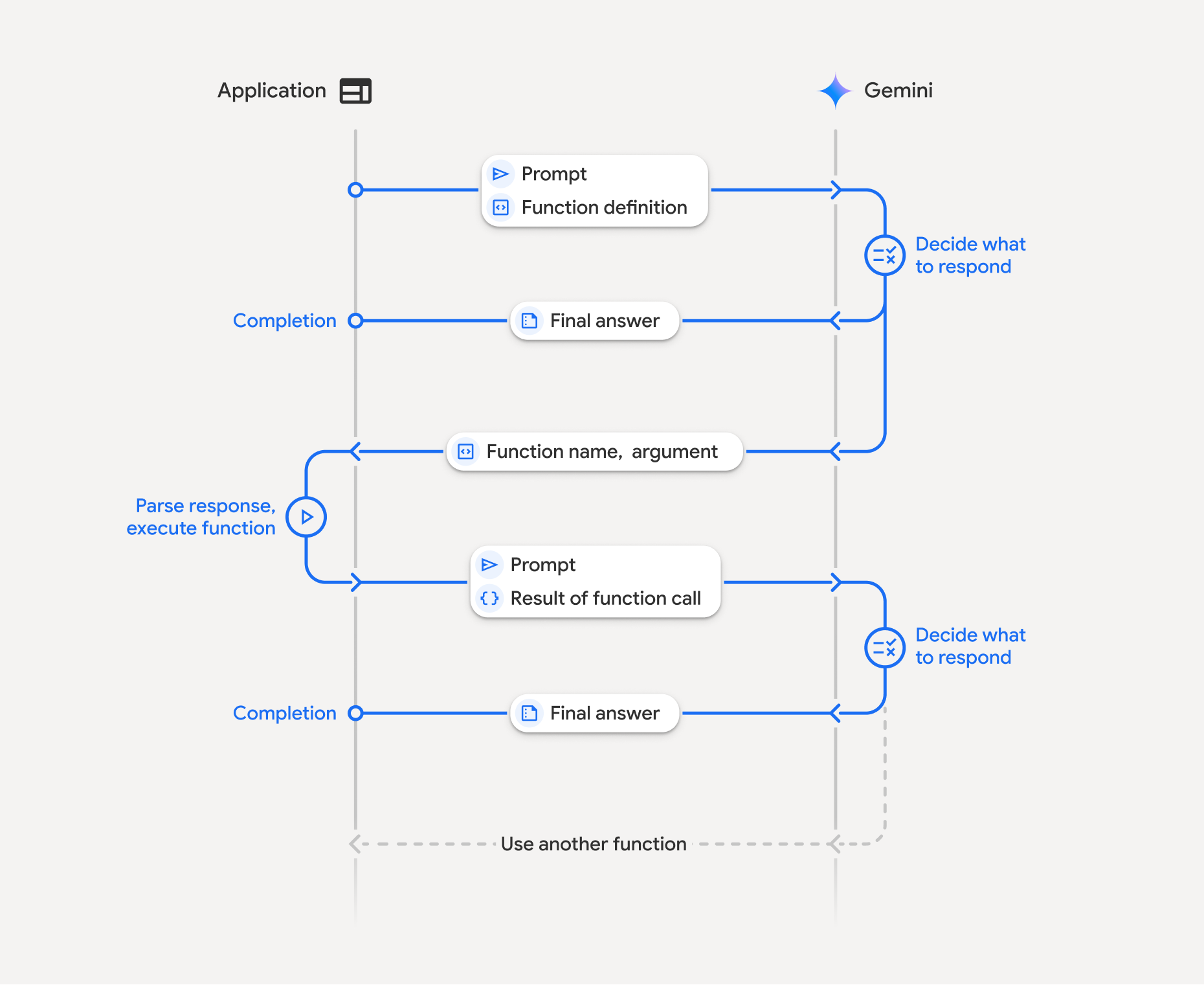713714Function calling involves a structured interaction between your application, the715model, and external functions. Here's a breakdown of the process:7167171. **Define function declaration:** Define the function declaration in your application code. Function Declarations describe the function's name, parameters, and purpose to the model.7182. **Call API with function declarations:** Send user prompt along with the function declaration(s) to the model. It analyzes the request and determines if a function call would be helpful. If so, it responds with a structured JSON object containing the function name, arguments, and a unique `id` (this `id` is now always returned by the API for Gemini 3 models^\*^).7193. **Execute function code (your responsibility):** The Model *doesn't* execute the function itself. It's your application's responsibility to process the response and check for a function call. If720 - **Yes** : Extract the name, args, and `id` of the function and execute the corresponding function in your application.721 - **No:** The model has provided a direct text response to the prompt (this flow is less emphasized in the example but is a possible outcome).7224. **Create user friendly response:** If a function was executed, capture the result and send it back to the model, ensuring you include the matching `id`, in a subsequent turn of the conversation. It will use the result to generate a final, user-friendly response that incorporates the information from the function call.723724This process can be repeated over multiple turns, allowing for complex725interactions and workflows. The model also supports calling multiple functions726in a single turn ([parallel function calling](https://ai.google.dev/gemini-api/docs/generate-content/function-calling#parallel_function_calling)), in727sequence ([compositional function calling](https://ai.google.dev/gemini-api/docs/generate-content/function-calling#compositional_function_calling)),728and with built-in Gemini tools ([multi-tool use](https://ai.google.dev/gemini-api/docs/generate-content/function-calling#native-tools)).729730^\*^ **Always map function IDs:** Gemini 3 now always returns a unique731`id` with every `functionCall`. Include this exact `id` in your732`functionResponse` so the model can accurately map your result back to the733original request.734735### Step 1: Define a function declaration736737Define a function and its declaration within your application code that allows738users to set light values and make an API request. This function could call739external services or APIs.740741### Python742743 # Define a function that the model can call to control smart lights744 set_light_values_declaration = {745 "name": "set_light_values",746 "description": "Sets the brightness and color temperature of a light.",747 "parameters": {748 "type": "object",749 "properties": {750 "brightness": {751 "type": "integer",752 "description": "Light level from 0 to 100. Zero is off and 100 is full brightness",753 },754 "color_temp": {755 "type": "string",756 "enum": ["daylight", "cool", "warm"],757 "description": "Color temperature of the light fixture, which can be `daylight`, `cool` or `warm`.",758 },759 },760 "required": ["brightness", "color_temp"],761 },762 }763764 # This is the actual function that would be called based on the model's suggestion765 def set_light_values(brightness: int, color_temp: str) -> dict[str, int | str]:766 """Set the brightness and color temperature of a room light. (mock API).767768 Args:769 brightness: Light level from 0 to 100. Zero is off and 100 is full brightness770 color_temp: Color temperature of the light fixture, which can be `daylight`, `cool` or `warm`.771772 Returns:773 A dictionary containing the set brightness and color temperature.774 """775 return {"brightness": brightness, "colorTemperature": color_temp}776777### JavaScript778779 import { Type } from '@google/genai';780781 // Define a function that the model can call to control smart lights782 const setLightValuesFunctionDeclaration = {783 name: 'set_light_values',784 description: 'Sets the brightness and color temperature of a light.',785 parameters: {786 type: Type.OBJECT,787 properties: {788 brightness: {789 type: Type.NUMBER,790 description: 'Light level from 0 to 100. Zero is off and 100 is full brightness',791 },792 color_temp: {793 type: Type.STRING,794 enum: ['daylight', 'cool', 'warm'],795 description: 'Color temperature of the light fixture, which can be `daylight`, `cool` or `warm`.',796 },797 },798 required: ['brightness', 'color_temp'],799 },800 };801802 /**803804 * Set the brightness and color temperature of a room light. (mock API)805 * @param {number} brightness - Light level from 0 to 100. Zero is off and 100 is full brightness806 * @param {string} color_temp - Color temperature of the light fixture, which can be `daylight`, `cool` or `warm`.807 * @return {Object} A dictionary containing the set brightness and color temperature.808 */809 function setLightValues(brightness, color_temp) {810 return {811 brightness: brightness,812 colorTemperature: color_temp813 };814 }815816### Go817818 package main819820 import "google.golang.org/genai"821822 // Define a function declaration that the model can call to control smart lights823 var setLightValuesDeclaration = &genai.FunctionDeclaration{824 Name: "set_light_values",825 Description: "Sets the brightness and color temperature of a light.",826 Parameters: &genai.Schema{827 Type: genai.TypeObject,828 Properties: map[string]*genai.Schema{829 "brightness": {830 Type: genai.TypeInteger,831 Description: "Light level from 0 to 100. Zero is off and 100 is full brightness",832 },833 "color_temp": {834 Type: genai.TypeString,835 Enum: []string{"daylight", "cool", "warm"},836 Description: "Color temperature of the light fixture, which can be `daylight`, `cool` or `warm`.",837 },838 },839 Required: []string{"brightness", "color_temp"},840 },841 }842843 // This is the actual function that would be called based on the model's suggestion844 func setLightValues(brightness int, colorTemp string) map[string]any {845 return map[string]any{846 "brightness": brightness,847 "colorTemperature": colorTemp,848 }849 }850851### Step 2: Call the model with function declarations852853Once you have defined your function declarations, you can prompt the model to854use them. It analyzes the prompt and function declarations and decides whether855to respond directly or to call a function. If a function is called, the response856object will contain a function call suggestion.857858### Python859860 from google.genai import types861862 # Configure the client and tools863 client = genai.Client()864 tools = types.Tool(function_declarations=[set_light_values_declaration])865 config = types.GenerateContentConfig(tools=[tools])866867 # Define user prompt868 contents = [869 types.Content(870 role="user", parts=[types.Part(text="Turn the lights down to a romantic level")]871 )872 ]873874 # Send request with function declarations875 response = client.models.generate_content(876 model="gemini-3.8-flash",877 contents=contents,878 config=config,879 )880881 print(response.candidates[0].content.parts[0].function_call)882883### JavaScript884885 import { GoogleGenAI } from '@google/genai';886887 // Generation config with function declaration888 const config = {889 tools: [{890 functionDeclarations: [setLightValuesFunctionDeclaration]891 }]892 };893894 // Configure the client895 const ai = new GoogleGenAI({});896897 // Define user prompt898 const contents = [899 {900 role: 'user',901 parts: [{ text: 'Turn the lights down to a romantic level' }]902 }903 ];904905 // Send request with function declarations906 const response = await ai.models.generateContent({907 model: 'gemini-3.8-flash',908 contents: contents,909 config: config910 });911912 console.log(response.functionCalls[0]);913914### Go915916 ctx := context.Background()917 client, err := genai.NewClient(ctx, nil)918 if err != nil {919 log.Fatal(err)920 }921922 // Generation config with function declaration923 config := &genai.GenerateContentConfig{924 Tools: []*genai.Tool{925 {FunctionDeclarations: []*genai.FunctionDeclaration{setLightValuesDeclaration}},926 },927 }928929 // Define user prompt930 contents := []*genai.Content{931 genai.NewContentFromText("Turn the lights down to a romantic level", genai.RoleUser),932 }933934 // Send request with function declarations935 response, err := client.Models.GenerateContent(ctx, "gemini-3.8-flash", contents, config)936 if err != nil {937 log.Fatal(err)938 }939940 fmt.Println(response.FunctionCalls()[0])941942The model then returns a `functionCall` object in an OpenAPI compatible943schema specifying how to call one or more of the declared functions in order to944respond to the user's question.945946### Python947948 id='8f2b1a3c' args={'color_temp': 'warm', 'brightness': 25} name='set_light_values'949950### JavaScript951952 {953 id: '8f2b1a3c',954 name: 'set_light_values',955 args: { brightness: 25, color_temp: 'warm' }956 }957958### Go959960 &{ID:8f2b1a3c Args:map[brightness:25 color_temp:warm] Name:set_light_values}961962### Step 3: Execute set_light_values function code963964Extract the function call details from the model's response, parse the arguments965, and execute the `set_light_values` function.966967### Python968969 # Extract tool call details, it may not be in the first part.970 tool_call = response.candidates[0].content.parts[0].function_call971972 if tool_call.name == "set_light_values":973 result = set_light_values(**tool_call.args)974 print(f"Function execution result: {result}")975976### JavaScript977978 // Extract tool call details979 const tool_call = response.functionCalls[0]980981 let result;982 if (tool_call.name === 'set_light_values') {983 result = setLightValues(tool_call.args.brightness, tool_call.args.color_temp);984 console.log(`Function execution result: ${JSON.stringify(result)}`);985 }986987### Go988989 // Extract tool call details990 toolCall := response.FunctionCalls()[0]991992 var result map[string]any993 if toolCall.Name == "set_light_values" {994 brightness := int(toolCall.Args["brightness"].(float64))995 colorTemp := toolCall.Args["color_temp"].(string)996 result = setLightValues(brightness, colorTemp)997 fmt.Printf("Function execution result: %v\n", result)998 }9991000### Step 4: Create user friendly response with function result and call the model again10011002Finally, send the result of the function execution back to the model so it can1003incorporate this information into its final response to the user.10041005### Python10061007 from google import genai1008 from google.genai import types10091010 # Create a function response part1011 function_response_part = types.Part.from_function_response(1012 name=tool_call.name,1013 response={"result": result},1014 id=tool_call.id,1015 )10161017 # Append function call and result of the function execution to contents1018 contents.append(response.candidates[0].content) # Append the content from the model's response.1019 contents.append(types.Content(role="user", parts=[function_response_part])) # Append the function response10201021 client = genai.Client()1022 final_response = client.models.generate_content(1023 model="gemini-3.8-flash",1024 config=config,1025 contents=contents,1026 )10271028 print(final_response.text)10291030### JavaScript10311032 // Create a function response part1033 const function_response_part = {1034 name: tool_call.name,1035 response: { result },1036 id: tool_call.id1037 }10381039 // Append function call and result of the function execution to contents1040 contents.push(response.candidates[0].content);1041 contents.push({ role: 'user', parts: [{ functionResponse: function_response_part }] });10421043 // Get the final response from the model1044 const final_response = await ai.models.generateContent({1045 model: 'gemini-3.8-flash',1046 contents: contents,1047 config: config1048 });10491050 console.log(final_response.text);10511052### Go10531054 // Create a function response part1055 functionResponsePart := &genai.Part{1056 FunctionResponse: &genai.FunctionResponse{1057 ID: toolCall.ID,1058 Name: toolCall.Name,1059 Response: result,1060 },1061 }10621063 // Append function call and result of the function execution to contents1064 contents = append(contents, response.Candidates[0].Content)1065 contents = append(contents, &genai.Content{1066 Role: genai.RoleUser,1067 Parts: []*genai.Part{functionResponsePart},1068 })10691070 // Get the final response from the model1071 finalResponse, err := client.Models.GenerateContent(ctx, "gemini-3.8-flash", contents, config)1072 if err != nil {1073 log.Fatal(err)1074 }10751076 fmt.Println(finalResponse.Text())10771078This completes the function calling flow. The model successfully used the1079`set_light_values` function to perform the request action of the user.10801081## Function declarations10821083When you implement function calling in a prompt, you create a `tools` object,1084which contains one or more `function declarations`. You define functions using1085JSON, specifically with a [select subset](https://ai.google.dev/api/caching#Schema)1086of the [OpenAPI schema](https://spec.openapis.org/oas/v3.0.3#schemaw) format. A1087single function declaration can include the following parameters:10881089- `name` (string): A unique name for the function (`get_weather_forecast`, `send_email`). Use descriptive names without spaces or special characters (use underscores or camelCase).1090- `description` (string): A clear and detailed explanation of the function's purpose and capabilities. This is crucial for the model to understand when to use the function. Be specific and provide examples if helpful ("Finds theaters based on location and optionally movie title which is currently playing in theaters.").1091- `parameters` (object): Defines the input parameters the function expects.1092 - `type` (string): Specifies the overall data type, such as `object`.1093 - `properties` (object): Lists individual parameters, each with:1094 - `type` (string): The data type of the parameter, such as `string`, `integer`, `boolean, array`.1095 - `description` (string): A description of the parameter's purpose and format. Provide examples and constraints ("The city and state, e.g., 'San Francisco, CA' or a zip code e.g., '95616'.").1096 - `enum` (array, optional): If the parameter values are from a fixed set, use "enum" to list the allowed values instead of just describing them in the description. This improves accuracy ("enum": \["daylight", "cool", "warm"\]).1097 - `required` (array): An array of strings listing the parameter names that are mandatory for the function to operate.10981099You can also construct `FunctionDeclarations` from Python functions directly using1100`types.FunctionDeclaration.from_callable(client=client, callable=your_function)`.11011102## Function calling with thinking models11031104Gemini 3 and 2.5 series models use an internal ["thinking"](https://ai.google.dev/gemini-api/docs/thinking) process to reason through requests. This1105significantly improves function calling performance,1106allowing the model to better determine when to call a function and which1107parameters to use. Because the Gemini API is stateless, models use1108[thought signatures](https://ai.google.dev/gemini-api/docs/thought-signatures) to maintain context1109across multi-turn conversations.11101111This section covers advanced management of thought signatures and is only1112necessary if you're manually constructing API requests (e.g., via REST) or1113manipulating conversation history.11141115**If you're using the [Google GenAI SDKs](https://ai.google.dev/gemini-api/docs/libraries) (our1116official libraries), you don't need to manage this process** . The SDKs1117automatically handle the necessary steps, as shown in the earlier1118[example](https://ai.google.dev/gemini-api/docs/function-calling#step-4).11191120### Managing conversation history manually11211122If you modify the conversation history manually, instead of sending the1123[complete previous response](https://ai.google.dev/gemini-api/docs/function-calling#step-4) you1124must correctly handle the `thought_signature` included in the model's turn.11251126Follow these rules to ensure the model's context is preserved:11271128- Always send the `thought_signature` back to the model inside its original [`Part`](https://ai.google.dev/api#request-body-structure).1129- **Always include the exact `id` from the `function_call` in your1130 `function_response` so the API can map the result to the correct request.**1131- Don't merge a `Part` containing a signature with one that does not. This breaks the positional context of the thought.1132- Don't combine two `Parts` that both contain signatures, as the signature strings cannot be merged.11331134#### Gemini 3 thought signatures11351136In Gemini 3, any [`Part`](https://ai.google.dev/api#request-body-structure) of a model response1137may contain a thought signature.1138While we generally recommend returning signatures from all `Part` types,1139passing back thought signatures is mandatory for function calling. Unless you1140are manipulating conversation history manually, the Google GenAI SDK will1141handle thought signatures automatically.11421143If you are manipulating conversation history manually, refer to the1144[Thoughts Signatures](https://ai.google.dev/gemini-api/docs/thought-signatures) page for complete1145guidance and details on handling thought signatures for Gemini 3.11461147##### Inspecting thought signatures11481149While not necessary for implementation, you can inspect the response to see the1150`thought_signature` for debugging or educational purposes.11511152### Python11531154 import base641155 # After receiving a response from a model with thinking enabled1156 # response = client.models.generate_content(...)11571158 # The signature is attached to the response part containing the function call1159 part = response.candidates[0].content.parts[0]1160 if part.thought_signature:1161 print(base64.b64encode(part.thought_signature).decode("utf-8"))11621163### JavaScript11641165 // After receiving a response from a model with thinking enabled1166 // const response = await ai.models.generateContent(...)11671168 // The signature is attached to the response part containing the function call1169 const part = response.candidates[0].content.parts[0];1170 if (part.thoughtSignature) {1171 console.log(part.thoughtSignature);1172 }11731174### Go11751176 // After receiving a response from a model with thinking enabled1177 // response, err := client.Models.GenerateContent(...)11781179 // The signature is attached to the response part containing the function call1180 part := response.Candidates[0].Content.Parts[0]1181 if len(part.ThoughtSignature) > 0 {1182 fmt.Println(string(part.ThoughtSignature))1183 }11841185Learn more about limitations and usage of thought signatures, and about thinking1186models in general, on the [Thinking](https://ai.google.dev/gemini-api/docs/thinking#signatures) page.11871188## Parallel function calling11891190In addition to single turn function calling, you can also call multiple1191functions at once. Parallel function calling lets you execute multiple functions1192at once and is used when the functions are not dependent on each other. This is1193useful in scenarios like gathering data from multiple independent sources, such1194as retrieving customer details from different databases or checking inventory1195levels across various warehouses or performing multiple actions such as1196converting your apartment into a disco.11971198When the model initiates multiple function calls in a single turn, you don't1199need to return the `function_result` objects in the same order that the1200`function_call` objects were received. The Gemini API maps each result back to1201its corresponding call using the `id` from the model's output. This lets you1202execute your functions asynchronously and append the results to your list as1203they complete.12041205### Python12061207 power_disco_ball = {1208 "name": "power_disco_ball",1209 "description": "Powers the spinning disco ball.",1210 "parameters": {1211 "type": "object",1212 "properties": {1213 "power": {1214 "type": "boolean",1215 "description": "Whether to turn the disco ball on or off.",1216 }1217 },1218 "required": ["power"],1219 },1220 }12211222 start_music = {1223 "name": "start_music",1224 "description": "Play some music matching the specified parameters.",1225 "parameters": {1226 "type": "object",1227 "properties": {1228 "energetic": {1229 "type": "boolean",1230 "description": "Whether the music is energetic or not.",1231 },1232 "loud": {1233 "type": "boolean",1234 "description": "Whether the music is loud or not.",1235 },1236 },1237 "required": ["energetic", "loud"],1238 },1239 }12401241 dim_lights = {1242 "name": "dim_lights",1243 "description": "Dim the lights.",1244 "parameters": {1245 "type": "object",1246 "properties": {1247 "brightness": {1248 "type": "number",1249 "description": "The brightness of the lights, 0.0 is off, 1.0 is full.",1250 }1251 },1252 "required": ["brightness"],1253 },1254 }12551256### JavaScript12571258 import { Type } from '@google/genai';12591260 const powerDiscoBall = {1261 name: 'power_disco_ball',1262 description: 'Powers the spinning disco ball.',1263 parameters: {1264 type: Type.OBJECT,1265 properties: {1266 power: {1267 type: Type.BOOLEAN,1268 description: 'Whether to turn the disco ball on or off.'1269 }1270 },1271 required: ['power']1272 }1273 };12741275 const startMusic = {1276 name: 'start_music',1277 description: 'Play some music matching the specified parameters.',1278 parameters: {1279 type: Type.OBJECT,1280 properties: {1281 energetic: {1282 type: Type.BOOLEAN,1283 description: 'Whether the music is energetic or not.'1284 },1285 loud: {1286 type: Type.BOOLEAN,1287 description: 'Whether the music is loud or not.'1288 }1289 },1290 required: ['energetic', 'loud']1291 }1292 };12931294 const dimLights = {1295 name: 'dim_lights',1296 description: 'Dim the lights.',1297 parameters: {1298 type: Type.OBJECT,1299 properties: {1300 brightness: {1301 type: Type.NUMBER,1302 description: 'The brightness of the lights, 0.0 is off, 1.0 is full.'1303 }1304 },1305 required: ['brightness']1306 }1307 };13081309### Go13101311 package main13121313 import "google.golang.org/genai"13141315 var powerDiscoBall = &genai.FunctionDeclaration{1316 Name: "power_disco_ball",1317 Description: "Powers the spinning disco ball.",1318 Parameters: &genai.Schema{1319 Type: genai.TypeObject,1320 Properties: map[string]*genai.Schema{1321 "power": {1322 Type: genai.TypeBoolean,1323 Description: "Whether to turn the disco ball on or off.",1324 },1325 },1326 Required: []string{"power"},1327 },1328 }13291330 var startMusic = &genai.FunctionDeclaration{1331 Name: "start_music",1332 Description: "Play some music matching the specified parameters.",1333 Parameters: &genai.Schema{1334 Type: genai.TypeObject,1335 Properties: map[string]*genai.Schema{1336 "energetic": {1337 Type: genai.TypeBoolean,1338 Description: "Whether the music is energetic or not.",1339 },1340 "loud": {1341 Type: genai.TypeBoolean,1342 Description: "Whether the music is loud or not.",1343 },1344 },1345 Required: []string{"energetic", "loud"},1346 },1347 }13481349 var dimLights = &genai.FunctionDeclaration{1350 Name: "dim_lights",1351 Description: "Dim the lights.",1352 Parameters: &genai.Schema{1353 Type: genai.TypeObject,1354 Properties: map[string]*genai.Schema{1355 "brightness": {1356 Type: genai.TypeNumber,1357 Description: "The brightness of the lights, 0.0 is off, 1.0 is full.",1358 },1359 },1360 Required: []string{"brightness"},1361 },1362 }13631364Configure the function calling mode to allow using all of the specified tools.1365To learn more, you can read about1366[configuring function calling](https://ai.google.dev/gemini-api/docs/function-calling#function_calling_modes).13671368### Python13691370 from google import genai1371 from google.genai import types13721373 # Configure the client and tools1374 client = genai.Client()1375 house_tools = [1376 types.Tool(function_declarations=[power_disco_ball, start_music, dim_lights])1377 ]1378 config = types.GenerateContentConfig(1379 tools=house_tools,1380 automatic_function_calling=types.AutomaticFunctionCallingConfig(1381 disable=True1382 ),1383 # Force the model to call 'any' function, instead of chatting.1384 tool_config=types.ToolConfig(1385 function_calling_config=types.FunctionCallingConfig(mode='ANY')1386 ),1387 )13881389 chat = client.chats.create(model="gemini-3.8-flash", config=config)1390 response = chat.send_message("Turn this place into a party!")13911392 # Print out each of the function calls requested from this single call1393 print("Example 1: Forced function calling")1394 for fn in response.function_calls:1395 args = ", ".join(f"{key}={val}" for key, val in fn.args.items())1396 print(f"{fn.name}({args}) - ID: {fn.id}")13971398### JavaScript13991400 import { GoogleGenAI } from '@google/genai';14011402 // Set up function declarations1403 const houseFns = [powerDiscoBall, startMusic, dimLights];14041405 const config = {1406 tools: [{1407 functionDeclarations: houseFns1408 }],1409 // Force the model to call 'any' function, instead of chatting.1410 toolConfig: {1411 functionCallingConfig: {1412 mode: 'any'1413 }1414 }1415 };14161417 // Configure the client1418 const ai = new GoogleGenAI({});14191420 // Create a chat session1421 const chat = ai.chats.create({1422 model: 'gemini-3.8-flash',1423 config: config1424 });1425 const response = await chat.sendMessage({message: 'Turn this place into a party!'});14261427 // Print out each of the function calls requested from this single call1428 console.log("Example 1: Forced function calling");1429 for (const fn of response.functionCalls) {1430 const args = Object.entries(fn.args)1431 .map(([key, val]) => `${key}=${val}`)1432 .join(', ');1433 console.log(`${fn.name}(${args}) - ID: ${fn.id}`);1434 }14351436### Go14371438 ctx := context.Background()1439 client, err := genai.NewClient(ctx, nil)1440 if err != nil {1441 log.Fatal(err)1442 }14431444 houseTools := []*genai.Tool{1445 {FunctionDeclarations: []*genai.FunctionDeclaration{powerDiscoBall, startMusic, dimLights}},1446 }14471448 config := &genai.GenerateContentConfig{1449 Tools: houseTools,1450 // Force the model to call 'any' function, instead of chatting.1451 ToolConfig: &genai.ToolConfig{1452 FunctionCallingConfig: &genai.FunctionCallingConfig{1453 Mode: genai.FunctionCallingConfigModeAny,1454 },1455 },1456 }14571458 response, err := client.Models.GenerateContent(1459 ctx,1460 "gemini-3.8-flash",1461 genai.Text("Turn this place into a party!"),1462 config,1463 )1464 if err != nil {1465 log.Fatal(err)1466 }14671468 // Print out each of the function calls requested from this single call1469 fmt.Println("Example 1: Forced function calling")1470 for _, fn := range response.FunctionCalls() {1471 fmt.Printf("%s(%v) - ID: %s\n", fn.Name, fn.Args, fn.ID)1472 }14731474Each of the printed results reflects a single function call that the model has1475requested. To send the results back, include the responses in the same order as1476they were requested.14771478The Python SDK supports [automatic function calling](https://ai.google.dev/gemini-api/docs/function-calling#automatic_function_calling_python_only),1479which automatically converts Python functions to declarations, handles the1480function call execution and response cycle for you. Following is an example for1481the disco use case.14821483> [!NOTE]1484> **Note:** Automatic Function Calling is a Python SDK only feature at the moment.14851486### Python14871488 from google import genai1489 from google.genai import types14901491 # Actual function implementations1492 def power_disco_ball_impl(power: bool) -> dict:1493 """Powers the spinning disco ball.14941495 Args:1496 power: Whether to turn the disco ball on or off.14971498 Returns:1499 A status dictionary indicating the current state.1500 """1501 return {"status": f"Disco ball powered {'on' if power else 'off'}"}15021503 def start_music_impl(energetic: bool, loud: bool) -> dict:1504 """Play some music matching the specified parameters.15051506 Args:1507 energetic: Whether the music is energetic or not.1508 loud: Whether the music is loud or not.15091510 Returns:1511 A dictionary containing the music settings.1512 """1513 music_type = "energetic" if energetic else "chill"1514 volume = "loud" if loud else "quiet"1515 return {"music_type": music_type, "volume": volume}15161517 def dim_lights_impl(brightness: float) -> dict:1518 """Dim the lights.15191520 Args:1521 brightness: The brightness of the lights, 0.0 is off, 1.0 is full.15221523 Returns:1524 A dictionary containing the new brightness setting.1525 """1526 return {"brightness": brightness}15271528 # Configure the client1529 client = genai.Client()1530 config = types.GenerateContentConfig(1531 tools=[power_disco_ball_impl, start_music_impl, dim_lights_impl]1532 )15331534 # Make the request1535 response = client.models.generate_content(1536 model="gemini-3.8-flash",1537 contents="Do everything you need to this place into party!",1538 config=config,1539 )15401541 print("\nExample 2: Automatic function calling")1542 print(response.text)1543 # I've turned on the disco ball, started playing loud and energetic music, and dimmed the lights to 50% brightness. Let's get this party started!15441545## Compositional function calling15461547Compositional or sequential function calling allows Gemini to chain multiple1548function calls together to fulfill a complex request. For example, to answer1549"Get the temperature in my current location", the Gemini API might first invoke1550a `get_current_location()` function followed by a `get_weather()` function that1551takes the location as a parameter.15521553The following example demonstrates how to implement compositional function1554calling using the Python SDK and automatic function calling.15551556### Python15571558This example uses the automatic function calling feature of the1559`google-genai` Python SDK. The SDK automatically converts the Python1560functions to the required schema, executes the function calls when requested1561by the model, and sends the results back to the model to complete the task.15621563 import os1564 from google import genai1565 from google.genai import types15661567 # Example Functions1568 def get_weather_forecast(location: str) -> dict:1569 """Gets the current weather temperature for a given location."""1570 print(f"Tool Call: get_weather_forecast(location={location})")1571 # TODO: Make API call1572 print("Tool Response: {'temperature': 25, 'unit': 'celsius'}")1573 return {"temperature": 25, "unit": "celsius"} # Dummy response15741575 def set_thermostat_temperature(temperature: int) -> dict:1576 """Sets the thermostat to a desired temperature."""1577 print(f"Tool Call: set_thermostat_temperature(temperature={temperature})")1578 # TODO: Interact with a thermostat API1579 print("Tool Response: {'status': 'success'}")1580 return {"status": "success"}15811582 # Configure the client and model1583 client = genai.Client()1584 config = types.GenerateContentConfig(1585 tools=[get_weather_forecast, set_thermostat_temperature]1586 )15871588 # Make the request1589 response = client.models.generate_content(1590 model="gemini-3.8-flash",1591 contents="If it's warmer than 20°C in London, set the thermostat to 20°C, otherwise set it to 18°C.",1592 config=config,1593 )15941595 # Print the final, user-facing response1596 print(response.text)15971598**Expected Output**15991600When you run the code, you will see the SDK orchestrating the function1601calls. The model first calls `get_weather_forecast`, receives the1602temperature, and then calls `set_thermostat_temperature` with the correct1603value based on the logic in the prompt.16041605 Tool Call: get_weather_forecast(location=London)1606 Tool Response: {'temperature': 25, 'unit': 'celsius'}1607 Tool Call: set_thermostat_temperature(temperature=20)1608 Tool Response: {'status': 'success'}1609 OK. I've set the thermostat to 20°C.16101611### JavaScript16121613This example shows how to use JavaScript/TypeScript SDK to do comopositional1614function calling using a manual execution loop.16151616 import { GoogleGenAI, Type } from "@google/genai";16171618 // Configure the client1619 const ai = new GoogleGenAI({});16201621 // Example Functions1622 function get_weather_forecast({ location }) {1623 console.log(`Tool Call: get_weather_forecast(location=${location})`);1624 // TODO: Make API call1625 console.log("Tool Response: {'temperature': 25, 'unit': 'celsius'}");1626 return { temperature: 25, unit: "celsius" };1627 }16281629 function set_thermostat_temperature({ temperature }) {1630 console.log(1631 `Tool Call: set_thermostat_temperature(temperature=${temperature})`,1632 );1633 // TODO: Make API call1634 console.log("Tool Response: {'status': 'success'}");1635 return { status: "success" };1636 }16371638 const toolFunctions = {1639 get_weather_forecast,1640 set_thermostat_temperature,1641 };16421643 const tools = [1644 {1645 functionDeclarations: [1646 {1647 name: "get_weather_forecast",1648 description:1649 "Gets the current weather temperature for a given location.",1650 parameters: {1651 type: Type.OBJECT,1652 properties: {1653 location: {1654 type: Type.STRING,1655 },1656 },1657 required: ["location"],1658 },1659 },1660 {1661 name: "set_thermostat_temperature",1662 description: "Sets the thermostat to a desired temperature.",1663 parameters: {1664 type: Type.OBJECT,1665 properties: {1666 temperature: {1667 type: Type.NUMBER,1668 },1669 },1670 required: ["temperature"],1671 },1672 },1673 ],1674 },1675 ];16761677 // Prompt for the model1678 let contents = [1679 {1680 role: "user",1681 parts: [1682 {1683 text: "If it's warmer than 20°C in London, set the thermostat to 20°C, otherwise set it to 18°C.",1684 },1685 ],1686 },1687 ];16881689 // Loop until the model has no more function calls to make1690 while (true) {1691 const result = await ai.models.generateContent({1692 model: "gemini-3.8-flash",1693 contents,1694 config: { tools },1695 });16961697 if (result.functionCalls && result.functionCalls.length > 0) {1698 const functionCall = result.functionCalls[0];16991700 const { name, args } = functionCall;17011702 if (!toolFunctions[name]) {1703 throw new Error(`Unknown function call: ${name}`);1704 }17051706 // Call the function and get the response.1707 const toolResponse = toolFunctions[name](args);17081709 const functionResponsePart = {1710 name: functionCall.name,1711 response: {1712 result: toolResponse,1713 },1714 id: functionCall.id,1715 };17161717 // Send the function response back to the model.1718 contents.push({1719 role: "model",1720 parts: [1721 {1722 functionCall: functionCall,1723 },1724 ],1725 });1726 contents.push({1727 role: "user",1728 parts: [1729 {1730 functionResponse: functionResponsePart,1731 },1732 ],1733 });1734 } else {1735 // No more function calls, break the loop.1736 console.log(result.text);1737 break;1738 }1739 }17401741**Expected Output**17421743When you run the code, you will see the SDK orchestrating the function1744calls. The model first calls `get_weather_forecast`, receives the1745temperature, and then calls `set_thermostat_temperature` with the correct1746value based on the logic in the prompt.17471748 Tool Call: get_weather_forecast(location=London)1749 Tool Response: {'temperature': 25, 'unit': 'celsius'}1750 Tool Call: set_thermostat_temperature(temperature=20)1751 Tool Response: {'status': 'success'}1752 OK. It's 25°C in London, so I've set the thermostat to 20°C.17531754### Go17551756This example shows how to use the Go SDK to do compositional function1757calling using a manual execution loop.17581759 package main17601761 import (1762 "context"1763 "fmt"1764 "log"17651766 "google.golang.org/genai"1767 )17681769 func getWeatherForecast(location string) map[string]any {1770 fmt.Printf("Tool Call: get_weather_forecast(location=%s)\n", location)1771 fmt.Println("Tool Response: map[temperature:25 unit:celsius]")1772 return map[string]any{"temperature": 25, "unit": "celsius"}1773 }17741775 func setThermostatTemperature(temperature float64) map[string]any {1776 fmt.Printf("Tool Call: set_thermostat_temperature(temperature=%v)\n", temperature)1777 fmt.Println("Tool Response: map[status:success]")1778 return map[string]any{"status": "success"}1779 }17801781 func main() {1782 ctx := context.Background()1783 client, err := genai.NewClient(ctx, nil)1784 if err != nil {1785 log.Fatal(err)1786 }17871788 tools := []*genai.Tool{1789 {1790 FunctionDeclarations: []*genai.FunctionDeclaration{1791 {1792 Name: "get_weather_forecast",1793 Description: "Gets the current weather temperature for a given location.",1794 Parameters: &genai.Schema{1795 Type: genai.TypeObject,1796 Properties: map[string]*genai.Schema{1797 "location": {Type: genai.TypeString},1798 },1799 Required: []string{"location"},1800 },1801 },1802 {1803 Name: "set_thermostat_temperature",1804 Description: "Sets the thermostat to a desired temperature.",1805 Parameters: &genai.Schema{1806 Type: genai.TypeObject,1807 Properties: map[string]*genai.Schema{1808 "temperature": {Type: genai.TypeNumber},1809 },1810 Required: []string{"temperature"},1811 },1812 },1813 },1814 },1815 }18161817 config := &genai.GenerateContentConfig{Tools: tools}18181819 contents := []*genai.Content{1820 genai.NewContentFromText("If it's warmer than 20°C in London, set the thermostat to 20°C, otherwise set it to 18°C.", genai.RoleUser),1821 }18221823 for {1824 result, err := client.Models.GenerateContent(ctx, "gemini-3.8-flash", contents, config)1825 if err != nil {1826 log.Fatal(err)1827 }18281829 if len(result.FunctionCalls()) > 0 {1830 functionCall := result.FunctionCalls()[0]1831 var toolResponse map[string]any18321833 switch functionCall.Name {1834 case "get_weather_forecast":1835 location := functionCall.Args["location"].(string)1836 toolResponse = getWeatherForecast(location)1837 case "set_thermostat_temperature":1838 temperature := functionCall.Args["temperature"].(float64)1839 toolResponse = setThermostatTemperature(temperature)1840 default:1841 log.Fatalf("Unknown function call: %s", functionCall.Name)1842 }18431844 contents = append(contents, result.Candidates[0].Content)1845 contents = append(contents, &genai.Content{1846 Role: genai.RoleUser,1847 Parts: []*genai.Part{1848 {1849 FunctionResponse: &genai.FunctionResponse{1850 ID: functionCall.ID,1851 Name: functionCall.Name,1852 Response: toolResponse,1853 },1854 },1855 },1856 })1857 } else {1858 fmt.Println(result.Text())1859 break1860 }1861 }1862 }18631864**Expected Output**18651866 Tool Call: get_weather_forecast(location=London)1867 Tool Response: map[temperature:25 unit:celsius]1868 Tool Call: set_thermostat_temperature(temperature=20)1869 Tool Response: map[status:success]1870 OK. It's 25°C in London, so I've set the thermostat to 20°C.18711872Compositional function calling is a native [Live1873API](https://ai.google.dev/gemini-api/docs/live) feature. This means Live API1874can handle the function calling similar to the Python SDK.18751876### Python18771878 # Light control schemas1879 turn_on_the_lights_schema = {'name': 'turn_on_the_lights'}1880 turn_off_the_lights_schema = {'name': 'turn_off_the_lights'}18811882 prompt = """1883 Hey, can you write run some python code to turn on the lights, wait 10s and then turn off the lights?1884 """18851886 tools = [1887 {'code_execution': {}},1888 {'function_declarations': [turn_on_the_lights_schema, turn_off_the_lights_schema]}1889 ]18901891 await run(prompt, tools=tools, modality="AUDIO")18921893### JavaScript18941895 // Light control schemas1896 const turnOnTheLightsSchema = { name: 'turn_on_the_lights' };1897 const turnOffTheLightsSchema = { name: 'turn_off_the_lights' };18981899 const prompt = `1900 Hey, can you write run some python code to turn on the lights, wait 10s and then turn off the lights?1901 `;19021903 const tools = [1904 { codeExecution: {} },1905 { functionDeclarations: [turnOnTheLightsSchema, turnOffTheLightsSchema] }1906 ];19071908 await run(prompt, tools=tools, modality="AUDIO")19091910## Function calling modes19111912The Gemini API lets you control how the model uses the provided tools1913(function declarations). Specifically, you can set the mode within1914the.`function_calling_config`.19151916- `VALIDATED`: Default mode for tool combination (when built-in tools or structured outputs also enabled). The model is constrained to predict either function calls or natural language, and ensures function schema adherence. If `allowed_function_names` is not provided, the model picks from all of the available function declarations. If `allowed_function_names` is provided, the model picks from the set of allowed functions. This mode reduces malformed function calls (compared to `AUTO` mode).1917- `AUTO`: Default mode when only function_declarations tool enabled. The model decides whether to generate a natural language response or suggest a function call based on the prompt and context.1918- `ANY`: The model is constrained to always predict a function call and ensures function schema adherence. If `allowed_function_names` is not specified, the model can choose from any of the provided function declarations. If `allowed_function_names` is provided as a list, the model can only choose from the functions in that list. Use this mode when you require a function call response to every prompt (if applicable).1919- `NONE`: The model is *prohibited* from making function calls. This is1920 equivalent to sending a request without any function declarations. Use this to1921 temporarily disable function calling without removing your tool definitions.19221923### Python19241925 from google.genai import types19261927 # Configure function calling mode1928 tool_config = types.ToolConfig(1929 function_calling_config=types.FunctionCallingConfig(1930 mode="ANY", allowed_function_names=["get_current_temperature"]1931 )1932 )19331934 # Create the generation config1935 config = types.GenerateContentConfig(1936 tools=[tools], # not defined here.1937 tool_config=tool_config,1938 )19391940### JavaScript19411942 import { FunctionCallingConfigMode } from '@google/genai';19431944 // Configure function calling mode1945 const toolConfig = {1946 functionCallingConfig: {1947 mode: FunctionCallingConfigMode.ANY,1948 allowedFunctionNames: ['get_current_temperature']1949 }1950 };19511952 // Create the generation config1953 const config = {1954 tools: tools, // not defined here.1955 toolConfig: toolConfig,1956 };19571958### Go19591960 // Configure function calling mode1961 toolConfig := &genai.ToolConfig{1962 FunctionCallingConfig: &genai.FunctionCallingConfig{1963 Mode: genai.FunctionCallingConfigModeAny,1964 AllowedFunctionNames: []string{"get_current_temperature"},1965 },1966 }19671968 // Create the generation config1969 config := &genai.GenerateContentConfig{1970 Tools: tools, // not defined here.1971 ToolConfig: toolConfig,1972 }19731974## Automatic function calling (Python only)19751976When using the Python SDK, you can provide Python functions directly as tools.1977The SDK converts these functions into declarations, manages the function call1978execution, and handles the response cycle for you. Define your function with1979type hints and a docstring. For optimal results, it is recommended to use1980[Google-style docstrings.](https://google.github.io/styleguide/pyguide.html#383-functions-and-methods)1981The SDK will then automatically:198219831. Detect function call responses from the model.19842. Call the corresponding Python function in your code.19853. Send the function's response back to the model.19864. Return the model's final text response.19871988The SDK currently doesn't parse argument descriptions into the property1989description slots of the generated function declaration. Instead, it sends the1990entire docstring as the top-level function description.19911992### Python19931994 from google import genai1995 from google.genai import types19961997 # Define the function with type hints and docstring1998 def get_current_temperature(location: str) -> dict:1999 """Gets the current temperature for a given location.20002001 Args:2002 location: The city and state, e.g. San Francisco, CA20032004 Returns:2005 A dictionary containing the temperature and unit.2006 """2007 # ... (implementation) ...2008 return {"temperature": 25, "unit": "Celsius"}20092010 # Configure the client2011 client = genai.Client()2012 config = types.GenerateContentConfig(2013 tools=[get_current_temperature]2014 ) # Pass the function itself20152016 # Make the request2017 response = client.models.generate_content(2018 model="gemini-3.8-flash",2019 contents="What's the temperature in Boston?",2020 config=config,2021 )20222023 print(response.text) # The SDK handles the function call and returns the final text20242025You can disable automatic function calling with:20262027### Python20282029 config = types.GenerateContentConfig(2030 tools=[get_current_temperature],2031 automatic_function_calling=types.AutomaticFunctionCallingConfig(disable=True)2032 )20332034### Automatic function schema declaration20352036The API is able to describe any of the following types. `Pydantic` types are2037allowed, as long as the fields defined on them are also composed of allowed2038types. Dict types (like `dict[str: int]`) are not well supported here, don't2039use them.20402041### Python20422043 AllowedType = (2044 int | float | bool | str | list['AllowedType'] | pydantic.BaseModel)20452046To see what the inferred schema looks like, you can convert it using2047[`from_callable`](https://googleapis.github.io/python-genai/genai.html#genai.types.FunctionDeclaration.from_callable):20482049### Python20502051 from google import genai2052 from google.genai import types20532054 def multiply(a: float, b: float):2055 """Returns a * b."""2056 return a * b20572058 client = genai.Client()2059 fn_decl = types.FunctionDeclaration.from_callable(callable=multiply, client=client)20602061 # to_json_dict() provides a clean JSON representation.2062 print(fn_decl.to_json_dict())20632064## Multi-tool use: Combine built-in tools with function calling20652066You can enable multiple tools, combining built-in tools with function calling in2067the same request.20682069Gemini 3 models can combine built-in tools with function calling out-of-the-box,2070thanks to the tool context circulation feature. Read the page on2071[Combining built-in tools and function calling](https://ai.google.dev/gemini-api/docs/tool-combination) to learn more.20722073> [!WARNING]2074> **Preview:** Combining built-in tools with function calling and tool context circulation features are in Preview in Gemini 3 models.20752076### Python20772078 from google import genai2079 from google.genai import types20802081 client = genai.Client()20822083 getWeather = {2084 "name": "getWeather",2085 "description": "Gets the weather for a requested city.",2086 "parameters": {2087 "type": "object",2088 "properties": {2089 "city": {2090 "type": "string",2091 "description": "The city and state, e.g. Utqiaġvik, Alaska",2092 },2093 },2094 "required": ["city"],2095 },2096 }20972098 response = client.models.generate_content(2099 model="gemini-3.8-flash",2100 contents="What is the northernmost city in the United States? What's the weather like there today?",2101 config=types.GenerateContentConfig(2102 tools=[2103 types.Tool(2104 google_search=types.ToolGoogleSearch(), # Built-in tool2105 function_declarations=[getWeather] # Custom tool2106 ),2107 ],2108 include_server_side_tool_invocations=True2109 ),2110 )21112112 history = [2113 types.Content(2114 role="user",2115 parts=[types.Part(text="What is the northernmost city in the United States? What's the weather like there today?")]2116 ),2117 response.candidates[0].content,2118 types.Content(2119 role="user",2120 parts=[types.Part(2121 function_response=types.FunctionResponse(2122 name="getWeather",2123 response={"response": "Very cold. 22 degrees Fahrenheit."},2124 id=response.candidates[0].content.parts[2].function_call.id2125 )2126 )]2127 )2128 ]21292130 response_2 = client.models.generate_content(2131 model="gemini-3.8-flash",2132 contents=history,2133 config=types.GenerateContentConfig(2134 tools=[2135 types.Tool(2136 google_search=types.ToolGoogleSearch(),2137 function_declarations=[getWeather]2138 ),2139 ],2140 include_server_side_tool_invocations=True2141 ),2142 )21432144### Javascript21452146 import { GoogleGenAI} from '@google/genai';21472148 const client = new GoogleGenAI({});21492150 const getWeather = {2151 name: "getWeather",2152 description: "Get the weather in a given location",2153 parameters: {2154 type: "OBJECT",2155 properties: {2156 location: {2157 type: "STRING",2158 description: "The city and state, e.g. San Francisco, CA"2159 }2160 },2161 required: ["location"]2162 }2163 };21642165 async function run() {2166 const tools = [2167 { googleSearch: {} },2168 { functionDeclarations: [getWeather] }2169 ];2170 const toolConfig = { includeServerSideToolInvocations: true };21712172 const response1 = await client.models.generateContent({2173 model: "gemini-3.8-flash",2174 contents: [{role: "user", parts: [{text: "What is the northernmost city in the United States? What's the weather like there today?"}]}],2175 config: {2176 tools: tools,2177 toolConfig: toolConfig,2178 },2179 });21802181 const functionCallId = response1.candidates[0].content.parts.find(p => p.functionCall)?.functionCall?.id;21822183 const history = [2184 {2185 role: "user",2186 parts:[{text: "What is the northernmost city in the United States? What's the weather like there today?"}]2187 },2188 response1.candidates[0].content,2189 {2190 role: "user",2191 parts: [{2192 functionResponse: {2193 name: "getWeather",2194 response: {response: "Very cold. 22 degrees Fahrenheit."},2195 id: functionCallId2196 }2197 }]2198 }2199 ];22002201 const response2 = await client.models.generateContent({2202 model: "gemini-3.8-flash",2203 contents: history,2204 config: {2205 tools: tools,2206 toolConfig: toolConfig,2207 },2208 });2209 }22102211 run();22122213### Go22142215 package main22162217 import (2218 "context"2219 "fmt"2220 "log"22212222 "google.golang.org/genai"2223 )22242225 func main() {2226 ctx := context.Background()2227 client, err := genai.NewClient(ctx, nil)2228 if err != nil {2229 log.Fatal(err)2230 }22312232 getWeather := &genai.FunctionDeclaration{2233 Name: "getWeather",2234 Description: "Get the weather in a given location",2235 Parameters: &genai.Schema{2236 Type: genai.TypeObject,2237 Properties: map[string]*genai.Schema{2238 "location": {2239 Type: genai.TypeString,2240 Description: "The city and state, e.g. San Francisco, CA",2241 },2242 },2243 Required: []string{"location"},2244 },2245 }22462247 tools := []*genai.Tool{2248 {GoogleSearch: &genai.GoogleSearch{}},2249 {FunctionDeclarations: []*genai.FunctionDeclaration{getWeather}},2250 }22512252 config := &genai.GenerateContentConfig{2253 Tools: tools,2254 }22552256 prompt := "What is the northernmost city in the United States? What's the weather like there today?"2257 response1, err := client.Models.GenerateContent(ctx, "gemini-3.8-flash", genai.Text(prompt), config)2258 if err != nil {2259 log.Fatal(err)2260 }22612262 toolCall := response1.FunctionCalls()[0]22632264 history := []*genai.Content{2265 genai.NewContentFromText(prompt, genai.RoleUser),2266 response1.Candidates[0].Content,2267 {2268 Role: genai.RoleUser,2269 Parts: []*genai.Part{2270 {2271 FunctionResponse: &genai.FunctionResponse{2272 ID: toolCall.ID,2273 Name: toolCall.Name,2274 Response: map[string]any{"response": "Very cold. 22 degrees Fahrenheit."},2275 },2276 },2277 },2278 },2279 }22802281 response2, err := client.Models.GenerateContent(ctx, "gemini-3.8-flash", history, config)2282 if err != nil {2283 log.Fatal(err)2284 }22852286 fmt.Println(response2.Text())2287 }22882289For models before the Gemini 3 series, use the2290[Live API](https://ai.google.dev/gemini-api/docs/live-api/tools).22912292## Multimodal function responses22932294> [!NOTE]2295> **Note:** This feature is available for [Gemini 3](https://ai.google.dev/gemini-api/docs/gemini-3) series models.22962297For Gemini 3 series models, you can include multimodal content in2298the function response parts that you send to the model. The model can process2299this multimodal content in its next turn to produce a more informed response.2300The following MIME types are supported for multimodal content in function2301responses:23022303- **Images** : `image/png`, `image/jpeg`, `image/webp`2304- **Documents** : `application/pdf`, `text/plain`23052306To include multimodal data in a function response, include it as one or more2307parts nested within the `functionResponse` part. Each multimodal part must2308contain `inlineData`. If you reference a multimodal part from2309within the structured `response` field, it must contain a unique `displayName`.23102311You can also reference a multimodal part from within the structured `response`2312field of the `functionResponse` part by using the JSON reference format2313`{"$ref": "<displayName>"}`. The model substitutes the reference with the2314multimodal content when processing the response. Each `displayName` can only be2315referenced once in the structured `response` field.23162317The following example shows a message containing a `functionResponse` for a2318function named `get_image` and a nested part containing image data with2319`displayName: "instrument.jpg"`. The `functionResponse`'s `response` field2320references this image part:23212322### Python23232324 from google import genai2325 from google.genai import types23262327 import requests23282329 client = genai.Client()23302331 # This is a manual, two turn multimodal function calling workflow:23322333 # 1. Define the function tool2334 get_image_declaration = types.FunctionDeclaration(2335 name="get_image",2336 description="Retrieves the image file reference for a specific order item.",2337 parameters={2338 "type": "object",2339 "properties": {2340 "item_name": {2341 "type": "string",2342 "description": "The name or description of the item ordered (e.g., 'instrument')."2343 }2344 },2345 "required": ["item_name"],2346 },2347 )2348 tool_config = types.Tool(function_declarations=[get_image_declaration])23492350 # 2. Send a message that triggers the tool2351 prompt = "Show me the instrument I ordered last month."2352 response_1 = client.models.generate_content(2353 model="gemini-3.8-flash",2354 contents=[prompt],2355 config=types.GenerateContentConfig(2356 tools=[tool_config],2357 )2358 )23592360 # 3. Handle the function call2361 function_call = response_1.function_calls[0]2362 requested_item = function_call.args["item_name"]2363 print(f"Model wants to call: {function_call.name}")23642365 # Execute your tool (e.g., call an API)2366 # (This is a mock response for the example)2367 print(f"Calling external tool for: {requested_item}")23682369 function_response_data = {2370 "image_ref": {"$ref": "instrument.jpg"},2371 }2372 image_path = "https://goo.gle/instrument-img"2373 image_bytes = requests.get(image_path).content2374 function_response_multimodal_data = types.FunctionResponsePart(2375 inline_data=types.FunctionResponseBlob(2376 mime_type="image/jpeg",2377 display_name="instrument.jpg",2378 data=image_bytes,2379 )2380 )23812382 # 4. Send the tool's result back2383 # Append this turn's messages to history for a final response.2384 history = [2385 types.Content(role="user", parts=[types.Part(text=prompt)]),2386 response_1.candidates[0].content,2387 types.Content(2388 role="user",2389 parts=[2390 types.Part.from_function_response(2391 id=function_call.id,2392 name=function_call.name,2393 response=function_response_data,2394 parts=[function_response_multimodal_data]2395 )2396 ],2397 )2398 ]23992400 response_2 = client.models.generate_content(2401 model="gemini-3.8-flash",2402 contents=history,2403 config=types.GenerateContentConfig(2404 tools=[tool_config],2405 thinking_config=types.ThinkingConfig(include_thoughts=True)2406 ),2407 )24082409 print(f"\nFinal model response: {response_2.text}")24102411### JavaScript24122413 import { GoogleGenAI, Type } from '@google/genai';24142415 const client = new GoogleGenAI({ apiKey: process.env.GEMINI_API_KEY });24162417 // This is a manual, two turn multimodal function calling workflow:2418 // 1. Define the function tool2419 const getImageDeclaration = {2420 name: 'get_image',2421 description: 'Retrieves the image file reference for a specific order item.',2422 parameters: {2423 type: Type.OBJECT,2424 properties: {2425 item_name: {2426 type: Type.STRING,2427 description: "The name or description of the item ordered (e.g., 'instrument').",2428 },2429 },2430 required: ['item_name'],2431 },2432 };24332434 const toolConfig = {2435 functionDeclarations: [getImageDeclaration],2436 };24372438 // 2. Send a message that triggers the tool2439 const prompt = 'Show me the instrument I ordered last month.';2440 const response1 = await client.models.generateContent({2441 model: 'gemini-3.8-flash',2442 contents: prompt,2443 config: {2444 tools: [toolConfig],2445 },2446 });24472448 // 3. Handle the function call2449 const functionCall = response1.functionCalls[0];2450 const requestedItem = functionCall.args.item_name;2451 console.log(`Model wants to call: ${functionCall.name}`);24522453 // Execute your tool (e.g., call an API)2454 // (This is a mock response for the example)2455 console.log(`Calling external tool for: ${requestedItem}`);24562457 const functionResponseData = {2458 image_ref: { $ref: 'instrument.jpg' },2459 };24602461 const imageUrl = "https://goo.gle/instrument-img";2462 const response = await fetch(imageUrl);2463 const imageArrayBuffer = await response.arrayBuffer();2464 const base64ImageData = Buffer.from(imageArrayBuffer).toString('base64');24652466 const functionResponseMultimodalData = {2467 inlineData: {2468 mimeType: 'image/jpeg',2469 displayName: 'instrument.jpg',2470 data: base64ImageData,2471 },2472 };24732474 // 4. Send the tool's result back2475 // Append this turn's messages to history for a final response.2476 const history = [2477 { role: 'user', parts: [{ text: prompt }] },2478 response1.candidates[0].content,2479 {2480 role: 'user',2481 parts: [2482 {2483 functionResponse: {2484 id: functionCall.id,2485 name: functionCall.name,2486 response: functionResponseData,2487 parts: [functionResponseMultimodalData]2488 },2489 },2490 ],2491 },2492 ];24932494 const response2 = await client.models.generateContent({2495 model: 'gemini-3.8-flash',2496 contents: history,2497 config: {2498 tools: [toolConfig],2499 thinkingConfig: { includeThoughts: true },2500 },2501 });25022503 console.log(`\nFinal model response: ${response2.text}`);25042505### Go25062507 package main25082509 import (2510 "context"2511 "fmt"2512 "io"2513 "log"2514 "net/http"25152516 "google.golang.org/genai"2517 )25182519 func main() {2520 ctx := context.Background()2521 client, err := genai.NewClient(ctx, nil)2522 if err != nil {2523 log.Fatal(err)2524 }25252526 // 1. Define the function tool2527 getImageDeclaration := &genai.FunctionDeclaration{2528 Name: "get_image",2529 Description: "Retrieves the image file reference for a specific order item.",2530 Parameters: &genai.Schema{2531 Type: genai.TypeObject,2532 Properties: map[string]*genai.Schema{2533 "item_name": {2534 Type: genai.TypeString,2535 Description: "The name or description of the item ordered (e.g., 'instrument').",2536 },2537 },2538 Required: []string{"item_name"},2539 },2540 }25412542 tools := []*genai.Tool{2543 {FunctionDeclarations: []*genai.FunctionDeclaration{getImageDeclaration}},2544 }25452546 // 2. Send a message that triggers the tool2547 prompt := "Show me the instrument I ordered last month."2548 response1, err := client.Models.GenerateContent(ctx, "gemini-3.8-flash", genai.Text(prompt), &genai.GenerateContentConfig{2549 Tools: tools,2550 })2551 if err != nil {2552 log.Fatal(err)2553 }25542555 // 3. Handle the function call2556 functionCall := response1.FunctionCalls()[0]2557 requestedItem := functionCall.Args["item_name"]2558 fmt.Printf("Model wants to call: %s\n", functionCall.Name)2559 fmt.Printf("Calling external tool for: %v\n", requestedItem)25602561 resp, err := http.Get("https://goo.gle/instrument-img")2562 if err != nil {2563 log.Fatal(err)2564 }2565 defer resp.Body.Close()2566 imageBytes, err := io.ReadAll(resp.Body)2567 if err != nil {2568 log.Fatal(err)2569 }25702571 functionResponseData := map[string]any{2572 "image_ref": map[string]any{"$ref": "instrument.jpg"},2573 }25742575 functionResponseMultimodalData := &genai.FunctionResponsePart{2576 InlineData: &genai.FunctionResponseBlob{2577 MIMEType: "image/jpeg",2578 DisplayName: "instrument.jpg",2579 Data: imageBytes,2580 },2581 }25822583 // 4. Send the tool's result back2584 history := []*genai.Content{2585 genai.NewContentFromText(prompt, genai.RoleUser),2586 response1.Candidates[0].Content,2587 {2588 Role: genai.RoleUser,2589 Parts: []*genai.Part{2590 {2591 FunctionResponse: &genai.FunctionResponse{2592 ID: functionCall.ID,2593 Name: functionCall.Name,2594 Response: functionResponseData,2595 Parts: []*genai.FunctionResponsePart{functionResponseMultimodalData},2596 },2597 },2598 },2599 },2600 }26012602 response2, err := client.Models.GenerateContent(ctx, "gemini-3.8-flash", history, &genai.GenerateContentConfig{2603 Tools: tools,2604 ThinkingConfig: &genai.ThinkingConfig{2605 IncludeThoughts: true,2606 },2607 })2608 if err != nil {2609 log.Fatal(err)2610 }26112612 fmt.Printf("\nFinal model response: %s\n", response2.Text())2613 }26142615### REST26162617 IMG_URL="https://goo.gle/instrument-img"26182619 MIME_TYPE=$(curl -sIL "$IMG_URL" | grep -i '^content-type:' | awk -F ': ' '{print $2}' | sed 's/\r$//' | head -n 1)2620 if [[ -z "$MIME_TYPE" || ! "$MIME_TYPE" == image/* ]]; then2621 MIME_TYPE="image/jpeg"2622 fi26232624 # Check for macOS2625 if [[ "$(uname)" == "Darwin" ]]; then2626 IMAGE_B64=$(curl -sL "$IMG_URL" | base64 -b 0)2627 elif [[ "$(base64 --version 2>&1)" = *"FreeBSD"* ]]; then2628 IMAGE_B64=$(curl -sL "$IMG_URL" | base64)2629 else2630 IMAGE_B64=$(curl -sL "$IMG_URL" | base64 -w0)2631 fi26322633 curl "https://generativelanguage.googleapis.com/v1beta/models/gemini-3.8-flash:generateContent" \2634 -H "x-goog-api-key: $GEMINI_API_KEY" \2635 -H 'Content-Type: application/json' \2636 -X POST \2637 -d '{2638 "contents": [2639 ...,2640 {2641 "role": "user",2642 "parts": [2643 {2644 "functionResponse": {2645 "name": "get_image",2646 "id": "UNIQUE_CALL_ID_HERE",2647 "response": {2648 "image_ref": {2649 "$ref": "instrument.jpg"2650 }2651 },2652 "parts": [2653 {2654 "inlineData": {2655 "displayName": "instrument.jpg",2656 "mimeType":"'"$MIME_TYPE"'",2657 "data": "'"$IMAGE_B64"'"2658 }2659 }2660 ]2661 }2662 }2663 ]2664 }2665 ]2666 }'26672668## Function calling with Structured output26692670> [!NOTE]2671> **Note:** This feature is available for [Gemini 3](https://ai.google.dev/gemini-api/docs/gemini-3) series models.26722673For Gemini 3 series models, you can use function calling with2674[structured output](https://ai.google.dev/gemini-api/docs/structured-output). This lets the model2675predict function calls or outputs that adhere to a specific schema. As a result,2676you receive consistently formatted responses when the model doesn't generate2677function calls.26782679## Model context protocol (MCP)26802681[Model Context Protocol (MCP)](https://modelcontextprotocol.io/introduction) is2682an open standard for connecting AI applications with external tools and data.2683MCP provides a common protocol for models to access context, such as functions2684(tools), data sources (resources), or predefined prompts.26852686The Gemini SDKs have built-in support for the MCP, reducing boilerplate code and2687offering2688[automatic tool calling](https://ai.google.dev/gemini-api/docs/function-calling#automatic_function_calling_python_only)2689for MCP tools. When the model generates an MCP tool call, the Python and2690JavaScript client SDK can automatically execute the MCP tool and send the2691response back to the model in a subsequent request, continuing this loop until2692no more tool calls are made by the model.26932694Here, you can find an example of how to use a local MCP server with Gemini and2695`mcp` SDK.26962697### Python26982699Make sure the latest version of the2700[`mcp` SDK](https://modelcontextprotocol.io/introduction) is installed on2701your platform of choice.27022703 pip install mcp27042705> [!NOTE]2706> **Note:** Python supports automatic tool calling by passing in the `ClientSession` into the `tools` parameters. If you want to disable it, you can provide `automatic_function_calling` with disabled `True`.27072708 import os2709 import asyncio2710 from datetime import datetime2711 from mcp import ClientSession, StdioServerParameters2712 from mcp.client.stdio import stdio_client2713 from google import genai27142715 client = genai.Client()27162717 # Create server parameters for stdio connection2718 server_params = StdioServerParameters(2719 command="npx", # Executable2720 args=["-y", "@philschmid/weather-mcp"], # MCP Server2721 env=None, # Optional environment variables2722 )27232724 async def run():2725 async with stdio_client(server_params) as (read, write):2726 async with ClientSession(read, write) as session:2727 # Prompt to get the weather for the current day in London.2728 prompt = f"What is the weather in London in {datetime.now().strftime('%Y-%m-%d')}?"27292730 # Initialize the connection between client and server2731 await session.initialize()27322733 # Send request to the model with MCP function declarations2734 response = await client.aio.models.generate_content(2735 model="gemini-3.8-flash",2736 contents=prompt,2737 config=genai.types.GenerateContentConfig(2738 temperature=0,2739 tools=[session], # uses the session, will automatically call the tool2740 # Uncomment if you **don't** want the SDK to automatically call the tool2741 # automatic_function_calling=genai.types.AutomaticFunctionCallingConfig(2742 # disable=True2743 # ),2744 ),2745 )2746 print(response.text)27472748 # Start the asyncio event loop and run the main function2749 asyncio.run(run())27502751### JavaScript27522753Make sure the latest version of the `mcp` SDK is installed on your platform2754of choice.27552756 npm install @modelcontextprotocol/sdk27572758> [!NOTE]2759> **Note:** JavaScript supports automatic tool calling by wrapping the `client` with `mcpToTool`. If you want to disable it, you can provide `automaticFunctionCalling` with disabled `true`.27602761 import { GoogleGenAI, FunctionCallingConfigMode , mcpToTool} from '@google/genai';2762 import { Client } from "@modelcontextprotocol/sdk/client/index.js";2763 import { StdioClientTransport } from "@modelcontextprotocol/sdk/client/stdio.js";27642765 // Create server parameters for stdio connection2766 const serverParams = new StdioClientTransport({2767 command: "npx", // Executable2768 args: ["-y", "@philschmid/weather-mcp"] // MCP Server2769 });27702771 const client = new Client(2772 {2773 name: "example-client",2774 version: "1.0.0"2775 }2776 );27772778 // Configure the client2779 const ai = new GoogleGenAI({});27802781 // Initialize the connection between client and server2782 await client.connect(serverParams);27832784 // Send request to the model with MCP tools2785 const response = await ai.models.generateContent({2786 model: "gemini-3.8-flash",2787 contents: `What is the weather in London in ${new Date().toLocaleDateString()}?`,2788 config: {2789 tools: [mcpToTool(client)], // uses the session, will automatically call the tool2790 // Uncomment if you **don't** want the sdk to automatically call the tool2791 // automaticFunctionCalling: {2792 // disable: true,2793 // },2794 },2795 });2796 console.log(response.text)27972798 // Close the connection2799 await client.close();28002801### Limitations with built-in MCP support28022803Built-in MCP support is a [experimental](https://ai.google.dev/gemini-api/docs/models#preview)2804feature in our SDKs and has the following limitations:28052806- Only tools are supported, not resources nor prompts2807- It is available for the Python and JavaScript/TypeScript SDK.2808- Breaking changes might occur in future releases.28092810Manual integration of MCP servers is always an option if these limit what you're2811building.28122813## Supported models28142815This section lists models and their function calling capabilities. Experimental2816models are not included. You can find a comprehensive capabilities overview on2817the [model overview](https://ai.google.dev/gemini-api/docs/models) page.28182819| Model | Function calling | Parallel function calling | Compositional function calling |2820|---|---|---|---|2821| [Gemini 3.8 Flash](https://ai.google.dev/gemini-api/docs/models/gemini-3.8-flash) | ✔️ | ✔️ | ✔️ |2822| [Gemini 3.7 Flash](https://ai.google.dev/gemini-api/docs/models/gemini-3.7-flash) | ✔️ | ✔️ | ✔️ |2823| [Gemini 3.6 Flash](https://ai.google.dev/gemini-api/docs/models/gemini-3.6-flash) | ✔️ | ✔️ | ✔️ |2824| [Gemini 3.5 Flash-Lite](https://ai.google.dev/gemini-api/docs/models/gemini-3.5-flash-lite) | ✔️ | ✔️ | ✔️ |2825| [Gemini 3.1 Pro Preview](https://ai.google.dev/gemini-api/docs/models/gemini-3.1-pro-preview) | ✔️ | ✔️ | ✔️ |2826| [Gemini 3.1 Flash-Lite](https://ai.google.dev/gemini-api/docs/models/gemini-3.1-flash-lite) | ✔️ | ✔️ | ✔️ |2827| [Gemini 3.5 Flash](https://ai.google.dev/gemini-api/docs/models/gemini-3.5-flash) | ✔️ | ✔️ | ✔️ |2828| [Gemini 2.5 Pro](https://ai.google.dev/gemini-api/docs/models/gemini-2.5-pro) | ✔️ | ✔️ | ✔️ |2829| [Gemini 2.5 Flash](https://ai.google.dev/gemini-api/docs/models/gemini-2.5-flash) | ✔️ | ✔️ | ✔️ |2830| [Gemini 2.5 Flash-Lite](https://ai.google.dev/gemini-api/docs/models/gemini-2.5-flash-lite) | ✔️ | ✔️ | ✔️ |28312832## Best practices28332834- **Function and Parameter Descriptions:** Be extremely clear and specific in your descriptions. The model relies on these to choose the correct function and provide appropriate arguments.2835- **Naming:** Use descriptive function names (without spaces, periods, or dashes).2836- **Strong Typing:** Use specific types (integer, string, enum) for parameters to reduce errors. If a parameter has a limited set of valid values, use an enum.2837- **Tool Selection:** While the model can use an arbitrary number of tools, providing too many can increase the risk of selecting an incorrect or suboptimal tool. For best results, aim to provide only the relevant tools for the context or task, ideally keeping the active set to a maximum of 10-20. Consider dynamic tool selection based on conversation context if you have a large total number of tools.2838- **Prompt Engineering:**2839 - Provide context: Tell the model its role (e.g., "You are a helpful weather assistant.").2840 - Give instructions: Specify how and when to use functions (e.g., "Don't guess dates; always use a future date for forecasts.").2841 - Encourage clarification: Instruct the model to ask clarifying questions if needed.2842 - See [Agentic workflows](https://ai.google.dev/gemini-api/docs/prompting-strategies#agentic-workflows) for further strategies on designing these prompts. Here is an example of a tested [system instruction](https://ai.google.dev/gemini-api/docs/prompting-strategies#agentic-si-template).2843- **Temperature:** Use a low temperature (e.g., 0) for more deterministic and2844 reliable function calls.28452846- **Validation:** If a function call has significant consequences (e.g.,2847 placing an order), validate the call with the user before executing it.28482849- **Check Finish Reason:** Always check the [`finishReason`](https://ai.google.dev/api/generate-content#FinishReason)2850 in the model's response to handle cases where the model failed to generate a2851 valid function call.28522853- **Error Handling**: Implement robust error handling in your functions to2854 gracefully handle unexpected inputs or API failures. Return informative2855 error messages that the model can use to generate helpful responses to the2856 user.28572858- **Security:** Be mindful of security when calling external APIs. Use2859 appropriate authentication and authorization mechanisms. Avoid exposing2860 sensitive data in function calls.28612862- **Token Limits:** Function descriptions and parameters count towards your2863 input token limit. If you're hitting token limits, consider limiting the2864 number of functions or the length of the descriptions, break down complex2865 tasks into smaller, more focused function sets.28662867- **Mix of bash and custom tools** For those building with a mix of bash and2868 custom tools, Gemini 3.1 Pro Preview2869 comes with a separate endpoint available via the API called2870 [`gemini-3.1-pro-preview-customtools`](https://ai.google.dev/gemini-api/docs/models/gemini-3.1-pro-preview#gemini-31-pro-preview-customtools).28712872## Workarounds for pre-tool text requirements28732874**Issue:** If your prompt requires the model to output structured text (XML, YAML, JSON, etc.) (e.g., `<UPDATE>...</UPDATE>`) immediately before making a tool call, the tool call may occasionally fail with `Malformed_Function_Call`.28752876**Solutions:** The following workarounds resolve this issue:28772878- **PREFERRED:** Instruct the model to put its pre-tool notes inside a dedicated `update()` function call instead of raw text (details below).2879- Instruct the model to write notes as Markdown headers (`# UPDATE`, `## PLAN`) instead of structured text.2880- Do not require the model to output text before tool calls.28812882### Preferred workaround: Wrap working notes in a dedicated function call28832884Instead of the original instruction:28852886 Before calling a tool, in every response you MUST first output a single `<UPDATE>` part as specified, don't skip this part or any of required sub-tags within `<UPDATE>`.28872888Use this updated instruction:28892890 Before calling any other tool, in every response you MUST first call `update` with all required parameters (previous_step, plan, next_step, external).28912892And update all references to the old `<UPDATE>` XML format in the customer request. Then add the corresponding function declaration for the update function:28932894 {2895 "name": "update",2896 "description": "Update working notes (previous step analysis, plan, next step, external note).",2897 "parameters": {2898 "type": "OBJECT",2899 "properties": {2900 "previous_step": {2901 "type": "STRING",2902 "description": "Key findings and outcomes since the previous step."2903 },2904 "plan": {2905 "type": "STRING",2906 "description": "The current status of the plan."2907 },2908 "next_step": {2909 "type": "STRING",2910 "description": "Brief explanation of the immediate next action according to the plan."2911 },2912 "external": {2913 "type": "STRING",2914 "description": "A short, plain-language note shown to the User about what you are ABOUT TO DO next."2915 }2916 },2917 "required": [2918 "previous_step",2919 "plan",2920 "next_step",2921 "external"2922 ]2923 }2924 }29252926Then the model will make two calls in the same step: the `update()` call that replaces the structured XML, and the actual function call it wants to make.29272928## Notes and limitations29292930- Positioning of function call parts: When using custom function declarations [alongside built-in tools](https://ai.google.dev/gemini-api/docs/tool-combination) (like Google Search), the model may return a mix of `functionCall`, `toolCall`, and `toolResponse` parts in a single turn. Because of this, don't assume the `functionCall` will always be the last item in the parts array. If you are manually parsing the JSON response, always iterate through the parts array rather than relying on position.2931- Only a [subset of the OpenAPI2932 schema](https://ai.google.dev/api/caching#FunctionDeclaration) is supported.2933- For `ANY` mode, the API may reject very large or deeply nested schemas. If you encounter errors, try simplifying your function parameter and response schemas by shortening property names, reducing nesting, or limiting the number of function declarations.2934- Supported parameter types in Python are limited.2935- Automatic function calling is a Python SDK feature only.