Repository Public
1Gemini models are built to be multimodal from the ground up, unlocking a wide2range of image processing and computer vision tasks including but not limited to3image captioning, classification, and visual question answering without having4to train specialized ML models.56In addition to their general multimodal capabilities, Gemini models offer7**enhanced accuracy** for specific use cases like [object detection](https://ai.google.dev/gemini-api/docs/image-understanding#object-detection)8and [segmentation](https://ai.google.dev/gemini-api/docs/image-understanding#segmentation), through additional training.910## Passing images to Gemini1112You can provide images as input to Gemini using several methods:1314- [Passing image using URL](https://ai.google.dev/gemini-api/docs/image-understanding#url-image): Ideal for publicly accessible images.15- [Passing inline image data](https://ai.google.dev/gemini-api/docs/image-understanding#inline-image): For base64-encoded image data.16- [Uploading images using the File API](https://ai.google.dev/gemini-api/docs/image-understanding#upload-image): Recommended for larger files or for reusing images across multiple requests.1718### Passing image using URL1920You can upload an image using the [Files API](https://ai.google.dev/gemini-api/docs/files) and pass it21in the request:2223### Python2425 from google import genai2627 client = genai.Client()2829 uploaded_file = client.files.upload(file="path/to/organ.jpg")3031 interaction = client.interactions.create(32 model="gemini-3.8-flash",33 input=[34 {"type": "text", "text": "Caption this image."},35 {36 "type": "image",37 "uri": uploaded_file.uri,38 "mime_type": uploaded_file.mime_type39 }40 ]41 )42 print(interaction.output_text)4344### JavaScript4546 import { GoogleGenAI } from "@google/genai";4748 const client = new GoogleGenAI({});4950 const uploadedFile = await client.files.upload({51 file: "path/to/organ.jpg",52 config: { mimeType: "image/jpeg" }53 });5455 const interaction = await client.interactions.create({56 model: "gemini-3.8-flash",57 input: [58 {type: "text", text: "Caption this image."},59 {60 type: "image",61 uri: uploadedFile.uri,62 mime_type: uploadedFile.mimeType63 }64 ]65 });66 console.log(interaction.output_text);6768### Java6970 import com.google.genai.Client;71 import com.google.genai.gaos.models.interactions.Content;72 import com.google.genai.gaos.models.interactions.CreateModelInteraction;73 import com.google.genai.gaos.models.interactions.ImageContent;74 import com.google.genai.gaos.models.interactions.ImageContentMimeType;75 import com.google.genai.gaos.models.interactions.Interaction;76 import com.google.genai.gaos.models.interactions.InteractionsInput;77 import com.google.genai.gaos.models.interactions.Model;78 import com.google.genai.gaos.models.interactions.TextContent;79 import com.google.genai.gaos.models.operations.CreateInteractionRequestBody;80 import com.google.genai.types.File;81 import com.google.genai.types.UploadFileConfig;82 import java.util.Arrays;83 import java.util.List;8485 Client client = new Client();8687 File uploadedFile =88 client.files.upload(89 new java.io.File("path/to/organ.jpg"),90 UploadFileConfig.builder().mimeType("image/jpeg").build());9192 Content textContent = TextContent.builder().text("Caption this image.").build();93 Content imageContent =94 ImageContent.builder()95 .uri(uploadedFile.uri().orElse(""))96 .mimeType(ImageContentMimeType.of(uploadedFile.mimeType().orElse("image/jpeg")))97 .build();9899 List<Content> contents = Arrays.asList(textContent, imageContent);100101 CreateModelInteraction params =102 CreateModelInteraction.builder()103 .model(Model.of("gemini-3.8-flash"))104 .input(InteractionsInput.ofContent(contents))105 .build();106107 Interaction interaction =108 client.interactions.create(CreateInteractionRequestBody.of(params)).interaction().get();109 System.out.println(interaction.outputText().orElse(""));110111### REST112113 # First upload the file using the Files API, then use the URI:114 curl -X POST "https://generativelanguage.googleapis.com/v1beta/interactions" \115 -H "x-goog-api-key: $GEMINI_API_KEY" \116 -H 'Content-Type: application/json' \117 -d '{118 "model": "gemini-3.8-flash",119 "input": [120 {"type": "text", "text": "Caption this image."},121 {122 "type": "image",123 "uri": "YOUR_FILE_URI",124 "mime_type": "image/jpeg"125 }126 ]127 }'128129### Passing inline image data130131You can provide image data as base64-encoded strings:132133### Python134135 import base64136 from google import genai137138 with open('path/to/small-sample.jpg', 'rb') as f:139 image_bytes = f.read()140141 client = genai.Client()142143 interaction = client.interactions.create(144 model="gemini-3.8-flash",145 input=[146 {"type": "text", "text": "Caption this image."},147 {148 "type": "image",149 "data": base64.b64encode(image_bytes).decode('utf-8'),150 "mime_type": "image/jpeg"151 }152 ]153 )154 print(interaction.output_text)155156### JavaScript157158 import { GoogleGenAI } from "@google/genai";159 import * as fs from "node:fs";160161 const client = new GoogleGenAI({});162 const base64ImageFile = fs.readFileSync("path/to/small-sample.jpg", {163 encoding: "base64",164 });165166 const interaction = await client.interactions.create({167 model: "gemini-3.8-flash",168 input: [169 {type: "text", text: "Caption this image."},170 {171 type: "image",172 data: base64ImageFile,173 mime_type: "image/jpeg"174 }175 ]176 });177 console.log(interaction.output_text);178179### Java180181 import com.google.genai.Client;182 import com.google.genai.gaos.models.interactions.Content;183 import com.google.genai.gaos.models.interactions.CreateModelInteraction;184 import com.google.genai.gaos.models.interactions.ImageContent;185 import com.google.genai.gaos.models.interactions.ImageContentMimeType;186 import com.google.genai.gaos.models.interactions.Interaction;187 import com.google.genai.gaos.models.interactions.InteractionsInput;188 import com.google.genai.gaos.models.interactions.Model;189 import com.google.genai.gaos.models.interactions.TextContent;190 import com.google.genai.gaos.models.operations.CreateInteractionRequestBody;191 import java.nio.file.Files;192 import java.nio.file.Paths;193 import java.util.Arrays;194 import java.util.Base64;195 import java.util.List;196197 byte[] imageBytes = Files.readAllBytes(Paths.get("path/to/small-sample.jpg"));198 String base64Image = Base64.getEncoder().encodeToString(imageBytes);199200 Client client = new Client();201202 Content textContent = TextContent.builder().text("Caption this image.").build();203 Content imageContent =204 ImageContent.builder()205 .data(base64Image)206 .mimeType(ImageContentMimeType.IMAGE_JPEG)207 .build();208209 List<Content> contents = Arrays.asList(textContent, imageContent);210211 CreateModelInteraction params =212 CreateModelInteraction.builder()213 .model(Model.of("gemini-3.8-flash"))214 .input(InteractionsInput.ofContent(contents))215 .build();216217 Interaction interaction =218 client.interactions.create(CreateInteractionRequestBody.of(params)).interaction().get();219 System.out.println(interaction.outputText().orElse(""));220221### REST222223 IMG_PATH="/path/to/your/image1.jpg"224225 if [[ "$(base64 --version 2>&1)" = *"FreeBSD"* ]]; then226 B64FLAGS="--input"227 else228 B64FLAGS="-w0"229 fi230231 curl -X POST "https://generativelanguage.googleapis.com/v1beta/interactions" \232 -H "x-goog-api-key: $GEMINI_API_KEY" \233 -H 'Content-Type: application/json' \234 -d '{235 "model": "gemini-3.8-flash",236 "input": [237 {"type": "text", "text": "Caption this image."},238 {239 "type": "image",240 "data": "'"$(base64 $B64FLAGS $IMG_PATH)"'",241 "mime_type": "image/jpeg"242 }243 ]244 }'245246> [!NOTE]247> **Note:** Inline image data limits your total request size (text prompts, system instructions, and inline bytes) to 20MB. For larger requests, [upload image files](https://ai.google.dev/gemini-api/docs/image-understanding#upload-image) using the File API.248249### Uploading images using the File API250251For large files or to be able to use the same image file repeatedly, use the252Files API. See the [Files API guide](https://ai.google.dev/gemini-api/docs/files).253254### Python255256 from google import genai257258 client = genai.Client()259260 my_file = client.files.upload(file="path/to/sample.jpg")261262 interaction = client.interactions.create(263 model="gemini-3.8-flash",264 input=[265 {"type": "text", "text": "Caption this image."},266 {267 "type": "image",268 "uri": my_file.uri,269 "mime_type": my_file.mime_type270 }271 ]272 )273 print(interaction.output_text)274275### JavaScript276277 import { GoogleGenAI } from "@google/genai";278279 const client = new GoogleGenAI({});280281 const myfile = await client.files.upload({282 file: "path/to/sample.jpg",283 config: { mimeType: "image/jpeg" },284 });285286 const interaction = await client.interactions.create({287 model: "gemini-3.8-flash",288 input: [289 {type: "text", text: "Caption this image."},290 {291 type: "image",292 uri: myfile.uri,293 mime_type: myfile.mimeType294 }295 ]296 });297 console.log(interaction.output_text);298299### Java300301 import com.google.genai.Client;302 import com.google.genai.gaos.models.interactions.Content;303 import com.google.genai.gaos.models.interactions.CreateModelInteraction;304 import com.google.genai.gaos.models.interactions.ImageContent;305 import com.google.genai.gaos.models.interactions.ImageContentMimeType;306 import com.google.genai.gaos.models.interactions.Interaction;307 import com.google.genai.gaos.models.interactions.InteractionsInput;308 import com.google.genai.gaos.models.interactions.Model;309 import com.google.genai.gaos.models.interactions.TextContent;310 import com.google.genai.gaos.models.operations.CreateInteractionRequestBody;311 import com.google.genai.types.File;312 import com.google.genai.types.UploadFileConfig;313 import java.util.Arrays;314 import java.util.List;315316 Client client = new Client();317318 File myFile =319 client.files.upload(320 new java.io.File("path/to/sample.jpg"),321 UploadFileConfig.builder().mimeType("image/jpeg").build());322323 Content textContent = TextContent.builder().text("Caption this image.").build();324 Content imageContent =325 ImageContent.builder()326 .uri(myFile.uri().orElse(""))327 .mimeType(ImageContentMimeType.of(myFile.mimeType().orElse("image/jpeg")))328 .build();329330 List<Content> contents = Arrays.asList(textContent, imageContent);331332 CreateModelInteraction params =333 CreateModelInteraction.builder()334 .model(Model.of("gemini-3.8-flash"))335 .input(InteractionsInput.ofContent(contents))336 .build();337338 Interaction interaction =339 client.interactions.create(CreateInteractionRequestBody.of(params)).interaction().get();340 System.out.println(interaction.outputText().orElse(""));341342### REST343344 # First upload the file (see Files API guide for details)345 # Then use the file URI in the request:346347 curl -X POST "https://generativelanguage.googleapis.com/v1beta/interactions" \348 -H "x-goog-api-key: $GEMINI_API_KEY" \349 -H 'Content-Type: application/json' \350 -d '{351 "model": "gemini-3.8-flash",352 "input": [353 {"type": "text", "text": "Caption this image."},354 {355 "type": "image",356 "uri": "YOUR_FILE_URI",357 "mime_type": "image/jpeg"358 }359 ]360 }'361362## Prompting with multiple images363364You can provide multiple images in a single prompt by including multiple image365objects in the `input` array:366367### Python368369 from google import genai370371 client = genai.Client()372373 interaction = client.interactions.create(374 model="gemini-3.8-flash",375 input=[376 {"type": "text", "text": "What is different between these two images?"},377 {378 "type": "image",379 "uri": "https://example.com/image1.jpg",380 "mime_type": "image/jpeg"381 },382 {383 "type": "image",384 "uri": "https://example.com/image2.jpg",385 "mime_type": "image/jpeg"386 }387 ]388 )389 print(interaction.output_text)390391### JavaScript392393 import { GoogleGenAI } from "@google/genai";394395 const client = new GoogleGenAI({});396397 const interaction = await client.interactions.create({398 model: "gemini-3.8-flash",399 input: [400 {type: "text", text: "What is different between these two images?"},401 {402 type: "image",403 uri: "https://example.com/image1.jpg",404 mime_type: "image/jpeg"405 },406 {407 type: "image",408 uri: "https://example.com/image2.jpg",409 mime_type: "image/jpeg"410 }411 ]412 });413 console.log(interaction.output_text);414415### Java416417 import com.google.genai.Client;418 import com.google.genai.gaos.models.interactions.Content;419 import com.google.genai.gaos.models.interactions.CreateModelInteraction;420 import com.google.genai.gaos.models.interactions.ImageContent;421 import com.google.genai.gaos.models.interactions.ImageContentMimeType;422 import com.google.genai.gaos.models.interactions.Interaction;423 import com.google.genai.gaos.models.interactions.InteractionsInput;424 import com.google.genai.gaos.models.interactions.Model;425 import com.google.genai.gaos.models.interactions.TextContent;426 import com.google.genai.gaos.models.operations.CreateInteractionRequestBody;427 import java.util.Arrays;428 import java.util.List;429430 Client client = new Client();431432 Content textContent =433 TextContent.builder().text("What is different between these two images?").build();434 Content image1 =435 ImageContent.builder()436 .uri("https://example.com/image1.jpg")437 .mimeType(ImageContentMimeType.IMAGE_JPEG)438 .build();439 Content image2 =440 ImageContent.builder()441 .uri("https://example.com/image2.jpg")442 .mimeType(ImageContentMimeType.IMAGE_JPEG)443 .build();444445 List<Content> contents = Arrays.asList(textContent, image1, image2);446447 CreateModelInteraction params =448 CreateModelInteraction.builder()449 .model(Model.of("gemini-3.8-flash"))450 .input(InteractionsInput.ofContent(contents))451 .build();452453 Interaction interaction =454 client.interactions.create(CreateInteractionRequestBody.of(params)).interaction().get();455 System.out.println(interaction.outputText().orElse(""));456457### REST458459 curl -X POST "https://generativelanguage.googleapis.com/v1beta/interactions" \460 -H "x-goog-api-key: $GEMINI_API_KEY" \461 -H 'Content-Type: application/json' \462 -d '{463 "model": "gemini-3.8-flash",464 "input": [465 {"type": "text", "text": "What is different between these two images?"},466 {467 "type": "image",468 "uri": "https://example.com/image1.jpg",469 "mime_type": "image/jpeg"470 },471 {472 "type": "image",473 "uri": "https://example.com/image2.jpg",474 "mime_type": "image/jpeg"475 }476 ]477 }'478479## Object detection480481Models are trained to detect objects in an482image and get their bounding box coordinates. The coordinates, relative to image483dimensions, scale to \[0, 1000\]. You need to descale these coordinates based on484your original image size.485486> [!NOTE]487> **Note:** Using Zod for structured output schema validation in TypeScript/JavaScript requires installing the `zod` package (`npm install zod`).488489### Python490491 from google import genai492 from pydantic import BaseModel, Field493 from typing import List494 import json495496 client = genai.Client()497 prompt = "Detect the all of the prominent items in the image. The box_2d should be [ymin, xmin, ymax, xmax] normalized to 0-1000."498499 class BoundingBox(BaseModel):500 box_2d: List[int] = Field(description="The 2D bounding box of the item as [ymin, xmin, ymax, xmax] normalized to 0-1000.")501 mask: List[List[int]] = Field(description="The segmentation mask of the item as a polygon of [x,y] coordinates, normalized to 0-1000.")502 label: str = Field(description="A descriptive label for the item.")503504 class BoundingBoxes(BaseModel):505 boxes: List[BoundingBox]506507 interaction = client.interactions.create(508 model="gemini-3.8-flash",509 input=[510 {"type": "text", "text": prompt},511 {512 "type": "image",513 "uri": "https://example.com/image.png",514 "mime_type": "image/png"515 }516 ],517 response_format={518 "type": "text",519 "mime_type": "application/json",520 "schema": BoundingBoxes.model_json_schema()521 }522 )523524 bounding_boxes = BoundingBoxes.model_validate_json(interaction.output_text)525 print(bounding_boxes)526527### JavaScript528529 import { GoogleGenAI } from "@google/genai";530 import * as z from "zod";531532 const client = new GoogleGenAI({});533 const prompt = "Detect the all of the prominent items in the image. The box_2d should be [ymin, xmin, ymax, xmax] normalized to 0-1000.";534535 const boundingBoxesSchema = z.object({536 boxes: z.array(z.object({537 box_2d: z.array(z.number()),538 mask: z.array(z.array(z.number())),539 label: z.string()540 }))541 });542543 const interaction = await client.interactions.create({544 model: "gemini-3.8-flash",545 input: [546 { type: "text", text: prompt },547 {548 type: "image",549 uri: "https://example.com/image.png",550 mime_type: "image/png"551 }552 ],553 response_format: {554 type: 'text',555 mime_type: 'application/json',556 schema: z.toJSONSchema(boundingBoxesSchema)557 },558 });559560 const result = boundingBoxesSchema.parse(JSON.parse(interaction.output_text));561 console.log(result);562563### Java564565 import com.google.genai.Client;566 import com.google.genai.gaos.models.interactions.Content;567 import com.google.genai.gaos.models.interactions.CreateModelInteraction;568 import com.google.genai.gaos.models.interactions.CreateModelInteractionResponseFormat;569 import com.google.genai.gaos.models.interactions.ImageContent;570 import com.google.genai.gaos.models.interactions.ImageContentMimeType;571 import com.google.genai.gaos.models.interactions.Interaction;572 import com.google.genai.gaos.models.interactions.InteractionsInput;573 import com.google.genai.gaos.models.interactions.Model;574 import com.google.genai.gaos.models.interactions.ResponseFormat;575 import com.google.genai.gaos.models.interactions.TextContent;576 import com.google.genai.gaos.models.interactions.TextResponseFormat;577 import com.google.genai.gaos.models.interactions.TextResponseFormatMimeType;578 import com.google.genai.gaos.models.operations.CreateInteractionRequestBody;579 import java.util.Arrays;580 import java.util.List;581 import java.util.Map;582583 Client client = new Client();584 String prompt =585 "Detect the all of the prominent items in the image. The box_2d should be [ymin, xmin, ymax, xmax] normalized to 0-1000.";586587 Map<String, Object> boundingBoxSchema =588 Map.of(589 "type", "object",590 "properties",591 Map.of(592 "box_2d",593 Map.of(594 "type", "array",595 "items", Map.of("type", "integer"),596 "description",597 "The 2D bounding box of the item as [ymin, xmin, ymax, xmax] normalized to 0-1000."),598 "mask",599 Map.of(600 "type", "array",601 "items", Map.of("type", "array", "items", Map.of("type", "integer")),602 "description",603 "The segmentation mask of the item as a polygon of [x,y] coordinates, normalized to 0-1000."),604 "label",605 Map.of("type", "string", "description", "A descriptive label for the item.")),606 "required", List.of("box_2d", "mask", "label"));607608 Map<String, Object> boundingBoxesSchema =609 Map.of(610 "type", "object",611 "properties", Map.of("boxes", Map.of("type", "array", "items", boundingBoxSchema)),612 "required", List.of("boxes"));613614 CreateModelInteractionResponseFormat format =615 CreateModelInteractionResponseFormat.of(616 ResponseFormat.of(617 TextResponseFormat.builder()618 .mimeType(TextResponseFormatMimeType.APPLICATION_JSON)619 .schema(boundingBoxesSchema)620 .build()));621622 Content textContent = TextContent.builder().text(prompt).build();623 Content imageContent =624 ImageContent.builder()625 .uri("https://example.com/image.png")626 .mimeType(ImageContentMimeType.IMAGE_PNG)627 .build();628629 CreateModelInteraction params =630 CreateModelInteraction.builder()631 .model(Model.of("gemini-3.8-flash"))632 .input(InteractionsInput.ofContent(Arrays.asList(textContent, imageContent)))633 .responseFormat(format)634 .build();635636 Interaction interaction =637 client.interactions.create(CreateInteractionRequestBody.of(params)).interaction().get();638 System.out.println(interaction.outputText().orElse(""));639640### REST641642 curl -X POST "https://generativelanguage.googleapis.com/v1beta/interactions" \643 -H "x-goog-api-key: $GEMINI_API_KEY" \644 -H 'Content-Type: application/json' \645 -d '{646 "model": "gemini-3.8-flash",647 "input": [648 {"type": "text", "text": "Detect the all of the prominent items in the image. The box_2d should be [ymin, xmin, ymax, xmax] normalized to 0-1000."},649 {650 "type": "image",651 "uri": "https://example.com/image.png",652 "mime_type": "image/png"653 }654 ],655 "response_format": {656 "type": "text",657 "mime_type": "application/json",658 "schema": {659 "type": "object",660 "properties": {661 "boxes": {662 "type": "array",663 "items": {664 "type": "object",665 "properties": {666 "box_2d": { "type": "array", "items": { "type": "integer" } },667 "mask": { "type": "array", "items": { "type": "array", "items": { "type": "integer" } } },668 "label": { "type": "string" }669 },670 "required": ["box_2d", "mask", "label"]671 }672 }673 },674 "required": ["boxes"]675 }676 }677 }'678679> [!NOTE]680> **Note:** The model also supports generating bounding boxes based on custom instructions, such as: "Show bounding boxes of all green objects in this image".681682For more examples, visit the [Gemini Cookbook](https://github.com/google-gemini/cookbook).683684## Segmentation685686Gemini models not only detect items but also segment them and provide their contour masks.687688The model predicts a JSON list, where each item represents a segmentation mask. Each item has a bounding box ("`box_2d`") in the format `[ymin, xmin, ymax, xmax]` with normalized coordinates between 0 and 1000, a label ("`label`") that identifies the object, and finally the segmentation mask inside the bounding box as a polygon of `[x, y]` coordinates normalized to 0-1000.689690> [!NOTE]691> **Note:** For better results, disable [thinking](https://ai.google.dev/gemini-api/docs/thinking) by setting the thinking level to "minimal".692693### Python694695 from google import genai696 from pydantic import BaseModel, Field697 from typing import List698 import json699700 client = genai.Client()701702 prompt = """703 Give the segmentation masks for the wooden and glass items.704 Output a JSON list of segmentation masks where each entry contains the 2D705 bounding box in the key "box_2d", the segmentation mask in key "mask", and706 the text label in the key "label". Use descriptive labels.707 """708709 class BoundingBox(BaseModel):710 box_2d: List[int] = Field(description="The 2D bounding box of the item as [ymin, xmin, ymax, xmax] normalized to 0-1000.")711 mask: List[List[int]] = Field(description="The segmentation mask of the item as a polygon of [x,y] coordinates, normalized to 0-1000.")712 label: str = Field(description="A descriptive label for the item.")713714 class BoundingBoxes(BaseModel):715 boxes: List[BoundingBox]716717 interaction = client.interactions.create(718 model="gemini-3.8-flash",719 input=[720 {"type": "text", "text": prompt},721 {722 "type": "image",723 "uri": "https://example.com/image.png",724 "mime_type": "image/png"725 }726 ],727 response_format={728 "type": "text",729 "mime_type": "application/json",730 "schema": BoundingBoxes.model_json_schema()731 },732 generation_config={733 "thinking_level": "minimal"734 }735 )736737 items = BoundingBoxes.model_validate_json(interaction.output_text)738 print("Segmentation results:", items)739740### JavaScript741742 import { GoogleGenAI } from "@google/genai";743 import * as z from "zod";744745 const client = new GoogleGenAI({});746 const prompt = `747 Give the segmentation masks for the wooden and glass items.748 Output a JSON list of segmentation masks where each entry contains the 2D749 bounding box in the key "box_2d", the segmentation mask in key "mask", and750 the text label in the key "label". Use descriptive labels.751 `;752753 const boundingBoxesSchema = z.object({754 boxes: z.array(z.object({755 box_2d: z.array(z.number()),756 mask: z.array(z.array(z.number())),757 label: z.string()758 }))759 });760761 const interaction = await client.interactions.create({762 model: "gemini-3.8-flash",763 input: [764 { type: "text", text: prompt },765 {766 type: "image",767 uri: "https://example.com/image.png",768 mime_type: "image/png"769 }770 ],771 response_format: {772 type: 'text',773 mime_type: 'application/json',774 schema: z.toJSONSchema(boundingBoxesSchema)775 },776 generation_config: {777 thinking_level: "minimal"778 }779 });780781 const result = boundingBoxesSchema.parse(JSON.parse(interaction.output_text));782 console.log(result);783784### Java785786 import com.google.genai.Client;787 import com.google.genai.gaos.models.interactions.Content;788 import com.google.genai.gaos.models.interactions.CreateModelInteraction;789 import com.google.genai.gaos.models.interactions.CreateModelInteractionResponseFormat;790 import com.google.genai.gaos.models.interactions.GenerationConfig;791 import com.google.genai.gaos.models.interactions.ImageContent;792 import com.google.genai.gaos.models.interactions.ImageContentMimeType;793 import com.google.genai.gaos.models.interactions.Interaction;794 import com.google.genai.gaos.models.interactions.InteractionsInput;795 import com.google.genai.gaos.models.interactions.Model;796 import com.google.genai.gaos.models.interactions.ResponseFormat;797 import com.google.genai.gaos.models.interactions.TextContent;798 import com.google.genai.gaos.models.interactions.TextResponseFormat;799 import com.google.genai.gaos.models.interactions.TextResponseFormatMimeType;800 import com.google.genai.gaos.models.interactions.ThinkingLevel;801 import com.google.genai.gaos.models.operations.CreateInteractionRequestBody;802 import java.util.Arrays;803 import java.util.List;804 import java.util.Map;805806 Client client = new Client();807808 String prompt =809 "Give the segmentation masks for the wooden and glass items.\n"810 + "Output a JSON list of segmentation masks where each entry contains the 2D\n"811 + "bounding box in the key \"box_2d\", the segmentation mask in key \"mask\", and\n"812 + "the text label in the key \"label\". Use descriptive labels.";813814 Map<String, Object> boundingBoxSchema =815 Map.of(816 "type", "object",817 "properties",818 Map.of(819 "box_2d",820 Map.of(821 "type", "array",822 "items", Map.of("type", "integer"),823 "description",824 "The 2D bounding box of the item as [ymin, xmin, ymax, xmax] normalized to 0-1000."),825 "mask",826 Map.of(827 "type", "array",828 "items", Map.of("type", "array", "items", Map.of("type", "integer")),829 "description",830 "The segmentation mask of the item as a polygon of [x,y] coordinates, normalized to 0-1000."),831 "label",832 Map.of("type", "string", "description", "A descriptive label for the item.")),833 "required", List.of("box_2d", "mask", "label"));834835 Map<String, Object> boundingBoxesSchema =836 Map.of(837 "type", "object",838 "properties", Map.of("boxes", Map.of("type", "array", "items", boundingBoxSchema)),839 "required", List.of("boxes"));840841 CreateModelInteractionResponseFormat format =842 CreateModelInteractionResponseFormat.of(843 ResponseFormat.of(844 TextResponseFormat.builder()845 .mimeType(TextResponseFormatMimeType.APPLICATION_JSON)846 .schema(boundingBoxesSchema)847 .build()));848849 Content textContent = TextContent.builder().text(prompt).build();850 Content imageContent =851 ImageContent.builder()852 .uri("https://example.com/image.png")853 .mimeType(ImageContentMimeType.IMAGE_PNG)854 .build();855856 CreateModelInteraction params =857 CreateModelInteraction.builder()858 .model(Model.of("gemini-3.8-flash"))859 .input(InteractionsInput.ofContent(Arrays.asList(textContent, imageContent)))860 .responseFormat(format)861 .generationConfig(GenerationConfig.builder().thinkingLevel(ThinkingLevel.MINIMAL).build())862 .build();863864 Interaction interaction =865 client.interactions.create(CreateInteractionRequestBody.of(params)).interaction().get();866 System.out.println("Segmentation results: " + interaction.outputText().orElse(""));867868### REST869870 curl -X POST "https://generativelanguage.googleapis.com/v1beta/interactions" \871 -H "x-goog-api-key: $GEMINI_API_KEY" \872 -H 'Content-Type: application/json' \873 -d '{874 "model": "gemini-3.8-flash",875 "input": [876 {"type": "text", "text": "Give the segmentation masks for the wooden and glass items.\nOutput a JSON list of segmentation masks where each entry contains the 2D\nbounding box in the key \"box_2d\", the segmentation mask in key \"mask\", and\nthe text label in the key \"label\". Use descriptive labels."},877 {878 "type": "image",879 "uri": "https://example.com/image.png",880 "mime_type": "image/png"881 }882 ],883 "response_format": {884 "type": "text",885 "mime_type": "application/json",886 "schema": {887 "type": "object",888 "properties": {889 "boxes": {890 "type": "array",891 "items": {892 "type": "object",893 "properties": {894 "box_2d": { "type": "array", "items": { "type": "integer" } },895 "mask": { "type": "array", "items": { "type": "array", "items": { "type": "integer" } } },896 "label": { "type": "string" }897 },898 "required": ["box_2d", "mask", "label"]899 }900 }901 },902 "required": ["boxes"]903 }904 },905 "generation_config": {906 "thinking_level": "minimal"907 }908 }'909910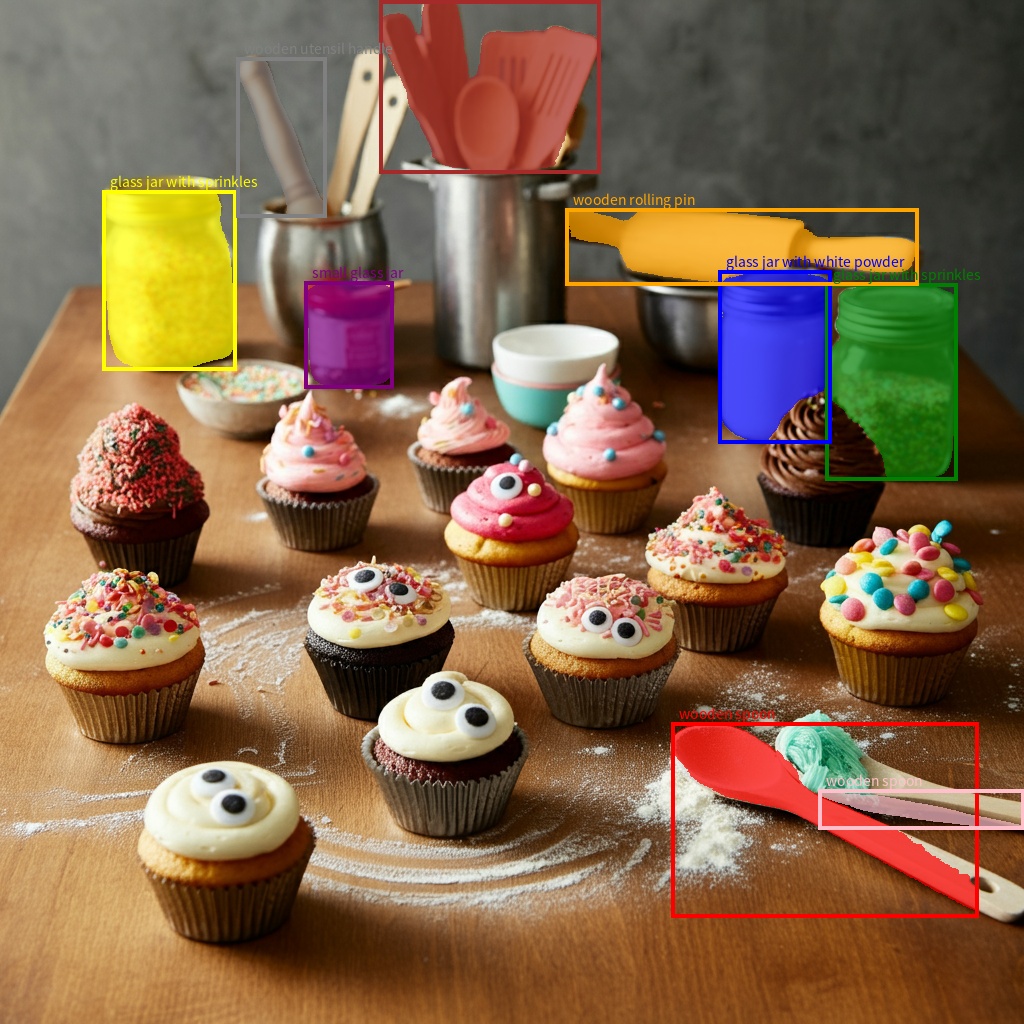 An example segmentation output with objects and segmentation masks911912## Supported image formats913914Gemini supports the following image format MIME types:915916- PNG - `image/png`917- JPEG - `image/jpeg`918- WEBP - `image/webp`919- HEIC - `image/heic`920- HEIF - `image/heif`921922To learn about other file input methods, see the923[File input methods](https://ai.google.dev/gemini-api/docs/file-input-methods) guide.924925## Capabilities926927All Gemini model versions are multimodal and can be utilized in a wide range928of image processing and computer vision tasks including but not limited to929image captioning, visual question and answering, image classification,930object detection and segmentation.931932Gemini can reduce the need to use specialized ML models depending on your933quality and performance requirements.934935The latest model versions are specifically trained to improve accuracy of936specialized tasks in addition to generic capabilities, like enhanced937[object detection](https://ai.google.dev/gemini-api/docs/image-understanding#object-detection) and [segmentation](https://ai.google.dev/gemini-api/docs/image-understanding#segmentation).938939## Limitations and key technical information940941### File limit942943Gemini models support a maximum of 3,600 image files per request.944945### Token calculation946947- 258 tokens if both dimensions \<= 384 pixels. Larger images are tiled into 768x768 pixel tiles, each costing 258 tokens.948949A rough formula for calculating the number of tiles is as follows:950951- Calculate the crop unit size which is roughly: `floor(min(width, height)` / 1.5).952- Divide each dimension by the crop unit size and multiply together to get the number of tiles.953954For example, for an image of dimensions 960x540 would have a crop unit size955of 360. Divide each dimension by 360 and the number of tile is 3 \* 2 = 6.956957### Media resolution958959Gemini 3 introduces granular control over multimodal vision processing with the960`media_resolution` parameter. The `media_resolution` parameter determines the961**maximum number of tokens allocated per input image or video frame.**962Higher resolutions improve the model's ability to read fine text or identify small details, but increase token usage and latency.963964## Tips and best practices965966- Verify that images are correctly rotated.967- Use clear, non-blurry images.968- When using a single image with text, place the text prompt *before* the image in the `input` array.969970## What's next971972This guide shows you how to upload image files and generate text outputs973from image inputs. To learn more, see the following resources:974975- [Files API](https://ai.google.dev/gemini-api/docs/files): Learn more about uploading and managing files for use with Gemini.976- [System instructions](https://ai.google.dev/gemini-api/docs/text-generation#system-instructions): System instructions let you steer the behavior of the model based on your specific needs and use cases.977- [File prompting strategies](https://ai.google.dev/gemini-api/docs/files#prompt-guide): The Gemini API supports prompting with text, image, audio, and video data, also known as multimodal prompting.978- [Safety guidance](https://ai.google.dev/gemini-api/docs/safety-guidance): Sometimes generative AI models produce unexpected outputs, such as outputs that are inaccurate, biased, or offensive. Post-processing and human evaluation are essential to limit the risk of harm from such outputs.