Repository Public
1<br />23> [!NOTE]4> **Note:** Video understanding requires Gemini Robotics ER 2 (`gemini-robotics-er-2-preview`). It is not available on ER 1.6.56Gemini Robotics ER 2 can track task progress from continuous video feeds using7two capabilities:89- Moment finding: identifies the precise timestamp where a key event occurs.10- Progress classification: assigns each video to one of five completion brackets (0--20%, 20--40%, 40--60%, 60--80%, 80--100%).1112## Moment finding1314Moment finding identifies the exact video frame where a critical event occurs ---15for example, when a cup is full or a knot is tied. Robots use this to verify16success, sequence steps, and trigger corrections.1718The following example prompt asks the model to identify the completion moment19for a given task in a video:2021 from google import genai2223 client = genai.Client()2425 uploaded_file = client.files.upload(file="task_video.mp4")2627 prompt = """28 At what timestamp (in seconds) does the task reach successful completion?29 Return a JSON object: {"completion_time_seconds": <float>}.30 If the task is not completed, return {"completion_time_seconds": null}.31 """3233 interaction = client.interactions.create(34 model="gemini-robotics-er-2-preview",35 input=[36 {37 "type": "video",38 "uri": uploaded_file.uri,39 "mime_type": uploaded_file.mime_type40 },41 {"type": "text", "text": prompt}42 ],43 )4445 print(interaction.output_text)4647The following shows example frames from a moment-finding video, with the48model identifying the task completion timestamp:4950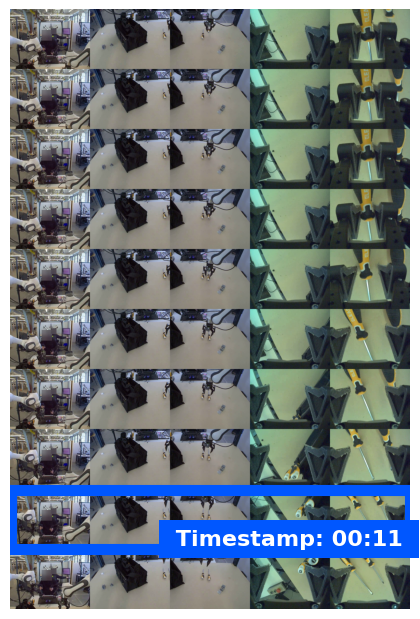5152## Progress classification5354Progress classification assigns a video to one of five completion brackets:550--20%, 20--40%, 40--60%, 60--80%, or 80--100%. This gives robots real-time56situational awareness so they can adjust actions or retry failed steps without57restarting an entire workflow.5859The following example prompt asks the model to classify the current progress60level from a video:6162 from google import genai6364 client = genai.Client()6566 uploaded_file = client.files.upload(file="task_video.mp4")6768 prompt = """69 Watch this video and classify the task progress level at the final frame.70 Return a JSON object with the progress bracket:71 {"progress_level": "0-20" | "20-40" | "40-60" | "60-80" | "80-100"}.72 """7374 interaction = client.interactions.create(75 model="gemini-robotics-er-2-preview",76 input=[77 {78 "type": "video",79 "uri": uploaded_file.uri,80 "mime_type": uploaded_file.mime_type81 },82 {"type": "text", "text": prompt}83 ],84 )8586 print(interaction.output_text)8788The following shows example frames from a progress classification video, with89the model assigning a progress bracket:9091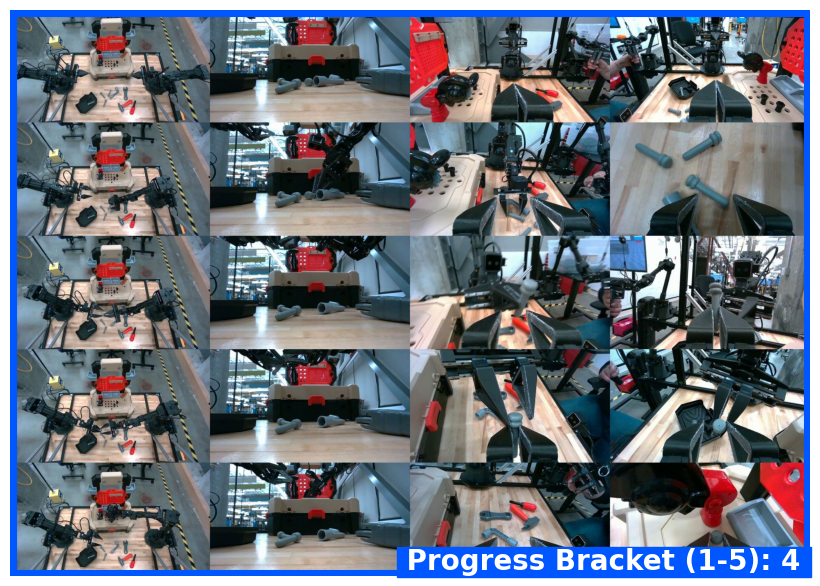9293## Examples9495For full runnable examples including multi-step task tracking, see the96[Robotics cookbook](https://github.com/google-gemini/robotics-samples/blob/main/Getting%20Started/gemini_robotics_er.ipynb).9798## What's next99100- [Live API for robotics](https://ai.google.dev/gemini-api/docs/robotics-streaming) --- real-time bidirectional streaming.101- [Task orchestration](https://ai.google.dev/gemini-api/docs/robotics-orchestration) --- long-horizon tasks with spatial reasoning.102- [Gemini Robotics ER overview](https://ai.google.dev/gemini-api/docs/robotics-overview) --- model comparison and capabilities.