Repository Public
1The Gemini API provides safety settings that you can adjust during the2prototyping stage to determine if your application requires a more or less3restrictive safety configuration. You can adjust these settings across four4filter categories to restrict or allow certain types of content.56This guide covers how the Gemini API handles safety settings and filtering and7how you can change the safety settings for your application.89> [!NOTE]10> **Note:** Applications that use less restrictive safety settings may be subject to review. See the [Terms of Service](https://ai.google.dev/gemini-api/terms#use-restrictions) for more information.1112## Safety filters1314The Gemini API's adjustable safety filters cover the following categories:1516| Category | Description |17|---|---|18| Harassment | Negative or harmful comments targeting identity and/or protected attributes. |19| Hate speech | Content that is rude, disrespectful, or profane. |20| Sexually explicit | Contains references to sexual acts or other lewd content. |21| Dangerous | Promotes, facilitates, or encourages harmful acts. |2223These categories are defined in [`HarmCategory`](https://ai.google.dev/api/rest/v1/HarmCategory). You24can use these filters to adjust what's appropriate for your use case. For25example, if you're building video game dialogue, you may deem it acceptable to26allow more content that's rated as *Dangerous* due to the nature of the game.2728In addition to the adjustable safety filters, the Gemini API has built-in29protections against core harms, such as content that endangers child safety.30These types of harm are always blocked and cannot be adjusted.3132### Content safety filtering level3334The Gemini API categorizes the probability level of content being unsafe as35`HIGH`, `MEDIUM`, `LOW`, or `NEGLIGIBLE`.3637The Gemini API blocks content based on the probability of content being unsafe38and not the severity. This is important to consider because some content can39have low probability of being unsafe even though the severity of harm could40still be high. For example, comparing the sentences:41421. The robot punched me.432. The robot slashed me up.4445The first sentence might result in a higher probability of being unsafe, but you46might consider the second sentence to be a higher severity in terms of violence.47Given this, it is important that you carefully test and consider what the48appropriate level of blocking is needed to support your key use cases while49minimizing harm to end users.5051### Safety filtering per request5253You can adjust the safety settings for each request you make to the API. When54you make a request, the content is analyzed and assigned a safety rating. The55safety rating includes the category and the probability of the harm56classification. For example, if the content was blocked due to the harassment57category having a high probability, the safety rating returned would have58category equal to `HARASSMENT` and harm probability set to `HIGH`.5960Due to the model's inherent safety, additional filters are **Off** by default.61If you choose to enable them, you can configure the system to block content62based on its probability of being unsafe. The default model behavior covers most63use cases, so you should only adjust these settings if consistently is required64for your application.6566The following table describes the block settings you can adjust for each67category. For example, if you set the block setting to **Block few** for the68**Hate speech** category, everything that has a high probability of being hate69speech content is blocked. But anything with a lower probability is allowed.7071| Threshold (Google AI Studio) | Threshold (API) | Description |72|---|---|---|73| Off | `OFF` | Turn off the safety filter |74| Block none | `BLOCK_NONE` | Always show regardless of probability of unsafe content |75| Block few | `BLOCK_ONLY_HIGH` | Block when high probability of unsafe content |76| Block some | `BLOCK_MEDIUM_AND_ABOVE` | Block when medium or high probability of unsafe content |77| Block most | `BLOCK_LOW_AND_ABOVE` | Block when low, medium or high probability of unsafe content |78| N/A | `HARM_BLOCK_THRESHOLD_UNSPECIFIED` | Threshold is unspecified, block using default threshold |7980If the threshold is not set, the default block threshold is **Off** for Gemini812.5 and 3 models.8283You can set these settings for each request you make to the generative service.84See the [`HarmBlockThreshold`](https://ai.google.dev/api/generate-content#harmblockthreshold) API85reference for details.8687### Safety feedback8889[`generateContent`](https://ai.google.dev/api/generate-content#method:-models.generatecontent)90returns a91[`GenerateContentResponse`](https://ai.google.dev/api/generate-content#generatecontentresponse) which92includes safety feedback.9394Prompt feedback is included in95[`promptFeedback`](https://ai.google.dev/api/generate-content#promptfeedback). If96`promptFeedback.blockReason` is set, then the content of the prompt was blocked.9798Response candidate feedback is included in99[`Candidate.finishReason`](https://ai.google.dev/api/generate-content#candidate) and100[`Candidate.safetyRatings`](https://ai.google.dev/api/generate-content#candidate). If response101content was blocked and the `finishReason` was `SAFETY`, you can inspect102`safetyRatings` for more details. The content that was blocked is not returned.103104## Adjust safety settings105106This section covers how to adjust the safety settings in both Google AI Studio107and in your code.108109### Google AI Studio110111You can adjust safety settings in Google AI Studio.112113Click **Safety settings** under **Advanced settings** in the **Run settings** panel to open the **Run114safety settings** modal. In the modal, you can use the sliders to adjust the115content filtering level per safety category:116117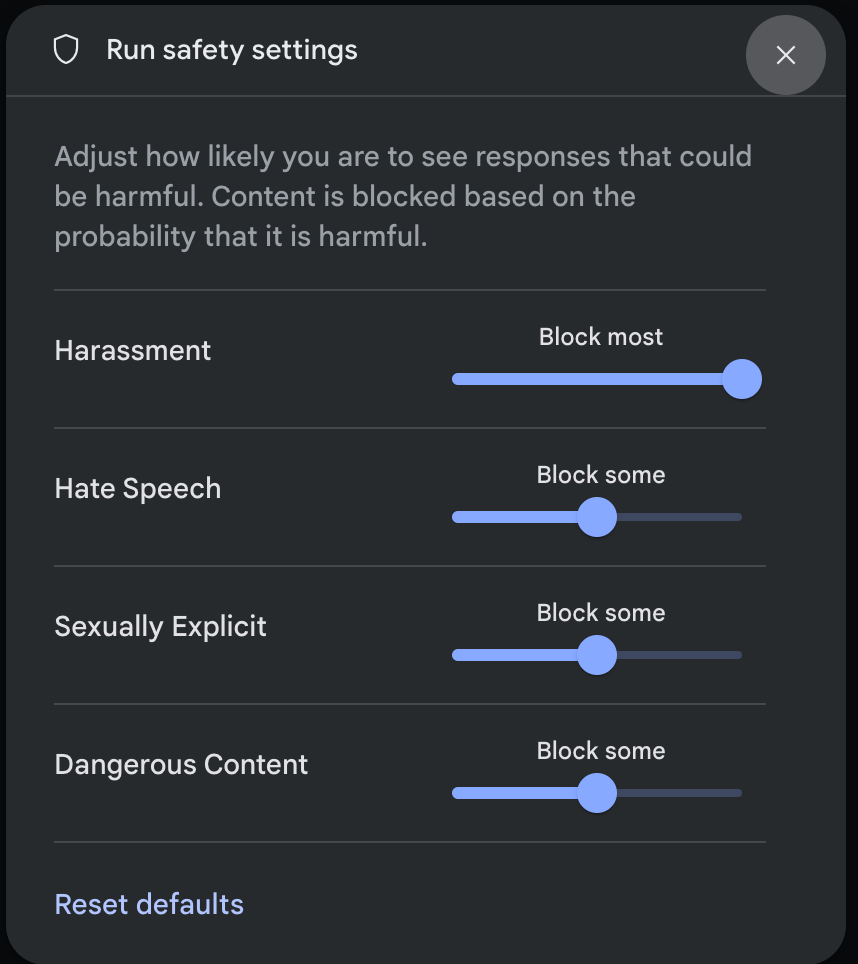118119> [!NOTE]120> **Note:** You are responsible for ensuring that safety settings for your intended use case comply with the [Terms of Service](https://ai.google.dev/gemini-api/terms#use-restrictions).121122When you send a request (for example, by asking the model a question), a123**Content blocked** message appears if the request's content is blocked. To see124more details, hold the pointer over the125**Content blocked** text to see the category and the probability of the harm126classification.127128### Code examples129130The following code snippet shows how to set safety settings in your131`GenerateContent` call. This sets the threshold for the hate speech132(`HARM_CATEGORY_HATE_SPEECH`) category. Setting this category to133`BLOCK_LOW_AND_ABOVE` blocks any content that has a low or higher probability of134being hate speech. To understand the threshold settings, see [Safety filtering135per request](https://ai.google.dev/gemini-api/docs/safety-settings#safety-filtering-per-request).136137### Python138139 from google import genai140 from google.genai import types141142 client = genai.Client()143144 response = client.models.generate_content(145 model="gemini-3.8-flash",146 contents="Some potentially unsafe prompt",147 config=types.GenerateContentConfig(148 safety_settings=[149 types.SafetySetting(150 category=types.HarmCategory.HARM_CATEGORY_HATE_SPEECH,151 threshold=types.HarmBlockThreshold.BLOCK_LOW_AND_ABOVE,152 ),153 ]154 )155 )156157 print(response.text)158159### Go160161 package main162163 import (164 "context"165 "fmt"166 "log"167 "google.golang.org/genai"168 )169170 func main() {171 ctx := context.Background()172 client, err := genai.NewClient(ctx, nil)173 if err != nil {174 log.Fatal(err)175 }176177 config := &genai.GenerateContentConfig{178 SafetySettings: []*genai.SafetySetting{179 {180 Category: "HARM_CATEGORY_HATE_SPEECH",181 Threshold: "BLOCK_LOW_AND_ABOVE",182 },183 },184 }185186 response, err := client.Models.GenerateContent(187 ctx,188 "gemini-3.8-flash",189 genai.Text("Some potentially unsafe prompt."),190 config,191 )192 if err != nil {193 log.Fatal(err)194 }195 fmt.Println(response.Text())196 }197198### JavaScript199200 import { GoogleGenAI } from "@google/genai";201202 const ai = new GoogleGenAI({});203204 const safetySettings = [205 {206 category: "HARM_CATEGORY_HATE_SPEECH",207 threshold: "BLOCK_LOW_AND_ABOVE",208 },209 ];210211 async function main() {212 const response = await ai.models.generateContent({213 model: "gemini-3.8-flash",214 contents: "Some potentially unsafe prompt.",215 config: {216 safetySettings: safetySettings,217 },218 });219 console.log(response.text);220 }221222 await main();223224### Java225226 import com.google.genai.Client;227 import com.google.genai.types.GenerateContentConfig;228 import com.google.genai.types.GenerateContentResponse;229 import com.google.genai.types.HarmBlockThreshold;230 import com.google.genai.types.HarmCategory;231 import com.google.genai.types.SafetySetting;232 import java.util.Arrays;233234 Client client = new Client();235236 SafetySetting hateSpeechSafety =237 SafetySetting.builder()238 .category(HarmCategory.Known.HARM_CATEGORY_HATE_SPEECH)239 .threshold(HarmBlockThreshold.Known.BLOCK_LOW_AND_ABOVE)240 .build();241242 GenerateContentConfig config =243 GenerateContentConfig.builder()244 .safetySettings(Arrays.asList(hateSpeechSafety))245 .build();246247 GenerateContentResponse response =248 client.models.generateContent(249 "gemini-3.8-flash", "Some potentially unsafe prompt.", config);250251 System.out.println(response.text());252253### REST254255 curl "https://generativelanguage.googleapis.com/v1beta/models/gemini-3.8-flash:generateContent" \256 -H "x-goog-api-key: $GEMINI_API_KEY" \257 -H "Content-Type: application/json" \258 -X POST \259 -d '{260 "safetySettings": [261 {"category": "HARM_CATEGORY_HATE_SPEECH", "threshold": "BLOCK_LOW_AND_ABOVE"}262 ],263 "contents": [{264 "parts":[{265 "text": "'\''Some potentially unsafe prompt.'\''"266 }]267 }]268 }'269270## Next steps271272- See the [API reference](https://ai.google.dev/api) to learn more about the full API.273- Review the [safety guidance](https://ai.google.dev/gemini-api/docs/safety-guidance) for a general look at safety considerations when developing with LLMs.274- Learn more about assessing probability versus severity from the [Jigsaw275 team](https://developers.perspectiveapi.com/s/about-the-api-score)276- Learn more about the products that contribute to safety solutions like the [Perspective277 API](https://medium.com/jigsaw/reducing-toxicity-in-large-language-models-with-perspective-api-c31c39b7a4d7). \* You can use these safety settings to create a toxicity classifier. See the [classification278 example](https://ai.google.dev/examples/train_text_classifier_embeddings) to get started.