Repository Public
1# Realtime conversations23> For the complete documentation index, see [llms.txt](/llms.txt). Markdown versions of documentation pages are available by appending `.md` to the page URL.45Once you have connected to the Realtime API through either [WebRTC](https://developers.openai.com/api/docs/guides/voice-webrtc?api=realtime) or [WebSocket](https://developers.openai.com/api/docs/guides/voice-websockets?api=realtime), you can call a Realtime model (such as [`gpt-realtime-2.1`](https://developers.openai.com/api/docs/models/gpt-realtime-2.1)) to have speech-to-speech conversations. Doing so will require you to **send client events** to initiate actions, and **listen for server events** to respond to actions taken by the Realtime API.67This guide will walk through the event flows required to use model capabilities like audio and text generation, image input, and function calling, and how to think about the state of a Realtime Session.89If you do not need to have a conversation with the model, meaning you don't10 expect any response, you can use the Realtime API in [transcription11 mode](https://developers.openai.com/api/docs/guides/realtime-transcription).1213## Realtime speech-to-speech sessions1415A Realtime Session is a stateful interaction between the model and a connected client. The key components of the session are:1617- The **Session** object, which controls the parameters of the interaction, like the model being used, the voice used to generate output, and other configuration.18- A **Conversation**, which represents user input Items and model output Items generated during the current session.19- **Responses**, which are model-generated audio or text Items that are added to the Conversation.2021**Input audio buffer and WebSockets**2223If you are using WebRTC, much of the media handling required to send and receive audio from the model is assisted by WebRTC APIs.24252627If you are using WebSockets for audio, you will need to manually interact with the **input audio buffer** by sending audio to the server, sent with JSON events with base64-encoded audio.2829All these components together make up a Realtime Session. You will use client events to update the state of the session, and listen for server events to react to state changes within the session.3031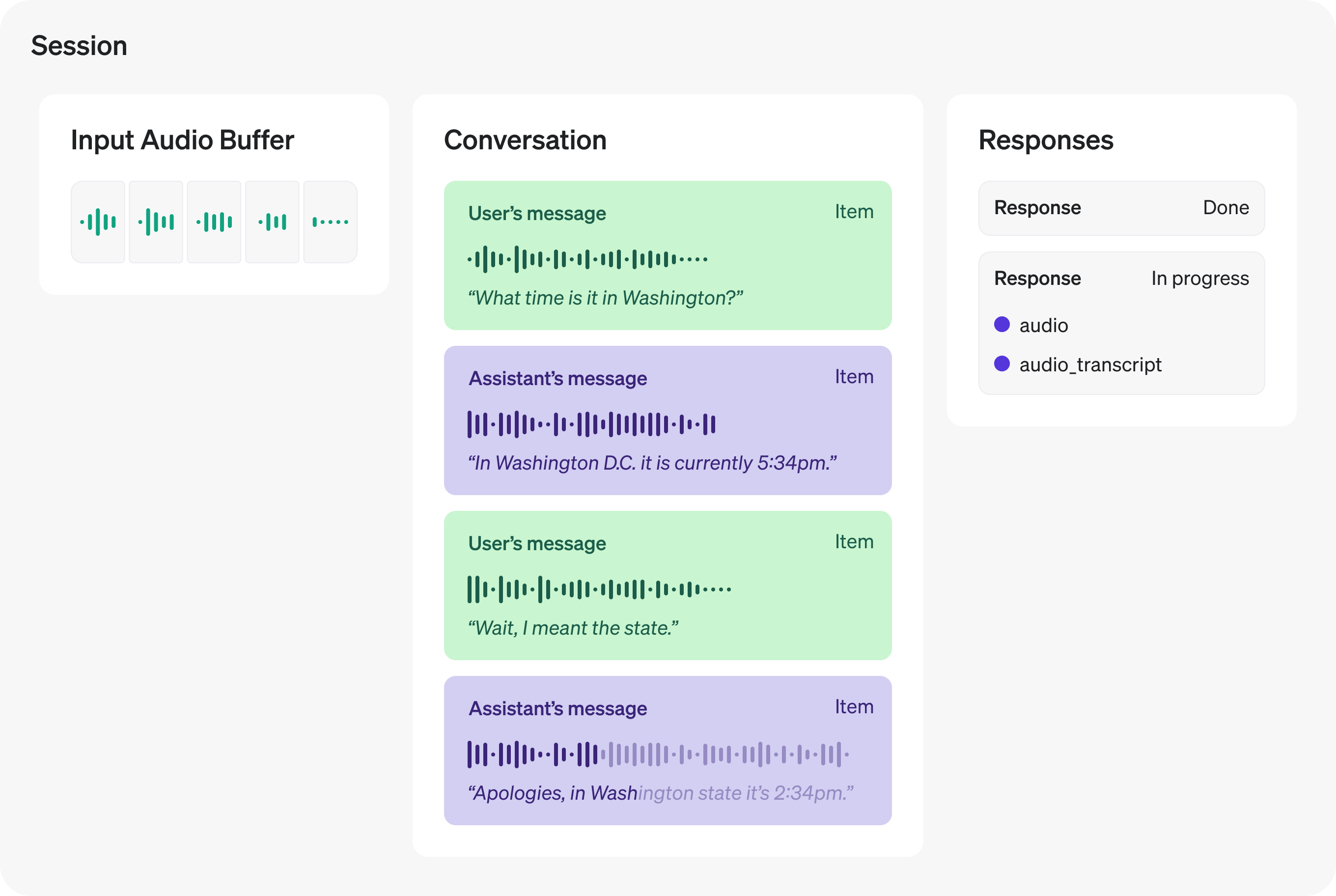3233## Session lifecycle events3435After initiating a session via either [WebRTC](https://developers.openai.com/api/docs/guides/voice-webrtc?api=realtime) or [WebSockets](https://developers.openai.com/api/docs/guides/voice-websockets?api=realtime), the server will send a [`session.created`](https://developers.openai.com/api/reference/resources/realtime) event indicating the session is ready. On the client, you can update the current session configuration with the [`session.update`](https://developers.openai.com/api/reference/resources/realtime) event. Most session properties can be updated at any time, except for the `voice` the model uses for audio output, after the model has responded with audio once during the session. The maximum duration of a Realtime session is **60 minutes**.3637The following example shows updating the session with a `session.update` client event. See the [WebRTC](https://developers.openai.com/api/docs/guides/voice-webrtc?api=realtime#sending-and-receiving-events) or [WebSocket](https://developers.openai.com/api/docs/guides/voice-websockets?api=realtime#sending-and-receiving-events) guide for more on sending client events over these channels.3839Update the system instructions used by the model in this session4041```javascript42const event = {43 type: "session.update",44 session: {45 type: "realtime",46 model: "gpt-realtime-2.1",47 // Lock the output to audio (set to ["text"] if you want text without audio)48 output_modalities: ["audio"],49 audio: {50 input: {51 format: {52 type: "audio/pcm",53 rate: 24000,54 },55 turn_detection: {56 type: "semantic_vad",57 },58 },59 output: {60 format: {61 type: "audio/pcm",62 },63 voice: "marin",64 },65 },66 // Use a server-stored prompt by ID. Optionally pin a version and pass variables.67 prompt: {68 id: "pmpt_123", // your stored prompt ID69 version: "89", // optional: pin a specific version70 variables: {71 city: "Paris", // example variable used by your prompt72 },73 },74 // You can still set direct session fields; these override prompt fields if they overlap:75 instructions:76 "Speak clearly and briefly. Confirm understanding before taking actions.",77 },78};7980// WebRTC data channel and WebSocket both have .send()81dataChannel.send(JSON.stringify(event));82```8384```python85event = {86 "type": "session.update",87 "session": {88 "type": "realtime",89 "model": "gpt-realtime-2.1",90 # Lock the output to audio (add "text" if you also want text).91 "output_modalities": ["audio"],92 "audio": {93 "input": {94 "format": {95 "type": "audio/pcm",96 "rate": 24000,97 },98 "turn_detection": {"type": "semantic_vad"},99 },100 "output": {101 "format": {102 "type": "audio/pcmu",103 },104 "voice": "marin",105 },106 },107 # Use a server-stored prompt by ID. Optionally pin a version and pass variables.108 "prompt": {109 "id": "pmpt_123", # Your stored prompt ID.110 "version": "89", # Optional: pin a specific version.111 "variables": {112 "city": "Paris", # Example variable used by your prompt.113 },114 },115 # Direct session fields override prompt fields if they overlap.116 "instructions": "Speak clearly and briefly. Confirm understanding before taking actions.",117 },118}119ws.send(json.dumps(event))120```121122```ruby123# Replace the illustrative IDs and URLs below with your own resource values.124connection.session.update(125 type: :realtime,126 model: "gpt-realtime-2.1",127 output_modalities: [:audio],128 audio: {129 input: {130 format: {131 type: :"audio/pcm",132 rate: 24_000133 },134 turn_detection: { type: :semantic_vad }135 },136 output: {137 format: {138 type: :"audio/pcm",139 rate: 24_000140 },141 voice: :marin142 }143 },144 prompt: {145 id: "pmpt_123",146 version: "89",147 variables: { city: "Paris" }148 },149 instructions: "Speak clearly and briefly. Confirm before taking action."150)151```152153154When the session has been updated, the server will emit a [`session.updated`](https://developers.openai.com/api/reference/resources/realtime) event with the new state of the session.155156<table>157 <tr>158 <th>Related client events</th>159 <th>Related server events</th>160 </tr>161 <tr>162 <td>163 [`session.update`](https://developers.openai.com/api/reference/resources/realtime)164 </td>165 <td>166 [`session.created`](https://developers.openai.com/api/reference/resources/realtime)167 168169 [`session.updated`](https://developers.openai.com/api/reference/resources/realtime)170 </td>171 </tr>172</table>173174## Text inputs and outputs175176To generate text with a Realtime model, you can add text inputs to the current conversation, ask the model to generate a response, and listen for server-sent events indicating the progress of the model's response. In order to generate text, the [session must be configured](https://developers.openai.com/api/reference/resources/realtime) with the `text` modality (this is true by default).177178Create a new text conversation item using the [`conversation.item.create`](https://developers.openai.com/api/reference/resources/realtime) client event. This is similar to sending a [user message (prompt) in Chat Completions](https://developers.openai.com/api/docs/guides/text) in the REST API.179180Create a conversation item with user input181182```javascript183const event = {184 type: "conversation.item.create",185 item: {186 type: "message",187 role: "user",188 content: [189 {190 type: "input_text",191 text: "What Prince album sold the most copies?",192 },193 ],194 },195};196197// WebRTC data channel and WebSocket both have .send()198dataChannel.send(JSON.stringify(event));199```200201```python202event = {203 "type": "conversation.item.create",204 "item": {205 "type": "message",206 "role": "user",207 "content": [208 {209 "type": "input_text",210 "text": "What Prince album sold the most copies?",211 }212 ],213 },214}215ws.send(json.dumps(event))216```217218```ruby219connection.conversation.items.create(220 type: :message,221 role: :user,222 content: [223 {224 type: :input_text,225 text: "What is the weather like today?"226 }227 ]228)229```230231232After adding the user message to the conversation, send the [`response.create`](https://developers.openai.com/api/reference/resources/realtime) event to initiate a response from the model. If both audio and text are enabled for the current session, the model will respond with both audio and text content. If you'd like to generate text only, you can specify that when sending the `response.create` client event, as shown below.233234Generate a text-only response235236```javascript237const event = {238 type: "response.create",239 response: {240 output_modalities: ["text"],241 },242};243244// WebRTC data channel and WebSocket both have .send()245dataChannel.send(JSON.stringify(event));246```247248```python249event = {"type": "response.create", "response": {"output_modalities": ["text"]}}250ws.send(json.dumps(event))251```252253```ruby254connection.response.create(255 output_modalities: [:text],256 instructions: "Respond with a concise text message."257)258```259260261When the response is completely finished, the server will emit the [`response.done`](https://developers.openai.com/api/reference/resources/realtime) event. This event will contain the full text generated by the model, as shown below.262263Listen for response.done to see the final results264265```javascript266function handleEvent(message) {267 const data = "data" in message ? message.data : message.toString();268 const serverEvent = JSON.parse(data);269 if (serverEvent.type === "response.done") {270 console.log(serverEvent.response.output[0]);271 }272}273274// Listen for server messages (WebRTC)275dataChannel.addEventListener("message", handleEvent);276277// Listen for server messages (WebSocket)278// ws.on("message", handleEvent);279```280281```python282def on_message(ws, message):283 server_event = json.loads(message)284 if server_event["type"] == "response.done":285 print(server_event["response"]["output"][0])286```287288```ruby289connection.each do |event|290 next unless event.is_a?(OpenAI::Realtime::ResponseDoneEvent)291292 puts("Response status: #{event.response.status}")293 Array(event.response.output).each do |item|294 next unless item.is_a?(OpenAI::Realtime::RealtimeConversationItemAssistantMessage)295296 item.content.each do |content|297 puts(content.text) if content.type == :output_text298 end299 end300 break301end302```303304305While the model response is being generated, the server will emit a number of lifecycle events during the process. You can listen for these events, such as [`response.output_text.delta`](https://developers.openai.com/api/reference/resources/realtime), to provide realtime feedback to users as the response is generated. A full listing of the events emitted by the server is found below under **related server events**. They are provided in the rough order of when they are emitted, along with relevant client-side events for text generation.306307<table>308 <tr>309 <th>Related client events</th>310 <th>Related server events</th>311 </tr>312 <tr>313 <td>314 [`conversation.item.create`](https://developers.openai.com/api/reference/resources/realtime)315 316317 [`response.create`](https://developers.openai.com/api/reference/resources/realtime)318 </td>319 <td>320 [`conversation.item.added`](https://developers.openai.com/api/reference/resources/realtime)321 322323 [`conversation.item.done`](https://developers.openai.com/api/reference/resources/realtime)324 325326 [`response.created`](https://developers.openai.com/api/reference/resources/realtime)327 328329 [`response.output_item.added`](https://developers.openai.com/api/reference/resources/realtime)330 331332 [`response.content_part.added`](https://developers.openai.com/api/reference/resources/realtime)333 334335 [`response.output_text.delta`](https://developers.openai.com/api/reference/resources/realtime)336 337338 [`response.output_text.done`](https://developers.openai.com/api/reference/resources/realtime)339 340341 [`response.content_part.done`](https://developers.openai.com/api/reference/resources/realtime)342 343344 [`response.output_item.done`](https://developers.openai.com/api/reference/resources/realtime)345 346347 [`response.done`](https://developers.openai.com/api/reference/resources/realtime)348 349350 [`rate_limits.updated`](https://developers.openai.com/api/reference/resources/realtime/server-events#rate_limits.updated)351 </td>352 </tr>353</table>354355## Audio inputs and outputs356357One of the most powerful features of the Realtime API is voice-to-voice interaction with the model, without an intermediate text-to-speech or speech-to-text step. This enables lower latency for voice interfaces, and gives the model more data to work with around the tone and inflection of voice input.358359### Voice options360361Realtime sessions can be configured to use one of several built‑in voices when producing audio output. You can set the `voice` on session creation (or on a `response.create`) to control how the model sounds. Current voice options are `alloy`, `ash`, `ballad`, `coral`, `echo`, `sage`, `shimmer`, `verse`, `marin`, and `cedar`. Once the model has emitted audio in a session, the `voice` cannot be modified for that session. For best quality, we recommend using `marin` or `cedar`.362363### Handling audio with WebRTC364365If you are connecting to the Realtime API using WebRTC, the Realtime API is acting as a [peer connection](https://developer.mozilla.org/en-US/docs/Web/API/RTCPeerConnection) to your client. Audio output from the model is delivered to your client as a [remote media stream](https://developer.mozilla.org/en-US/docs/Web/API/MediaStream). Audio input to the model is collected using audio devices ([`getUserMedia`](https://developer.mozilla.org/en-US/docs/Web/API/MediaDevices/getUserMedia)), and media streams are added as tracks to the peer connection.366367The example code from the [WebRTC connection guide](https://developers.openai.com/api/docs/guides/voice-webrtc?api=realtime) shows a basic example of configuring both local and remote audio using browser APIs:368369```javascript370// Create a peer connection371const pc = new RTCPeerConnection();372373// Set up to play remote audio from the model374const audioEl = document.createElement("audio");375audioEl.autoplay = true;376pc.ontrack = (e) => (audioEl.srcObject = e.streams[0]);377378// Add local audio track for microphone input in the browser379const ms = await navigator.mediaDevices.getUserMedia({380 audio: true,381});382pc.addTrack(ms.getTracks()[0]);383```384385386The snippet above enables interaction with the Realtime API, but there's much more that can be done. For more examples of different kinds of user interfaces, check out the [WebRTC samples](https://github.com/webrtc/samples) repository. Live demos of these samples can also be [found here](https://webrtc.github.io/samples/).387388Using [media captures and streams](https://developer.mozilla.org/en-US/docs/Web/API/Media_Capture_and_Streams_API) in the browser enables you to do things like mute and unmute microphones, select which device to collect input from, and more.389390### Client and server events for audio in WebRTC391392By default, WebRTC clients don't need to send any client events to the Realtime API before sending audio inputs. Once a local audio track is added to the peer connection, your users can just start talking!393394However, WebRTC clients still receive a number of server-sent lifecycle events as audio is moving back and forth between client and server over the peer connection. Examples include:395396- When input is sent over the local media track, you will receive [`input_audio_buffer.speech_started`](https://developers.openai.com/api/reference/resources/realtime) events from the server.397- When local audio input stops, you'll receive the [`input_audio_buffer.speech_stopped`](https://developers.openai.com/api/reference/resources/realtime) event.398- You'll receive [delta events for the in-progress audio transcript](https://developers.openai.com/api/reference/resources/realtime).399- You'll receive a [`response.done`](https://developers.openai.com/api/reference/resources/realtime) event when the model has transcribed and completed sending a response.400401Manipulating WebRTC APIs for media streams may give you all the control you need. However, it may occasionally be necessary to use lower-level interfaces for audio input and output. Refer to the WebSockets section below for more information and a listing of events required for granular audio input handling.402403### Handling audio with WebSockets404405When sending and receiving audio over a WebSocket, you will have a bit more work to do in order to send media from the client, and receive media from the server. Below, you'll find a table describing the flow of events during a WebSocket session that are necessary to send and receive audio over the WebSocket.406407The events below are given in lifecycle order, though some events (like the `delta` events) may happen concurrently.408409<table>410 <tr>411 <th>Lifecycle stage</th>412 <th>Client events</th>413 <th>Server events</th>414 </tr>415 <tr>416 <td>Session initialization</td>417 <td>418 [`session.update`](https://developers.openai.com/api/reference/resources/realtime)419 </td>420 <td>421 [`session.created`](https://developers.openai.com/api/reference/resources/realtime)422 423424 [`session.updated`](https://developers.openai.com/api/reference/resources/realtime)425 </td>426 </tr>427 <tr>428 <td>User audio input</td>429 <td>430 [`conversation.item.create`](https://developers.openai.com/api/reference/resources/realtime)431 432433 (send whole audio message)434 435436 [`input_audio_buffer.append`](https://developers.openai.com/api/reference/resources/realtime)437 438439 (stream audio in chunks)440 441442 [`input_audio_buffer.commit`](https://developers.openai.com/api/reference/resources/realtime)443 444445 (used when VAD is disabled)446 447448 [`response.create`](https://developers.openai.com/api/reference/resources/realtime)449 450451 (used when VAD is disabled)452 </td>453 <td>454 [`input_audio_buffer.speech_started`](https://developers.openai.com/api/reference/resources/realtime)455 456457 [`input_audio_buffer.speech_stopped`](https://developers.openai.com/api/reference/resources/realtime)458 459460 [`input_audio_buffer.committed`](https://developers.openai.com/api/reference/resources/realtime)461 </td>462 </tr>463 <tr>464 <td>Server audio output</td>465 <td>466 [`input_audio_buffer.clear`](https://developers.openai.com/api/reference/resources/realtime)467 468469 (used when VAD is disabled)470 </td>471 <td>472 [`conversation.item.added`](https://developers.openai.com/api/reference/resources/realtime)473 474475 [`conversation.item.done`](https://developers.openai.com/api/reference/resources/realtime)476 477478 [`response.created`](https://developers.openai.com/api/reference/resources/realtime)479 480481 [`response.output_item.added`](https://developers.openai.com/api/reference/resources/realtime/server-events#response.output_item.added)482 483484 [`response.content_part.added`](https://developers.openai.com/api/reference/resources/realtime)485 486487 [`response.output_audio.delta`](https://developers.openai.com/api/reference/resources/realtime)488 489490 [`response.output_audio.done`](https://developers.openai.com/api/reference/resources/realtime)491 492493 [`response.output_audio_transcript.delta`](https://developers.openai.com/api/reference/resources/realtime)494 495496 [`response.output_audio_transcript.done`](https://developers.openai.com/api/reference/resources/realtime)497 498499 [`response.output_text.delta`](https://developers.openai.com/api/reference/resources/realtime)500 501502 [`response.output_text.done`](https://developers.openai.com/api/reference/resources/realtime)503 504505 [`response.content_part.done`](https://developers.openai.com/api/reference/resources/realtime)506 507508 [`response.output_item.done`](https://developers.openai.com/api/reference/resources/realtime)509 510511 [`response.done`](https://developers.openai.com/api/reference/resources/realtime)512 513514 [`rate_limits.updated`](https://developers.openai.com/api/reference/resources/realtime)515 </td>516 </tr>517</table>518519### Streaming audio input to the server520521To stream audio input to the server, you can use the [`input_audio_buffer.append`](https://developers.openai.com/api/reference/resources/realtime) client event. This event requires you to send chunks of **Base64-encoded audio bytes** to the Realtime API over the socket. Each chunk cannot exceed 15 MB in size.522523The format of the input chunks can be configured either for the entire session, or per response.524525- Session: `session.input_audio_format` in [`session.update`](https://developers.openai.com/api/reference/resources/realtime)526- Response: `response.input_audio_format` in [`response.create`](https://developers.openai.com/api/reference/resources/realtime)527528Append audio input bytes to the conversation529530```javascript531import fs from "fs";532import decodeAudio from "audio-decode";533534// Converts Float32Array of audio data to PCM16 ArrayBuffer535function floatTo16BitPCM(float32Array) {536 const buffer = new ArrayBuffer(float32Array.length * 2);537 const view = new DataView(buffer);538 let offset = 0;539 for (let i = 0; i < float32Array.length; i++, offset += 2) {540 let s = Math.max(-1, Math.min(1, float32Array[i]));541 view.setInt16(offset, s < 0 ? s * 0x8000 : s * 0x7fff, true);542 }543 return buffer;544}545546// Converts a Float32Array to base64-encoded PCM16 data547function base64EncodeAudio(float32Array) {548 const arrayBuffer = floatTo16BitPCM(float32Array);549 let binary = "";550 let bytes = new Uint8Array(arrayBuffer);551 const chunkSize = 0x8000; // 32KB chunk size552 for (let i = 0; i < bytes.length; i += chunkSize) {553 let chunk = bytes.subarray(i, i + chunkSize);554 binary += String.fromCharCode(...chunk);555 }556 return btoa(binary);557}558559// Fills the audio buffer with the contents of three files,560// then asks the model to generate a response.561const files = [562 "fixtures/sample1.wav",563 "fixtures/sample2.wav",564 "fixtures/sample3.wav",565];566567for (const filename of files) {568 const audioFile = fs.readFileSync(filename);569 const audioBuffer = await decodeAudio(audioFile);570 const channelData = audioBuffer.channelData[0];571 const base64Chunk = base64EncodeAudio(channelData);572 ws.send(573 JSON.stringify({574 type: "input_audio_buffer.append",575 audio: base64Chunk,576 })577 );578}579580ws.send(JSON.stringify({ type: "input_audio_buffer.commit" }));581ws.send(JSON.stringify({ type: "response.create" }));582```583584```python585import base64586import json587import struct588import soundfile as sf589from websocket import create_connection590591# ... create websocket-client named ws ...592593594def float_to_16bit_pcm(float32_array):595 clipped = [max(-1.0, min(1.0, x)) for x in float32_array]596 pcm16 = b"".join(struct.pack("<h", int(x * 32767)) for x in clipped)597 return pcm16598599600def base64_encode_audio(float32_array):601 pcm_bytes = float_to_16bit_pcm(float32_array)602 encoded = base64.b64encode(pcm_bytes).decode("ascii")603 return encoded604605606files = ["./path/to/sample1.wav", "./path/to/sample2.wav", "./path/to/sample3.wav"]607608for filename in files:609 data, samplerate = sf.read(filename, dtype="float32")610 channel_data = data[:, 0] if data.ndim > 1 else data611 base64_chunk = base64_encode_audio(channel_data)612613 # Send the client event614 event = {"type": "input_audio_buffer.append", "audio": base64_chunk}615 ws.send(json.dumps(event))616```617618```ruby619File.open("speech.pcm", "rb") do |audio|620 while (chunk = audio.read(9_600))621 connection.input_audio_buffer.append_bytes(chunk)622 end623end624```625626627### Send full audio messages628629It is also possible to create conversation messages that are full audio recordings. Use the [`conversation.item.create`](https://developers.openai.com/api/reference/resources/realtime) client event to create messages with `input_audio` content.630631Create full audio input conversation items632633```javascript634const fullAudio = "<a base64-encoded string of audio bytes>";635636const event = {637 type: "conversation.item.create",638 item: {639 type: "message",640 role: "user",641 content: [642 {643 type: "input_audio",644 audio: fullAudio,645 },646 ],647 },648};649650// WebRTC data channel and WebSocket both have .send()651dataChannel.send(JSON.stringify(event));652```653654```python655fullAudio = "<a base64-encoded string of audio bytes>"656657event = {658 "type": "conversation.item.create",659 "item": {660 "type": "message",661 "role": "user",662 "content": [663 {664 "type": "input_audio",665 "audio": fullAudio,666 }667 ],668 },669}670671ws.send(json.dumps(event))672```673674```ruby675audio = Base64.strict_encode64(File.binread("speech.pcm"))676677connection.conversation.items.create(678 type: :message,679 role: :user,680 content: [681 {682 type: :input_audio,683 audio: audio684 }685 ]686)687```688689690### Working with audio output from a WebSocket691692**To play output audio back on a client device like a web browser, we recommend using WebRTC rather than WebSockets**. WebRTC will be more robust sending media to client devices over uncertain network conditions.693694But to work with audio output in server-to-server applications using a WebSocket, you will need to listen for [`response.output_audio.delta`](https://developers.openai.com/api/reference/resources/realtime) events containing the Base64-encoded chunks of audio data from the model. You will either need to buffer these chunks and write them out to a file, or maybe immediately stream them to another source like [a phone call with Twilio](https://www.twilio.com/en-us/blog/twilio-openai-realtime-api-launch-integration).695696Note that the [`response.output_audio.done`](https://developers.openai.com/api/reference/resources/realtime) and [`response.done`](https://developers.openai.com/api/reference/resources/realtime) events won't actually contain audio data in them - just audio content transcriptions. To get the actual bytes, you'll need to listen for the [`response.output_audio.delta`](https://developers.openai.com/api/reference/resources/realtime) events.697698The format of the output chunks can be configured either for the entire session, or per response.699700- Session: `session.audio.output.format` in [`session.update`](https://developers.openai.com/api/reference/resources/realtime)701- Response: `response.audio.output.format` in [`response.create`](https://developers.openai.com/api/reference/resources/realtime)702703Listen for response.output_audio.delta events704705```javascript706function handleEvent(message) {707 const serverEvent = JSON.parse(message.toString());708 if (serverEvent.type === "response.output_audio.delta") {709 // Access Base64-encoded audio chunks710 // console.log(serverEvent.delta);711 }712}713714// Listen for server messages (WebSocket)715ws.on("message", handleEvent);716```717718```python719def on_message(ws, message):720 server_event = json.loads(message)721 if server_event["type"] == "response.output_audio.delta":722 # Access Base64-encoded audio chunks:723 print(server_event["delta"])724```725726```ruby727connection.each do |event|728 case event729 when OpenAI::Realtime::ResponseAudioDeltaEvent730 audio_bytes = Base64.strict_decode64(event.delta)731 puts("Received #{audio_bytes.bytesize} audio bytes")732 when OpenAI::Realtime::ResponseDoneEvent733 break734 end735end736```737738739## Image inputs740741`gpt-realtime-2` and `gpt-realtime` also support image input. You can attach an image as a content part in a user message, and the model can incorporate what’s in the image when it responds.742743Add an image to the conversation744745```javascript746const base64Image = "<a base64-encoded string of image bytes>";747748const event = {749 type: "conversation.item.create",750 item: {751 type: "message",752 role: "user",753 content: [754 {755 type: "input_image",756 image_url: `data:image/{format};base64,${base64Image}`,757 },758 ],759 },760};761762// WebRTC data channel and WebSocket both have .send()763dataChannel.send(JSON.stringify(event));764```765766```ruby767encoded_image = Base64.strict_encode64(File.binread("image.png"))768769connection.conversation.items.create(770 type: :message,771 role: :user,772 content: [773 {774 type: :input_image,775 image_url: "data:image/png;base64,#{encoded_image}"776 },777 {778 type: :input_text,779 text: "Describe this image."780 }781 ]782)783connection.response.create(output_modalities: [:text])784```785786787## Voice activity detection788789By default, Realtime sessions have **voice activity detection (VAD)** enabled, which means the API will determine when the user has started or stopped speaking and respond automatically.790791Read more about how to configure VAD in our [voice activity detection](https://developers.openai.com/api/docs/guides/realtime-vad) guide.792793### Disable VAD794795VAD can be disabled by setting `turn_detection` to `null` with the [`session.update`](https://developers.openai.com/api/reference/resources/realtime) client event. This can be useful for interfaces where you would like to take granular control over audio input, like [push to talk](https://en.wikipedia.org/wiki/Push-to-talk) interfaces.796797When VAD is disabled, the client will have to manually emit some additional client events to trigger audio responses:798799- Manually send [`input_audio_buffer.commit`](https://developers.openai.com/api/reference/resources/realtime), which will create a new user input item for the conversation.800- Manually send [`response.create`](https://developers.openai.com/api/reference/resources/realtime) to trigger an audio response from the model.801- Send [`input_audio_buffer.clear`](https://developers.openai.com/api/reference/resources/realtime) before beginning a new user input.802803### Keep VAD, but disable automatic responses804805If you would like to keep VAD mode enabled, but would just like to retain the ability to manually decide when a response is generated, you can set `turn_detection.interrupt_response` and `turn_detection.create_response` to `false` with the [`session.update`](https://developers.openai.com/api/reference/resources/realtime) client event. This will retain all the behavior of VAD but not automatically create new Responses. Clients can trigger these manually with a [`response.create`](https://developers.openai.com/api/reference/resources/realtime) event.806807This can be useful for moderation or input validation or RAG patterns, where you're comfortable trading a bit more latency in the interaction for control over inputs.808809## Create responses outside the default conversation810811By default, all responses generated during a session are added to the session's conversation state (the "default conversation"). However, you may want to generate model responses outside the context of the session's default conversation, or have multiple responses generated concurrently. You might also want to have more granular control over which conversation items are considered while the model generates a response (for example, only the last N number of turns).812813Generating "out-of-band" responses which are not added to the default conversation state is possible by setting the `response.conversation` field to the string `none` when creating a response with the [`response.create`](https://developers.openai.com/api/reference/resources/realtime) client event.814815When creating an out-of-band response, you will probably also want some way to identify which server-sent events pertain to this response. You can provide `metadata` for your model response that will help you identify which response is being generated for this client-sent event.816817Create an out-of-band model response818819```javascript820const prompt = `821Analyze the conversation so far. If it is related to support, output822"support". If it is related to sales, output "sales".823`;824825const event = {826 type: "response.create",827 response: {828 // Setting to "none" indicates the response is out of band829 // and will not be added to the default conversation830 conversation: "none",831832 // Set metadata to help identify responses sent back from the model833 metadata: { topic: "classification" },834835 // Set any other available response fields836 output_modalities: ["text"],837 instructions: prompt,838 },839};840841// WebRTC data channel and WebSocket both have .send()842dataChannel.send(JSON.stringify(event));843```844845```python846prompt = """847Analyze the conversation so far. If it is related to support, output848"support". If it is related to sales, output "sales".849"""850851event = {852 "type": "response.create",853 "response": {854 # Setting to "none" indicates the response is out of band,855 # and will not be added to the default conversation856 "conversation": "none",857 # Set metadata to help identify responses sent back from the model858 "metadata": {"topic": "classification"},859 # Set any other available response fields860 "output_modalities": ["text"],861 "instructions": prompt,862 },863}864865ws.send(json.dumps(event))866```867868```ruby869connection.response.create(870 conversation: :none,871 metadata: { topic: "classification" },872 output_modalities: [:text],873 instructions: "Classify the conversation as support or sales."874)875```876877878Now, when you listen for the [`response.done`](https://developers.openai.com/api/reference/resources/realtime) server event, you can identify the result of your out-of-band response.879880Create an out-of-band model response881882```javascript883function handleEvent(message) {884 const data = "data" in message ? message.data : message.toString();885 const serverEvent = JSON.parse(data);886 if (887 serverEvent.type === "response.done" &&888 serverEvent.response.metadata?.topic === "classification"889 ) {890 // this server event pertained to our OOB model response891 console.log(serverEvent.response.output[0]);892 }893}894895// Listen for server messages (WebRTC)896dataChannel.addEventListener("message", handleEvent);897898// Listen for server messages (WebSocket)899// ws.on("message", handleEvent);900```901902```python903def on_message(ws, message):904 server_event = json.loads(message)905 topic = ""906907 # See if metadata is present908 try:909 topic = server_event["response"]["metadata"]["topic"]910 except KeyError:911 print("topic not set")912913 if server_event["type"] == "response.done" and topic == "classification":914 # this server event pertained to our OOB model response915 print(server_event["response"]["output"][0])916```917918```ruby919connection.each do |event|920 next unless event.is_a?(OpenAI::Realtime::ResponseDoneEvent)921 next unless event.response.metadata&.fetch(:topic, nil) == "classification"922923 puts("Classification response completed: #{event.response.status}")924 Array(event.response.output).each do |item|925 next unless item.is_a?(OpenAI::Realtime::RealtimeConversationItemAssistantMessage)926927 item.content.each do |content|928 puts("Classification: #{content.text}") if content.type == :output_text929 end930 end931 break932end933```934935936### Create a custom context for responses937938You can also construct a custom context that the model will use to generate a response, outside the default/current conversation. This can be done using the `input` array on a [`response.create`](https://developers.openai.com/api/reference/resources/realtime) client event. You can use new inputs, or reference existing input items in the conversation by ID.939940Listen for out-of-band model response with custom context941942```javascript943const event = {944 type: "response.create",945 response: {946 conversation: "none",947 metadata: { topic: "pizza" },948 output_modalities: ["text"],949950 // Create a custom input array for this request with whatever context951 // is appropriate952 input: [953 // potentially include existing conversation items:954 {955 type: "item_reference",956 id: "some_conversation_item_id",957 },958 {959 type: "message",960 role: "user",961 content: [962 {963 type: "input_text",964 text: "Is it okay to put pineapple on pizza?",965 },966 ],967 },968 ],969 },970};971972// WebRTC data channel and WebSocket both have .send()973dataChannel.send(JSON.stringify(event));974```975976```python977event = {978 "type": "response.create",979 "response": {980 "conversation": "none",981 "metadata": {"topic": "pizza"},982 "output_modalities": ["text"],983 # Create a custom input array for this request with whatever984 # context is appropriate985 "input": [986 # potentially include existing conversation items:987 {"type": "item_reference", "id": "some_conversation_item_id"},988 # include new content as well989 {990 "type": "message",991 "role": "user",992 "content": [993 {994 "type": "input_text",995 "text": "Is it okay to put pineapple on pizza?",996 }997 ],998 },999 ],1000 },1001}10021003ws.send(json.dumps(event))1004```10051006```ruby1007connection.response.create(1008 conversation: :none,1009 metadata: { topic: "classification" },1010 output_modalities: [:text],1011 input: [1012 {1013 type: :item_reference,1014 id: existing_item_id1015 },1016 {1017 type: :message,1018 role: :user,1019 content: [1020 {1021 type: :input_text,1022 text: "Classify this issue: my order is late."1023 }1024 ]1025 }1026 ]1027)1028```102910301031### Create responses with no context10321033You can also insert responses into the default conversation, ignoring all other instructions and context. Do this by setting `input` to an empty array.10341035Insert no-context model responses into the default conversation10361037```javascript1038const prompt = `1039Say exactly the following:1040I'm a little teapot, short and stout!1041This is my handle, this is my spout!1042`;10431044const event = {1045 type: "response.create",1046 response: {1047 // An empty input array removes existing context1048 input: [],1049 instructions: prompt,1050 },1051};10521053// WebRTC data channel and WebSocket both have .send()1054dataChannel.send(JSON.stringify(event));1055```10561057```python1058prompt = """1059Say exactly the following:1060I'm a little teapot, short and stout!1061This is my handle, this is my spout!1062"""10631064event = {1065 "type": "response.create",1066 "response": {1067 # An empty input array removes all prior context1068 "input": [],1069 "instructions": prompt,1070 },1071}10721073ws.send(json.dumps(event))1074```10751076```ruby1077connection.response.create(1078 input: [],1079 output_modalities: [:text],1080 instructions: "Generate a concise greeting without conversation context."1081)1082```108310841085## Function calling10861087The Realtime models also support **function calling**, which enables you to execute custom code to extend the capabilities of the model. Here's how it works at a high level:108810891. When [updating the session](https://developers.openai.com/api/reference/resources/realtime) or [creating a response](https://developers.openai.com/api/reference/resources/realtime), you can specify a list of available functions for the model to call.10901. If when processing input, the model determines it should make a function call, it will add items to the conversation representing arguments to a function call.10911. When the client detects conversation items that contain function call arguments, it will execute custom code using those arguments10921. When the custom code has been executed, the client will create new conversation items that contain the output of the function call, and ask the model to respond.10931094Let's see how this would work in practice by adding a callable function that will provide today's horoscope to users of the model. We'll show the shape of the client event objects that need to be sent, and what the server will emit in turn.10951096### Configure callable functions10971098First, we must give the model a selection of functions it can call based on user input. Available functions can be configured either at the session level, or the individual response level.10991100- Session: `session.tools` property in [`session.update`](https://developers.openai.com/api/reference/resources/realtime)1101- Response: `response.tools` property in [`response.create`](https://developers.openai.com/api/reference/resources/realtime)11021103Here's an example client event payload for a `session.update` that configures a horoscope generation function, that takes a single argument (the astrological sign for which the horoscope should be generated):11041105[`session.update`](https://developers.openai.com/api/reference/resources/realtime)11061107```json1108{1109 "type": "session.update",1110 "session": {1111 "tools": [1112 {1113 "type": "function",1114 "name": "generate_horoscope",1115 "description": "Give today's horoscope for an astrological sign.",1116 "parameters": {1117 "type": "object",1118 "properties": {1119 "sign": {1120 "type": "string",1121 "description": "The sign for the horoscope.",1122 "enum": [1123 "Aries",1124 "Taurus",1125 "Gemini",1126 "Cancer",1127 "Leo",1128 "Virgo",1129 "Libra",1130 "Scorpio",1131 "Sagittarius",1132 "Capricorn",1133 "Aquarius",1134 "Pisces"1135 ]1136 }1137 },1138 "required": ["sign"]1139 }1140 }1141 ],1142 "tool_choice": "auto"1143 }1144}1145```11461147The `description` fields for the function and the parameters help the model choose whether or not to call the function, and what data to include in each parameter. If the model receives input that indicates the user wants their horoscope, it will call this function with a `sign` parameter.11481149### Detect when the model wants to call a function11501151Based on inputs to the model, the model may decide to call a function in order to generate the best response. Let's say our application adds the following conversation item with a [`conversation.item.create`](https://developers.openai.com/api/reference/resources/realtime) event and then creates a response:11521153```json1154{1155 "type": "conversation.item.create",1156 "item": {1157 "type": "message",1158 "role": "user",1159 "content": [1160 {1161 "type": "input_text",1162 "text": "What is my horoscope? I am an aquarius."1163 }1164 ]1165 }1166}1167```11681169Followed by a [`response.create`](https://developers.openai.com/api/reference/resources/realtime) client event to generate a response:11701171```json1172{1173 "type": "response.create"1174}1175```11761177Instead of immediately returning a text or audio response, the model will instead generate a response that contains the arguments that should be passed to a function in the developer's application. You can listen for realtime updates to function call arguments using the [`response.function_call_arguments.delta`](https://developers.openai.com/api/reference/resources/realtime) server event, but `response.done` will also have the complete data we need to call our function.11781179[`response.done`](https://developers.openai.com/api/reference/resources/realtime)11801181```json1182{1183 "type": "response.done",1184 "event_id": "event_AeqLA8iR6FK20L4XZs2P6",1185 "response": {1186 "object": "realtime.response",1187 "id": "resp_AeqL8XwMUOri9OhcQJIu9",1188 "status": "completed",1189 "status_details": null,1190 "output": [1191 {1192 "object": "realtime.item",1193 "id": "item_AeqL8gmRWDn9bIsUM2T35",1194 "type": "function_call",1195 "status": "completed",1196 "name": "generate_horoscope",1197 "call_id": "call_sHlR7iaFwQ2YQOqm",1198 "arguments": "{\"sign\":\"Aquarius\"}"1199 }1200 ],1201 ...1202 }1203}1204```12051206In the JSON emitted by the server, we can detect that the model wants to call a custom function:12071208| Property | Function calling purpose |1209| ------------------------------ | -------------------------------------------------------------------------------------------------------------------------- |1210| `response.output[0].type` | When set to `function_call`, indicates this response contains arguments for a named function call. |1211| `response.output[0].name` | The name of the configured function to call, in this case `generate_horoscope` |1212| `response.output[0].arguments` | A JSON string containing arguments to the function. In our case, `"{\"sign\":\"Aquarius\"}"`. |1213| `response.output[0].call_id` | A system-generated ID for this function call - **you will need this ID to pass a function call result back to the model**. |12141215Given this information, we can execute code in our application to generate the horoscope, and then provide that information back to the model so it can generate a response.12161217### Provide the results of a function call to the model12181219Upon receiving a response from the model with arguments to a function call, your application can execute code that satisfies the function call. This could be anything you want, like talking to external APIs or accessing databases.12201221Once you are ready to give the model the results of your custom code, you can create a new conversation item containing the result via the [`conversation.item.create`](https://developers.openai.com/api/reference/resources/realtime) client event.12221223```json1224{1225 "type": "conversation.item.create",1226 "item": {1227 "type": "function_call_output",1228 "call_id": "call_sHlR7iaFwQ2YQOqm",1229 "output": "{\"horoscope\": \"You will soon meet a new friend.\"}"1230 }1231}1232```12331234- The conversation item type is `function_call_output`1235- `item.call_id` is the same ID we got back in the `response.done` event above1236- `item.output` is a JSON string containing the results of our function call12371238Once we have added the conversation item containing our function call results, we again emit the [`response.create`](https://developers.openai.com/api/reference/resources/realtime) event from the client. This will trigger a model response using the data from the function call.12391240```json1241{1242 "type": "response.create"1243}1244```12451246## Error handling12471248The [`error`](https://developers.openai.com/api/reference/resources/realtime) event is emitted by the server whenever an error condition is encountered on the server during the session. Occasionally, these errors can be traced to a client event that was emitted by your application.12491250Unlike HTTP requests and responses, where a response is implicitly tied to a request from the client, we need to use an `event_id` property on client events to know when one of them has triggered an error condition on the server. This technique is shown in the code below, where the client attempts to emit an unsupported event type.12511252```javascript1253const event = {1254 event_id: "my_awesome_event",1255 type: "scooby.dooby.doo",1256};12571258dataChannel.send(JSON.stringify(event));1259```126012611262This unsuccessful event sent from the client will emit an error event like the following:12631264```json1265{1266 "type": "invalid_request_error",1267 "code": "invalid_value",1268 "message": "Invalid value: 'scooby.dooby.doo' ...",1269 "param": "type",1270 "event_id": "my_awesome_event"1271}1272```12731274## Interruption and Truncation12751276In many voice applications the user can interrupt the model while it's speaking. Realtime API handles interruptions when VAD is enabled, in that it detects user speech, cancels the ongoing response, and starts a new one. However in this scenario you will want the model to know where it was interrupted, so it can continue the conversation naturally (for example if the user says "what was that last thing?"). We call this **truncating** the model's last response, that is, removing the unplayed portion of the model's last response from the conversation.12771278In WebRTC and SIP connections the server manages a buffer of output audio, and thus knows how much audio has been played at a given moment. The server will automatically truncate unplayed audio when there's a user interruption.12791280With a WebSocket connection the client manages audio playback, and thus must stop playback and handle truncation. Here's how this procedure works:128112821. The client monitors for new `input_audio_buffer.speech_started` events from the server, which indicate the user has started speaking. The server will automatically cancel any in-progress model response and a `response.cancelled` event will be emitted.12831. When the client detects this event, it should immediately stop playback of any audio currently being played from the model. It should note how much of the last audio response was played before the interruption.12841. The client should send a [`conversation.item.truncate`](https://developers.openai.com/api/reference/resources/realtime) event to remove the unplayed portion of the model's last response from the conversation.12851286Here's an example:12871288```json1289{1290 "type": "conversation.item.truncate",1291 "item_id": "item_1234", # this is the item ID of the model's last response1292 "content_index": 0,1293 "audio_end_ms": 1500 # truncate audio after 1.5 seconds1294}1295```12961297What about truncating the transcript as well? The realtime model doesn't have enough information to precisely align transcript and audio, and thus `conversation.item.truncate` will cut the audio at a given place and remove the text transcript for the unplayed portion. This solves the problem of removing unplayed audio but doesn't provide a truncated transcript.12981299## Push-to-talk13001301Realtime API defaults to using voice activity detection (VAD), which means model responses will be triggered with audio input. You can also do a push-to-talk interaction by disabling VAD and using an application-level gate to control when audio input is sent to the model, for example holding the space-bar down to capture audio, then triggering a response when it's released. For some apps this works surprisingly well -- it gives the users control over interactions, avoids VAD failures, and it feels snappy because we're not waiting for a VAD timeout.13021303Implementing push-to-talk looks a bit different on WebSockets and WebRTC. In a Realtime API WebSocket connection all events are sent in the same channel and with the same ordering, while a WebRTC connection has separate channels for audio and control events.13041305### WebSockets13061307To implement push-to-talk with a WebSocket connection, you'll want the client to stop audio playback, handle interruptions, and kick off a new response. Here's a more detailed procedure:130813091. Turn VAD off by setting `"turn_detection": null` in a [`session.update`](https://developers.openai.com/api/reference/resources/realtime) event.13101. On push down, start recording audio on the client.1311 1. If there is an in-progress response from the model, cancel it by sending a [`response.cancel`](https://developers.openai.com/api/reference/resources/realtime) event.1312 1. If there is ongoing output playback from the model, stop playback immediately and send a `conversation.item.truncate` event to remove any unplayed audio from the conversation.13131. On up, send an [`input_audio_buffer.append`](https://developers.openai.com/api/reference/resources/realtime) message with the audio to place new audio into the input buffer.13141. Send an [`input_audio_buffer.commit`](https://developers.openai.com/api/reference/resources/realtime) event, this will commit the audio written to the input buffer and kick off input transcription (if enabled).13151. Then trigger a response with a [`response.create`](https://developers.openai.com/api/reference/resources/realtime) event.13161317### WebRTC and SIP13181319Implementing push-to-talk with WebRTC is similar but the input audio buffer must be explicitly cleared. Here's a procedure:132013211. Turn VAD off by setting `"turn_detection": null` in a [`session.update`](https://developers.openai.com/api/reference/resources/realtime) event.13221. On push down, send an [`input_audio_buffer.clear`](https://developers.openai.com/api/reference/resources/realtime) event to clear any previous audio input.1323 1. If there is an in-progress response from the model, cancel it by sending a [`response.cancel`](https://developers.openai.com/api/reference/resources/realtime) event.1324 1. If there is ongoing output playback from the model, send an [`output_audio_buffer.clear`](https://developers.openai.com/api/reference/resources/realtime) event to clear out the unplayed audio, this truncates the conversation as well.13251. On up, send an [`input_audio_buffer.commit`](https://developers.openai.com/api/reference/resources/realtime) event, this will commit the audio written to the input buffer and kick off input transcription (if enabled).13261. Then trigger a response with a [`response.create`](https://developers.openai.com/api/reference/resources/realtime) event.