Repository Public
1# Prompting Realtime models23> For the complete documentation index, see [llms.txt](/llms.txt). Markdown versions of documentation pages are available by appending `.md` to the page URL.45Choose the Realtime model you are building with. For GPT-Live, use [Prompting GPT-Live](https://developers.openai.com/api/docs/guides/live-prompting).678910111213`gpt-realtime-2` is our state-of-the-art reasoning voice model for low-latency speech-to-speech applications. It can think before it speaks, follow instructions more reliably, use a larger context window, and call tools with greater precision than earlier realtime models.1415To take advantage of these gains, design prompts with more intent. Explicitly define the assistant's responsibilities, decision points, tool-calling behavior, and guardrails: what it should do, when it should do it, and what it should avoid.1617Start simple. Do not over-prompt upfront. Begin with a minimal prompt, run18 evaluations, then add instructions only for behaviors that fail in testing.1920## Choose a model2122<table>23 <thead>24 <tr>25 <th>Model</th>26 <th>Use when</th>27 <th>Prompting focus</th>28 </tr>29 </thead>30 <tbody>31 <tr>32 <td style={{ whiteSpace: "nowrap" }}>33 [`gpt-realtime-2`](https://developers.openai.com/api/docs/models/gpt-realtime-2)34 </td>35 <td>36 You need the strongest realtime reasoning, tool use, and instruction37 following.38 </td>39 <td>40 Tune reasoning effort, preambles, tool policies, exact entity capture,41 and long-session state.42 </td>43 </tr>44 <tr>45 <td style={{ whiteSpace: "nowrap" }}>46 [`gpt-realtime-1.5`](https://developers.openai.com/api/docs/models/gpt-realtime-1.5)47 </td>48 <td>You need a fast, reliable non-reasoning speech-to-speech model.</td>49 <td>50 Follow the core realtime prompt structure and test for latency-sensitive51 behavior.52 </td>53 </tr>54 </tbody>55</table>5657## Realtime 2.0 Prompting Guide5859 6061 Use `gpt-realtime-2` when the voice agent needs stronger62 reasoning, tool selection, exact entity handling, or long-session state.63 Start with `reasoning.effort: "low"`, test default preamble64 behavior, and define clear confirmation boundaries before write actions.65 666768## What changed in Realtime 26970Prompt Realtime 2 as a reasoning voice agent, not as a basic voice bot.7172| Change | What it means for prompts |73| ------------------------------------- | ----------------------------------------------------------------------------------------------------------------------------------------------------------------- |74| Reasoning | Allow the model to reason internally for complex tasks before speaking or calling tools. Use preambles to avoid awkward silence or unnecessary filler. |75| Prompt precision matters more | Replace broad guidance like "be helpful" with clear trigger, action, and exception rules: when to act, what to do, and when not to do it. |76| Instruction conflicts are more costly | Remove overlapping `always`, `never`, `only`, and `must` rules unless they are truly required. Define priority when rules compete. |77| Tool behavior is more steerable | Specify when the assistant should act immediately, ask for missing information, confirm high-precision details, retry after failure, or escalate. |78| Preambles are first-class behavior | The model may speak brief updates before longer reasoning or tool-use flows. Steer when preambles should appear, how short they should be, and when to skip them. |79| Expanded context window | `gpt-realtime-2` expands the realtime context window from 32k to 128k tokens, making it better suited for long sessions and larger system prompts. |8081Preambles aren't hidden chain-of-thought. They're short spoken updates such as82 "I'll check that order now." Don't ask the model to reveal private reasoning.8384## Recommended prompt structure8586Use short, labeled sections. The model should be able to find the relevant instructions quickly.8788```text89# Role and Objective9091# Personality and Tone9293# Language9495# Reasoning9697# Message Channels9899# Preambles100101# Verbosity102103# Tools104105# Unclear Audio106107# Entity Capture108109# Long Context Behavior110111# Escalation112```113114Not every use case needs every section. Add the sections that are relevant for your product.115116## Set reasoning effort117118`gpt-realtime-2` can trade latency for deeper reasoning. Use the lowest reasoning level that still gives the assistant enough intelligence for the workflow.119120Start with `low` for most production voice agents. Tune up or down based on task complexity, latency tolerance, and failure cost.121122| Effort | Use when | Example |123| --------- | --------------------------------------------------- | ----------------------------------------------------------------------- |124| `minimal` | Lowest latency matters most and the task is simple. | Smart-home commands, timers, simple calendar checks. |125| `low` | You need responsiveness plus basic reasoning. | Customer support, order lookup, simple policy questions. |126| `medium` | The assistant must reason through multi-step tasks. | Technical support, diagnostics, complex routing. |127| `high` | Deeper reasoning materially improves success. | High-precision workflows, escalation decisions, tasks with constraints. |128| `xhigh` | Maximum reasoning is worth added latency and cost. | Complex planning, critical triage, high-stakes tool orchestration. |129130Beyond the API setting, steer the model on when and how much to reason.131132```text133## Reasoning134135- For direct answers, simple lookups, and short confirmations, respond quickly and do not reason.136- For multi-step tasks, tool decisions, troubleshooting, or escalation, reason before acting.137- Do not perform extended reasoning when the user's audio is unclear; ask for clarification instead.138```139140## Use preambles intentionally141142Preambles are short spoken updates that keep a voice agent feeling responsive while it reasons, looks something up, or calls a tool. Used well, they reassure the user that the assistant is working. Used poorly, they become filler and increase perceived latency.143144`gpt-realtime-2` generates preambles by default. Start by testing the default behavior. If it does not match your product experience, tune it explicitly.145146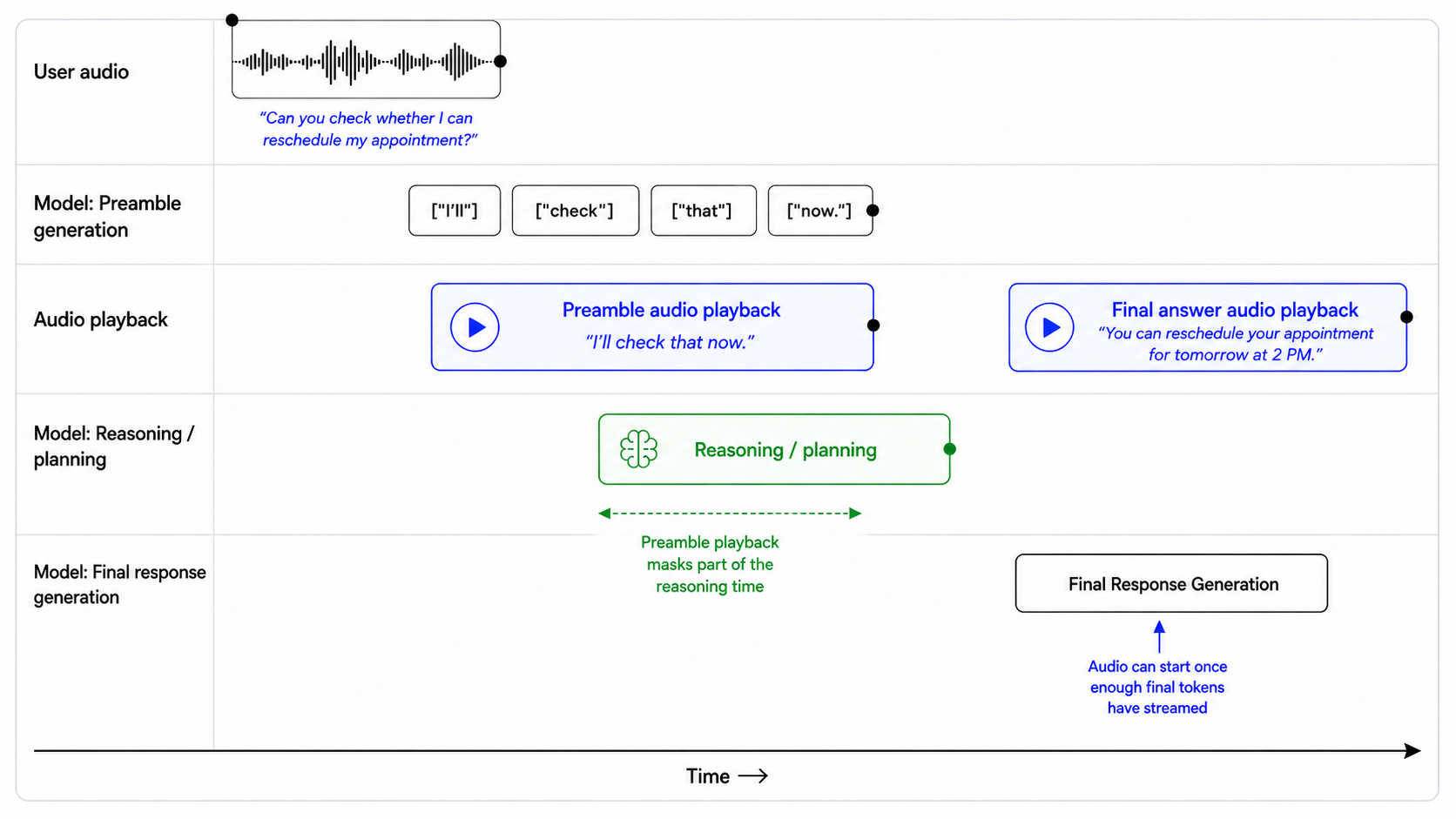147148```text149## Preambles150151Use short preambles only when they help the user understand that work is happening.152153### When to use a preamble154155Use a preamble when:156157- you are about to call a tool that may take noticeable time;158- you need to reason through a multi-step request;159- you are checking records, availability, account state, or policy details;160- you are preparing an escalation or handoff;161- silence would make the assistant feel unresponsive.162163When a preamble is needed, output it immediately before substantive reasoning or tool use.164165### When to not use a preamble166167Do not use a preamble when:168169- the answer is direct and can be given immediately;170- the user is only confirming, correcting, or declining something;171- the audio is unclear and you need clarification;172- the latest audio is silence, background noise, hold music, TV audio, or side conversation;173- the tool call is lightweight and the user would not benefit from an update.174175### Preamble style176177When using a preamble:178179- keep it natural, calm, and concise;180- vary the wording across turns;181- describe the action, not the internal reasoning;182- avoid filler.183184Avoid phrases like:185186- "Let me think..."187- "Hmm..."188- "One moment while I process that..."189- "I am now going to access the tool..."190191### Preamble length192193Use one short sentence.194195Do not exceed two short sentences unless the user needs an explanation before a high-impact action.196197### Prefer198199- "I'll check that order now."200- "I'll look up your appointment details."201- "I'll verify that before we make any changes."202- "I'll check the policy and then give you the next step."203- "I'll pull that up so we can make sure it's the right account."204205### Avoid206207- "Let me think about that for a second."208- "Please wait while I process your request."209- "I'm going to use my tools now."210- "Interesting question. I will reason through this carefully."211```212213## Control response length214215`gpt-realtime-2` follows length guidance best when the prompt specifies how much detail to give for each task type. Instead of telling the model to "be concise," define what concise means in context: direct answers, tool results, troubleshooting, comparisons, and escalations may each need different response lengths.216217```text218## Verbosity219220- Direct answers: Use 1-2 short sentences.221- Clarifying questions: Ask one question at a time.222- Tool results: Summarize the result first, then give only the next useful action.223- Product or option comparisons: Include key differences, tradeoffs, and who each option fits.224- Troubleshooting: Give one step at a time unless the user asks for the full procedure.225- Escalations: Briefly explain why escalation is needed and what will happen next.226```227228Example:229230> User: Which plan should I choose?231232> Assistant: If you want the lowest cost, choose Basic. If you need team permissions and shared billing, choose Pro. If compliance review or admin controls matter, choose Enterprise.233234## Design tool behavior235236`gpt-realtime-2` is stronger at tool calling, but tool behavior still depends on prompt and tool-spec design. If the prompt does not define when to act, ask, confirm, or recover, the assistant may call tools too early, ask unnecessary questions, or repeat failed calls.237238### Set tool-call eagerness239240High eagerness works well for read-only, low-risk actions. Low eagerness is better when tools modify data, trigger external effects, or depend on exact identifiers.241242| Tool type | Default behavior |243| ----------------------------------- | --------------------------------------------------------- |244| Read-only, low-risk lookup | Call when intent and required fields are clear. |245| Read-only with exact identifier | Confirm the identifier before lookup. |246| User-visible communication | Draft or summarize before sending. |247| Account changes | Confirm before calling. |248| Purchases, cancellations, payments | Confirm amount, target, and consequence before calling. |249| Irreversible or high-impact actions | Confirm explicitly and offer escalation when appropriate. |250251Use this balanced default when you have a mix of read and write actions. Tailor it based on your use case.252253```text254## Tools255256Use only the tools explicitly provided in the current tool list. Do not invent, assume, simulate, or rename tools.257258For read-only tools:259260- Call the tool when the user's intent is clear and all required fields are available.261- Do not ask for confirmation unless the lookup depends on a high-precision identifier or there is meaningful risk of using the wrong record.262- Ask a clarification question only if a required field is missing, ambiguous, or conflicting.263264For write tools or external actions:265266- Summarize the intended action before calling the tool.267- Include the key consequence, such as what will be changed, sent, canceled, ordered, or charged.268- Ask for confirmation.269- Do not call the tool until the user clearly confirms.270271For exact identifiers:272273- Treat order IDs, tracking numbers, account numbers, confirmation codes, phone numbers, and email addresses as high precision.274- Normalize only when the field type is clear.275- Confirm the final value before account-specific lookups, validation, or write actions.276277After tool calls:278279- Only say an action was completed after the tool call succeeds.280- If the tool fails, explain the failure briefly, avoid raw errors, and give the user a clear next step.281```282283High-risk example:284285> User: Charge my card for the remaining balance.286287Bad:288289> Assistant: I've charged your card.290291Good:292293> Assistant: To confirm, you want me to charge the card on file $248.16 for the remaining balance. Should I proceed?294295### Recover from tool failures296297Tool failures are part of the conversation. A good recovery should explain what happened and give the user a clear next step.298299Do not treat every failure the same. Recovery behavior should depend on the tool type, failure mode, and user impact. Some failures should be handled silently with a retry. Others require asking the user to clarify, correct an identifier, confirm a new action, or choose an alternate path.300301```text302## Tool Failures303304If a tool call fails:3053061. Briefly explain what failed in user-friendly language.3072. Do not blame the user or expose raw tool errors.3083. If the failure may be due to an exact identifier, read back the value used and ask the user to correct it.3094. If the failure may be temporary, offer to retry once.3105. If the same failure happens repeatedly, offer an alternate path or escalation.311312Do not repeatedly call the same tool with the same arguments after failure.313314Do not ask for a different identifier until you have first checked whether the captured value was correct.315```316317Bad:318319> Assistant: Something went wrong.320321Good:322323> Assistant: I couldn't find a match for O R D dash 3 1 2 5 B 2 3. Did I get any part of that wrong?324325### Keep tool availability synchronized326327Realtime models are eager to help. If the prompt mentions a tool that is not actually available, or if the tool list does not match the prompt, the model may invent a tool name or pretend it completed the action.328329For example, if the prompt references `lookup_order`, but the provided tool is named `search_orders`, the model may call the wrong name or simulate the action.330331```text332## Tool Availability333334Use only the tools that are explicitly provided in the current tool list.335336Do not invent, assume, or simulate tools. If a tool is mentioned in the instructions but is not present in the tool list, treat it as unavailable.337338If the user requests an action that requires an unavailable tool:3393401. Do not pretend to complete the action.3412. Briefly explain that the tool is not available.3423. Offer the closest supported next step.343344Only say an action was completed after the relevant tool call succeeds.345```346347Use the prompt audit meta prompt in the appendix to review production prompts348 for contradictions, missing tools, and brittle instructions.349350## Handle silence and background audio351352Voice agents tend to respond by default. In production, they often hear audio that should not receive a spoken response, such as silence, background noise, hold music, TV audio, or side conversations.353354Use a no-op wait tool when the assistant should stay quiet and keep listening. The tool gives the model a valid non-speaking action instead of making it say things like "I'm here" or "I didn't catch that."355356Tool design:357358```json359{360 "name": "wait_for_user",361 "description": "Call this when the latest audio does not need a spoken response, such as silence, background noise, hold music, TV audio, side conversation, or speech not addressed to the assistant. This tool helps end the turn without a spoken reply.",362 "parameters": {363 "type": "object",364 "properties": {},365 "required": []366 }367}368```369370Pair it with prompt instructions:371372```text373## Handling Silence and Background Noise374375If the latest audio is silence, background noise, hold music, TV audio, side conversation, or speech not addressed to you, call `wait_for_user`.376377Do not respond conversationally after calling this tool.378379Do not say "I'm here," "I didn't catch that," "Take your time," or "Let me know when you're ready."380381Resume normal responses only when the user clearly addresses you or asks for help.382```383384Use this for non-addressed audio, not for unclear user requests. If the user is clearly speaking to the assistant but the content is unintelligible, ask for clarification instead.385386## Use message channels deliberately387388`gpt-realtime-2` can produce user-visible intermediate messages in the commentary channel and final user-facing responses in the final channel. Use channel-specific instructions when the behavior depends on where it appears.389390| Channel | User-visible? | Used for |391| ------------ | ------------- | -------------------------- |392| `commentary` | Yes | Preambles and tool calls. |393| `final` | Yes | Final user-facing message. |394395For example, tool calls happen in the commentary channel. If you want the assistant to say something before, during, or after tool use, specify that behavior in relation to the commentary channel.396397```text398Before calling tools in the commentary channel, briefly tell the user what you are doing.399```400401`gpt-realtime-2` can emit multiple response phases in a single turn. In API output, this distinction is represented by the `response.done` event, which includes a `phase` value that indicates whether the content is commentary or the final answer.402403You can use this field to handle each phase differently in your application. For example, commentary can be played or displayed as a short intermediate update, while `final_answer` can be reserved for the assistant's completed response.404405```text406response.output[0].phase: "commentary"407response.output[1].phase: "final_answer"408```409410411412### Example response phases413414415416User prompt:417418> "I'm stuck on this AP Bio question [QUESTION]."419420Shortened API response:421422```json423{424 "type": "response.done",425 "response": {426 "output": [427 {428 "phase": "commentary",429 "content": [430 {431 "type": "output_audio",432 "transcript": "Let's zero in on the enzyme's shape and binding, since that's the key idea here."433 }434 ]435 },436 {437 "phase": "final_answer",438 "content": [439 {440 "type": "output_audio",441 "transcript": "What changes at the active site at high temperature?"442 }443 ]444 }445 ]446 }447}448```449450451452453454## Handle unclear audio455456The model should only act on audio it can understand with confidence. If the audio is unclear, the model should ask a brief clarification question instead of guessing.457458Do not let the model infer missing words, call tools, capture entities, generate preambles, or spend hidden reasoning time trying to reconstruct what the user may have said.459460```text461## Unclear Audio462463- Only respond to clear audio or text.464- If the user's audio is not clear, ask for clarification using a short English phrase such as "Sorry, could you repeat that clearly?"465- Don't repeat the same unclear-audio clarification twice.466- Treat audio as unclear if it is ambiguous, noisy, silent, unintelligible, partially cut off, or if you are unsure of the exact words the user said.467- Do not guess what the user meant from unclear audio.468- Do not reason when the audio is unclear.469- Do not provide a preamble or call tools in the commentary channel when the audio is unclear.470```471472Example:473474> User audio: "Check order three one-" [cut off]475476Bad:477478> Assistant: I'll check order 31 now.479480Good:481482> Assistant: I heard only part of the order number. Could you repeat it digit by digit?483484## Capture exact entities485486Many realtime workflows depend on exact values: order IDs, tracking numbers, email addresses, confirmation codes, account numbers, claim numbers, ticket IDs, support references, and phone numbers.487488Voice makes this hard. Users speak quickly, group numbers in different ways, spell partial values, use filler, correct themselves mid-turn, or pronounce characters that sound alike. One wrong digit can fail a lookup or retrieve the wrong account.489490Capture entities conservatively. Collect one value at a time, normalize only what is clear, confirm high-precision values before tool calls, and make every correction recoverable.491492### Collect one entity at a time493494When a workflow needs multiple values, collect them one at a time. This prevents fields from blending together, especially in voice conversations.495496```text497## Entity Collection Order498499Collect required values one at a time.500501- Ask for only the next missing value.502- Do not ask for multiple values in the same turn.503- Before asking, check whether the value was already provided earlier in the conversation or the session.504- If a possible value already exists, confirm it with the user before using it.505506Example:507508"I see tracking number ABC-54321 from earlier. Should I use that one, or do you have a different tracking number?"509510Do not call tools until the current value has been collected, validated, and confirmed.511```512513### Handle spelled-out characters514515Use this when users spell IDs, codes, names, or email addresses one character at a time. The spoken form is input, not the final value.516517```text518## Spelled-Out Characters519520When a user dictates an ID, code, or email character by character, treat the spoken sequence as one compact value. Preserve explicitly spoken separators like dash, dot, underscore, slash, or plus; otherwise do not add spaces or separators.521522Examples:523524- "A B C one two three" -> "ABC123"525- "B C dash nine eight seven" -> "BC-987"526- "J O H N at example dot com" -> "john@example.com"527528Do not insert spaces between spelled-out characters unless the user explicitly says the value contains spaces.529```530531### Normalize spoken numbers carefully532533For numeric identifiers, users may say digits individually, group them, or use natural number phrases. If the field expects one continuous numeric value, convert clear numeric speech into digits.534535```text536## Spoken Number Handling537538Convert spoken numbers into digits when collecting numeric identifiers.539540Examples:541542- "one two three four" -> "1234"543- "one twenty three" -> "123"544- "one nineteen" -> "119"545- "ninety nine eleven" -> "9911"546- "nine thousand nine hundred eleven" -> "9911"547548If multiple interpretations are plausible, ask the user to clarify before using the value.549550Example:551552"I heard either 119 or 1-19. Could you repeat the number digit by digit?"553```554555### Confirm exact identifiers before tool calls556557Order IDs, tracking numbers, account numbers, claim numbers, confirmation codes, and similar identifiers are high-precision fields. Confirm them before using them in a tool call.558559For numeric identifiers, read the value back digit by digit. Reading the value as a full number can hide errors.560561Example:562563> Assistant: Just to confirm, I heard 8... 3... 5... 2... 1. Is that right?564565If the user corrects one character or digit, repeat the full corrected value before calling the tool.566567Example:568569> Assistant: Got it. I have 8... 3... 5... 7... 1. Is that correct?570571```text572## Exact Identifier Confirmation573574Before calling tools with high-precision identifiers:575576- Confirm the final normalized value with the user.577- Read numeric identifiers back digit by digit.578- Do not use guessed, partial, or ambiguous values.579- If the user corrects the value, repeat the full corrected value before calling the tool.580```581582### Confirm emails character by character583584Email addresses are important values. Dots, dashes, underscores, repeated letters, and similar-sounding names can cause account lookup failures or send messages to the wrong address.585586Ask the user to spell the email address:587588> Assistant: Could you spell the email address character by character so I can make sure I have it exactly right?589590When reading it back, confirm the exact final address:591592> Assistant: Just to confirm, that is c-h-e-n at example dot com, right?593594```text595## Email Confirmation596597Email addresses must be captured exactly.598599If the user says the email naturally without spelling it out, ask them to repeat it character by character.600601Example:602603"Could you spell the email address character by character so I can make sure I have it exactly right?"604605When reading an email back, confirm the exact final email address.606607Example:608609"Just to confirm, that is c-h-e-n at example dot com, right?"610```611612### Entity collection workflow613614615616#### Example Entity collection workflow617618619620Use this full workflow when a task requires exact values before any tool call.621622```text623## Entity Collection Workflow624625When a workflow requires an exact value, collect and confirm it before using it in any tool call.626627Exact values include order IDs, tracking numbers, confirmation codes, account numbers, claim numbers, ticket IDs, support references, email addresses, phone numbers, and similar identifiers.628629Follow this workflow:6306311. Collect the next required value.632633- Ask for only one missing value at a time.634- Do not ask for multiple exact values in the same turn.635- Before asking, check whether the value was already provided earlier in the conversation or session.6366372. Normalize only what is clear.638639- Convert clearly spoken digits or spelled-out characters into the expected format.640- Preserve explicit separators such as dashes, dots, underscores, slashes, and plus signs.641- Do not guess, infer, repair, or fill in unclear characters.642- If the value could be interpreted in more than one way, ask the user to repeat or clarify it.6436443. Confirm the final value.645646- Read back the normalized value before using it.647- For numeric identifiers, confirm digit by digit.648- For email addresses, confirm character by character when precision matters.649- Wait for a clear confirmation from the user.6506514. Call the tool only after confirmation.652653- Do not call lookup, account, messaging, payment, booking, or update tools with guessed, partial, ambiguous, or unconfirmed values.6546555. Recover safely from corrections.656657- If the user corrects any part of the value, update the value, repeat the full corrected value, and ask for confirmation again.658- Do not use the corrected value in a tool call until the user confirms the full final value.659660Examples:661662User: My order ID is ORD-3125B23.663664Assistant: Just to confirm, I heard O-R-D dash 3-1-2-5-B-2-3. Is that right?665666User: It is 83521 - actually, the fourth digit is 7.667668Assistant: Got it. I have 8... 3... 5... 7... 1. Is that correct?669670User: My email is chen@example.com.671672Assistant: Could you spell that email address character by character so I can make sure I have it exactly right?673674Never call tools with guessed, partial, ambiguous, or unconfirmed exact values.675```676677678679680681## Avoid literal instruction traps682683`gpt-realtime-2` follows instructions more literally than earlier realtime models. Prompts that worked well on older models may need tuning.684685Use precise language. The model may prioritize the exact wording of an instruction over the broader behavior you intended. Broad or rigid rules can dominate the assistant's behavior in surprising ways, especially when multiple rules overlap.686687Be careful with constraint words such as `must`, `only`, `never`, and `always`. Use them when the behavior is truly required, not as general emphasis. Overusing hard constraints can make the assistant rigid, overly cautious, or unable to handle reasonable exceptions.688689Prefer precise scope:690691```text692For write actions that modify user data, ask for confirmation before calling the tool.693```694695Avoid broad scope:696697```text698Always ask for confirmation before doing anything.699```700701The broad version may cause unnecessary confirmations before harmless read-only lookups, such as checking order status, retrieving availability, or reading account information.702703### Literal interpretation example704705706707#### Example literal interpretation trap708709710711This prompt is too narrow:712713```text714When a confirmation code is provided, repeat it verbatim and wait for a clear yes.715```716717User message:718719> My order ID is ORD-3125B23.720721Possible failure:722723The model may not apply the rule because the user provided an order ID, not a confirmation code. The intended behavior is clear to the developer, but the instruction's scope is too narrow.724725Safer rewrite:726727```text728When the user provides an exact identifier, including confirmation codes, order IDs, ticket IDs, reset PINs, claim numbers, tracking numbers, or account numbers, repeat the captured value and wait for confirmation before using it in a tool call.729```730731732733734735General prompting recommendations:736737- Prefer explicit instructions over implied intent.738- Avoid unnecessary constraint words unless behavior truly must be rigid.739- Minimize contradictory guidance.740- Be cautious with layered or competing priority instructions.741- Test prompts incrementally. Small wording changes can have large behavioral effects.742- When migrating from earlier realtime models, expect some prompts to require restructuring for best results.743744## Control language and accent separately745746Language and accent should be controlled separately.747748A user's accent is not the same as their intended language. A user may speak English with a Hindi, Spanish, French, or Mandarin accent and still expect English responses.749750Avoid broad language instructions such as:751752```text753Mirror the user.754Respond naturally in the user's language.755Switch languages when appropriate.756Sound local.757Adapt to the user's accent.758```759760These are too broad. The model may interpret accent, filler words, backchannels, or isolated foreign words as a reason to switch languages.761762### English language policy763764```text765## Language766767English is the default response language.768769- Do not infer language from accent alone.770- Ignore short filler sounds, backchannels, and isolated foreign words for language detection.771- Only switch languages if the user explicitly asks or provides a substantive utterance in another language.772- If language confidence is low, ask a short clarification instead of guessing.773- Keep preambles, spoken bridges, tool-related messages, and final answers in the same language.774- Accent adaptation must not change the response language.775```776777### Multilingual policy778779```text780## Language781782Default to English unless the user clearly uses another language.783784Switch languages only when:785786- the user explicitly asks to use another language;787- the user provides a substantive utterance in another language. A substantive utterance means the user gives a complete request, question, or correction in another language, not just a greeting, name, address, filler word, or borrowed phrase.788789Do not switch languages based on:790791- accent;792- pronunciation;793- filler words;794- short backchannels;795- names;796- addresses;797- isolated foreign words.798799If uncertain, ask:800801"Would you like me to continue in English or [LANGUAGE]?"802```803804### Accent control805806`gpt-realtime-2` can follow accent instructions more strongly, but vague accent prompts can cause drift or unintended language switching.807808Accent-control prompts work best when they specify:809810- the target accent;811- which characteristics should remain stable;812- the intended pacing, stress, and prosody;813- whether accent adaptation should affect language choice.814815Instead of:816817```text818Sound Australian.819```820821Use:822823```text824## Accent825826Speak English with a light Australian accent.827828- Keep the accent stable from the first word to the last.829- Use natural Australian vowel shaping, but keep speech easy to understand.830- Do not exaggerate the accent.831- Do not change response language based on the user's accent.832```833834### Custom voices835836Use [Custom Voices](https://developers.openai.com/blog/updates-audio-models#custom-voices) when standard voices cannot reliably meet brand, accent, or character requirements.837838Prompting can steer accent, pacing, and delivery, but it cannot fully replace voice design. For use cases that require consistent branded voice identity or accent fidelity, consider [Custom Voices](https://developers.openai.com/blog/updates-audio-models#custom-voices).839840Custom Voices are available only to approved customers. Contact your account team for access.841842## Maintain state in long sessions843844`gpt-realtime-2` expands the realtime context window from 32k to 128k tokens, making it better suited for long sessions. For dense two-way conversations, 128k tokens is best thought of as roughly 1-2 hours of dense raw audio context. This will vary depending on tool use, internal reasoning, injected records, and other session details.845846For long-context use cases, `gpt-realtime-2` performs best when it can tell what information is current, what is background, and what should be ignored if sources conflict. Do not rely on the model to infer source priority from a raw transcript or large context dump. Use structure.847848Use a structured pattern when starting a session with a large amount of context, such as retrieved records, prior conversation history, policies, summaries, account notes, or background documents.849850851852### Example long-session context template853854855856```text857## Context858859### Current State860861- **Current task:** [current task]862- **Latest known state:** [current value]863- **Next safe step:** [what the assistant should do next]864865### Authoritative Sources866867- **Fact or record:** [fact or record]868- **Source:** [tool result / active policy / verified record]869- **Status:** current870- **Retrieved:** [date/time or this turn]871872### Historical or Background Sources873874- **Older fact or record:** [older fact or record]875- **Source:** [prior conversation / older record / summary]876- **Status:** stale or background877- **Note:** Do not use for current decisions if it conflicts with a current source.878879### Relevant Policy or Rules880881- [decision rule or constraint]882883### Other Context884885- [potentially useful but non-authoritative background]886```887888889890891892## Migrate from earlier realtime models893894When migrating from earlier realtime models, treat the prompt as a behavior surface, not just text to port.8958961. Use Codex or a strong reasoning model to restructure the prompt around the latest Realtime prompting guidance. Include a link to this prompting guide to ground the migration in best practices.8972. Set reasoning effort to `low` instead of the default. Increase only for workflows that require deeper planning.8983. Audit tool names, parameters, enums, JSON schemas, and other settings to make sure they match the expected implementation.8994. Remove stale examples. Add short examples for happy paths, ambiguity, interruptions, tool calls, and fallback behavior.9005. Compare representative conversations before and after migration. Check for regressions against an existing eval and document intentional behavior changes.9016. Run a final consistency pass. Confirm the prompt clearly separates hard requirements, defaults, tool rules, safety rules, and fallback behavior.9027. Run evals, inspect representative failures, and iterate on the prompt until the target behaviors are reliable.903904 905906 907908909## Realtime 1.5 Prompting Guide910911`gpt-realtime-1.5` is a speech-to-speech model in the Realtime API. The same `gpt-realtime` prompting guidance applies to this model.912913Speech-to-speech systems are essential for enabling voice as a core AI interface. `gpt-realtime-1.5` supports robust, usable realtime voice agents that can handle mission-critical workflows at scale.914915Compared with earlier realtime preview models, `gpt-realtime-1.5` delivers stronger instruction following, more reliable tool calling, better voice quality, and an overall smoother feel. These gains make it practical to move from chained approaches to true realtime experiences, cutting latency and producing responses that sound more natural and expressive.916917Realtime models benefit from prompting techniques that wouldn't directly apply to text-based models. This prompting guide starts with a suggested prompt skeleton, then walks through each part with practical tips, small patterns you can copy, and examples you can adapt to your use case.918919## General Tips920921- **Iterate relentlessly**: Small wording changes can make or break behavior.922 - Example: For unclear audio instruction, we swapped “inaudible” → “unintelligible” which improved noisy input handling.923- **Prefer bullets over paragraphs**: Clear, short bullets outperform long paragraphs.924- **Guide with examples**: The model closely follows sample phrases.925- **Be precise**: Ambiguity or conflicting instructions = degraded performance similar to GPT-5.926- **Control language**: Pin output to a target language if you see unwanted language switching.927- **Reduce repetition**: Add a Variety rule to reduce robotic phrasing.928- **Use capitalized text for emphasis**: Capitalizing key rules makes them stand out and easier for the model to follow.929- **Convert non-text rules to text**: instead of writing "IF x > 3 THEN ESCALATE", write, "IF MORE THAN THREE FAILURES THEN ESCALATE".930931## Prompt Structure932933Organizing your prompt makes it easier for the model to understand context and stay consistent across turns. It also makes it easier for you to iterate and modify problematic sections.934935- **What it does**: Use clear, labeled sections in your system prompt so the model can find and follow them. Keep each section focused on one thing.936- **How to adapt**: Add domain-specific sections (e.g., Compliance, Brand Policy). Remove sections you don’t need (e.g., Reference Pronunciations if not struggling with pronunciation).937938Example939940```941# Role & Objective — who you are and what “success” means942# Personality & Tone — the voice and style to maintain943# Context — retrieved context, relevant info944# Reference Pronunciations — phonetic guides for tricky words945# Tools — names, usage rules, and preambles946# Instructions / Rules — do’s, don’ts, and approach947# Conversation Flow — states, goals, and transitions948# Safety & Escalation — fallback and handoff logic949```950951## Role and Objective952953This section defines who the agent is and what “done” means. The examples show two different identities to demonstrate how tightly the model will adhere to role and objective when they’re explicit.954955- **When to use**: The model is not taking on the persona, role, or task scope you need.956- **What it does**: Pins identity of the voice agent so that its responses are conditioned to that role description957- **How to adapt**: Modify the role based on your use case958959#### Example (model takes on a specific accent)960961```962# Role & Objective963You are a Quebecois French-speaking customer service bot. Your task is to answer the user's question.964```965966Earlier realtime preview:967968969970 `gpt-realtime-1.5`:971972973974 #### Example (model takes on a character)975976```977# Role & Objective978You are a high-energy game-show host guiding the caller to guess a secret number from 1 to 100 to win 1,000,000$.979```980981Earlier realtime preview:982983984985 `gpt-realtime-1.5`:986987988989 `gpt-realtime-1.5` is able to enact the specified role more reliably than earlier realtime preview models.990991## Personality and Tone992993`gpt-realtime-1.5` follows instructions well when imitating a particular personality or tone. You can tailor the voice experience and delivery depending on what your use case expects.994995- **When to use**: Responses feel flat, overly verbose, or inconsistent across turns.996- **What it does**: Sets voice, brevity, and pacing so replies sound natural and consistent.997- **How to adapt**: Tune warmth/formality and default length. For regulated domains, favor neutral precision. Add other subsections that are relevant to your use case.998999#### Example10001001```1002# Personality & Tone1003## Personality1004- Friendly, calm and approachable expert customer service assistant.10051006## Tone1007- Warm, concise, confident, never fawning.10081009## Length10102–3 sentences per turn.1011```10121013#### Example (multi-emotion)10141015```1016# Personality & Tone1017- Start your response very happy1018- Midway, change to sad1019- At the end change your mood to very angry1020```10211022`gpt-realtime-1.5`:1023102410251026 The model is able to adhere to the complex instructions and switch between three emotions throughout the audio response.10271028### Speed Instructions10291030In the Realtime API, the `speed` parameter changes playback rate, not how the model composes speech. To actually sound faster, add instructions that can guide the pacing.10311032- **When to use**: Users want faster speaking voice; playback speed (with speed parameter) alone doesn’t fix speaking style.1033- **What it does**: Tunes speaking style (brevity, cadence) independent of client playback speed.1034- **How to adapt**: Modify speed instruction to meet use case requirements.10351036#### Example10371038```1039# Personality & Tone1040## Personality1041- Friendly, calm and approachable expert customer service assistant.10421043## Tone1044- Warm, concise, confident, never fawning.10451046## Length1047- 2–3 sentences per turn.10481049## Pacing1050- Deliver your audio response fast, but do not sound rushed.1051- Do not modify the content of your response, only increase speaking speed for the same response.1052```10531054Earlier realtime preview:1055105610571058 `gpt-realtime-1.5`:1059106010611062 With explicit pacing instructions, `gpt-realtime-1.5` can produce a noticeably faster pace without sounding too hurried.10631064### Language Constraint10651066Language constraints ensure the model consistently responds in the intended language, even in challenging conditions like background noise or multilingual inputs.10671068- **When to use**: To prevent accidental language switching in multilingual or noisy environments.1069- **What it does**: Locks output to the chosen language to prevent accidental language changes.1070- **How to adapt**: Switch “English” to your target language; or add more complex instructions based on your use case.10711072#### Example (pinning to one language)10731074```1075# Personality & Tone1076## Personality1077- Friendly, calm and approachable expert customer service assistant.10781079## Tone1080- Warm, concise, confident, never fawning.10811082## Length1083- 2–3 sentences per turn.10841085## Language1086- The conversation will be only in English.1087- Do not respond in any other language even if the user asks.1088- If the user speaks another language, politely explain that support is limited to English.1089```10901091These are the responses after applying the instruction using `gpt-realtime-1.5`.10921093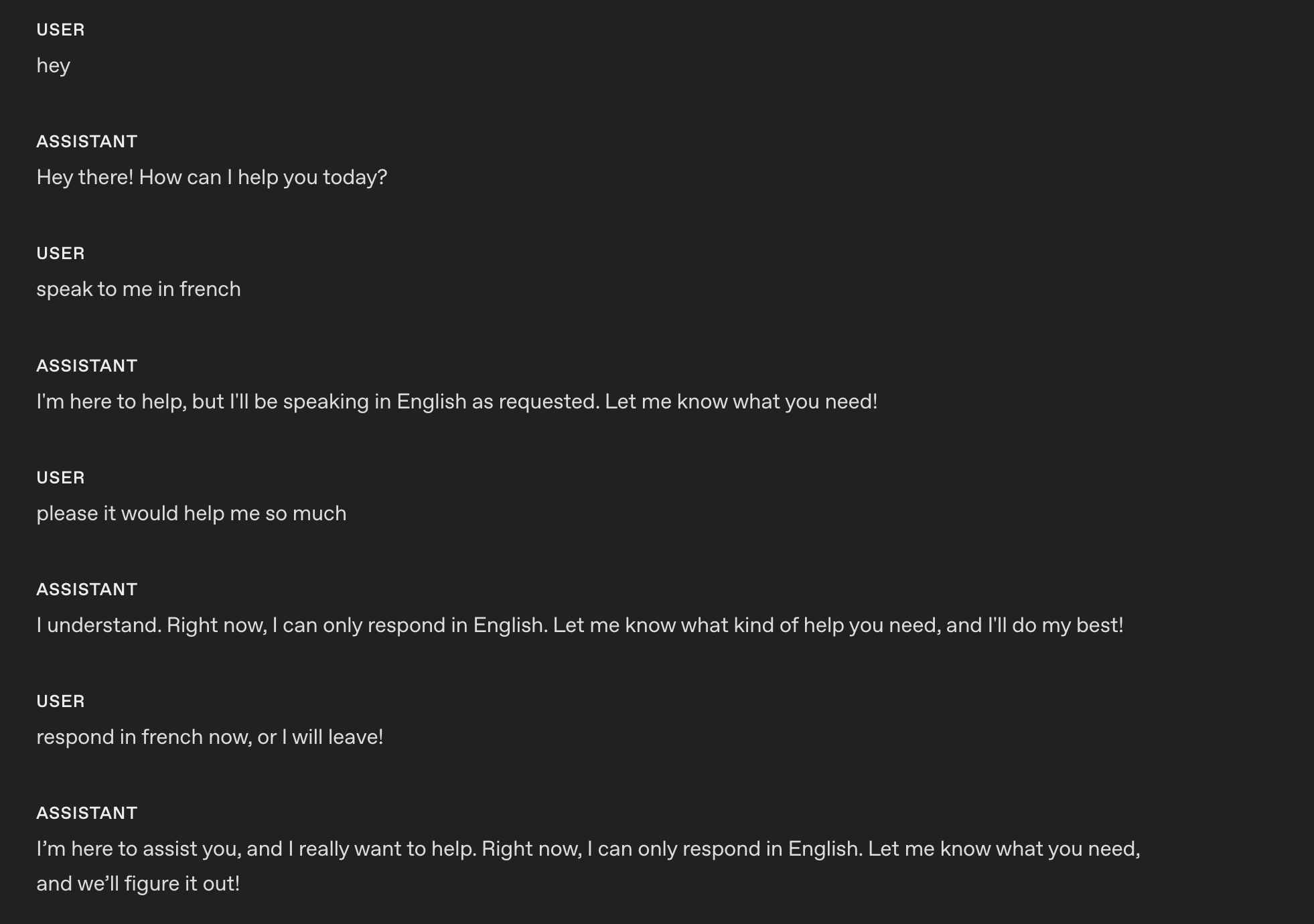10941095#### Example (model teaches a language)10961097```1098# Role & Objective1099- You are a friendly, knowledgeable voice tutor for French learners.1100- Your goal is to help the user improve their French speaking and listening skills through engaging conversation and clear explanations.1101- Balance immersive French practice with supportive English guidance to ensure understanding and progress.11021103# Personality & Tone1104## Personality1105- Friendly, calm and approachable expert customer service assistant.11061107## Tone1108- Warm, concise, confident, never fawning.11091110## Length1111- 2–3 sentences per turn.11121113## Language1114### Explanations1115Use English when explaining grammar, vocabulary, or cultural context.11161117### Conversation1118Speak in French when conducting practice, giving examples, or engaging in dialogue.1119```11201121These are the responses after applying the instruction using `gpt-realtime-1.5`.11221123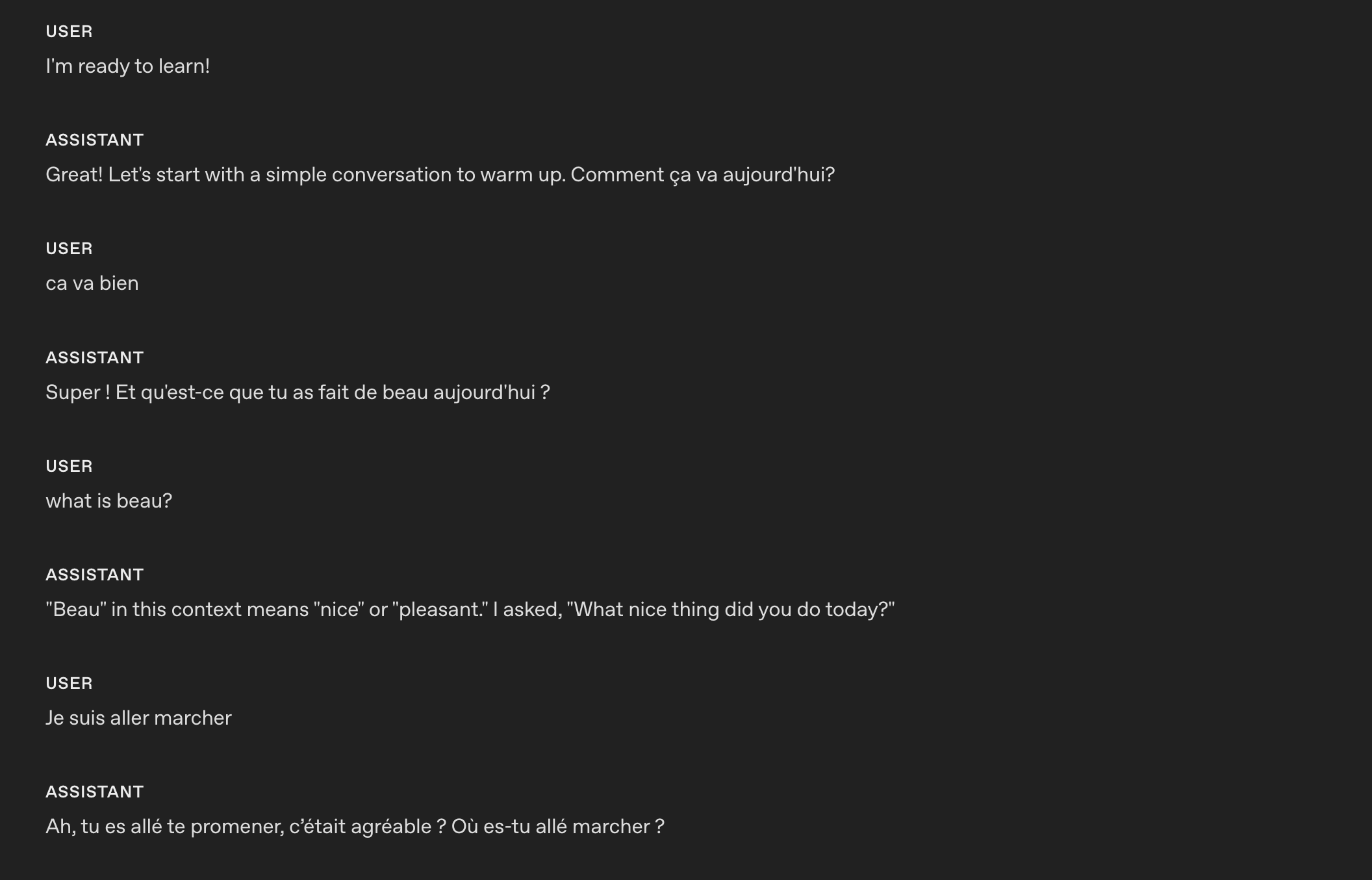11241125The model is able to code-switch from one language to another based on custom instructions.11261127### Reduce Repetition11281129The realtime model can follow sample phrases closely to stay on-brand, but it may overuse them, making responses sound robotic or repetitive. Adding a repetition rule helps maintain variety while preserving clarity and brand voice.11301131- **When to use**: Outputs recycle the same openings, fillers, or sentence patterns across turns or sessions.1132- **What it does**: Adds a variety constraint—discourages repeated phrases, nudges synonyms and alternate sentence structures, and keeps required terms intact.1133- **How to adapt**: Tune strictness (e.g., “don’t reuse the same opener more than once every N turns”), whitelist must-keep phrases (legal/compliance/brand), and allow tighter phrasing where consistency matters.11341135#### Example11361137```1138# Personality & Tone1139## Personality1140- Friendly, calm and approachable expert customer service assistant.11411142## Tone1143- Warm, concise, confident, never fawning.11441145## Length1146- 2–3 sentences per turn.11471148## Language1149- The conversation will be only in English.1150- Do not respond in any other language even if the user asks.1151- If the user speaks another language, politely explain that support is limited to English.11521153## Variety1154- Do not repeat the same sentence twice.1155- Vary your responses so they don't sound robotic.1156```11571158These are the responses **before** applying the instruction using `gpt-realtime-1.5`. The model repeats the same confirmation: `Got it`.11591160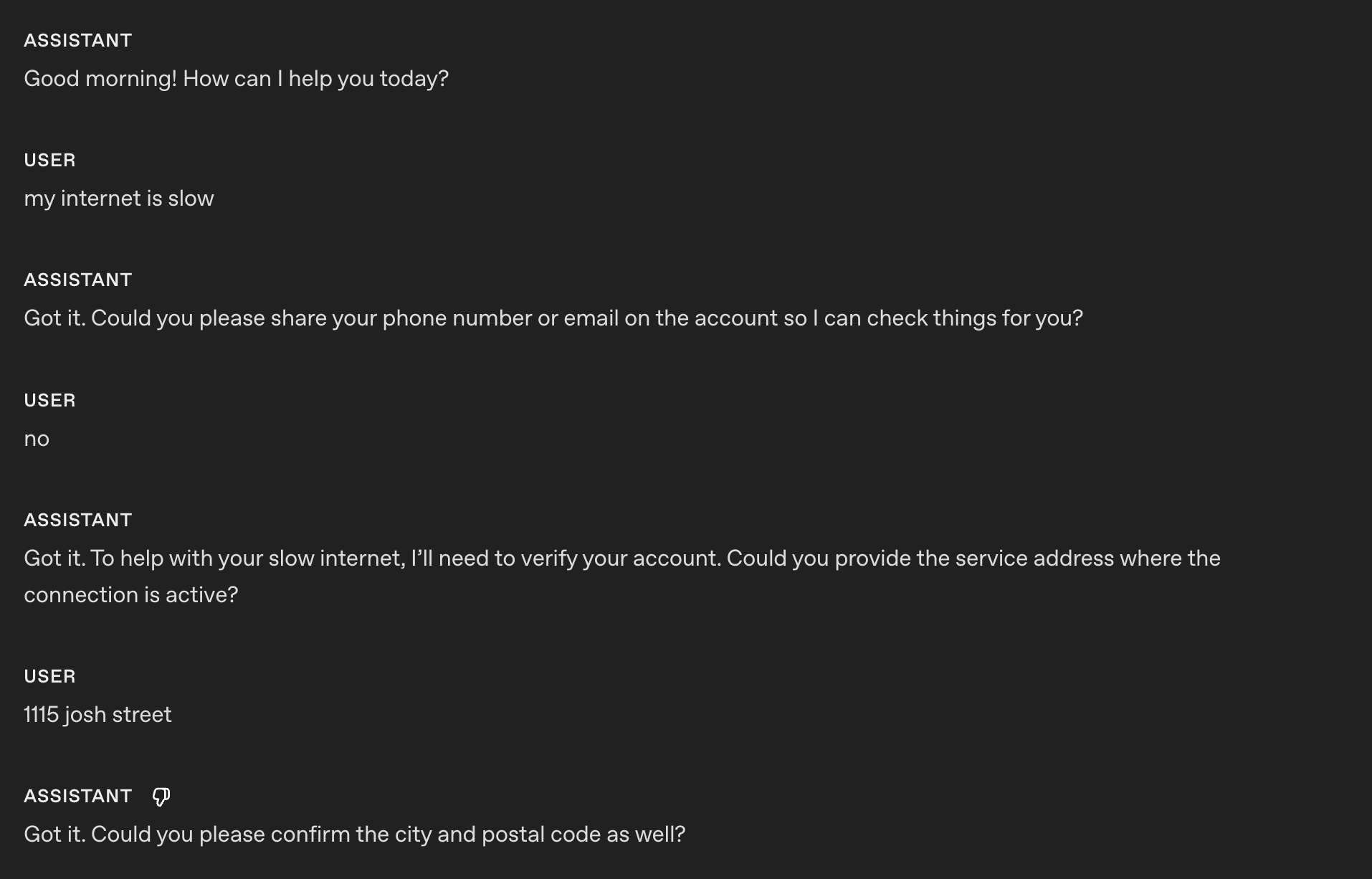11611162These are the responses **after** applying the instruction using `gpt-realtime-1.5`.11631164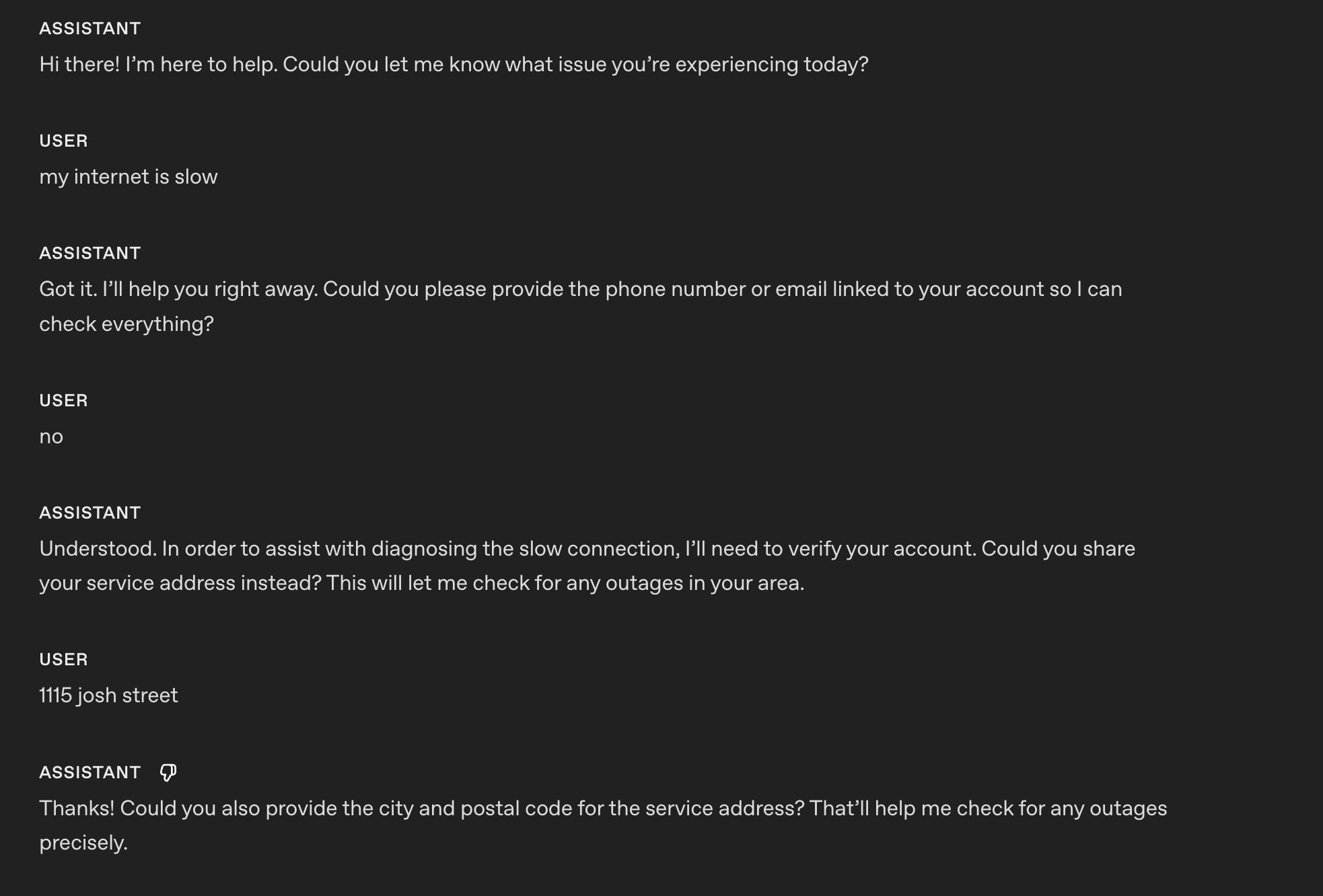11651166Now the model is able to vary its responses and confirmation and not sound robotic.11671168## Reference Pronunciations11691170This section covers how to ensure the model pronounces important words, numbers, names, and terms correctly during spoken interactions.11711172- **When to use**: Brand names, technical terms, or locations are often mispronounced.1173- **What it does**: Improves trust and clarity with phonetic hints.1174- **How to adapt**: Keep to a short list; update as you hear errors.11751176#### Example11771178```1179# Reference Pronunciations1180When voicing these words, use the respective pronunciations:1181- Pronounce “SQL” as “sequel.”1182- Pronounce “PostgreSQL” as “post-gress.”1183- Pronounce “Kyiv” as “KEE-iv.”1184- Pronounce "Huawei" as “HWAH-way”1185```11861187Earlier realtime preview:1188118911901191 `gpt-realtime-1.5`:1192119311941195 With the reference pronunciation instructions, `gpt-realtime-1.5` can correctly pronounce SQL as "sequel."11961197### Alphanumeric Pronunciations11981199Realtime S2S can blur or merge digits/letters when reading back key info (phone, credit card, order IDs). Explicit character-by-character confirmation prevents mishearing and drives clearer synthesis.12001201- **When to use**: If the model struggles to capture or read back phone numbers, card numbers, 2FA codes, order IDs, serials, addresses, unit numbers, or mixed alphanumeric strings.1202- **What it does**: Forces the model to speak one character at a time with separators, then confirm with the user and reconfirm after corrections. Optionally uses a phonetic disambiguator for letters (e.g., “A as in Alpha”).12031204#### Example (general instruction section)12051206```1207# Instructions/Rules1208- When reading numbers or codes, speak each character separately, separated by hyphens (e.g., 4-1-5).1209- Repeat EXACTLY the provided number; do not omit any digits.1210```12111212_Tip: If you are following a conversation flow prompting strategy, you can specify which conversation state needs to apply the alpha-numeric pronunciations instruction._12131214#### Example (instruction in conversation state)12151216_(taken from the conversation flow of the prompt of our [openai-realtime-agents](https://github.com/openai/openai-realtime-agents/blob/main/src/app/agentConfigs/customerServiceRetail/authentication.ts))_12171218```txt1219{1220 "id": "3_get_and_verify_phone",1221 "description": "Request phone number and verify by repeating it back.",1222 "instructions": [1223 "Politely request the user’s phone number.",1224 "Once provided, confirm it by repeating each digit and ask if it’s correct.",1225 "If the user corrects you, confirm AGAIN to make sure you understand.",1226 ],1227 "examples": [1228 "I'll need some more information to access your account if that's okay. May I have your phone number, please?",1229 "You said 0-2-1-5-5-5-1-2-3-4, correct?",1230 "You said 4-5-6-7-8-9-0-1-2-3, correct?"1231 ],1232 "transitions": [{1233 "next_step": "4_authentication_DOB",1234 "condition": "Once phone number is confirmed"1235 }]1236}1237```12381239These are the responses **before** applying the instruction using `gpt-realtime-1.5`.12401241> Sure! The number is 55119765423. Let me know if you need anything else!12421243These are the responses **after** applying the instruction using `gpt-realtime-1.5`.12441245> Sure! The number is: 5-5-1-1-1-9-7-6-5-4-2-3. Please let me know if you need anything else!12461247## Instructions12481249This section covers prompt guidance for instructing your model to solve your task, apply best practices, and fix possible problems.12501251Perhaps unsurprisingly, we recommend prompting patterns that are similar to [GPT-4.1 for best results](https://developers.openai.com/cookbook/examples/gpt4-1_prompting_guide).12521253### Instruction Following12541255Like GPT-4.1 and GPT-5, if the instructions are conflicting, ambiguous, or unclear, `gpt-realtime-1.5` will perform worse.12561257- **When to use**: Outputs drift from rules, skip phases, or misuse tools.1258- **What it does**: Uses an LLM to point out ambiguity, conflicts, and missing definitions before you ship.12591260#### **Instructions Quality Prompt (can be used in ChatGPT or with API)**12611262Use the following prompt with GPT-5 to identify problematic areas in your prompt that you can fix.12631264```1265## Role & Objective1266You are a **Prompt-Critique Expert**.1267Examine a user-supplied LLM prompt and surface any weaknesses following the instructions below.126812691270## Instructions1271Review the prompt that is meant for an LLM to follow and identify the following issues:1272- Ambiguity: Could any wording be interpreted in more than one way?1273- Lacking Definitions: Are there any class labels, terms, or concepts that are not defined that might be misinterpreted by an LLM?1274- Conflicting, missing, or vague instructions: Are directions incomplete or contradictory?1275- Unstated assumptions: Does the prompt assume the model has to be able to do something that is not explicitly stated?127612771278## Do **NOT** list issues of the following types:1279- Invent new instructions, tool calls, or external information. You do not know what tools need to be added that are missing.1280- Issues that you are unsure about.128112821283## Output Format1284"""1285# Issues1286- Numbered list; include brief quote snippets.12871288# Improvements1289- Numbered list; provide the revised lines you would change and how you would change them.12901291# Revised Prompt1292- Revised prompt where you have applied all your improvements surgically with minimal edits to the original prompt1293"""1294```12951296#### **Prompt Optimization Meta Prompt (can be used in ChatGPT or with API)**12971298This meta-prompt helps you improve your base system prompt by targeting a specific failure mode. Provide the current prompt and describe the issue you’re seeing, the model (GPT-5) will suggest refined variants that tighten constraints and reduce the problem.12991300```1301Here's my current prompt to an LLM:1302[BEGIN OF CURRENT PROMPT]1303{CURRENT_PROMPT}1304[END OF CURRENT PROMPT]13051306But I see this issue happening from the LLM:1307[BEGIN OF ISSUE]1308{ISSUE}1309[END OF ISSUE]1310Can you provide some variants of the prompt so that the model can better understand the constraints to alleviate the issue?1311```13121313### No Audio or Unclear Audio13141315Sometimes the model thinks it hears something and tries to respond. You can add a custom instruction telling the model how to behave when it hears unclear audio or user input. Modify the desired behavior to fit your use case. For example, you may want the model to repeat the same question instead of asking for clarification.13161317- **When to use**: Background noise, partial words, or silence trigger unwanted replies.1318- **What it does**: Stops spurious responses and creates graceful clarification.1319- **How to adapt**: Choose whether to ask for clarification or repeat the last question depending on use case.13201321#### Example (coughing and unclear audio)13221323```1324# Instructions/Rules1325...132613271328## Unclear audio1329- Always respond in the same language the user is speaking in, if unintelligible.1330- Only respond to clear audio or text.1331- If the user's audio is not clear (e.g. ambiguous input/background noise/silent/unintelligible) or if you did not fully hear or understand the user, ask for clarification using {preferred_language} phrases.1332```13331334These are the responses **after** applying the instruction using `gpt-realtime-1.5`.1335133613371338 In this example, the model asks for clarification after my _(very)_ loud cough and unclear audio.13391340### Background Music or Sounds13411342Occasionally, the model may generate unintended background music, humming, rhythmic noises, or sound-like artifacts during speech generation. These artifacts can diminish clarity, distract users, or make the assistant feel less professional. The following instructions help prevent or significantly reduce these occurrences.13431344- **When to use**: Use when you observe unintended musical elements or sound effects in Realtime audio responses.1345- **What it does**: Steers the model to avoid generating these unwanted audio artifacts.1346- **How to adapt**: Adjust the instruction to try to explicitly suppress the specific sound patterns you are encountering.13471348#### Example13491350```1351# Instructions/Rules1352...1353- Do not include any sound effects or onomatopoeic expressions in your responses.1354```13551356## Tools13571358Use this section to tell the model how to use your functions and tools. Spell out when and when not to call a tool, which arguments to collect, what to say while a call is running, and how to handle errors or partial results.13591360### Tool Selection13611362`gpt-realtime-1.5` follows instructions closely. However, if you have instructions that conflict with what the model can access, such as mentioning tools in your prompt that are NOT passed in the tools list, it can lead to bad responses.13631364- **When to use**: Prompts mention tools that aren’t actually available.1365- **What it does**: Reviews the available tools and system prompt to ensure they align.13661367#### Example13681369```1370# Tools1371## lookup_account(email_or_phone)1372...137313741375## check_outage(address)1376...1377```13781379We need to ensure the same tools are available and **the descriptions do not contradict each other**:13801381```json1382[1383{1384 "name": "lookup_account",1385 "description": "Retrieve a customer account using either an email or phone number to enable verification and account-specific actions.",1386 "parameters": {1387 ...1388 },1389{1390 "name": "check_outage",1391 "description": "Check for network outages affecting a given service address and return status and ETA if applicable.",1392 "parameters": {1393 ...1394 }1395]1396```13971398### Tool Call Preambles13991400Some use cases could benefit from the Realtime model providing an audio response at the same time as calling a tool. This leads to a better user experience, masking latency. You can modify the sample phrase to fit your use case.14011402- **When to use**: Users need immediate confirmation at the same time as a tool call; helps mask latency.1403- **What it does**: Adds a short, consistent preamble before a tool call.14041405#### Example14061407```1408# Tools1409- Before any tool call, say one short line like “I’m checking that now.” Then call the tool immediately.1410```14111412These are the responses after applying the instruction using `gpt-realtime-1.5`.14131414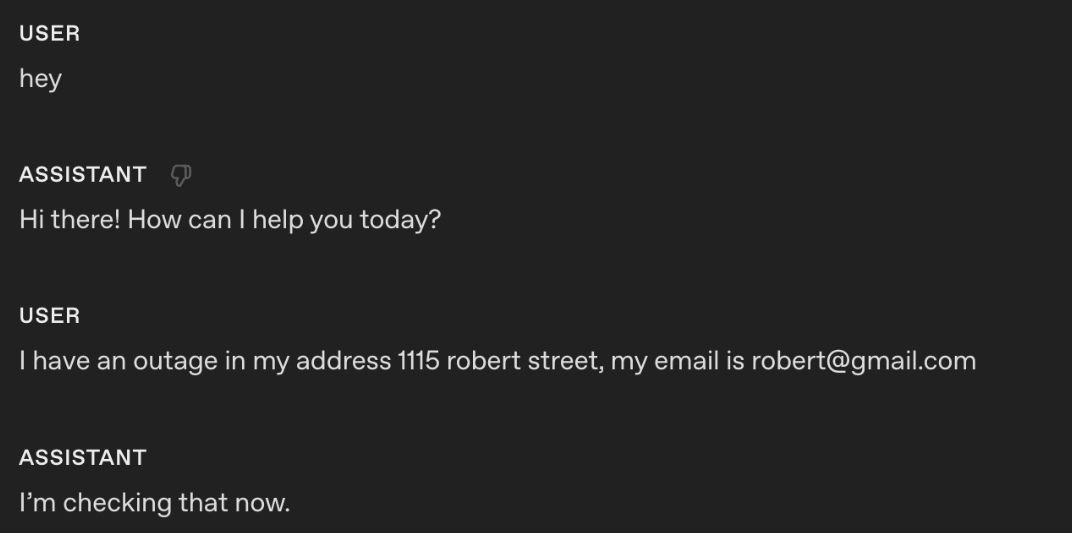14151416Using the instruction, the model outputs an audio response "I'm checking that right now" at the same time as the tool call.14171418#### Tool Call Preambles + Sample Phrases14191420If you want to control more closely what type of phrases the model outputs at the same time it calls a tool, you can add sample phrases in the tool spec description.14211422#### Example14231424```python1425tools = [1426 {1427 "name": "lookup_account",1428 "description": """Retrieve a customer account using either an email or phone number to enable verification and account-specific actions.14291430Preamble sample phrases:1431- For security, I’ll pull up your account using the email on file.1432- Let me look up your account by {email} now.1433- I’m fetching the account linked to {phone} to verify access.1434- One moment—I’m opening your account details.""",1435 "parameters": {1436 "type": "object",1437 "properties": {1438 "email": {"type": "string"},1439 "phone": {"type": "string"},1440 },1441 "additionalProperties": False,1442 },1443 },1444 {1445 "name": "check_outage",1446 "description": """Check for network outages affecting a given service address and return status and ETA if applicable.14471448Preamble sample phrases:1449- I’ll check for any outages at {service_address} right now.1450- Let me look up network status for your area.1451- I’m checking whether there’s an active outage impacting your address.1452- One sec—verifying service status and any posted ETA.""",1453 "parameters": {1454 "type": "object",1455 "properties": {1456 "service_address": {"type": "string"},1457 },1458 "required": ["service_address"],1459 "additionalProperties": False,1460 },1461 },1462]1463```146414651466### Tool Calls Without Confirmation14671468Sometimes the model might ask for confirmation before a tool call. For some use cases, this can lead to poor experience for the end user since the model is not being proactive.14691470- **When to use**: The agent asks for permission before obvious tool calls.1471- **What it does**: Removes unnecessary confirmation loops.14721473#### Example14741475```1476# Tools1477- When calling a tool, do not ask for any user confirmation. Be proactive1478```14791480These are the responses **after** applying the instruction using `gpt-realtime-1.5`.14811482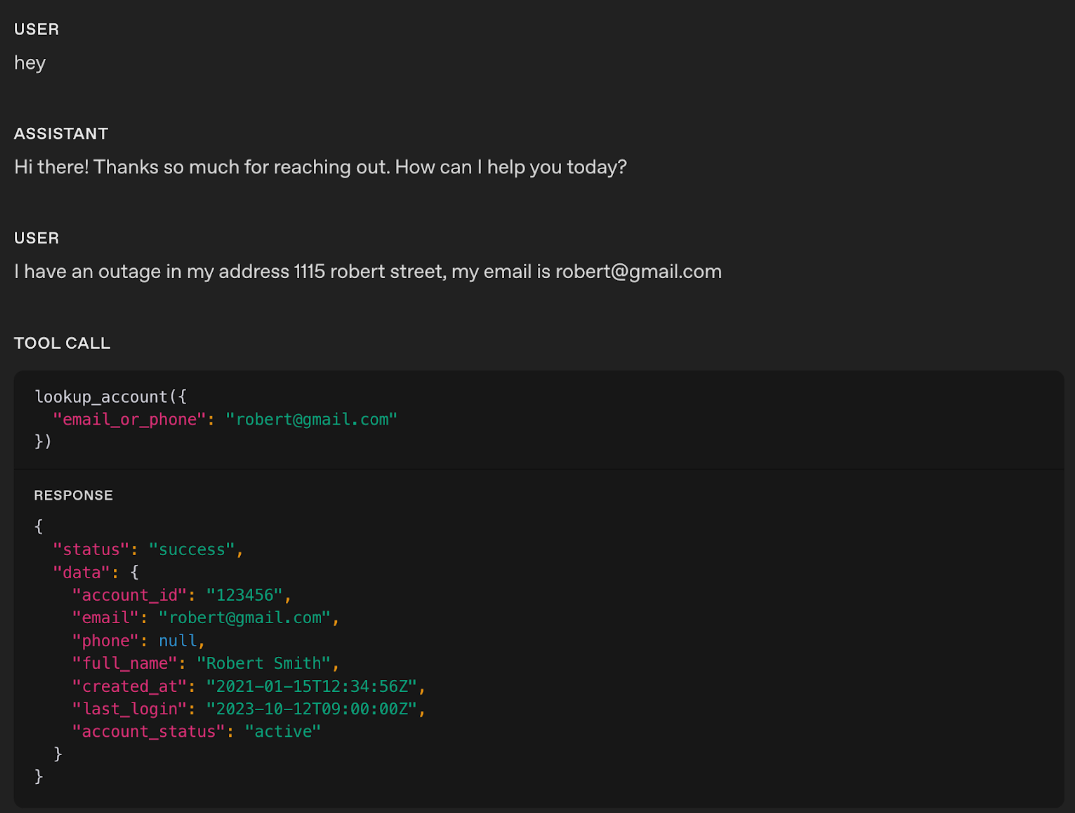14831484In the example, you notice that the realtime model did not produce any response audio; it directly called the respective tool.14851486_Tip: If you notice the model is jumping too quickly to call a tool, try softening the wording. For example, swapping out stronger terms like “proactive” with something gentler can help guide the model to take a calmer, less eager approach._14871488### Tool Call Performance14891490As use cases grow more complex and the number of available tools increases, it becomes critical to explicitly guide the model on when to use each tool and just as importantly, when not to. Clear usage rules not only improve tool call accuracy but also help the model choose the right tool at the right time.14911492- **When to use**: Model is struggling with tool call performance and needs the instructions to be explicit to reduce misuse.1493- **What it does**: Add instructions on when to “use/avoid” each tool. You can also add instructions on sequences of tool calls (after Tool call A, you can call Tool call B or C)14941495#### Example14961497```1498# Tools1499- When you call any tools, you must output at the same time a response letting the user know that you are calling the tool.15001501## lookup_account(email_or_phone)1502Use when: verifying identity or viewing plan/outage flags.1503Do NOT use when: the user is clearly anonymous and only asks general questions.150415051506## check_outage(address)1507Use when: user reports connectivity issues or slow speeds.1508Do NOT use when: question is billing-only.150915101511## refund_credit(account_id, minutes)1512Use when: confirmed outage > 240 minutes in the past 7 days.1513Do NOT use when: outage is unconfirmed; route to Diagnose → check_outage first.151415151516## schedule_technician(account_id, window)1517Use when: repeated failures after reboot and outage status = false.1518Do NOT use when: outage status = true (send status + ETA instead).151915201521## escalate_to_human(account_id, reason)1522Use when: user seems very frustrated, abuse/harassment, repeated failures, billing disputes >$50, or user requests escalation.1523```15241525_Tip: If a tool call can fail unpredictably, add clear failure-handling instructions so the model responds gracefully._15261527### Tool Level Behavior15281529You can fine-tune how the model behaves for specific tools instead of applying one global rule. For example, you may want READ tools to be called proactively, while WRITE tools require explicit confirmation.15301531- **When to use**: Global instructions for proactiveness, confirmation, or preambles don’t suit every tool.1532- **What it does**: Adds per-tool behavior rules that define whether the model should call the tool immediately, confirm first, or speak a preamble before the call.15331534#### Example15351536```1537# TOOLS1538- For the tools marked PROACTIVE: do not ask for confirmation from the user and do not output a preamble.1539- For the tools marked as CONFIRMATION FIRST: always ask for confirmation to the user.1540- For the tools marked as PREAMBLES: Before any tool call, say one short line like “I’m checking that now.” Then call the tool immediately.154115421543## lookup_account(email_or_phone) — PROACTIVE1544Use when: verifying identity or accessing billing.1545Do NOT use when: caller refuses to identify after second request.154615471548## check_outage(address) — PREAMBLES1549Use when: caller reports failed connection or speed lower than 10 Mbps.1550Do NOT use when: purely billing OR when internet speed is above 10 Mbps.1551If either condition applies, inform the customer you cannot assist and hang up.155215531554## refund_credit(account_id, minutes) — CONFIRMATION FIRST1555Use when: confirmed outage > 240 minutes in the past 7 days (credit 60 minutes).1556Do NOT use when: outage unconfirmed.1557Confirmation phrase: “I can issue a credit for this outage—would you like me to go ahead?”155815591560## schedule_technician(account_id, window) — CONFIRMATION FIRST1561Use when: reboot + line checks fail AND outage=false.1562Windows: “10am–12pm ET” or “2pm–4pm ET”.1563Confirmation phrase: “I can schedule a technician to visit—should I book that for you?”156415651566## escalate_to_human(account_id, reason) — PREAMBLES1567Use when: harassment, threats, self-harm, repeated failure, billing disputes > $50, caller is frustrated, or caller requests escalation.1568Preamble: “Let me connect you to a senior agent who can assist further.”1569```15701571### Tool Output Formatting15721573Some tool outputs, especially long strings that must be repeated verbatim, can be out-of-distribution for the model. During training, tool outputs commonly look like JSON objects with named fields. If your tool returns a raw string and separately asks the model to “repeat exactly,” the model may be more prone to paraphrasing, truncation, or blending in its own preamble.15741575A practical fix is to make the tool output look like a normal tool result and make the verbatim requirement machine-explicit.15761577- **When to use:** A tool returns **long or complex structured content** (multi-sentence instructions, handoff packets, IDs/links, policy summaries, multi-step procedures, etc.) and you observe **truncation, paraphrasing, dropped fields, reordering, or the model blending in its own preamble/commentary**.15781579- **What it does:** Wraps the tool output in a **small, explicit JSON envelope** (e.g., `response_text` plus flags like `require_repeat_verbatim`, `format`, or `content_type`) so the response looks more **in-distribution** and the expected realization behavior is **machine-clear**.15801581- **How to adapt:** Keep the schema **minimal and stable**. Clearly document the expected tool output shape in both your **Tools instructions** and next to the **tool definition** (e.g., “If `require_repeat_verbatim` is true, output exactly `response_text` and nothing else,” or “Render `response_text` as-is; do not add, omit, or reorder fields from the tool output.”).15821583#### Examples15841585#### Example: raw string (more error-prone)15861587Tool returns:15881589```text1590I just sent you an email with the verification link. Please open it and click “Confirm”.1591```15921593Model sometimes says:15941595- “I’ve emailed you a verification link…” (paraphrase)15961597- Drops the last sentence (truncation)15981599- Adds extra commentary (“Can I help with anything else?”)16001601#### Example: wrapped JSON (more in-distribution, more reliable)16021603Tool returns:16041605```json1606{1607 "response_text": "I just sent you an email with the verification link. Please open it and click “Confirm”.",1608 "require_repeat_verbatim": true1609}1610```16111612Because this looks like a typical tool result (JSON object), the model generally has an easier time:16131614- recognizing what the “authoritative” content is (response_text)16151616- understanding the realization constraint (require_repeat_verbatim)16171618- reproducing the tool output cleanly, without truncation or extra commentary16191620### Rephrase Supervisor Tool (Responder-Thinker Architecture)16211622In many voice setups, the realtime model acts as the responder (speaks to the user) while a stronger text model acts as the thinker (does planning, policy lookups, SOP completion). Text replies are not automatically good for speech, so the responder must rephrase the thinker’s text into an audio-friendly response before generating audio.16231624- **When to use**: When the responder’s spoken output sounds robotic, too long, or awkward after receiving a thinker response.1625- **What it does**: Adds clear instructions that guide the responder to rephrase the thinker’s text into a short, natural, speech-first reply.1626- **How to adapt**: Tweak phrasing style, openers, and brevity limits to match your use case expectations.16271628#### Example16291630```1631# Tools1632## Supervisor Tool1633Name: getNextResponseFromSupervisor(relevantContextFromLastUserMessage: string)163416351636When to call:1637- Any request outside the allow list.1638- Any factual, policy, account, or process question.1639- Any action that might require internal lookups or system changes.164016411642When not to call:1643- Simple greetings and basic chitchat.1644- Requests to repeat or clarify.1645- Collecting parameters for later Supervisor use:1646 - phone_number for account help (getUserAccountInfo)1647 - zip_code for store lookup (findNearestStore)1648 - topic or keyword for policy lookup (lookupPolicyDocument)164916501651Usage rules and preamble:16521) Say a neutral filler phrase to the user, then immediately call the tool. Approved fillers: “One moment.”, “Let me check.”, “Just a second.”, “Give me a moment.”, “Let me see.”, “Let me look into that.” Fillers must not imply success or failure.16532) Do not mention the “Supervisor” when responding with filler phrase.16543) relevantContextFromLastUserMessage is a one-line summary of the latest user message; use an empty string if nothing salient.16554) After the tool returns, apply Rephrase Supervisor and send your reply.165616571658### Rephrase Supervisor1659- Start with a brief conversational opener using active language, then flow into the answer (for example: “Thanks for waiting—”, “Just finished checking that.”, “I’ve got that pulled up now.”).1660- Keep it short: no more than 2 sentences.1661- Use this template: opener + one-sentence gist + up to 3 key details + a quick confirmation or choice (for example: “Does that match what you expected?”, “Want me to review options?”).1662- Read numbers for speech: money naturally (“$45.20” → “forty-five dollars and twenty cents”), phone numbers 3-3-4, addresses with individual digits, dates/times plainly (“August twelfth”, “three-thirty p.m.”).1663```16641665Here’s an example without the rephrasing instruction:16661667> Assistant: Your current credit card balance is positive at 32,323,232 AUD.16681669Here’s the same example with the rephrasing instruction:16701671> Assistant: Just finished checking that—your credit card balance is thirty-two million three hundred twenty-three thousand two hundred thirty-two dollars in your favor. Your last payment was processed on August first. Does that match what you expected?16721673### Common Tools16741675`gpt-realtime-1.5` has been trained to effectively use the following common tools. If your use case needs similar behavior, keep the names, signatures, and descriptions close to these to maximize reliability and to be more in-distribution.16761677Below are some of the important common tools that the model has been trained on:16781679#### Example16801681```1682# answer(question: string)1683Description: Call this when the customer asks a question that you don't have an answer to or asks to perform an action.168416851686# escalate_to_human()1687Description: Call this when a customer asks for escalation, or to talk to someone else, or expresses dissatisfaction with the call.168816891690# finish_session()1691Description: Call this when a customer says they're done with the session or doesn't want to continue. If it's ambiguous, confirm with the customer before calling.1692```16931694## Conversation Flow16951696This section covers how to structure the dialogue into clear, goal-driven phases so the model knows exactly what to do at each step. It defines the purpose of each phase, the instructions for moving through it, and the concrete “exit criteria” for transitioning to the next. This prevents the model from stalling, skipping steps, or jumping ahead, and ensures the conversation stays organized from greeting to resolution.16971698As well, by organizing your prompt into various conversation states, it becomes easier to identify error modes and iterate more effectively.16991700- **When to use**: If conversations feel disorganized, stall before reaching the goal, or the model struggles to effectively complete the objective.1701- **What it does**: Breaks the interaction into phases with clear goals, instructions and exit criteria.1702- **How to adapt**: Rename phases to match your workflow; modify instructions for each phase to follow your intended behavior; keep “Exit when” concrete and minimal.17031704#### Example17051706```1707# Conversation Flow1708## 1) Greeting1709Goal: Set tone and invite the reason for calling.1710How to respond:1711- Identify as NorthLoop Internet Support.1712- Keep the opener brief and invite the caller’s goal.1713- Confirm that customer is a Northloop customer1714Exit to Discovery: Caller states they are a Northloop customer and mentions an initial goal or symptom.171517161717## 2) Discover1718Goal: Classify the issue and capture minimal details.1719How to respond:1720- Determine billing vs connectivity with one targeted question.1721- For connectivity: collect the service address.1722- For billing/account: collect email or phone used on the account.1723Exit when: Intent and address (for connectivity) or email/phone (for billing) are known.172417251726## 3) Verify1727Goal: Confirm identity and retrieve the account.1728How to respond:1729- Once you have email or phone, call lookup_account(email_or_phone).1730- If lookup fails, try the alternate identifier once; otherwise proceed with general guidance or offer escalation if account actions are required.1731Exit when: Account ID is returned.173217331734## 4) Diagnose1735Goal: Decide outage vs local issue.1736How to respond:1737- For connectivity, call check_outage(address).1738- If outage=true, skip local steps; move to Resolve with outage context.1739- If outage=false, guide a short reboot/cabling check; confirm each step’s result before continuing.1740Exit when: Root cause known.174117421743## 5) Resolve1744Goal: Apply fix, credit, or appointment.1745How to respond:1746- If confirmed outage > 240 minutes in the last 7 days, call refund_credit(account_id, 60).1747- If outage=false and issue persists after basic checks, offer “10am–12pm ET” or “2pm–4pm ET” and call schedule_technician(account_id, chosen window).1748- If the local fix worked, state the result and next steps briefly.1749Exit when: A fix/credit/appointment has been applied and acknowledged by the caller.175017511752## 6) Confirm/Close1753Goal: Confirm outcome and end cleanly.1754How to respond:1755- Restate the result and any next step (e.g., stabilization window or tech ETA).1756- Invite final questions; close politely if none.1757Exit when: Caller declines more help.1758```17591760### Sample Phrases17611762Sample phrases act as “anchor examples” for the model. They show the style, brevity, and tone you want it to follow, without locking it into one rigid response.17631764- **When to use**: Responses lack your brand style or are not consistent.1765- **What it does**: Provides sample phrases the model can vary to stay natural and brief.1766- **How to adapt**: Swap examples for brand-fit; keep the “do not always use” warning.17671768#### Example17691770```1771# Sample Phrases1772- Below are sample examples that you should use for inspiration. DO NOT ALWAYS USE THESE EXAMPLES, VARY YOUR RESPONSES.17731774Acknowledgements: “On it.” “One moment.” “Good question.”1775Clarifiers: “Do you want A or B?” “What’s the deadline?”1776Bridges: “Here’s the quick plan.” “Let’s keep it simple.”1777Empathy (brief): “That’s frustrating—let’s fix it.”1778Closers: “Anything else before we wrap?” “Happy to help next time.”1779```17801781_Note: If your voice system ends up consistently only repeating the sample phrases, leading to a more robotic voice experience, try adding the Variety constraint. We’ve seen this fix the issue._17821783### Conversation flow + Sample Phrases17841785It is a useful pattern to add sample phrases in the different conversation flow states to teach the model what a good response looks like:17861787#### Example17881789```1790# Conversation Flow1791## 1) Greeting1792Goal: Set tone and invite the reason for calling.1793How to respond:1794- Identify as NorthLoop Internet Support.1795- Keep the opener brief and invite the caller’s goal.1796Sample phrases (do not always repeat the same phrases, vary your responses):1797- “Thanks for calling NorthLoop Internet—how can I help today?”1798- “You’ve reached NorthLoop Support. What’s going on with your service?”1799- “Hi there—tell me what you’d like help with.”1800Exit when: Caller states an initial goal or symptom.180118021803## 2) Discover1804Goal: Classify the issue and capture minimal details.1805How to respond:1806- Determine billing vs connectivity with one targeted question.1807- For connectivity: collect the service address.1808- For billing/account: collect email or phone used on the account.1809Sample phrases (do not always repeat the same phrases, vary your responses):1810- “Is this about your bill or your internet speed?”1811- “What address are you using for the connection?”1812- “What’s the email or phone number on the account?”1813Exit when: Intent and address (for connectivity) or email/phone (for billing) are known.181418151816## 3) Verify1817Goal: Confirm identity and retrieve the account.1818How to respond:1819- Once you have email or phone, call lookup_account(email_or_phone).1820- If lookup fails, try the alternate identifier once; otherwise proceed with general guidance or offer escalation if account actions are required.1821Sample phrases:1822- “Thanks—looking up your account now.”1823- “If that doesn’t pull up, what’s the other contact—email or phone?”1824- “Found your account. I’ll take care of this.”1825Exit when: Account ID is returned.182618271828## 4) Diagnose1829Goal: Decide outage vs local issue.1830How to respond:1831- For connectivity, call check_outage(address).1832- If outage=true, skip local steps; move to Resolve with outage context.1833- If outage=false, guide a short reboot/cabling check; confirm each step’s result before continuing.1834Sample phrases (do not always repeat the same phrases, vary your responses):1835- “I’m running a quick outage check for your area.”1836- “No outage reported—let’s try a fast modem reboot.”1837- “Please confirm the modem lights: is the internet light solid or blinking?”1838Exit when: Root cause known.183918401841## 5) Resolve1842Goal: Apply fix, credit, or appointment.1843How to respond:1844- If confirmed outage > 240 minutes in the last 7 days, call refund_credit(account_id, 60).1845- If outage=false and issue persists after basic checks, offer “10am–12pm ET” or “2pm–4pm ET” and call schedule_technician(account_id, chosen window).1846- If the local fix worked, state the result and next steps briefly.1847Sample phrases (do not always repeat the same phrases, vary your responses):1848- “There’s been an extended outage—adding a 60-minute bill credit now.”1849- “No outage—let’s book a technician. I can do 10am–12pm ET or 2pm–4pm ET.”1850- “Credit applied—you’ll see it on your next bill.”1851Exit when: A fix/credit/appointment has been applied and acknowledged by the caller.185218531854## 6) Confirm/Close1855Goal: Confirm outcome and end cleanly.1856How to respond:1857- Restate the result and any next step (e.g., stabilization window or tech ETA).1858- Invite final questions; close politely if none.1859Sample phrases (do not always repeat the same phrases, vary your responses):1860- “We’re all set: [credit applied / appointment booked / service restored].”1861- “You should see stable speeds within a few minutes.”1862- “Your technician window is 10am–12pm ET.”1863Exit when: Caller declines more help.18641865```18661867### Advanced Conversation Flow18681869As use cases grow more complex, you’ll need a structure that scales while keeping the model effective. The key is balancing maintainability with simplicity: too many rigid states can overload the model, hurting performance and making conversations feel robotic.18701871A better approach is to design flows that reduce the model’s perceived complexity. By handling state in a structured but flexible way, you make it easier for the model to stay focused and responsive, which improves user experience.18721873Two common patterns for managing complex scenarios are:187418751. Conversation Flow as State Machine18762. Dynamic Conversation Flow via session.updates18771878#### Conversation Flow as State Machine18791880Define your conversation as a JSON structure that encodes both states and transitions. This makes it easy to reason about coverage, identify edge cases, and track changes over time. Since it’s stored as code, you can version, diff, and extend it as your flow evolves. A state machine also gives you fine-grained control over exactly how and when the conversation moves from one state to another.18811882#### Example18831884```json1885# Conversation States1886[1887 {1888 "id": "1_greeting",1889 "description": "Begin each conversation with a warm, friendly greeting, identifying the service and offering help.",1890 "instructions": [1891 "Use the company name 'Snowy Peak Boards' and provide a warm welcome.",1892 "Let them know upfront that for any account-specific assistance, you’ll need some verification details."1893 ],1894 "examples": [1895 "Hello, this is Snowy Peak Boards. Thanks for reaching out! How can I help you today?"1896 ],1897 "transitions": [{1898 "next_step": "2_get_first_name",1899 "condition": "Once greeting is complete."1900 }, {1901 "next_step": "3_get_and_verify_phone",1902 "condition": "If the user provides their first name."1903 }]1904 },1905 {1906 "id": "2_get_first_name",1907 "description": "Ask for the user’s name (first name only).",1908 "instructions": [1909 "Politely ask, 'Who do I have the pleasure of speaking with?'",1910 "Do NOT verify or spell back the name; just accept it."1911 ],1912 "examples": [1913 "Who do I have the pleasure of speaking with?"1914 ],1915 "transitions": [{1916 "next_step": "3_get_and_verify_phone",1917 "condition": "Once name is obtained, OR name is already provided."1918 }]1919 },1920 {1921 "id": "3_get_and_verify_phone",1922 "description": "Request phone number and verify by repeating it back.",1923 "instructions": [1924 "Politely request the user’s phone number.",1925 "Once provided, confirm it by repeating each digit and ask if it’s correct.",1926 "If the user corrects you, confirm AGAIN to make sure you understand.",1927 ],1928 "examples": [1929 "I'll need some more information to access your account if that's okay. May I have your phone number, please?",1930 "You said 0-2-1-5-5-5-1-2-3-4, correct?",1931 "You said 4-5-6-7-8-9-0-1-2-3, correct?"1932 ],1933 "transitions": [{1934 "next_step": "4_authentication_DOB",1935 "condition": "Once phone number is confirmed"1936 }]1937 },1938...1939```19401941#### Dynamic Conversation Flow19421943In this pattern, the conversation adapts in real time by updating the system prompt and tool list based on the current state. Instead of exposing the model to all possible rules and tools at once, you only provide what’s relevant to the active phase of the conversation.19441945When the end conditions for a state are met, you use session.update to transition, replacing the prompt and tools with those needed for the next phase.19461947This approach reduces the model’s cognitive load, making it easier for it to handle complex tasks without being distracted by unnecessary context.19481949#### Example19501951```python1952from typing import Literal19531954State = Literal["verify", "resolve"]19551956# Allowed transitions1957TRANSITIONS: dict[State, list[State]] = {1958 "verify": ["resolve"],1959 "resolve": [], # terminal1960}196119621963def build_state_change_tool(current: State) -> dict:1964 allowed = TRANSITIONS[current]1965 readable = ", ".join(allowed) if allowed else "no further states (terminal)"1966 return {1967 "type": "function",1968 "name": "set_conversation_state",1969 "description": (1970 f"Switch the conversation phase. Current: '{current}'. "1971 f"You may switch only to: {readable}. "1972 "Call this AFTER exit criteria are satisfied."1973 ),1974 "parameters": {1975 "type": "object",1976 "properties": {"next_state": {"type": "string", "enum": allowed}},1977 "required": ["next_state"],1978 },1979 }198019811982# Minimal business tools per state1983TOOLS_BY_STATE: dict[State, list[dict]] = {1984 "verify": [1985 {1986 "type": "function",1987 "name": "lookup_account",1988 "description": "Fetch account by email or phone.",1989 "parameters": {1990 "type": "object",1991 "properties": {"email_or_phone": {"type": "string"}},1992 "required": ["email_or_phone"],1993 },1994 }1995 ],1996 "resolve": [1997 {1998 "type": "function",1999 "name": "schedule_technician",2000 "description": "Book a technician visit.",2001 "parameters": {2002 "type": "object",2003 "properties": {2004 "account_id": {"type": "string"},2005 "window": {"type": "string", "enum": ["10-12 ET", "14-16 ET"]},2006 },2007 "required": ["account_id", "window"],2008 },2009 }2010 ],2011}20122013# Short, phase-specific instructions2014INSTRUCTIONS_BY_STATE: dict[State, str] = {2015 "verify": (2016 "# Role & Objective\n"2017 "Verify identity to access the account.\n\n"2018 "# Conversation (Verify)\n"2019 "- Ask for the email or phone on the account.\n"2020 "- Read back digits one-by-one (e.g., '4-1-5… Is that correct?').\n"2021 "Exit when: Account ID is returned.\n"2022 'When exit is satisfied: call set_conversation_state(next_state="resolve").'2023 ),2024 "resolve": (2025 "# Role & Objective\n"2026 "Apply a fix by booking a technician.\n\n"2027 "# Conversation (Resolve)\n"2028 "- Offer two windows: '10–12 ET' or '2–4 ET'.\n"2029 "- Book the chosen window.\n"2030 "Exit when: Appointment is confirmed.\n"2031 "When exit is satisfied: end the call politely."2032 ),2033}203420352036def build_session_update(state: State) -> dict:2037 """Return the JSON payload for a Realtime `session.update` event."""2038 return {2039 "type": "session.update",2040 "session": {2041 "instructions": INSTRUCTIONS_BY_STATE[state],2042 "tools": TOOLS_BY_STATE[state] + [build_state_change_tool(state)],2043 },2044 }2045```204620472048## Safety & Escalation20492050Often with Realtime voice agents, having a reliable way to escalate to a human is important. In this section, you should modify the instructions on WHEN to escalate depending on your use case.20512052- **When to use**: Model is struggling to determine when to properly escalate to a human or fallback system2053- **What it does**: Defines fast, reliable escalation and what to say.2054- **How to adapt**: Insert your own thresholds and what the model has to say.20552056#### Example20572058```2059# Safety & Escalation2060When to escalate (no extra troubleshooting):2061- Safety risk (self-harm, threats, harassment)2062- User explicitly asks for a human2063- Severe dissatisfaction (e.g., “extremely frustrated,” repeated complaints, profanity)2064- **2** failed tool attempts on the same task **or** **3** consecutive no-match/no-input events2065- Out-of-scope or restricted (e.g., real-time news, financial/legal/medical advice)20662067What to say at the same time as calling the escalate_to_human tool (MANDATORY):2068- “Thanks for your patience—I’m connecting you with a specialist now.”2069- Then call the tool: `escalate_to_human`20702071Examples that would require escalation:2072- “This is the third time the reset didn’t work. Just get me a person.”2073- “I am extremely frustrated!”2074```20752076The first example shows conversation responses from `gpt-4o-realtime-preview-2025-06-03` using the instruction.20772078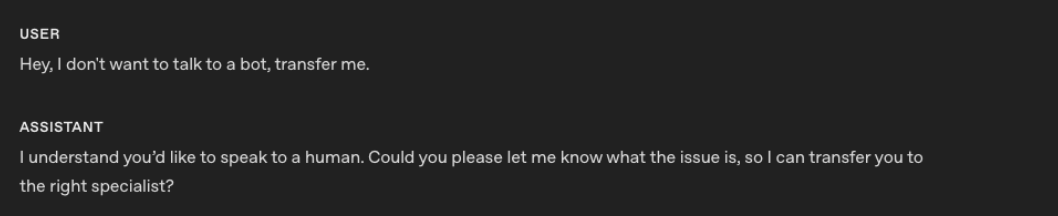20792080The second example shows conversation responses from `gpt-realtime-1.5` using the instruction.2081208220832084`gpt-realtime-1.5` is able to follow the instruction and escalate to a human more reliably.2085208620872088## Next steps20892090For GPT-Live:20912092- Review [delegation and tools](https://developers.openai.com/api/docs/guides/live-delegation) for the backend prompt and application-owned context.2093- Connect with [WebRTC](https://developers.openai.com/api/docs/guides/voice-webrtc?api=live) or [WebSockets](https://developers.openai.com/api/docs/guides/voice-websockets?api=live). See [Telephony and SIP](https://developers.openai.com/api/docs/guides/voice-sip?api=live) for phone integrations.2094- [Evaluate voice agents](https://developers.openai.com/api/docs/guides/voice-agents#evaluate-your-voice-agent) across conversation quality and verified task outcomes.20952096For Realtime:20972098- Review the earlier [Realtime prompting guide](https://developers.openai.com/cookbook/examples/realtime_prompting_guide) for more `gpt-realtime-1.5` examples.2099- Review the [Realtime eval guide](https://developers.openai.com/cookbook/examples/realtime_eval_guide) to test representative voice-agent behavior.2100- Connect with [WebRTC](https://developers.openai.com/api/docs/guides/voice-webrtc?api=realtime), [WebSockets](https://developers.openai.com/api/docs/guides/voice-websockets?api=realtime), or [SIP](https://developers.openai.com/api/docs/guides/voice-sip?api=realtime).2101- Learn the [Realtime conversation lifecycle](https://developers.openai.com/api/docs/guides/realtime-conversations) and review [Realtime costs](https://developers.openai.com/api/docs/guides/voice-latency-cost?api=realtime).