Zyquo Atlas app icon # Zyquo Atlas ### The AI-native macOS web browser — every surface, intelligent. *A fast, radically customizable, privacy-first browser where AI is woven into the omnibox, the page, your selection, and your tabs — powered by **your** keys across **12 providers** and **169 models**.*
[![Release](https://img.shields.io/github/v/release/spboucher-ai/zyquo-atlas?sort=semver&label=release&color=1FA9A0)](https://github.com/spboucher-ai/zyquo-atlas/releases/latest) [![Platform](https://img.shields.io/badge/platform-macOS%2013%2B-4E63E0)](https://www.apple.com/macos/) [![Swift](https://img.shields.io/badge/Swift-5.9-orange?logo=swift&logoColor=white)](https://swift.org) [![WebKit](https://img.shields.io/badge/engine-WebKit%20(WKWebView)-1FA9A0)](https://webkit.org) [![Universal](https://img.shields.io/badge/binary-Universal%20(arm64%20%2B%20x86__64)-4E63E0)](#-building-from-source) [![Notarized](https://img.shields.io/badge/Gatekeeper-Notarized%20Developer%20ID-2FA36B?logo=apple&logoColor=white)](#-installation) [![Downloads](https://img.shields.io/github/downloads/spboucher-ai/zyquo-atlas/total?color=1FA9A0)](https://github.com/spboucher-ai/zyquo-atlas/releases) [![License](https://img.shields.io/badge/license-Proprietary-lightgrey)](LICENSE)



[**⬇︎ Download the latest .dmg**](https://github.com/spboucher-ai/zyquo-atlas/releases/latest/download/ZyquoAtlas.dmg)  ·  [Features](#-features)  ·  [Screenshots](#-screenshots)  ·  [Install](#-installation)  ·  [Build](#-building-from-source)
--- ## 📑 Table of Contents - [Overview](#-overview) - [Screenshots](#-screenshots) - [Features](#-features) - [Browser core](#browser-core) - [AI everywhere](#ai-everywhere) - [Massive customization](#massive-customization) - [Privacy & security](#privacy--security) - [Keyboard shortcuts](#keyboard-shortcuts) - [Supported AI providers & models](#-supported-ai-providers--models) - [Requirements](#-requirements) - [Installation](#-installation) - [Usage](#-usage) - [Building from source](#-building-from-source) - [Architecture](#-architecture) - [Verification](#-verification) - [Roadmap](#-roadmap) - [Contributing](#-contributing) - [License](#-license) - [Author](#-author) --- ## 🧭 Overview **Zyquo Atlas** is a native macOS web browser built in **Swift + SwiftUI** on Apple's **WebKit (`WKWebView`)** engine — compiled entirely with the Swift Package Manager and the command-line toolchain, **without the Xcode IDE**. It is the web-browser member of the **Zyquo** family. Unlike browsers that bolt a chatbot onto a sidebar, Atlas weaves AI into every surface — the omnibox, the current page, your text selection, and across your open tabs — and it does so on **your** terms: you bring your own API keys, stored in a machine-bound, AES-256-GCM encrypted vault (no Keychain), and page content is sent to a provider **only** when you invoke an AI action. - **~8,300 lines** of Swift across **58 files**, zero build warnings. - **12 AI providers · 169 models** — the same catalog and provider layer as Zyquo Cloud. - **Universal** (Apple Silicon + Intel), **Developer ID–signed, notarized, and stapled**. --- ## 📸 Screenshots
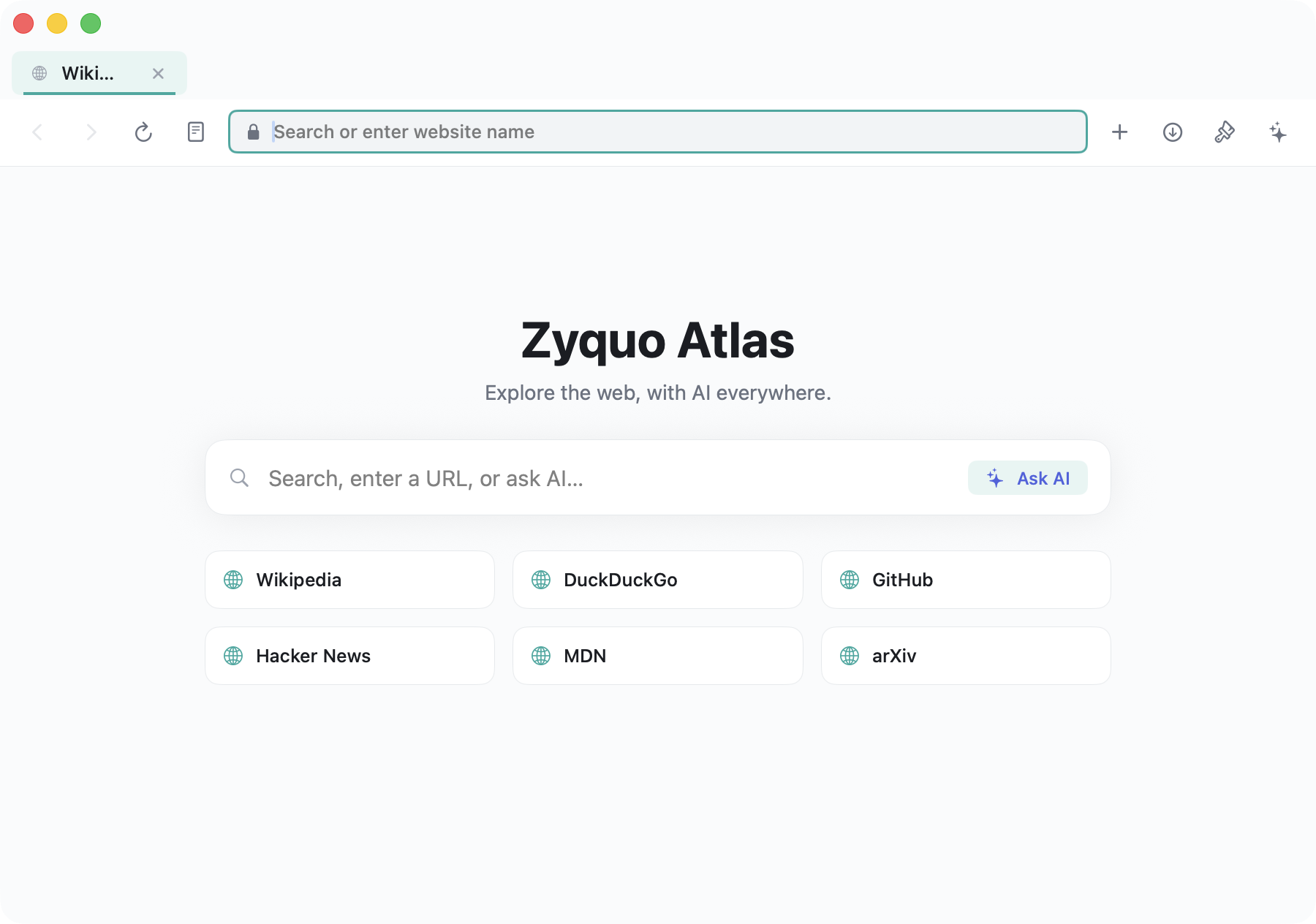
**Customizable start page — flagship light theme** Zyquo Atlas start page (light theme)
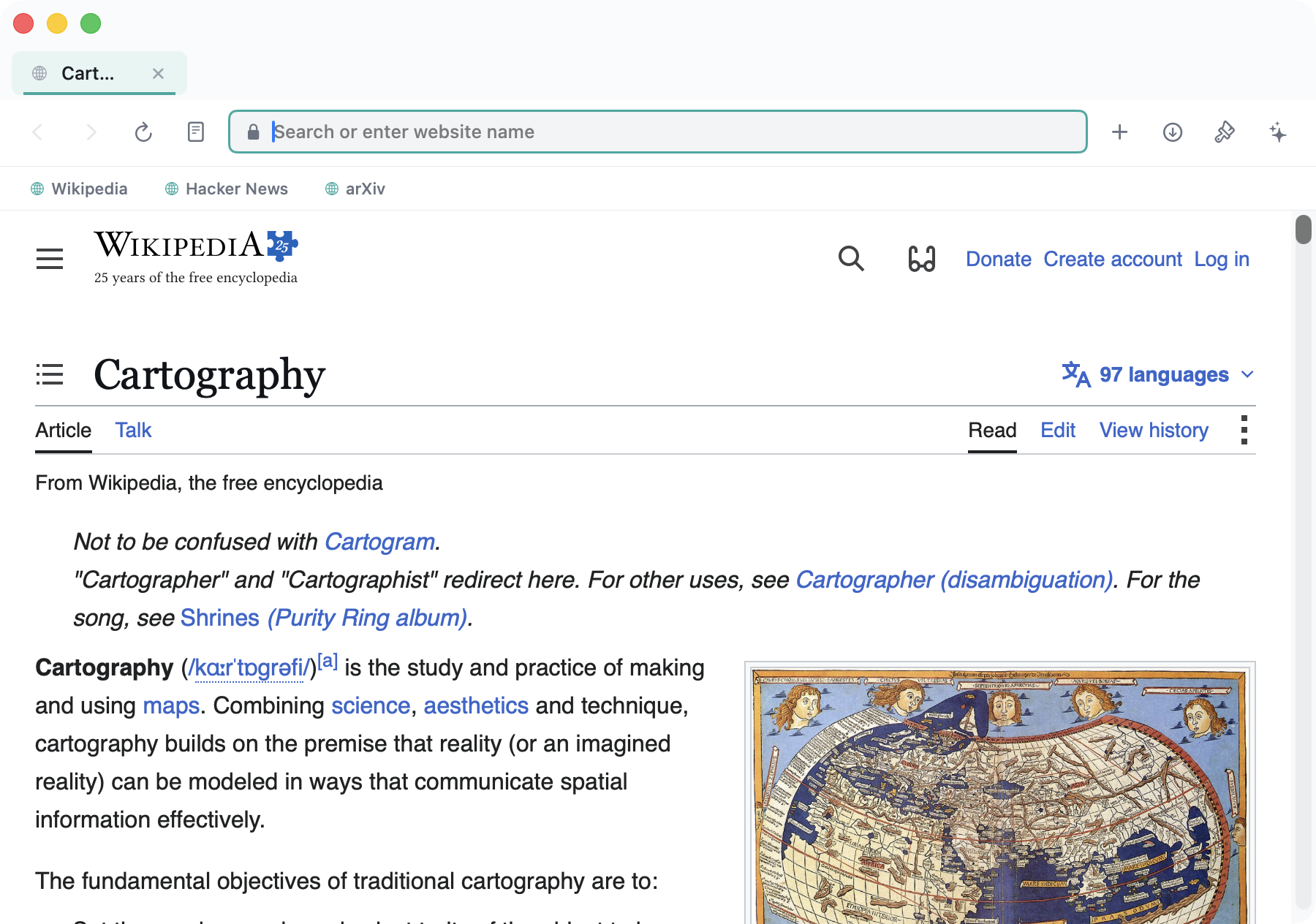
**Live browsing with the bookmarks bar** Zyquo Atlas rendering a web page with the bookmarks bar
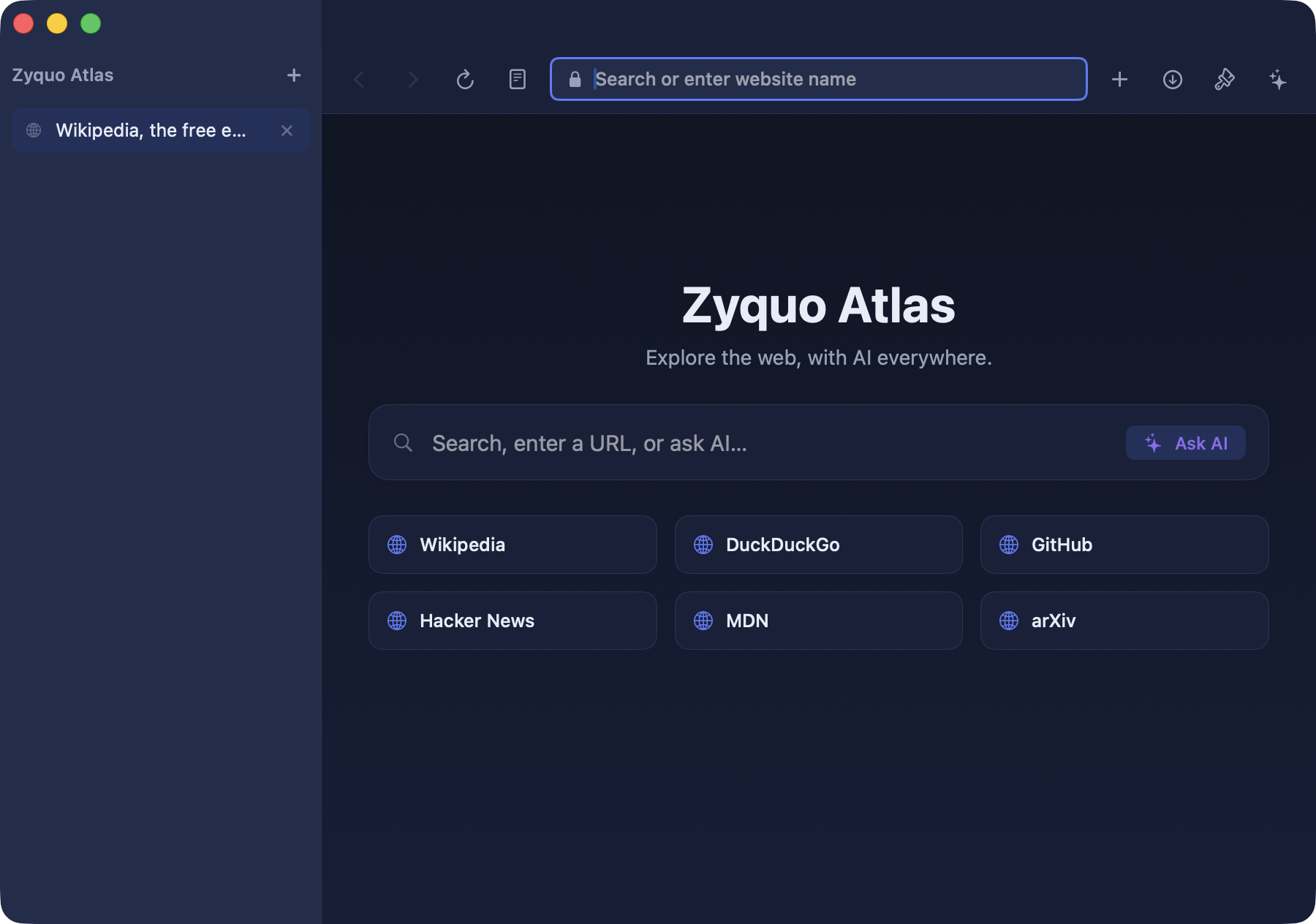
**Midnight dark theme with left vertical tabs** Zyquo Atlas dark theme with left vertical tab sidebar
--- ## ✨ Features Every feature below is implemented in this repository — nothing aspirational. ### Browser core - 🗂️ **Real multi-tab WKWebView browsing** — each tab owns its web view and navigation state, with a determinate progress bar, back/forward/reload/stop, and links that open in new tabs (`target=_blank`, ⌘-click, `window.open`). - 📌 **Tab pinning**, **background-tab suspension** (dims + frees memory), and **session restore** per profile on relaunch. - ↕️ **Top horizontal tabs OR a left vertical tab sidebar** (Arc-style) — switch live. - 🧭 **Smart omnibox** — resolves your input into **navigate** (URL), **web search**, or **Ask AI**, with a security indicator and reader toggle. - 🕵️ **Private windows** (⌘⇧N) using a non-persistent data store — no history, no session, no saved data. - 📖 **Reader mode** — a clean, themeable article view with an optional AI summary at the top. - ⬇️ **Downloads** — routed to `~/Downloads` with live progress, reveal-in-Finder, and open. - 🔎 **Find-in-page** (⌘F) — native WebKit find with next/previous and wrap. - ⭐ **Favorites** — a toggleable bookmarks bar, a full manager (edit title/URL/tags/notes, show-on-bar), search, and **Netscape HTML import/export** (interchange with other browsers). - 🕘 **Full-text history** — searchable, grouped by day, with delete-range/clear controls. - 👤 **Profiles** — a persistent personal profile and a private profile, each with isolated WebKit data stores. ### AI everywhere - 💬 **Chat-with-page sidebar** — a per-tab, multi-turn conversation grounded in the page's extracted content, with an in-panel **model picker across all 169 models**. - ⚡ **Quick actions** — one-click **Summarize**, **Key points**, and **Translate**, plus long-page **map-reduce** summarization for articles that exceed the model's context. - 🖱️ **Selection floating toolbar** — select any text on a page and get **Explain / Summarize / Translate / Rewrite / Ask** right at the cursor. - 🔮 **Ask AI from the omnibox** — get a streamed, grounded answer without leaving the page. - 🪟 **Multi-tab reasoning** — "compare these open tabs" gathers several pages and answers across them. - 🎚️ **Per-action model tiers** — pick a fast/cheap model for quick actions and a strong one for deep chat; choices persist. - 🧱 **Grounded & injection-safe** — page content is extracted with Mozilla Readability in an isolated JavaScript world (visible text only), wrapped as untrusted data in every prompt, and streamed responses **cancel automatically on navigation**. ### Massive customization - 🎨 **Theming engine** — **10 built-in themes** (light & dark, including the flagship teal-indigo *Atlas Light* and *Midnight*), plus a **custom theme editor** (native color wells for accent / background / chrome) that applies **live**. - 🖼️ **Backgrounds** — solid, gradient, or image behind the chrome and start page. - 🧩 **Layout** — top or left tabs, **compact/comfortable density**, bookmarks-bar toggle, and a **UI-size slider**. - 🏠 **Customizable start page** — greeting, a prominent search / Ask-AI box, and a favorites grid. - 💾 **Per-profile persistence** and **theme import/export** as small JSON files. ### Privacy & security - 🔐 **Encrypted key vault** — API keys are stored with **AES-256-GCM** (CryptoKit), bound to the machine via `IOPlatformUUID` + HKDF, in `~/Library/Application Support/ZyquoAtlas/vault.zq` — **not** the Keychain, decrypted on demand and never logged. - 🛡️ **Content leaves the device only on a user-invoked AI action**, always to the provider you chose, via your own key — **never to Zyquo**. - 🧯 **Prompt-injection hardening** — extraction drops hidden/`aria-hidden`/off-screen text; page content is delimited and labelled untrusted; the AI layer has no navigation or tool access, so even a hostile page can only produce a bad summary, never an action. - 🍎 **Hardened Runtime, Developer ID–signed, notarized & stapled** — `spctl` reports *Notarized Developer ID*. ### Keyboard shortcuts | Shortcut | Action | Shortcut | Action | |---|---|---|---| | `⌘T` | New tab | `⌘Y` | History | | `⌘W` | Close tab | `⌥⌘B` | Bookmarks manager | | `⌘L` | Focus omnibox | `⌘⇧J` | Downloads | | `⌘⇧A` | Toggle AI sidebar | `⌘⇧N` | Private window | | `⌘F` | Find in page | `⌘1`–`⌘8`, `⌘9` | Switch tab / last tab | | `⌘D` | Bookmark page | `⌥Space` | Quick AI ask | | `⌘R` | Reload | `⌘[` / `⌘]` | Back / forward | | `⌘,` | Customize | | | --- ## 🤖 Supported AI providers & models Atlas speaks to **12 providers** and ships a catalog of **169 chat models**, calling each provider exactly as Zyquo Cloud does (OpenAI-compatible or native Anthropic Messages API, streaming SSE, reasoning-token aware). Bring your own key per provider. | Provider | Provider | Provider | |---|---|---| | OpenAI | Anthropic (Claude) | xAI (Grok) | | Mistral | Google Gemini | Alibaba Qwen (DashScope) | | DeepSeek | Kimi (Moonshot) | Perplexity | | Together AI | DeepInfra | Cerebras | Every provider/model was live-verified end-to-end — see [Verification](#-verification). --- ## 💻 Requirements - **macOS 13.0 (Ventura) or later** — Apple Silicon or Intel. - An **API key** for at least one supported provider to use the AI features (browsing works without any key). - To build from source: the **Swift 5.9+ toolchain** (Command Line Tools or Xcode). --- ## 📦 Installation 1. **[Download `ZyquoAtlas.dmg`](https://github.com/spboucher-ai/zyquo-atlas/releases/latest/download/ZyquoAtlas.dmg)** from the latest release. 2. Open the DMG and **drag *Zyquo Atlas* into Applications**. 3. Launch it. The app is **notarized by Apple**, so Gatekeeper opens it without warnings. 4. Add your API keys in **Customize / Settings** (or import them) to enable AI features. > Verify authenticity yourself: `spctl -a -vv "/Applications/Zyquo Atlas.app"` → > `source=Notarized Developer ID`. --- ## 🚀 Usage - **Browse** — type a URL or search terms in the omnibox; press Enter. - **Ask AI** — click **Ask AI** in the omnibox, or open the sidebar with `⌘⇧A`, to ask about the current page with cited, grounded answers. - **Summarize** — open the AI sidebar and hit **Summarize** (works on long articles via map-reduce), or use **Reader mode** for a clean read + summary. - **Selection actions** — select text on any page and choose **Explain / Translate / Rewrite / Ask** from the floating toolbar. - **Compare tabs** — open several pages and click **Compare tabs** in the sidebar. - **Customize** — press `⌘,` to switch themes, move tabs to a left sidebar, tune density, and edit a custom theme with live preview. --- ## 🛠️ Building from source Zyquo Atlas builds with the Swift Package Manager — **no Xcode project required**. ```sh git clone https://github.com/spboucher-ai/zyquo-atlas.git cd zyquo-atlas make dev # release build → dist/Zyquo Atlas.app (ad-hoc signed), for local iteration make run # build + launch make test # run the test suite make icon # regenerate AppIcon.icns from assets/icon/zyquo-atlas.svg # Distribution (requires a Developer ID certificate + notarytool profile): make release # universal (arm64 + x86_64), Developer ID signed, notarized, stapled make dmg # signed + notarized + stapled dist/ZyquoAtlas.dmg ``` Dependencies: Apple frameworks only — **SwiftUI, WebKit, CryptoKit, AppKit, Foundation, Combine, Security, IOKit** — plus Apple's **swift-markdown**. Mozilla **Readability** (Apache-2.0) is vendored for content extraction. No third-party HTTP libraries. --- ## 🏗️ Architecture ``` Sources/ZyquoAtlas/ ├── App/ @main entry, scene + commands, per-window state, app environment ├── DesignSystem/ ZyquoTheme tokens · AtlasTheme + 10 built-in themes · ThemeEngine ├── Models/ Tab · Profile · Bookmark · HistoryEntry · AIModel · Message · … ├── Browser/ WebView (WKWebView wrapper) · TabManager · ProfileStore · │ OmniIntent · DownloadManager ├── Content/ ContentExtractor + Readability.js + AtlasExtractor.js · PageContext · │ Chunker (isolated WKContentWorld, visible-text-only) ├── AI/ AIService (streaming, cancel-on-nav) · AIActions · Summarizer ├── Providers/ ProviderProtocol · OpenAICompatibleClient · AnthropicClient · Registry ├── Services/ ModelCatalog (169) · SecureKeyStore (AES-256-GCM) · StreamingService (SSE) ├── Features/ BookmarksService · HistoryService ├── ViewModels/ KeyVaultStore └── Views/ Browser chrome, AI sidebar + selection toolbar, feature panels ``` --- ## ✅ Verification A built-in harness (`--verify`) exercises the real stack — content extraction, then a grounded summarize across **every one of the 169 models**, the full AI-action matrix, and cancel-on-navigation / privacy invariants — against live APIs. **Latest result: 183 / 183 checks green.** Full table in [`docs/VERIFICATION.md`](docs/VERIFICATION.md). --- ## 🗺️ Roadmap Planned enhancements (tracked in [`docs/PLAN.md`](docs/PLAN.md)): - Tab groups / "spaces" and drag-to-reorder - Hover thumbnail previews for tabs and links - AI writing assist that types back into web text fields - Opt-in auto-summaries and link hover-summaries - Inline source-link and section-citation chips in answers - A menu-bar quick-ask extra --- ## 🤝 Contributing Issues and feature suggestions are welcome via [GitHub Issues](https://github.com/spboucher-ai/zyquo-atlas/issues). This is a source-available project (see [License](#-license)); please open an issue to discuss substantial changes before submitting a pull request. Engineering standards: Swift 5.9+, zero warnings, every source file carries the project header, design tokens over magic numbers, and the provider layer stays byte-compatible with the Zyquo family. --- ## 📄 License Copyright © 2026 Simon-Pierre Boucher. **All rights reserved.** The source is public for reference and transparency; the compiled app (the notarized `.dmg`) is free for personal use. See [`LICENSE`](LICENSE). Vendored Mozilla Readability and swift-markdown are Apache-2.0. --- ## 👤 Author
**Simon-Pierre Boucher** 📧 [contact@spboucher.ai](mailto:contact@spboucher.ai)
*Part of the **Zyquo** family — Cloud · Local · Agent · Atlas.* Built with Swift, SwiftUI & WebKit — no Xcode IDE. 🗺️

