Zyquo Atlas
The AI-native macOS web browser — every surface, intelligent.
A fast, radically customizable, privacy-first browser where AI is woven into the omnibox, the page, your selection, and your tabs — powered by your keys across 12 providers and 169 models.



-1FA9A0)
-4E63E0)



⬇︎ Download the latest .dmg · Features · Screenshots · Install · Build
📑 Table of Contents
- Overview
- Screenshots
- Features
- Supported AI providers & models
- Requirements
- Installation
- Usage
- Building from source
- Architecture
- Verification
- Roadmap
- Contributing
- License
- Author
🧭 Overview
Zyquo Atlas is a native macOS web browser built in Swift + SwiftUI on Apple's
WebKit (WKWebView) engine — compiled entirely with the Swift Package Manager and the
command-line toolchain, without the Xcode IDE. It is the web-browser member of the
Zyquo family.
Unlike browsers that bolt a chatbot onto a sidebar, Atlas weaves AI into every surface — the omnibox, the current page, your text selection, and across your open tabs — and it does so on your terms: you bring your own API keys, stored in a machine-bound, AES-256-GCM encrypted vault (no Keychain), and page content is sent to a provider only when you invoke an AI action.
- ~8,300 lines of Swift across 58 files, zero build warnings.
- 12 AI providers · 169 models — the same catalog and provider layer as Zyquo Cloud.
- Universal (Apple Silicon + Intel), Developer ID–signed, notarized, and stapled.
📸 Screenshots
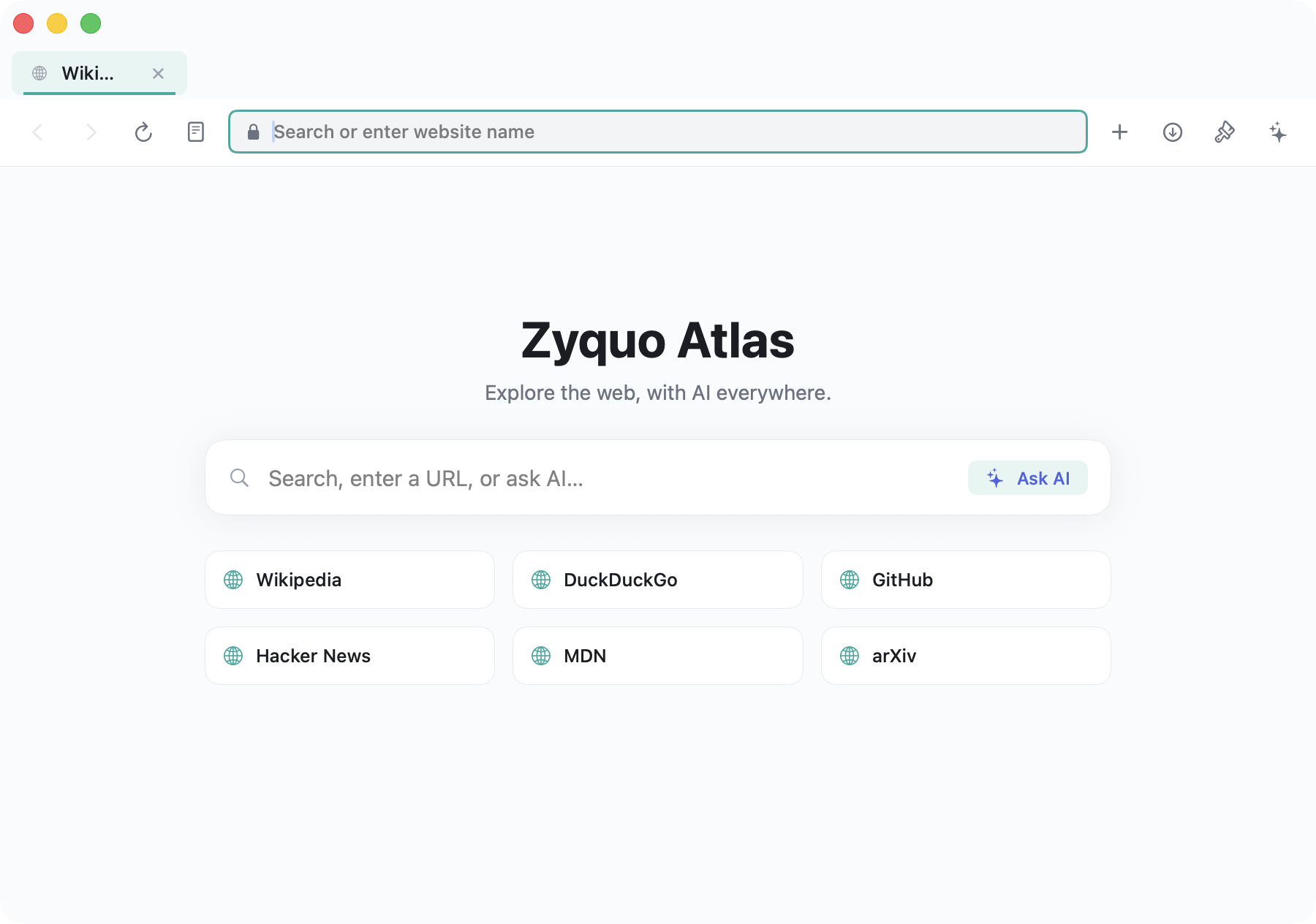
Customizable start page — flagship light theme
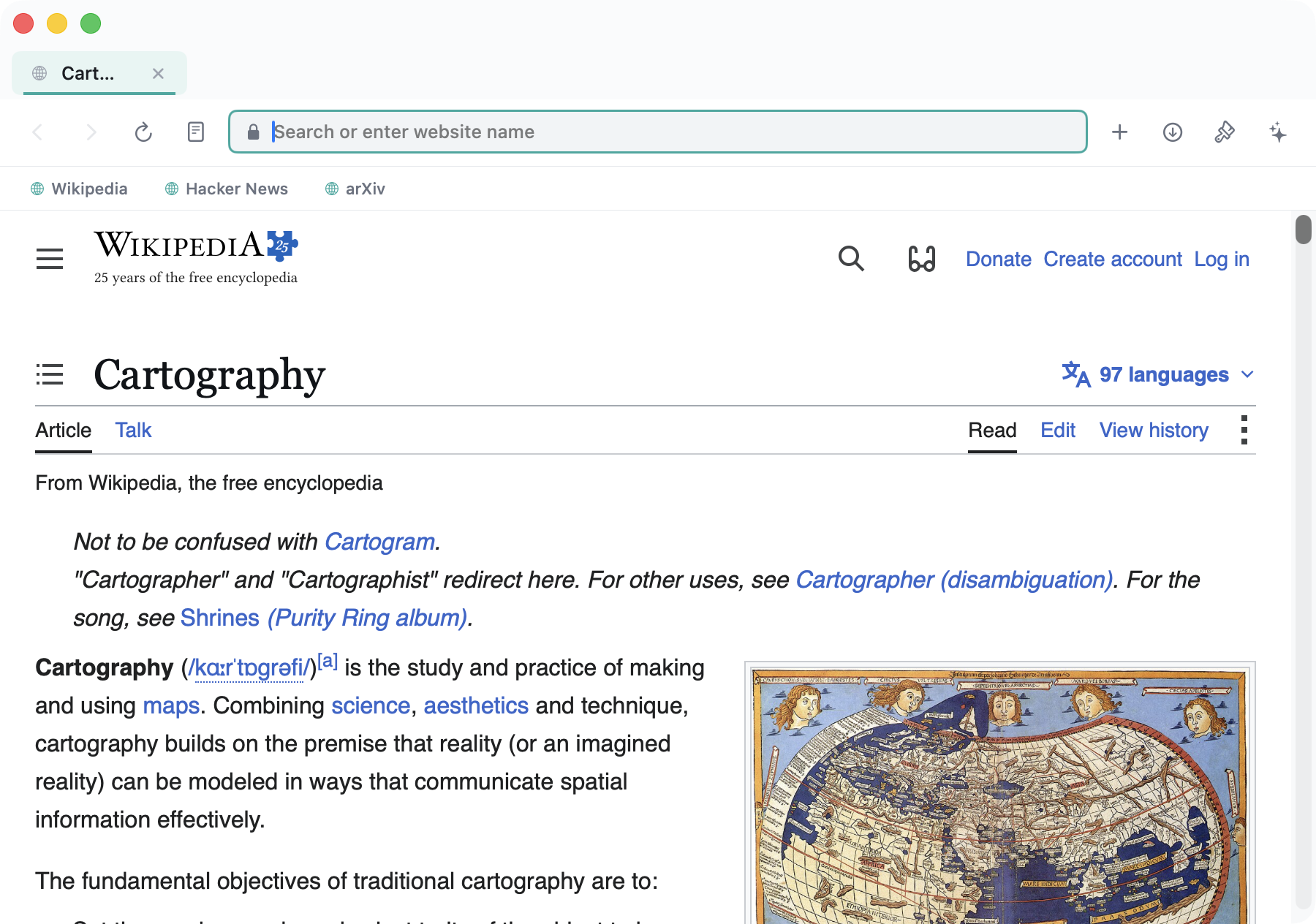
Live browsing with the bookmarks bar
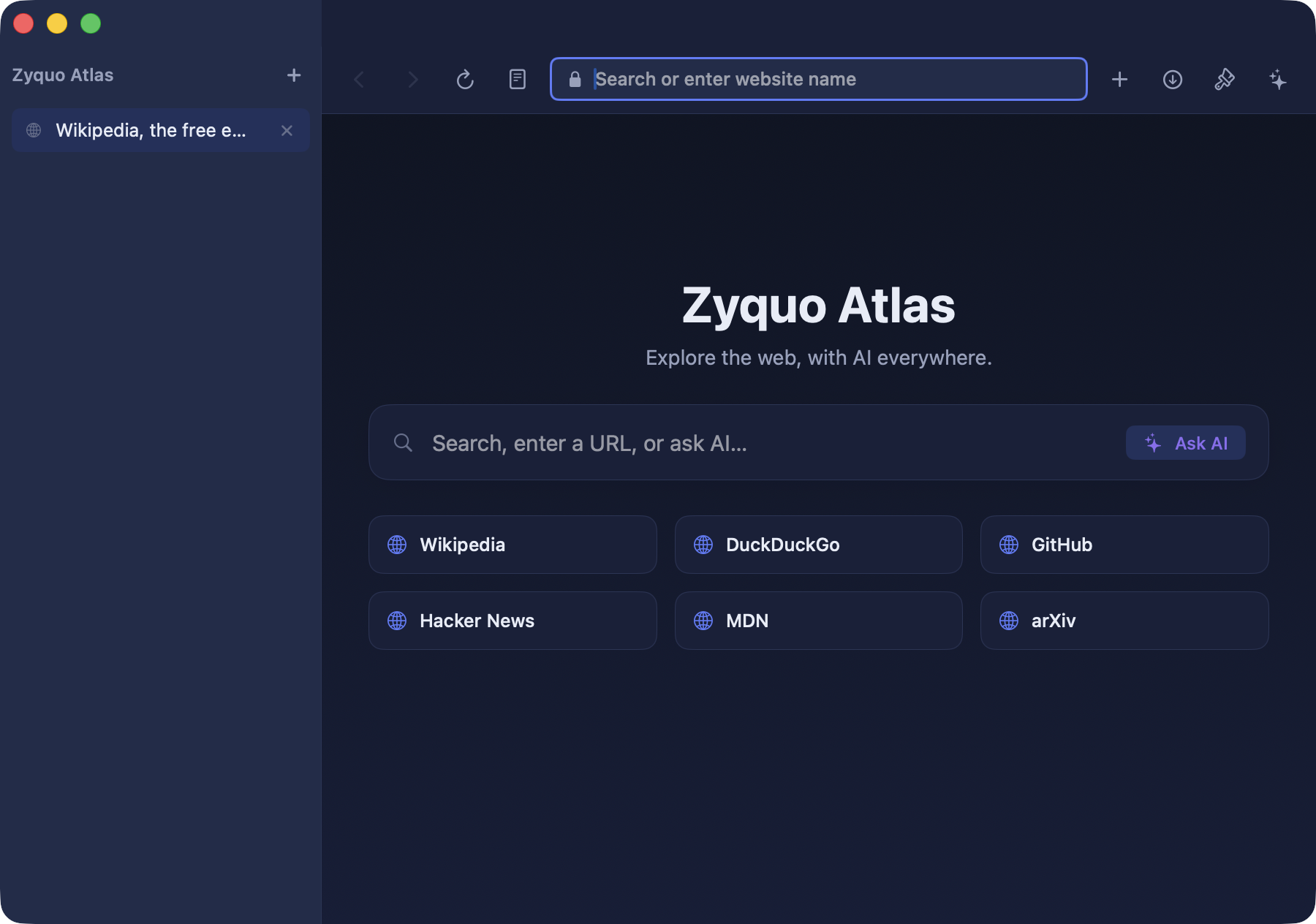
Midnight dark theme with left vertical tabs
✨ Features
Every feature below is implemented in this repository — nothing aspirational.
Browser core
- 🗂️ Real multi-tab WKWebView browsing — each tab owns its web view and navigation
state, with a determinate progress bar, back/forward/reload/stop, and links that open in
new tabs (
target=_blank, ⌘-click,window.open). - 📌 Tab pinning, background-tab suspension (dims + frees memory), and session restore per profile on relaunch.
- ↕️ Top horizontal tabs OR a left vertical tab sidebar (Arc-style) — switch live.
- 🧭 Smart omnibox — resolves your input into navigate (URL), web search, or Ask AI, with a security indicator and reader toggle.
- 🕵️ Private windows (⌘⇧N) using a non-persistent data store — no history, no session, no saved data.
- 📖 Reader mode — a clean, themeable article view with an optional AI summary at the top.
- ⬇️ Downloads — routed to
~/Downloadswith live progress, reveal-in-Finder, and open. - 🔎 Find-in-page (⌘F) — native WebKit find with next/previous and wrap.
- ⭐ Favorites — a toggleable bookmarks bar, a full manager (edit title/URL/tags/notes, show-on-bar), search, and Netscape HTML import/export (interchange with other browsers).
- 🕘 Full-text history — searchable, grouped by day, with delete-range/clear controls.
- 👤 Profiles — a persistent personal profile and a private profile, each with isolated WebKit data stores.
AI everywhere
- 💬 Chat-with-page sidebar — a per-tab, multi-turn conversation grounded in the page's extracted content, with an in-panel model picker across all 169 models.
- ⚡ Quick actions — one-click Summarize, Key points, and Translate, plus long-page map-reduce summarization for articles that exceed the model's context.
- 🖱️ Selection floating toolbar — select any text on a page and get Explain / Summarize / Translate / Rewrite / Ask right at the cursor.
- 🔮 Ask AI from the omnibox — get a streamed, grounded answer without leaving the page.
- 🪟 Multi-tab reasoning — "compare these open tabs" gathers several pages and answers across them.
- 🎚️ Per-action model tiers — pick a fast/cheap model for quick actions and a strong one for deep chat; choices persist.
- 🧱 Grounded & injection-safe — page content is extracted with Mozilla Readability in an isolated JavaScript world (visible text only), wrapped as untrusted data in every prompt, and streamed responses cancel automatically on navigation.
Massive customization
- 🎨 Theming engine — 10 built-in themes (light & dark, including the flagship teal-indigo Atlas Light and Midnight), plus a custom theme editor (native color wells for accent / background / chrome) that applies live.
- 🖼️ Backgrounds — solid, gradient, or image behind the chrome and start page.
- 🧩 Layout — top or left tabs, compact/comfortable density, bookmarks-bar toggle, and a UI-size slider.
- 🏠 Customizable start page — greeting, a prominent search / Ask-AI box, and a favorites grid.
- 💾 Per-profile persistence and theme import/export as small JSON files.
Privacy & security
- 🔐 Encrypted key vault — API keys are stored with AES-256-GCM (CryptoKit),
bound to the machine via
IOPlatformUUID+ HKDF, in~/Library/Application Support/ZyquoAtlas/vault.zq— not the Keychain, decrypted on demand and never logged. - 🛡️ Content leaves the device only on a user-invoked AI action, always to the provider you chose, via your own key — never to Zyquo.
- 🧯 Prompt-injection hardening — extraction drops hidden/
aria-hidden/off-screen text; page content is delimited and labelled untrusted; the AI layer has no navigation or tool access, so even a hostile page can only produce a bad summary, never an action. - 🍎 Hardened Runtime, Developer ID–signed, notarized & stapled —
spctlreports Notarized Developer ID.
Keyboard shortcuts
| Shortcut | Action | Shortcut | Action |
|---|---|---|---|
⌘T |
New tab | ⌘Y |
History |
⌘W |
Close tab | ⌥⌘B |
Bookmarks manager |
⌘L |
Focus omnibox | ⌘⇧J |
Downloads |
⌘⇧A |
Toggle AI sidebar | ⌘⇧N |
Private window |
⌘F |
Find in page | ⌘1–⌘8, ⌘9 |
Switch tab / last tab |
⌘D |
Bookmark page | ⌥Space |
Quick AI ask |
⌘R |
Reload | ⌘[ / ⌘] |
Back / forward |
⌘, |
Customize |
🤖 Supported AI providers & models
Atlas speaks to 12 providers and ships a catalog of 169 chat models, calling each provider exactly as Zyquo Cloud does (OpenAI-compatible or native Anthropic Messages API, streaming SSE, reasoning-token aware). Bring your own key per provider.
| Provider | Provider | Provider |
|---|---|---|
| OpenAI | Anthropic (Claude) | xAI (Grok) |
| Mistral | Google Gemini | Alibaba Qwen (DashScope) |
| DeepSeek | Kimi (Moonshot) | Perplexity |
| Together AI | DeepInfra | Cerebras |
Every provider/model was live-verified end-to-end — see Verification.
💻 Requirements
- macOS 13.0 (Ventura) or later — Apple Silicon or Intel.
- An API key for at least one supported provider to use the AI features (browsing works without any key).
- To build from source: the Swift 5.9+ toolchain (Command Line Tools or Xcode).
📦 Installation
- Download
ZyquoAtlas.dmgfrom the latest release. - Open the DMG and drag Zyquo Atlas into Applications.
- Launch it. The app is notarized by Apple, so Gatekeeper opens it without warnings.
- Add your API keys in Customize / Settings (or import them) to enable AI features.
Verify authenticity yourself:
spctl -a -vv "/Applications/Zyquo Atlas.app"→source=Notarized Developer ID.
🚀 Usage
- Browse — type a URL or search terms in the omnibox; press Enter.
- Ask AI — click Ask AI in the omnibox, or open the sidebar with
⌘⇧A, to ask about the current page with cited, grounded answers. - Summarize — open the AI sidebar and hit Summarize (works on long articles via map-reduce), or use Reader mode for a clean read + summary.
- Selection actions — select text on any page and choose Explain / Translate / Rewrite / Ask from the floating toolbar.
- Compare tabs — open several pages and click Compare tabs in the sidebar.
- Customize — press
⌘,to switch themes, move tabs to a left sidebar, tune density, and edit a custom theme with live preview.
🛠️ Building from source
Zyquo Atlas builds with the Swift Package Manager — no Xcode project required.
git clone https://github.com/spboucher-ai/zyquo-atlas.git
cd zyquo-atlas

make dev       # release build → dist/Zyquo Atlas.app (ad-hoc signed), for local iteration
make run       # build + launch
make test      # run the test suite
make icon      # regenerate AppIcon.icns from assets/icon/zyquo-atlas.svg

# Distribution (requires a Developer ID certificate + notarytool profile):
make release   # universal (arm64 + x86_64), Developer ID signed, notarized, stapled
make dmg       # signed + notarized + stapled dist/ZyquoAtlas.dmg
Dependencies: Apple frameworks only — SwiftUI, WebKit, CryptoKit, AppKit, Foundation, Combine, Security, IOKit — plus Apple's swift-markdown. Mozilla Readability (Apache-2.0) is vendored for content extraction. No third-party HTTP libraries.
🏗️ Architecture
Sources/ZyquoAtlas/
├── App/            @main entry, scene + commands, per-window state, app environment
├── DesignSystem/   ZyquoTheme tokens · AtlasTheme + 10 built-in themes · ThemeEngine
├── Models/         Tab · Profile · Bookmark · HistoryEntry · AIModel · Message · …
├── Browser/        WebView (WKWebView wrapper) · TabManager · ProfileStore ·
│                   OmniIntent · DownloadManager
├── Content/        ContentExtractor + Readability.js + AtlasExtractor.js · PageContext ·
│                   Chunker   (isolated WKContentWorld, visible-text-only)
├── AI/             AIService (streaming, cancel-on-nav) · AIActions · Summarizer
├── Providers/      ProviderProtocol · OpenAICompatibleClient · AnthropicClient · Registry
├── Services/       ModelCatalog (169) · SecureKeyStore (AES-256-GCM) · StreamingService (SSE)
├── Features/       BookmarksService · HistoryService
├── ViewModels/     KeyVaultStore
└── Views/ Browser chrome, AI sidebar + selection toolbar, feature panels✅ Verification
A built-in harness (--verify) exercises the real stack — content extraction, then a
grounded summarize across every one of the 169 models, the full AI-action matrix, and
cancel-on-navigation / privacy invariants — against live APIs.
Latest result: 183 / 183 checks green. Full table in
docs/VERIFICATION.md.
🗺️ Roadmap
Planned enhancements (tracked in docs/PLAN.md):
- Tab groups / "spaces" and drag-to-reorder
- Hover thumbnail previews for tabs and links
- AI writing assist that types back into web text fields
- Opt-in auto-summaries and link hover-summaries
- Inline source-link and section-citation chips in answers
- A menu-bar quick-ask extra
🤝 Contributing
Issues and feature suggestions are welcome via GitHub Issues. This is a source-available project (see License); please open an issue to discuss substantial changes before submitting a pull request.
Engineering standards: Swift 5.9+, zero warnings, every source file carries the project header, design tokens over magic numbers, and the provider layer stays byte-compatible with the Zyquo family.
📄 License
Copyright © 2026 Simon-Pierre Boucher. All rights reserved. The source is public for
reference and transparency; the compiled app (the notarized .dmg) is free for personal use.
See LICENSE. Vendored Mozilla Readability and swift-markdown are Apache-2.0.
👤 Author
Simon-Pierre Boucher
Part of the Zyquo family — Cloud · Local · Agent · Atlas.
Built with Swift, SwiftUI & WebKit — no Xcode IDE. 🗺️