Ephemeral tokens are short-lived authentication tokens for accessing the Gemini API throughWebSockets. They are designed to enhance security when you are connecting directly from a user's device to the API (aclient-to-serverimplementation). Like standard API keys, ephemeral tokens can be extracted from client-side applications such as web browsers or mobile apps. But because ephemeral tokens expire quickly and can be restricted, they significantly reduce the security risks in a production environment. You should use them when accessing the Live API directly from client-side applications to enhance API key security. | Note: At this time, ephemeral tokens are only compatible withLive API.
How ephemeral tokens work
Here's how ephemeral tokens work at a high level:
- Your client (e.g. web app) authenticates with your backend.
- Your backend requests an ephemeral token from Gemini API's provisioning service.
- Gemini API issues a short-lived token.
- Your backend sends the token to the client for WebSocket connections to Live API. You can do this by swapping your API key with an ephemeral token.
- The client then uses the token as if it were an API key.
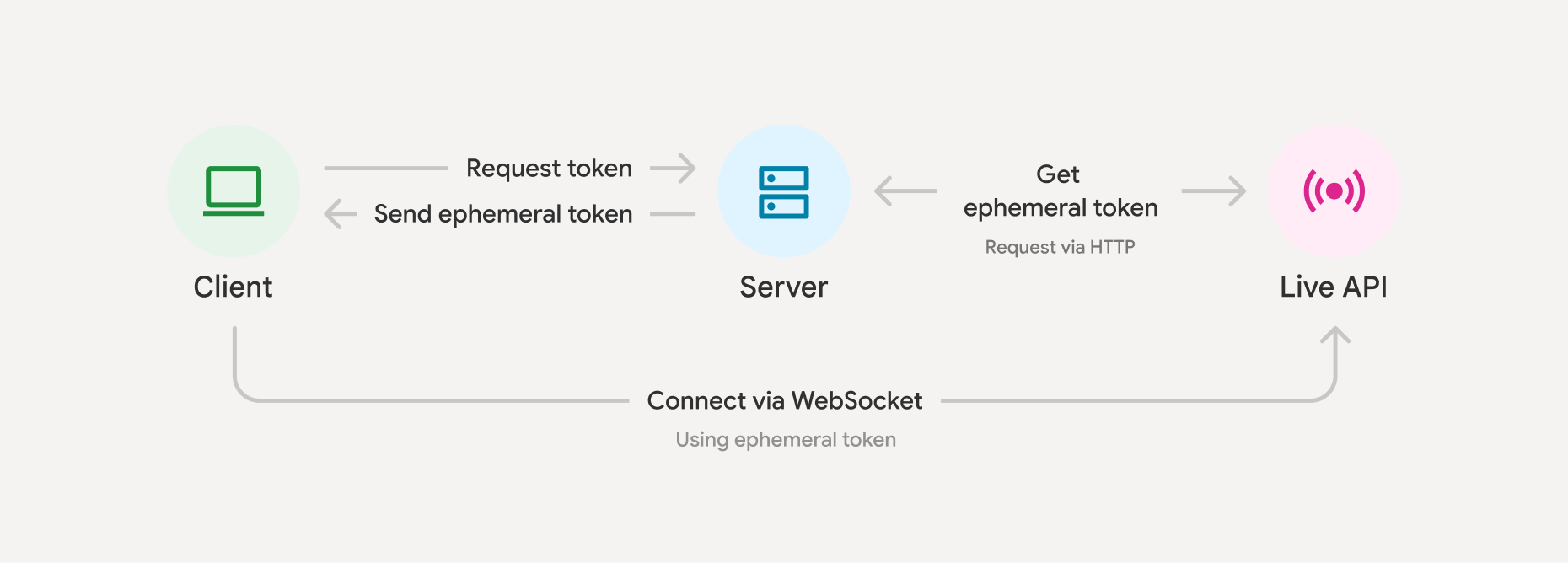
This enhances security because even if extracted, the token is short-lived, unlike a long-lived API key deployed client-side. Since the client sends data directly to Gemini, this also improves latency and avoids your backends needing to proxy the real time data.
Create an ephemeral token
Here is a simplified example of how to get an ephemeral token from Gemini. By default, you'll have 1 minute to start new Live API sessions using the token from this request (newSessionExpireTime), and 30 minutes to send messages over that connection (expireTime).
Python
import datetime

now = datetime.datetime.now(tz=datetime.timezone.utc)

client = genai.Client(
    http_options={'api_version': 'v1alpha',}
)

token = client.auth_tokens.create(
    config = {
    'uses': 1, # The ephemeral token can only be used to start a single session
    'expire_time': now + datetime.timedelta(minutes=30), # Default is 30 minutes in the future
    # 'expire_time': '2025-05-17T00:00:00Z',   # Accepts isoformat.
    'new_session_expire_time': now + datetime.timedelta(minutes=1), # Default 1 minute in the future
    'http_options': {'api_version': 'v1alpha'},
  }
)

# You'll need to pass the value under token.name back to your client to use it
JavaScript
import { GoogleGenAI } from "@google/genai";

const client = new GoogleGenAI({});
const expireTime = new Date(Date.now() + 30 * 60 * 1000).toISOString();

  const token: AuthToken = await client.authTokens.create({
    config: {
      uses: 1, // The default
      expireTime: expireTime // Default is 30 mins
      newSessionExpireTime: new Date(Date.now() + (1 * 60 * 1000)), // Default 1 minute in the future
      httpOptions: {apiVersion: 'v1alpha'},
    },
  });
ForexpireTimevalue constraints, defaults, and other field specs, see theAPI reference. Within theexpireTimetimeframe, you'll needsessionResumptionto reconnect the call every 10 minutes (this can be done with the same token even ifuses: 1).
It's also possible to lock an ephemeral token to a set of configurations. This might be useful to further improve security of your application and keep your system instructions on the server side.
Python
client = genai.Client(
    http_options={'api_version': 'v1alpha',}
)

token = client.auth_tokens.create(
    config = {
    'uses': 1,
    'live_connect_constraints': {
        'model': 'gemini-2.5-flash-native-audio-preview-12-2025',
        'config': {
            'session_resumption':{},
            'temperature':0.7,
            'response_modalities':['AUDIO']
        }
    },
    'http_options': {'api_version': 'v1alpha'},
    }
)

# You'll need to pass the value under token.name back to your client to use it
JavaScript
import { GoogleGenAI } from "@google/genai";

const client = new GoogleGenAI({});
const expireTime = new Date(Date.now() + 30 * 60 * 1000).toISOString();

const token = await client.authTokens.create({
    config: {
        uses: 1, // The default
        expireTime: expireTime,
        liveConnectConstraints: {
            model: 'gemini-2.5-flash-native-audio-preview-12-2025',
            config: {
                sessionResumption: {},
                temperature: 0.7,
                responseModalities: ['AUDIO']
            }
        },
        httpOptions: {
            apiVersion: 'v1alpha'
        }
    }
});

// You'll need to pass the value under token.name back to your client to use it
You can also lock a subset of fields, see theSDK documentationfor more info.
Connect to Live API with an ephemeral token
Once you have an ephemeral token, you use it as if it were an API key (but remember, it only works for the live API, and only with thev1alphaversion of the API).
The use of ephemeral tokens only adds value when deploying applications that followclient-to-server implementationapproach.
JavaScript
import { GoogleGenAI, Modality } from '@google/genai';

// Use the token generated in the "Create an ephemeral token" section here
const ai = new GoogleGenAI({
  apiKey: token.name
});
const model = 'gemini-2.5-flash-native-audio-preview-12-2025';
const config = { responseModalities: [Modality.AUDIO] };

async function main() {

  const session = await ai.live.connect({
    model: model,
    config: config,
    callbacks: { ... },
  });

  // Send content...

  session.close();
}

main();
| Note: If not using the SDK, note that ephemeral tokens must either be passed in anaccess_tokenquery parameter, or in an HTTPAuthorizationprefixed by theauth-schemeToken.
SeeGet started with Live APIfor more examples.
Best practices
- Set a short expiration duration using the
expire_timeparameter. - Tokens expire, requiring re-initiation of the provisioning process.
- Verify secure authentication for your own backend. Ephemeral tokens will only be as secure as your backend authentication method.
- Generally, avoid using ephemeral tokens for backend-to-Gemini connections, as this path is typically considered secure.
Limitations
Ephemeral tokens are only compatible withLive APIat this time.
What's next
- Read the Live APIreferenceon ephemeral tokens for more information.