Repository Public
1<br />23Ephemeral tokens are short-lived authentication tokens for accessing the Gemini API through[WebSockets](https://developer.mozilla.org/en-US/docs/Web/API/WebSockets_API). They are designed to enhance security when you are connecting directly from a user's device to the API (a[client-to-server](https://ai.google.dev/gemini-api/docs/live#implementation-approach)implementation). Like standard API keys, ephemeral tokens can be extracted from client-side applications such as web browsers or mobile apps. But because ephemeral tokens expire quickly and can be restricted, they significantly reduce the security risks in a production environment. You should use them when accessing the Live API directly from client-side applications to enhance API key security.4| **Note:** At this time, ephemeral tokens are only compatible with[Live API](https://ai.google.dev/gemini-api/docs/live).56## How ephemeral tokens work78Here's how ephemeral tokens work at a high level:9101. Your client (e.g. web app) authenticates with your backend.112. Your backend requests an ephemeral token from Gemini API's provisioning service.123. Gemini API issues a short-lived token.134. Your backend sends the token to the client for WebSocket connections to Live API. You can do this by swapping your API key with an ephemeral token.145. The client then uses the token as if it were an API key.1516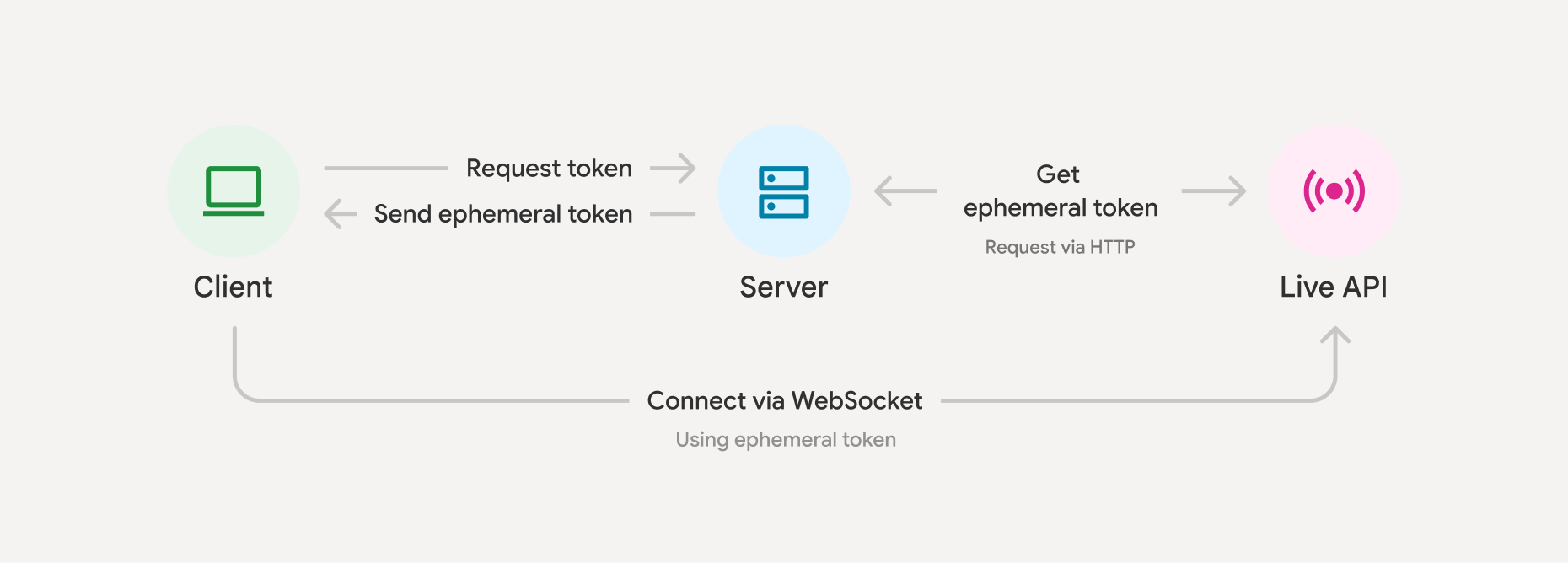1718This enhances security because even if extracted, the token is short-lived, unlike a long-lived API key deployed client-side. Since the client sends data directly to Gemini, this also improves latency and avoids your backends needing to proxy the real time data.1920## Create an ephemeral token2122Here is a simplified example of how to get an ephemeral token from Gemini. By default, you'll have 1 minute to start new Live API sessions using the token from this request (`newSessionExpireTime`), and 30 minutes to send messages over that connection (`expireTime`). 2324### Python2526 import datetime2728 now = datetime.datetime.now(tz=datetime.timezone.utc)2930 client = genai.Client(31 http_options={'api_version': 'v1alpha',}32 )3334 token = client.auth_tokens.create(35 config = {36 'uses': 1, # The ephemeral token can only be used to start a single session37 'expire_time': now + datetime.timedelta(minutes=30), # Default is 30 minutes in the future38 # 'expire_time': '2025-05-17T00:00:00Z', # Accepts isoformat.39 'new_session_expire_time': now + datetime.timedelta(minutes=1), # Default 1 minute in the future40 'http_options': {'api_version': 'v1alpha'},41 }42 )4344 # You'll need to pass the value under token.name back to your client to use it4546### JavaScript4748 import { GoogleGenAI } from "@google/genai";4950 const client = new GoogleGenAI({});51 const expireTime = new Date(Date.now() + 30 * 60 * 1000).toISOString();5253 const token: AuthToken = await client.authTokens.create({54 config: {55 uses: 1, // The default56 expireTime: expireTime // Default is 30 mins57 newSessionExpireTime: new Date(Date.now() + (1 * 60 * 1000)), // Default 1 minute in the future58 httpOptions: {apiVersion: 'v1alpha'},59 },60 });6162For`expireTime`value constraints, defaults, and other field specs, see the[API reference](https://ai.google.dev/api/live#ephemeral-auth-tokens). Within the`expireTime`timeframe, you'll need[`sessionResumption`](https://ai.google.dev/gemini-api/docs/live-session#session-resumption)to reconnect the call every 10 minutes (this can be done with the same token even if`uses: 1`).6364It's also possible to lock an ephemeral token to a set of configurations. This might be useful to further improve security of your application and keep your system instructions on the server side. 6566### Python6768 client = genai.Client(69 http_options={'api_version': 'v1alpha',}70 )7172 token = client.auth_tokens.create(73 config = {74 'uses': 1,75 'live_connect_constraints': {76 'model': 'gemini-2.5-flash-native-audio-preview-12-2025',77 'config': {78 'session_resumption':{},79 'temperature':0.7,80 'response_modalities':['AUDIO']81 }82 },83 'http_options': {'api_version': 'v1alpha'},84 }85 )8687 # You'll need to pass the value under token.name back to your client to use it8889### JavaScript9091 import { GoogleGenAI } from "@google/genai";9293 const client = new GoogleGenAI({});94 const expireTime = new Date(Date.now() + 30 * 60 * 1000).toISOString();9596 const token = await client.authTokens.create({97 config: {98 uses: 1, // The default99 expireTime: expireTime,100 liveConnectConstraints: {101 model: 'gemini-2.5-flash-native-audio-preview-12-2025',102 config: {103 sessionResumption: {},104 temperature: 0.7,105 responseModalities: ['AUDIO']106 }107 },108 httpOptions: {109 apiVersion: 'v1alpha'110 }111 }112 });113114 // You'll need to pass the value under token.name back to your client to use it115116You can also lock a subset of fields, see the[SDK documentation](https://googleapis.github.io/python-genai/genai.html#genai.types.CreateAuthTokenConfig.lock_additional_fields)for more info.117118## Connect to Live API with an ephemeral token119120Once you have an ephemeral token, you use it as if it were an API key (but remember, it only works for the live API, and only with the`v1alpha`version of the API).121122The use of ephemeral tokens only adds value when deploying applications that follow[client-to-server implementation](https://ai.google.dev/gemini-api/docs/live#implementation-approach)approach. 123124### JavaScript125126 import { GoogleGenAI, Modality } from '@google/genai';127128 // Use the token generated in the "Create an ephemeral token" section here129 const ai = new GoogleGenAI({130 apiKey: token.name131 });132 const model = 'gemini-2.5-flash-native-audio-preview-12-2025';133 const config = { responseModalities: [Modality.AUDIO] };134135 async function main() {136137 const session = await ai.live.connect({138 model: model,139 config: config,140 callbacks: { ... },141 });142143 // Send content...144145 session.close();146 }147148 main();149150| **Note:** If not using the SDK, note that ephemeral tokens must either be passed in an`access_token`query parameter, or in an HTTP`Authorization`prefixed by the[auth-scheme](https://datatracker.ietf.org/doc/html/rfc7235#section-2.1)`Token`.151152See[Get started with Live API](https://ai.google.dev/gemini-api/docs/live)for more examples.153154## Best practices155156- Set a short expiration duration using the`expire_time`parameter.157- Tokens expire, requiring re-initiation of the provisioning process.158- Verify secure authentication for your own backend. Ephemeral tokens will only be as secure as your backend authentication method.159- Generally, avoid using ephemeral tokens for backend-to-Gemini connections, as this path is typically considered secure.160161## Limitations162163Ephemeral tokens are only compatible with[Live API](https://ai.google.dev/gemini-api/docs/live)at this time.164165## What's next166167- Read the Live API[reference](https://ai.google.dev/api/live#ephemeral-auth-tokens)on ephemeral tokens for more information.