
Zyquo Agent
The autonomous agent that actually operates your Mac.
Plans. Runs real commands. Verifies its own work. Asks before anything risky.






-7A5AF0?style=flat-square&labelColor=2E2A3A)

-9B82F6?style=flat-square&labelColor=2E2A3A)



⬇️ Download the DMG · 📖 Docs · 🔬 Verification report · 🧪 Evaluation report
📋 Table of Contents
- ✨ What is Zyquo Agent?
- 🖼️ Screenshots
- 🚀 Features
- 🤖 Providers & Models
- 💾 Installation
- ⚙️ Requirements
- 📖 Usage
- 🔨 Building from Source
- 🏗️ Architecture
- 🔬 Verification & Evaluation
- 🗺️ Roadmap
- 🤝 Contributing
- 📄 License
- 👤 Author
✨ What is Zyquo Agent?
Zyquo Agent is a native macOS app that turns cloud LLMs into an agent that does things on your Mac — it runs bash commands, drives other apps with AppleScript, reads and writes files, and keeps iterating until the task is genuinely done.
It is not a chat window with a shell attached. It is a real plan → act → observe → reflect loop:
you describe a task
      ↓
the agent drafts a checklist            → shown live in the Plan panel
      ↓
it calls a tool (bash / osascript / file ops)
      ↓
◆ every action passes a policy gate     → risky ones stop and ask YOU
      ↓
it reads the actual result, revises the plan, and continues
      ↓
it verifies its own work with tools before declaring "done"
Everything is visible while it happens: streamed thinking, the exact command about to run, live stdout/stderr, exit codes, plan check-offs, token/time budgets — and an append-only audit log of every single action it took.
Zyquo Agent is the agentic member of the Zyquo family (Zyquo Cloud — chat client · Zyquo Local — on-device models · Zyquo Agent — this). It reuses Cloud's provider layer and encrypted key vault, so your keys and model list feel identical across the family.
Built entirely without the Xcode IDE — Swift Package Manager and the command-line toolchain only.
🖼️ Screenshots
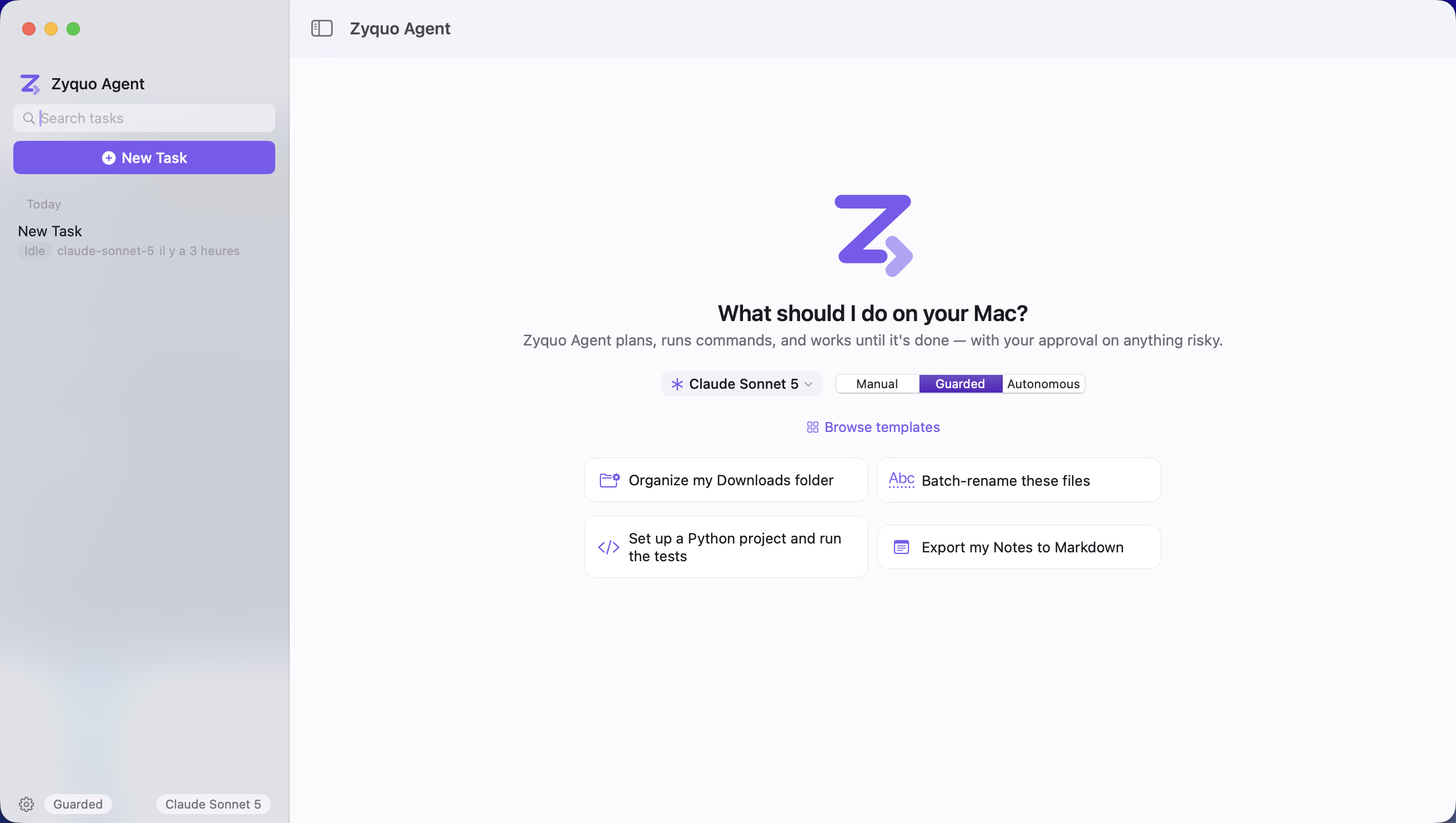
The command center at rest
A real run: step cards, live terminal feed, budget meters
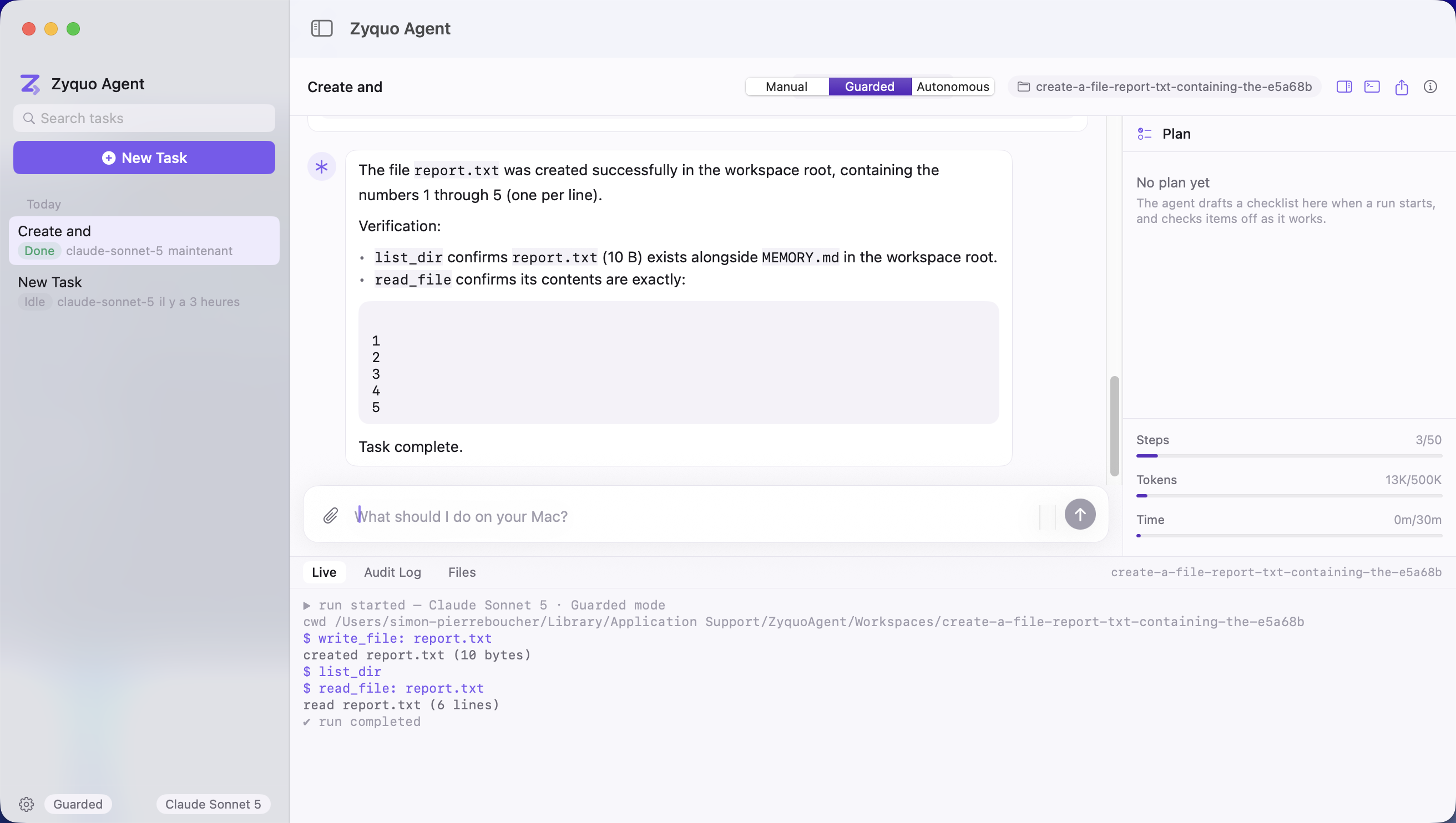
The agent wrote a file, then verified it with list_dir and read_file before answering. The drawer streams every action as it happens; the right panel tracks steps, tokens, and time against your budgets.
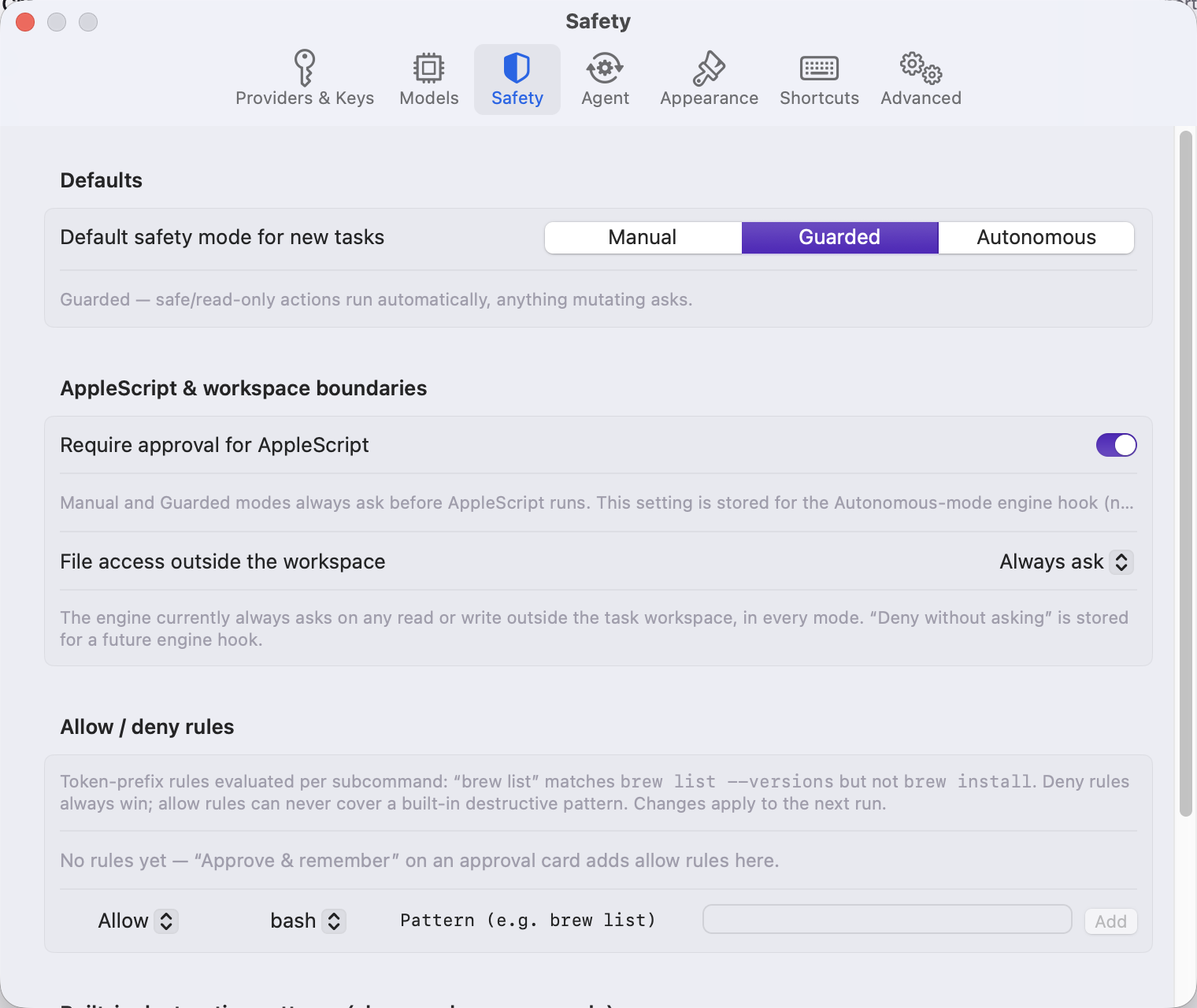
Safety settings: modes, boundaries, and your own allow/deny rules
🚀 Features
The agent engine
| 🔄 True agentic loop | A stop_reason-keyed while-loop (AgentLoop, a Swift actor): stream a model turn → execute its tool calls → thread the results back → repeat until the model answers without calling tools. Handles truncation, refusals, and transient provider errors (one automatic retry with backoff). |
| 🧠 Reasoning-model aware | Thinking/reasoning tokens stream into a collapsible section, separate from the answer. |
| 📋 Live editable plan | The agent maintains a real checklist through an internal update_plan tool — items go pending → active → done/failed, persisted to .zyquo/plan.json, rendered in the Plan panel, and editable by you mid-run. |
| ♻️ Re-planning on failure | A failed step doesn't derail the run: the agent self-critiques, revises the plan, and continues. (Verified end-to-end: scenario s6.) |
| 🛑 LoopGuard | Step / token / wall-clock budgets plus repetition detection (same failing call 3×) and stall detection (6 steps with no progress). On a trip it pauses and asks you — never silently spins or aborts. |
| ⚡ Streaming everything | Text, thinking, and even partial tool-call arguments stream live, so you watch the command being composed before it runs. |
| ⏹️ Real cancellation | ⌘. (or SIGINT on the CLI) cancels the model stream and kills the running child process (SIGTERM → SIGKILL), recording a cancelled outcome. Verified by test. |
The tools it can actually use
| Tool | What it does |
|---|---|
bash |
Runs commands via /bin/bash -lc with the workspace as cwd. Line-by-line stdout/stderr streaming, per-command timeout, exit code capture, 200 KB output cap with truncation notice, fully cancellable. |
osascript |
Executes AppleScript to automate macOS apps (Finder, Notes, Mail, Calendar, System Events…). Detects TCC denials and explains how to grant Automation access. |
read_file |
Reads a file with offset/limit paging (50 KB per call cap). |
write_file |
Creates or overwrites a file, tracked in the workspace. |
edit_file |
Exact-unique string replacement — fails loudly if the target text matches zero or multiple times, so edits can't silently hit the wrong line. |
list_dir |
Directory listing with optional depth. |
search_files |
Grep-like content search returning file:line matches, capped. |
update_plan |
Internal (never touches the policy gate) — how the agent maintains its checklist. |
Adding a tool is deliberately trivial: conform to the Tool protocol (name, description, JSON-Schema parameters, execute) and register it in ToolRegistry.
🛡️ Safety: the headline feature
This is the part most agent tools treat as an afterthought.
Three modes, switchable per task, always visible in the header:
| Mode | Behavior |
|---|---|
| Manual | Every gated action asks first. |
| Guarded (default) | Curated read-only commands and in-workspace file writes run automatically; anything mutating asks. |
| Autonomous | Runs freely within budget — except the always-ask class, which still asks. |
The gate itself (PolicyEngine, a Swift actor) evaluates deny → ask → allow, per subcommand:
- 🔍 Commands are parsed, not pattern-matched. Compound lines split on
&&,||,;,|and newlines (quote-aware);$(…)/backtick substitutions are extracted and classified too; wrappers (env,nohup,time,xargs,nice) are stripped first. The verdict is the most severe across all subcommands —ls && rm -rf ~/xasks, because the second half asks. - ⛔ Hard denies that no approval can unlock:
rm -rf /and equivalents, fork bombs,mkfs,diskutil eraseDisk, writes to/System. - ⚠️ Always-ask circuit breakers, in every mode including Autonomous: any
sudo,rm -rfoutside the workspace,curl … | sh, overwrites outside the workspace,kill/pkill,defaults write,launchctl,csrutil,chmod -Routside the workspace, writes to/Library/usr/etc,git push --force,shutdown,security, and AppleScript containingwith administrator privileges. - 🚫
sudois never run silently. Ever. Proven by a test that forces asudotool call and confirms denial in all three modes. - ✅ Inline approval cards show the exact payload, the risk level and reason, the cwd, and the agent's stated intent — with Approve, Approve & Remember, Edit (re-classified after your edit), and Deny.
- 📝 "Approve & remember" stores the narrowest token-prefix rule (
brew listmatchesbrew list --versions, neverbrew install) — and a remembered rule can never override a circuit breaker. - 📜 Append-only audit log (
.zyquo/audit.jsonl) records every executed action: timestamp, kind, exact payload, cwd, ruling, exit code, truncated output. Viewable in-app, exportable.
Pattern matching is treated as UX, not a security boundary — it's paired with workspace scoping, human approval, and a complete audit trail.
📁 Workspaces
Every task gets its own directory under ~/Library/Application Support/ZyquoAgent/Workspaces/. bash runs there; file tools are scoped there by default and escaping requires explicit approval. Created and modified files are tracked with badges, checkpoints can snapshot the agent's work, and reopening an old task restores its workspace and full step history.
🗜️ Memory & context compaction
Long autonomous runs don't fall off the context window:
- Live token accounting, calibrated by the provider's own usage numbers.
- At 85% of the model's context, older completed steps are summarized into one compact record by the same model (with a mechanical fallback) — while the task, the plan,
MEMORY.md, and the most recent 6 steps stay verbatim. A thrash guard enforces a minimum gap between compactions. - 📤 Output offloading: any tool result over 8 KB is written to
.zyquo/outputs/and replaced in-context by its first ~40 lines plus a path the agent can re-read on demand. - 📌
MEMORY.mdlives in the workspace root and is owned by the agent — it records durable facts that survive compaction and whole sessions.
Verified live: a task that triggered 4 compactions still produced a fully correct result.
🖥️ The command-center interface
- Sidebar — tasks grouped Pinned / Today / Yesterday / Previous 7 Days / Older, each with an animated status pill (Planning · Running · Awaiting approval · Done · Failed), model badge, and a live activity indicator.
- Conversation column — your prompts as bubbles; the agent's work as step cards: thought line, tool chips, the exact command in monospace, color-coded streaming output, exit codes, expandable truncation, collapsible thinking, and inline approval / guard-trip / compaction cards. Final answers render as full Markdown with syntax-highlighted code.
- Plan panel — the live checklist with animated check-offs, a progress bar, and step/token/time meters against your budgets.
- Activity drawer — three tabs: Live (raw streaming terminal feed with cwd), Audit Log (every executed action), Files (workspace tree with created/modified badges, preview, reveal in Finder).
- Header — editable title, model picker (all 170 models, agent-capable ones emphasized), the safety-mode segmented control, workspace chip, export, and an info popover showing the actual system prompt and budgets.
- Light theme is the flagship; a deep plum-charcoal dark theme is derived from the same tokens. Five accent colors.
🎯 Productivity
- 📚 29 built-in task templates across 6 categories — Files & Folders (6), Development (6), Automation/AppleScript (5), Data (4), System Info (4), Writing (4) — with
{{variable}}fill-in. Plus your own. - 🎭 Personas — a system-prompt addendum, preferred model, and default safety mode, applied per task.
- ⚡ Quick Task panel (⌥Space) — a Spotlight-style floating panel that runs a one-off task and can be promoted to a full task.
- 🔍 ⌘K command palette — fuzzy search over tasks, templates, and actions.
- 📤 Export transcripts to Markdown or PDF · 🔎 full-text search across all tasks · 🏷️ auto-generated task titles · 🔔 menu bar extra showing running-task status.
- 🔐 Encrypted key vault — AES-256-GCM, HKDF-derived and machine-bound, stored at
~/Library/Application Support/ZyquoAgent/vault.zq. Deliberately not the Keychain, matching the rest of the Zyquo family. Environment variables take precedence at run time.
🤖 Providers & Models
Zyquo Agent ships the same 170-model catalog as Zyquo Cloud across 12 providers, and marks the ~80-model subset that's genuinely suited to multi-step agentic work (strong reasoning + reliable native function calling + adequate context).
| Provider | Provider | Provider |
|---|---|---|
| 🟢 OpenAI | 🟣 Anthropic | ⚫ xAI |
| 🟠 Mistral | 🔵 Google Gemini | 🟡 Alibaba Qwen |
| 🐋 DeepSeek | 🌙 Kimi (Moonshot) | 🔍 Perplexity |
| 🤝 Together AI | ☁️ DeepInfra | ⚡ Cerebras |
Plus custom OpenAI-compatible endpoints. Two clients cover everything: a native AnthropicClient (/v1/messages, tool_use/tool_result blocks, input_json_delta streaming) and one OpenAICompatibleClient (index-keyed tool_calls deltas, role:"tool" messages) — normalized behind a single ProviderClient protocol so the agent loop never sees a wire format.
Every agent-capable model was verified live, not assumed: 77 of 80 pass the full battery — receives the schema, emits a valid streamed tool call, consumes a threaded tool_result, and produces a correct final answer. Full per-model table with latencies: docs/VERIFICATION.md.
Two real provider quirks were found and fixed in the process:
- Gemini 3+ thought signatures — Gemini rejects a threaded tool result if the originating call's opaque
thought_signatureisn't echoed back verbatim; it's now captured and round-tripped. - OpenAI GPT-5.4+ —
/chat/completionsrefuses function tools unlessreasoning_effortisnone; the client now downgrades it automatically when tools are attached.
The 3 remaining failures are external and documented: DeepInfra's two Gemini re-hosts strip Google's required signature (the same models work via the native Gemini provider), and kimi-k3 is capacity-throttled upstream.
Default agent model: claude-sonnet-5.
🔑 Bring your own keys. Zyquo Agent ships with none and talks only to the providers you configure.
💾 Installation
Option 1 — Download the DMG (recommended)
- Download
ZyquoAgent.dmgfrom the latest release. - Open it and drag Zyquo Agent to your Applications folder.
- Launch it. No Gatekeeper warning, no right-click-to-open workaround — the app is signed with a Developer ID, notarized by Apple, and stapled:
$ spctl -a -vv "/Applications/Zyquo Agent.app"
/Applications/Zyquo Agent.app: accepted
source=Notarized Developer ID
origin=Developer ID Application: Simon-Pierre Boucher (3YM54G49SN)- Open Settings → Providers & Keys (⌘,) and paste at least one API key.
Option 2 — Build from source
See Building from Source.
First-run permissions
The first time the agent runs AppleScript against another app, macOS asks for Automation permission. If you deny it, grant it later in System Settings → Privacy & Security → Automation; the app explains this inline when it hits a TCC denial.
⚙️ Requirements
| macOS | 13.0 Ventura or later |
| Architecture | Apple Silicon or Intel — the release is a Universal binary (arm64 + x86_64) |
| Disk | ~15 MB for the app, plus whatever your task workspaces use |
| API key | At least one from a supported provider (BYOK — none included) |
| Network | Only to the providers you configure |
| To build | Swift 6 command-line toolchain. The Xcode IDE is not required; rsvg-convert (Homebrew) only if you regenerate the icon. |
Runtime dependency: exactly one — swift-markdown for rendering. Everything else is Foundation, SwiftUI, AppKit, and CryptoKit.
📖 Usage
Your first task
- Press ⌘N (or click New Task).
- Pick a model, and a safety mode — Guarded is a sensible default.
- Describe the outcome you want, not the commands. Press ⌘↩.
- Watch it work. When an approval card appears, read the command, then Approve, Edit, or Deny.
Good first tasks (all shipped as templates):
Organize my Downloads folder by file type into subfolders
Set up a Python project with a venv, add pytest, and run the tests
Find every file over 100 MB in this folder and summarize what's using space
Batch-rename these screenshots to a YYYY-MM-DD-description pattern
Read this CSV and give me totals per category
Export my Notes to Markdown filesChoosing a safety mode
| If you… | Use |
|---|---|
| are trying it out, or the task touches anything you care about | Manual |
| want it to move but keep your hand on anything mutating | Guarded ✅ |
| have a long, well-understood, low-stakes task | Autonomous |
In all three, destructive and elevated actions still require your approval.
Keyboard shortcuts
| Shortcut | Action | Shortcut | Action | |
|---|---|---|---|---|
⌘N |
New task | ⌘K |
Command palette | |
⌘↩ |
Run | ⌘F |
Search tasks | |
⌘. |
Stop | ⌘⇧A |
Open audit log | |
⌥Space |
Quick Task panel | ⌘⇧E |
Export transcript | |
⌘, |
Settings |
The command-line interface
The app binary doubles as a headless CLI — useful for scripting and CI:
BIN="/Applications/Zyquo Agent.app/Contents/MacOS/ZyquoAgent"

# Run a task headlessly, with live rendering and stdin approval prompts
"$BIN" --run "summarize the largest files in this folder" \
       --model claude-sonnet-5 --mode guarded --workspace ~/scratch --max-steps 20

# Scripted runs: auto-approve mode-driven prompts.
# NOTE: --yes never auto-approves the always-ask class — those are auto-DENIED
# unless you additionally pass --allow-destructive.
"$BIN" --run "…" --yes

"$BIN" --load-vault      # import provider keys from environment variables
"$BIN" --verify          # live tool-calling verification across the catalog
"$BIN" --verify-policy   # PolicyEngine safety self-check (38 assertions)
"$BIN" --run-mock        # offline engine smoke test, no keys or network
Keys resolve from the environment first (ANTHROPIC_API_KEY, OPENAI_API_KEY, GEMINI_API_KEY, …), then the encrypted vault.
🔨 Building from Source
git clone https://github.com/spboucher-ai/zyquo-agent.git
cd zyquo-agent

make dev     # release build → dist/Zyquo Agent.app (ad-hoc signed) — fast iteration
make run     # build, bundle, and launch
make icon    # regenerate AppIcon.icns from assets/icon/zyquo-agent.svg
make clean
Plain SwiftPM works too:
export SDKROOT=/Library/Developer/CommandLineTools/SDKs/MacOSX26.sdk
swift build -c release
Why SDKROOT is pinned
SDK 27 declares SwiftUI's @State and friends as macros, and the macro plugin (libSwiftUIMacros.dylib) ships only with the full Xcode install. SDK 26 keeps the property-wrapper forms, so a Command-Line-Tools-only toolchain can build the whole app. The Makefile sets this for you.
Producing a signed, notarized release
make release builds a Universal binary (arm64 + x86_64 via lipo), assembles the bundle, then signs, notarizes, staples, and verifies it. It requires your own Developer ID certificate and a notarytool keychain profile — edit IDENTITY and NOTARY_PROFILE in the Makefile.
make release                                   # app: sign → notarize → staple → spctl
scripts/notarize.sh "dist/Zyquo Agent.app" "<identity>" "<profile>" \
    Resources/ZyquoAgent.entitlements dmg      # …and a notarized DMG
The script fails loudly unless spctl reports source=Notarized Developer ID.
⚠️ Keep
Resources/ZyquoAgent.entitlementspure ASCII with no XML comments — the AMFI parsercodesignuses rejects both.
Running the checks
.build/release/ZyquoAgent --verify-policy   # 38 safety assertions
.build/release/ZyquoAgent --run-mock        # offline end-to-end engine test
.build/release/ZyquoAgent --run-ui-smoke    # UI state-machine test
scripts/agent-eval.sh all                   # full live scenario + safety suite (needs keys)
swift test requires an XCTest-capable toolchain; the XCTest files are there for Xcode/CI, and the executable checks above are the equivalents that run anywhere.
🏗️ Architecture
82 Swift files, ~19,000 lines, no Xcode project file.
Sources/ZyquoAgent/
├── App/            @main, CLI modes, SwiftUI shell, menu bar        (5 files)
├── Agent/          AgentLoop · Planner · MemoryManager · LoopGuard
│                   Transcript · AgentStep · AgentEvent · prompt     (8 files)
├── Tools/          Tool protocol · ToolRegistry · ShellTool
│                   AppleScriptTool · FileTools                      (5 files)
├── Execution/      ExecutionService · PolicyEngine · AuditLog       (4 files)
├── Workspace/      WorkspaceManager                                 (1 file)
├── Providers/      ProviderClient · Anthropic · OpenAI-compatible   (4 files)
├── Models/         ToolSpec/ToolCall/ToolResult · AgentTask
│                   catalog types · templates                        (9 files)
├── Services/       ModelCatalog · SecureKeyStore · Streaming        (6 files)
├── ViewModels/     TaskStore · RunController · approval bridge      (8 files)
├── Views/          Command center, settings, palette, Markdown     (25 files)
├── DesignSystem/   ZyquoTheme tokens, components, glyph             (4 files)
└── Verify/         Live provider verification harness               (1 file)
Design rules that hold throughout:
AgentLoop,ExecutionService,PolicyEngine,AuditLog, andWorkspaceManagerare actors; structured concurrency everywhere; every long operation is cancellable.- Shell execution never leaks into views or view models — it lives behind
ExecutionService, and everything passesPolicyEnginefirst. - The UI renders exclusively from an
AgentEventstream and the persistedTranscript. - Every color, font, spacing, and radius comes from
ZyquoThemetokens — no raw hex in views.
The architecture traces directly back to research documented in docs/AGENT-RESEARCH.md (413 lines, 79 cited sources), and the provider layer to docs/PROVIDER-REUSE.md.
🔬 Verification & Evaluation
Nothing here is claimed on vibes — it was measured, and the failures are documented too.
| Suite | Result | Report |
|---|---|---|
| Provider tool-calling (live, every agent-capable model) | 77 / 80 green | docs/VERIFICATION.md |
| End-to-end scenarios (live, real workspaces) | 11 / 11 pass | docs/EVALUATION.md |
| Safety tests (live) | 8 / 8 pass | docs/EVALUATION.md |
| PolicyEngine self-check | 38 / 38 | --verify-policy |
Scenarios cover: nested file structures, batch renaming, writing and running a Python script, CSV analysis checked against ground truth, largest-file discovery, re-planning after a deliberate failure, forced memory compaction, AppleScript automation, multi-tool log analysis, and cross-provider parity on a second provider.
Safety tests confirm: sudo never executes in any mode (including a test that forces a sudo tool call), out-of-workspace deletes are auto-denied, cancellation kills the child process, rm -rf / is hard-denied, and no key material reaches any transcript, log, or workspace file.
🗺️ Roadmap
- Enforce the two settings that are currently persisted-but-advisory:
requireApprovalForAppleScriptin Autonomous mode, andworkspaceEscapePolicy = deny(the engine already asks for AppleScript in Manual/Guarded and always asks on workspace escape — these would add stricter hooks) - Optional Seatbelt sandbox profile for Autonomous runs, on top of the policy gate
- Read-only explorer sub-agent that returns summaries without mutating state
- HTTP fetch tool (the
Toolprotocol is built for this) - Improve auto-generated task titles — short prompts can produce clipped titles
- Workspace checkpoint restore exposed in the UI
- Structured exit codes and policy rulings surfaced per step card (currently in the audit log)
- Re-verify
kimi-k3when Moonshot's capacity recovers
🤝 Contributing
Issues and pull requests are welcome.
If you contribute code, please keep the project's conventions:
- Every code file starts with the standard header (name,
Zyquo Agent, author, mail) — there's a sweep that checks. - Zero build warnings.
- Design tokens only — no raw hex values or magic numbers in views; add a token to
ZyquoThemeif one is genuinely missing. - Never bypass the safety gate. There must be no code path that executes a shell command or AppleScript without going through
PolicyEngine, and no action that isn't audited. - Never commit secrets. API keys belong in the vault or the environment.
.secrets/is gitignored. - Before opening a PR, run:
swift build -c release,--verify-policy,--run-mock, and--run-ui-smoke.
📄 License
Released under the MIT License — see LICENSE.
👤 Author
Simon-Pierre Boucher

The Zyquo family — one design language, three characters ☁️ Zyquo Cloud (chat) · 💠 Zyquo Local (on-device) · ⚡ Zyquo Agent (autonomous)
Built on macOS with Swift, SwiftUI, and the command line — no Xcode IDE.
⭐ If Zyquo Agent is useful to you, a star is genuinely appreciated.